Supporting organisations working with disabled people
Update from Mobile Technology Advisor – New features and updates from Apple and Google
Apple’s annual Worldwide Developers Conference (WWDC) took place last month. Unlike the previous 30 conferences, it was held virtually and free for anyone to attend.
The WWDC keynote, streamed directly from Apple Park included, the introduction of iOS and iPadOS 14, watchOS 7, tvOS 14, and more. The full keynote is available on YouTube.
iOS and iPadOS 14
Version 14 of iOS and iPadOS, expected to be released in September, brings the first major change to the user interface since iOS was first released with the introduction of widgets. A concept that Apple have used successfully on their Apple watch. These widgets, available in different shapes and sizes can be placed on the home screen, creating a more data-rich home screen. A variety of widgets that can be added through the Widget Gallery.
Widget Stacks
To optimise the use of space you can create Widget Stacks, allowing you to stack up to 10 widgets on top of each other. Swapping between them with a swipe.
A Smart Stack can be added. This folder uses on device intelligence to automatically display the best widget option based on time, location, and activity. For example, if you stack up the weather widget, the calendar widget, and the maps widget, you might see the weather when you wake up, the calendar as events as they come up and maps when you are out.
Siri is also ever present, providing a Siri Suggested widget based on your device usage. If you read the news every morning on the bus or train, you may see the BBC or Apple News app. If you order coffee each day around lunch time the Costa or Starbucks app will appear around that time.
App Library
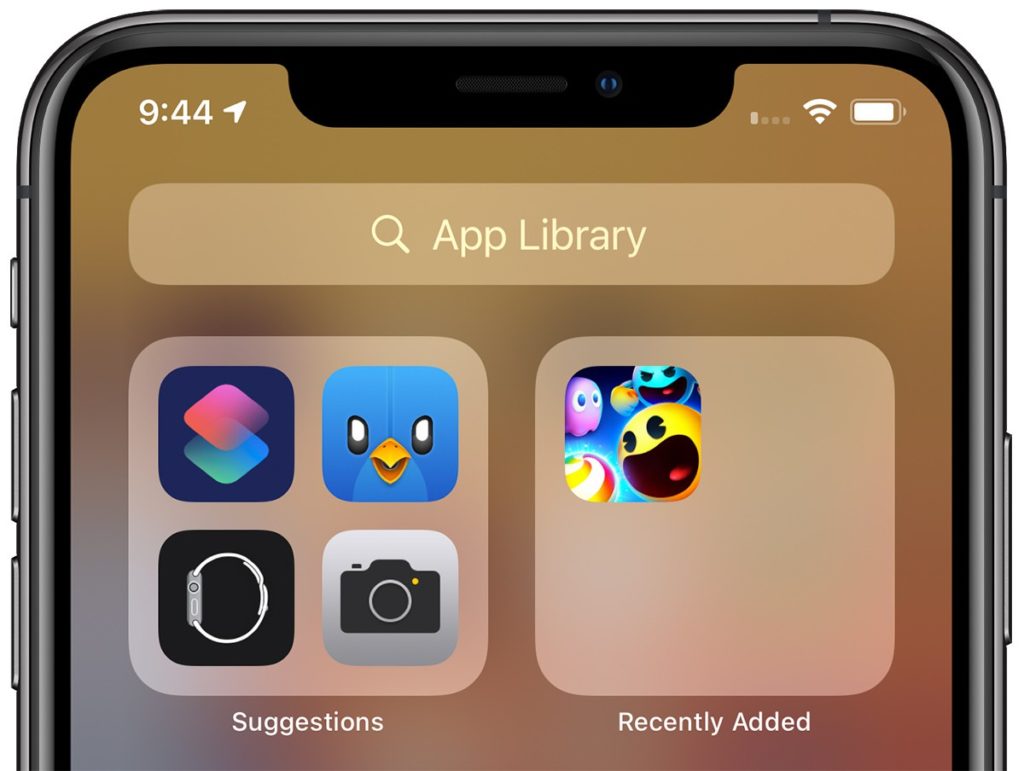
To compliment widgets, a new App Library feature has been added. Similar to Apple Watch’s app list view, App Library automatically organises every app you have installed into category folders.
Swipe right to get past the Home Screen pages and onto App Library view. This seems a great to quickly access apps that normally reside beyond the first or second page.
App Library includes an intelligent “Suggestions” folder where four recommended apps are shown based on factors like, usage, the time of day, location, and activity.
It is now possible to hide individual pages or apps, limiting apps to the App Library. This will allow for much tidier screens.
Other screen-space saving changes include a new compact incoming call and Siri interfaces. Siri is not only now more compact but has received a significant update, making Siri “smarter”.
Improved Accessibility
As with every new iteration of iOS, the accessibility has been improved and expanded. Voice Control, introduced last year gets a new British English voice and expanded capabilities, support for Braille has been enhanced and expanded, and more. Some of the new features worth mentioning are:
Sound recognition
While this is not a new concept, it is the first-time sound recognition has specifically been used for accessibility purposes. Amazon, Google, and others have used AI-based sound recognition for personal safety applications. For example, Google Pixel phones are able to listen for a car crash and Amazon’s Alexa can listen for the sound of broken glass. Once enabled in the accessibility section of iOS 14 the phone will listen for 14 different sounds, including a knock at the door, a doorbell, sirens, smoke detector alarm, dog barking, a crying baby, and more. If one of these sounds is heard you are alerted.
Headphone enhancements
This new feature allows people to adjust the frequency response and boost softer sounds to make it easier to hear. While this requires one of the compatible headphone sets (e.g. AirPods Pro, AirPods, Powerbeats, Powerbeats Pro and Beats Solo Pro, EarPods) it is a great enabler for anyone who has trouble hearing.
Back Tap
Back Tap this new simple feature lets you assign an action to a tap on the rear of your iPhone and it even works when the phone is in a case. Currently, Back Tap only supports two movements, a double and a triple tap. However, there are large number of actions that can be assigned to the taps.
FaceTime Sign Language
The update to FaceTime now includes artificial intelligence that will recognise if someone is using sign language during group FaceTime call. The system will then make the person on the call who is signing appear more prominent.
VoiceOver
VoiceOver has been upgraded. Most notably is VoiceOver utilises on-device machine learning and Apple’s Neural Engine to recognise and audibly describe what’s happening on screen. VoiceOver can now identify key display elements, especially on websites and apps that don’t have their own accessibility functionality. This can include text within images as well as interface controls that can all now be read out.
Apple Magnifier
Apple Magnifier has been upgraded too. It now magnifies more of the area you are pointing at, as well as capture multi-shot freeze frames. You can now filter or brighten images for better clarity as well as capture multiple images at once – making it simpler to review multipage documents or longer content.
Other new features and changes in iOS
With more than the reported 250 changes and enhancements from iOS 13 here are some of the changes and new features:
Picture-in-Picture (PiP). While not a new concept Apple has added it’s “Apple touch” to it. If you swipe away while watching a full-screened video, the window will now float on your home screen, allowing you to move and resize it. The video can also be minimise into a small button on the side of the screen. All this means that you can continue to play a video while doing something else.
App Clips – similar to Android’s Instant Apps, App Clips allow you to use an app without needing to download the full version. App Clips will also support Apple Pay. This feature could be useful for those times when you need quick access or only need an app temporarily.
A significant update to Apple Maps and includes new cycling-specific navigation, among other things. This can alert you to increases in elevation as well as a notification if there are stairs along your route. This could be very useful for wheelchair users too.
Unfortunately, for now, is US and China focused and will be first available for New York City, Los Angeles, San Francisco, Shanghai, and Beijing. Although more cities will be added once iOS 14 is released.
Third-Party Default Apps – for the first time since iOS was released Apple allows you to set third-party browser and e-mail apps as the default. This means Google Chrome users and those who prefer other e-mail apps can use them more easily.
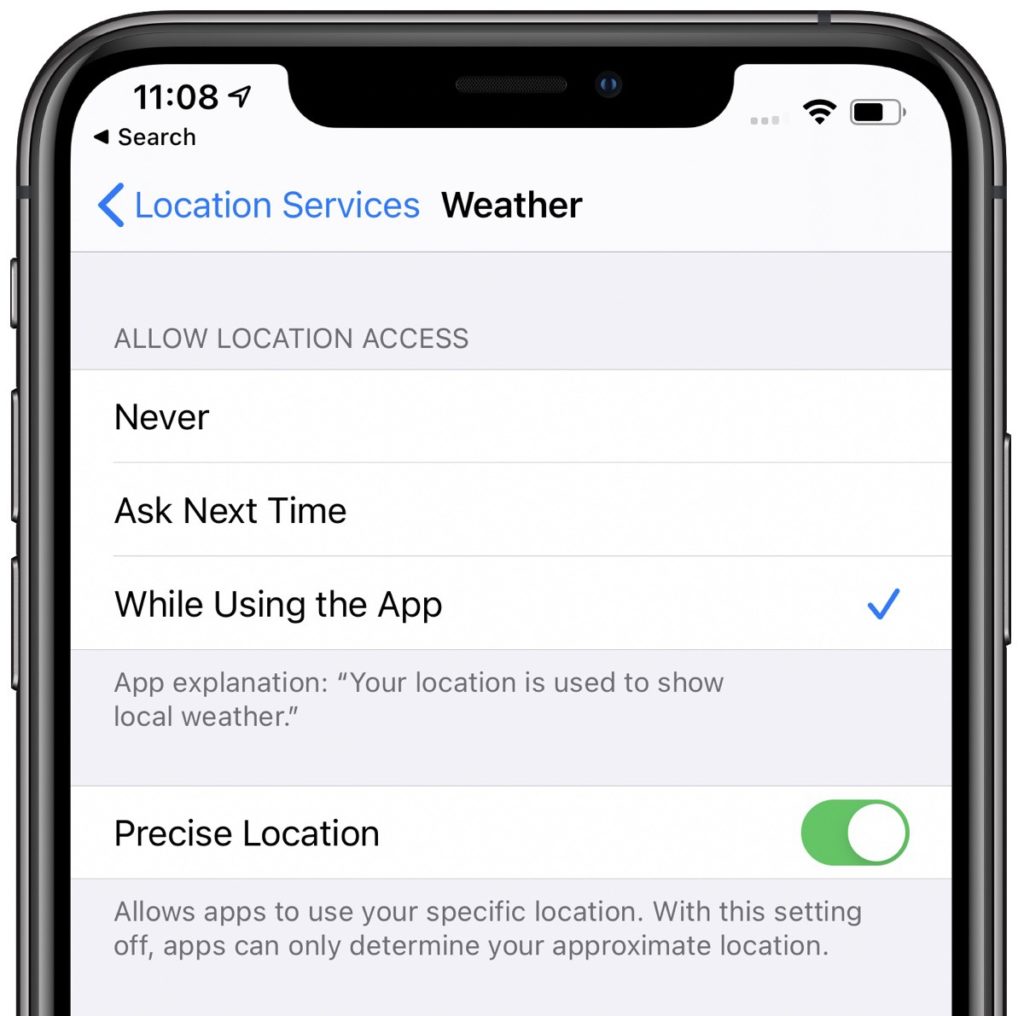
Privacy Protections – A significant amount of work has gone into improving and expanding the privacy protections. It is now even clearer what information apps collect, requiring more user permission. It is now possible to use location dependant features without providing your specific location data.
Changes have been made to the Apple app store to make is clearer what the privacy impact of each app is before you download it. Apple now require developers to self-report their privacy practices, including any data they collect and used to track people.
Developers must now also obtain express permission from the user to access or use any tracking data.
The Apple Clipboard now provides a notification, so you know what app is accessing text copied to it.
Apps that need to discover and access devices on your local network now need to gain your permission to do so first. Fine-grain control to your photos has been added. Any app that requests access to the Photo Library, no longer needs to have access to all your photos. You can choose to block access, select specific photos that the app can view, or allow full access.
If an app uses either the camera or microphone for recording purposes an indicator light will now appear next to the mobile signal bar. This will happen whether an app is being used or running in the background. This will ensure that apps are not secretly recording without your knowledge.
To prevent operators tracking your device Wi-Fi now includes the option to “Use Private Address”; and Bluetooth devices can be renamed.
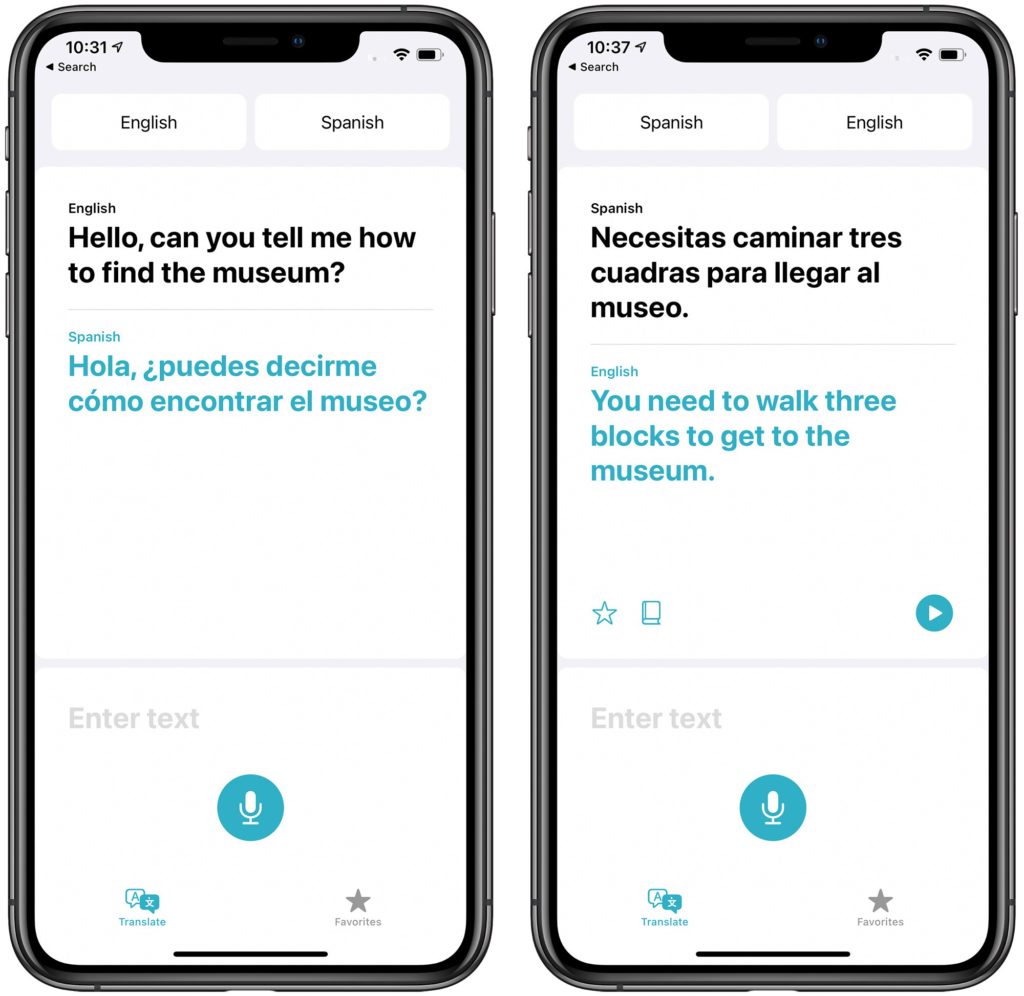
Translate App – Siri’s translation capabilities added in iOS 13 have been expanded into a dedicated translation app.The underling translation engine has also been integrated into the new version of Safari. This makes it possible for websites to be translated too.
Memoji will be expanded, including more age options, and accessories for Memoji, such as face masks – I sign of the extraordinary times we are living in.
iPadOS 14
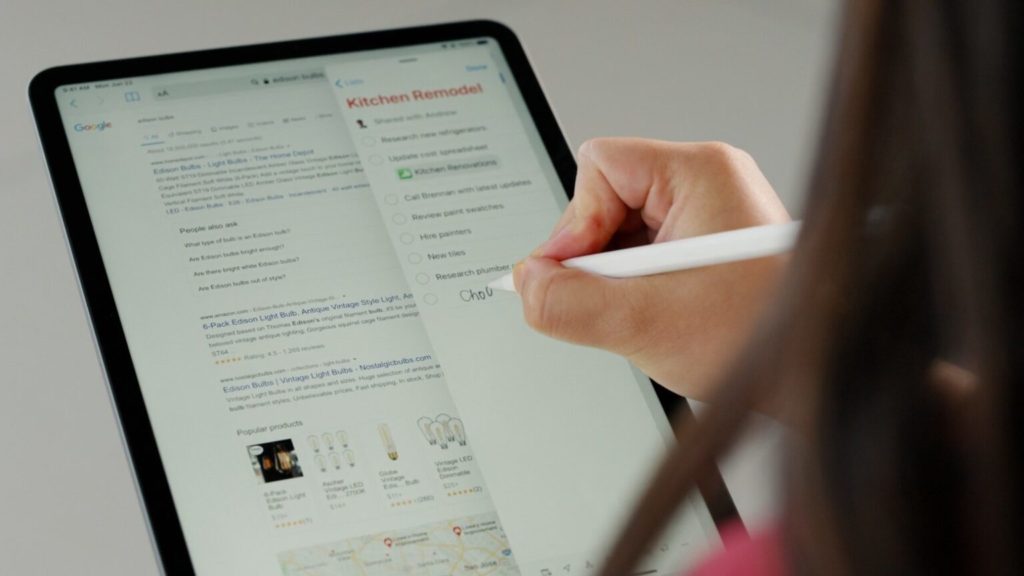
Most of the changes and new features of iOS 14 will also be included in iPadOS 14. Apple also introduced a new “Scribble” feature for Apple Pencil. This can automatically convert handwriting into text. Built in intelligence makes Scribble context aware. This means it is able to for example recognise a phone number or address and offer you an appropriate app to use the data.
watchOS 7
Apple has finally added sleep tracking to Apple watch. While more in-depth data will be gathered if you use an Apple watch, the companion app for iPhone doesn’t require you to use an Apple Watch.
With the coronavirus pandemic hand hygiene has become even more important. watchOS 7 now includes a Handwashing app. This new app not only can detect the motion of you washing your hands but uses the watch’s microphones listen for the sound of splashing water to confirm that you’re actually washing your hands. The app then displays a countdown to ensure you wash your hands for an adequate amount of time.
Google I/O
Google took the decision to cancel their annual developer conference entirely. Google did however announce some accessibility improvements.
An Accessible Places feature has been added to Google Maps. Available on both Android and iOS, Accessible Places is designed to display wheelchair accessibility information about a location or business. You can enable Accessible Places by open the latest version of the Google Maps app. Navigate to “Settings”, then choose Accessibility and turn on Accessible Places.
Once turned on, it’ll show a wheelchair icon for places with an accessible entrance. More detailed information is also available, including Blue Badge parking, accessible seating, and toilets. Accessible Places will be released in the UK, US, Japan and Australia, with more countries being added later.
Action blocks, mentioned in the Autumn 2019 newsletter has now been released. The app enables you to create customisable home screen buttons. Creating a string of tasks or actions that can be trigged by a single tap
Live Transcribe, Google’s real-time, speech-to-text transcriptions for conversations has been updated. You can add custom words or names for the system to recognize and spell. You can use search to search through past conversations. To enable this feature though you need to enable “Saving Transcriptions”. This will then save transcriptions to the device for three days.
It is now also possible to set Live Transcribe to listen for your name. Your phone will then vibrate whenever someone nearby says your name.
Images used in this article courtesy of:
macrumors.com
9to5mac.com
cultofmac.com
theverge.com
zdnet.com
techcrunch.com
phonedog.com
Article meta data
Clicking on any of the links in this section will take you to other articles that have been tagged in the same category.
We use cookies on our website to give you the most relevant experience by remembering your preferences and repeat visits. By clicking “Accept All”, you consent to the use of ALL the cookies. However, you may visit "Cookie Settings" to provide a controlled consent.
This website uses cookies to improve your experience while you navigate through the website. Out of these, the cookies that are categorized as necessary are stored on your browser as they are essential for the working of basic functionalities of the website. We also use third-party cookies that help us analyze and understand how you use this website. These cookies will be stored in your browser only with your consent. You also have the option to opt-out of these cookies. But opting out of some of these cookies may affect your browsing experience.
Necessary cookies are absolutely essential for the website to function properly. These cookies ensure basic functionalities and security features of the website, anonymously.
Cookie
Duration
Description
cookielawinfo-checkbox-analytics
11 months
This cookie is set by GDPR Cookie Consent plugin. The cookie is used to store the user consent for the cookies in the category "Analytics".
cookielawinfo-checkbox-functional
11 months
The cookie is set by GDPR cookie consent to record the user consent for the cookies in the category "Functional".
cookielawinfo-checkbox-necessary
11 months
This cookie is set by GDPR Cookie Consent plugin. The cookies is used to store the user consent for the cookies in the category "Necessary".
cookielawinfo-checkbox-others
11 months
This cookie is set by GDPR Cookie Consent plugin. The cookie is used to store the user consent for the cookies in the category "Other.
cookielawinfo-checkbox-performance
11 months
This cookie is set by GDPR Cookie Consent plugin. The cookie is used to store the user consent for the cookies in the category "Performance".
viewed_cookie_policy
11 months
The cookie is set by the GDPR Cookie Consent plugin and is used to store whether or not user has consented to the use of cookies. It does not store any personal data.
Functional cookies help to perform certain functionalities like sharing the content of the website on social media platforms, collect feedbacks, and other third-party features.
Performance cookies are used to understand and analyze the key performance indexes of the website which helps in delivering a better user experience for the visitors.
Analytical cookies are used to understand how visitors interact with the website. These cookies help provide information on metrics the number of visitors, bounce rate, traffic source, etc.
Advertisement cookies are used to provide visitors with relevant ads and marketing campaigns. These cookies track visitors across websites and collect information to provide customized ads.