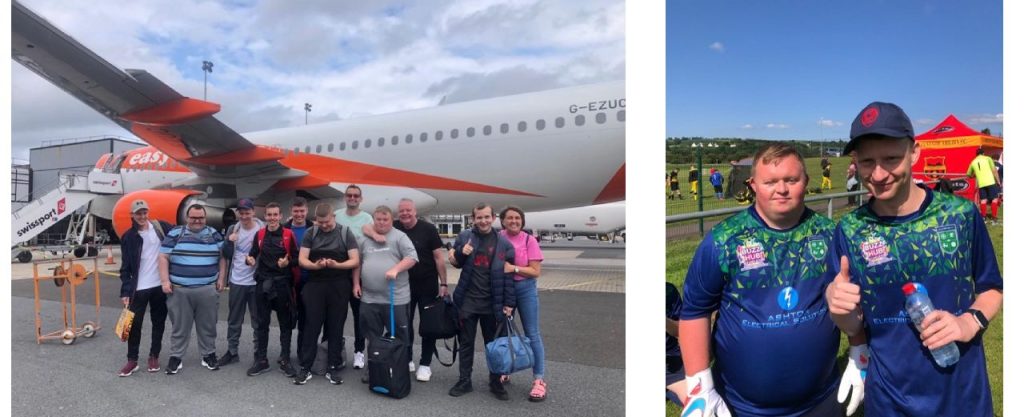
Our Football Team travelled over to Belfast in June. Playing in an International Tournament. We were one of 78 teams competing. It was a great occasion and a marvellous experience for our members.
As part of our Cultured offer, our choir performed a programme of songs at St Helens Town Hall.
As part of our Social and Leisure programme members enjoy day trips. Lots of fun had by all.
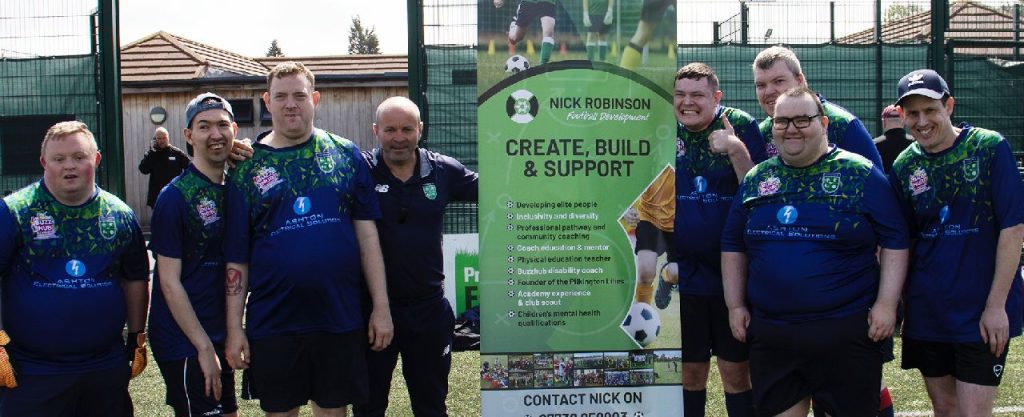
In June we hosted our second annual Football Festival. We were joined by 24 teams from all over Liverpool City Region. The day was a great success and showcased all that is good about disability football.
As part of this Years St Helens Borough of Culture, members have been involved in creating a sound and film in tribute to George Groves. George Groves native of St Helens moved to Hollywood in the 1920`s to pioneer sound. He was the first ever movie sound man. He won an Oscar in 1965. Our work will be showcased at St Helens Town Hall Saturday 16th September.
We attended a local Summer Fayre recently. Showcasing many items create by our talented members.
Members enjoying accessible bike riding. Wheels 4 All.
In July local schools took part in an Open Art Competition. The winners had their art wok printed by our members on a selection of items. Some of the printing equipment used was funded by The Karten Network.
In August, thanks to Lancashire Cricket Foundation, we attended Rainhill Cricket Club for their first disabled cricket festival. Over 40 players from Buzz Hub St Helens cdp, Daisy Inclusive UK, Ever Evolving and Your Voice Your Choice learnt new skills from batting, to fielding, to bowling & catching – well done everyone!
At Fundify we are building an AI research robot to help those not used to searching for funding the opportunity to find grants through having a conversation with the latest technology. The AI that we are deploying will have access to all of the internal fundify data and will used conversational techniques used by Chat GTP Open AI to help seek additional information and clarification.
At the present time we are busy training the robot, and so it would be of great assistance if any Karten Network users could assist with suggesting some search queries or criteria, and the link to the Robot is here. Fundify – The Search Engine for Grant Funding. (wearefundify.org.uk)
As a bit of fun we are also asking for suggestions to name the robot, with the winner gaining a two year subscription to the platform.
I wanted to add some feedback from one of the patients that I recently worked with. When I first met this gentleman, he woke in hospital with no limb movement and no recollection of anything that had happened or how he had come to be in hospital. He also had no personal possessions.
I worked closely with him and demonstrated how to use a phone and iPad with the various types of assitive technology (AT) equipment. With no upper limb or head movement, voice control would have been the most suitable option for him, however his voice was not strong enough, but after having a speaking valve fitted, we made some progress.
After several sessions and with his voice improving, he could make and receive phone calls, navigate his way around my work iPad to watch films and TV programs. I could visibly see the change this new independence gave to him. With limited visitors I took it upon myself to help him complete a grant application for an iPad. The application was approved, and he is now able to watch films when he wants, he has also progressed to Gaming. Previous to this he was only able to watch a tv in his room but was unable to change the channel. My work with this patient is still ongoing but to see such an improvement is fantastic.
Aspire’s Assistive Technologist commenting on the impact of equipment funded by the Ian Karten Charitable Trust
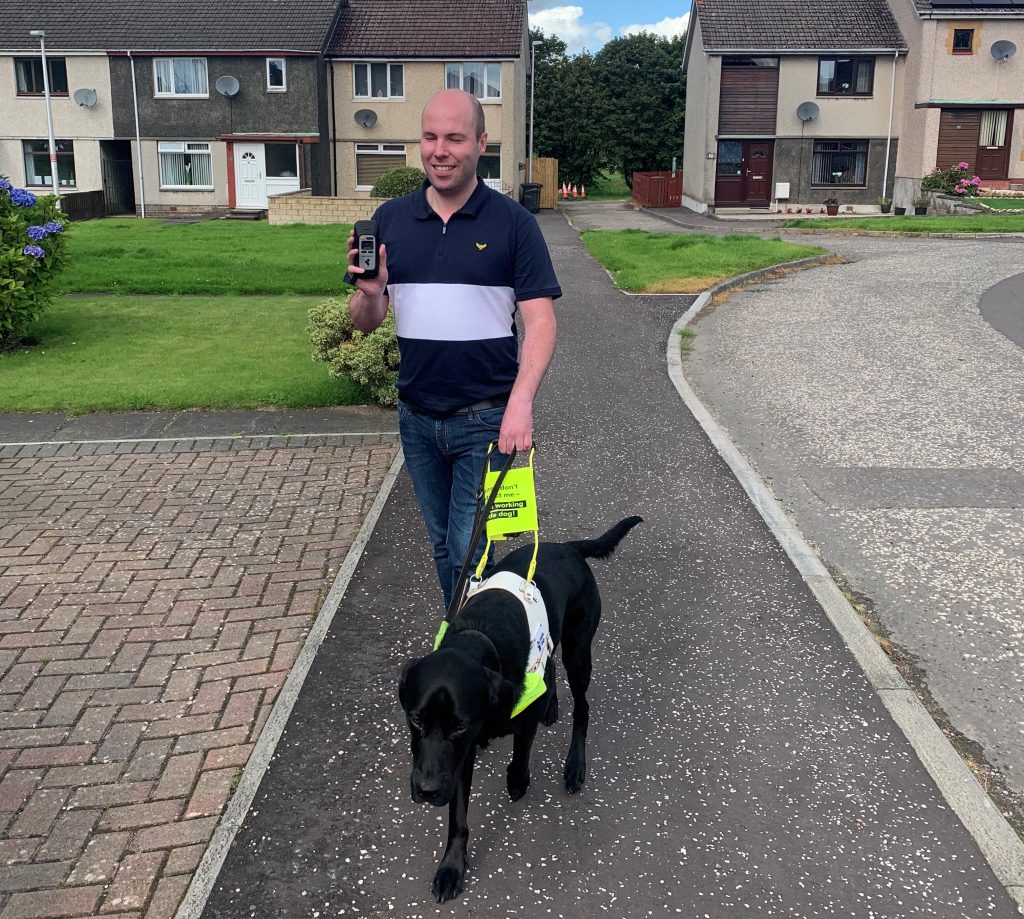
I recently qualified with my third Guide Dog, Dax and to help him with learning routes and for my own confidence and piece-of-mind. I worked with my Guide Dog instructor around my home area and used a specialist GPS and navigation device called the StellarTrek to mark all of the places I go to on a regular basis. This was enormously helpful, as Dax is still very young and while he keeps me safe in terms of obstacle avoidance. I am able to keep him right and give him correct directions when navigating to places like the local shops, football ground and to the local café for a nice cup of tea.
Dax has since mastered all of our home routes, but the StellarTrek will still be very useful in the future if I ever do need to learn a new route in my local area. However, it was when I was trying to learn a route at my place of work at Seescape where the capabilities of the StellarTrek blew me away.
Seescape is based at Newark Road North in Glenrothes, Fife, and finding a safe walk for Dax and I in our lunch our was proving challenging, as it is on an estate and Glenrothes is completely unfamiliar to us both. My Guide Dog instructor persevered though and we eventually found a safe walk with only a few busy roads to cross. The problem was that I was having serious trouble committing the route to memory and on one memorable occasion, I actually became completely lost and had to call my work and ask for someone to come and find me and take me back in their car.
I called my Guide Dog instructor again and we tried the same route, but this time and with her sighted assistance, I used the StellarTrek and voice tagged the correct places to cross the roads and what to do when I got to the other side. So for example, when Dax took me to the first down-kerb, I marked the exact place to cross and said, “cross, then keep going straight. At the next down-kerb, I said “turn right” because I didn’t actually need to cross that road, I just needed to keep going and Dax then took me to the next road crossing which I marked with the instruction to “cross and turn right on the up-kerb.” I was unsure if this plan would work, but the only way to find out was to try it and my colleagues were on call if I needed help.
I recently went out accompanied by Dax as always and with the StellarTrek clipped to my pocket. The experience was absolutely uplifting, amazing and astounding. I followed the route and as soon as I was at a point I had previously marked with an instruction, I was able to follow it and keep Dax on the right path. Now with Dax’s superb guidance to keep me safe at all times along with the instructions from the StellarTrek, I can complete the route at lunch times independently and with confidence. Without the StellarTrek, I can honestly say that this would not be possible.”
This year, we’re excited to introduce an enriched conference experience through the addition of a Discussion Forum. Participate in themed discussion sessions or reconnect with peers you met earlier in the day. Although the Discussion Forum is free, places are limited and available on a first-come, first-served basis. Book now for TechAbility2023, as many have already taken advantage of this opportunity.
Conference sessions have been carefully curated so that whatever sector you work in there will be relevant content. Sessions include:
Using technology to enable physically disabled people to explore their sexuality. Victoria Pitt, Treloar School and College
Exploring the potential of AI for accessibility. Helen Nicholson, Jisc National Centre for AI
Improving the confidence and practice of communication partners. Alysia Martindale, Ambitious about Autism
Realising the benefits of technology in supported employment. Shamima Akhtar, Policy Connect
Inclusive storytelling – approaches to telling stories for all! Pete Wells, winner of Bett and ERA Awards
Beyond music therapy – hacking the paradigm. Lee Holder, The Music Works
Seven stages of switch development. Luke Thompson, The Pace Centre
Taking place at the easy-to-reach Radisson Blu Hotel, Stansted, TechAbility2023 is a must attend event for anyone who wants to use technology to support living and learning.
Make Technology Work for You Poster – Links now fixed
Apologies if you had issues with QR codes on our “Make technology work for you” poster. These are now fixed. The poster links to video resources which help people get the best accessibility features out of their tech whether using a mobile phone, a laptop or a tablet.
The videos can also be embedded in your VLE or SharePoint site to use in training resources.
Please note: The EFT website will be closing on 30 September 2023 with some content moving to: www.et-foundation.co.uk. However, not all content will be available, they suggest downloading any resources you would like.
TechAbility AT Champions: Building a community of practice
In Natpec’s recent blog post Neil Harrod-Beck talks about building a community of practice with the TechAbility champions by bringing together those responsible for Assistive Technology in Natspec colleges and Karten Centres.
AI Regulation and Inclusive by Design
A House of Lords report has called for UK national AI centre and top-down regulation. Embedding ‘do no harm’ into AI legislation is essential and AI regulation must be inclusive by design, the publication says.
Have you ever filled out an accessibility or adjustments passport? It’s a format disabled people often know all too well; you’re sent a word document for you to list your diagnoses, fill in some text boxes with your most personal, private information, and then send it into someone else’s inbox, not knowing where it might end up, or what will happen as a result.
Accessibility passports should be designed to enable disabled people, to break down the barriers that prevent us from accessing our education, work, and lives. And yet, in reality, they often present us with more barriers, such as:
Cognitive barriers, like trying to understand what we’re being asked of with vague questions of “what do you struggle with at work?”
Emotional barriers, like feeling vulnerable about being asked to share very intimate information with business owners, managers or coworkers
Digital accessibility barriers, like filling in PDF documents that aren’t compatible with our screen reading software.
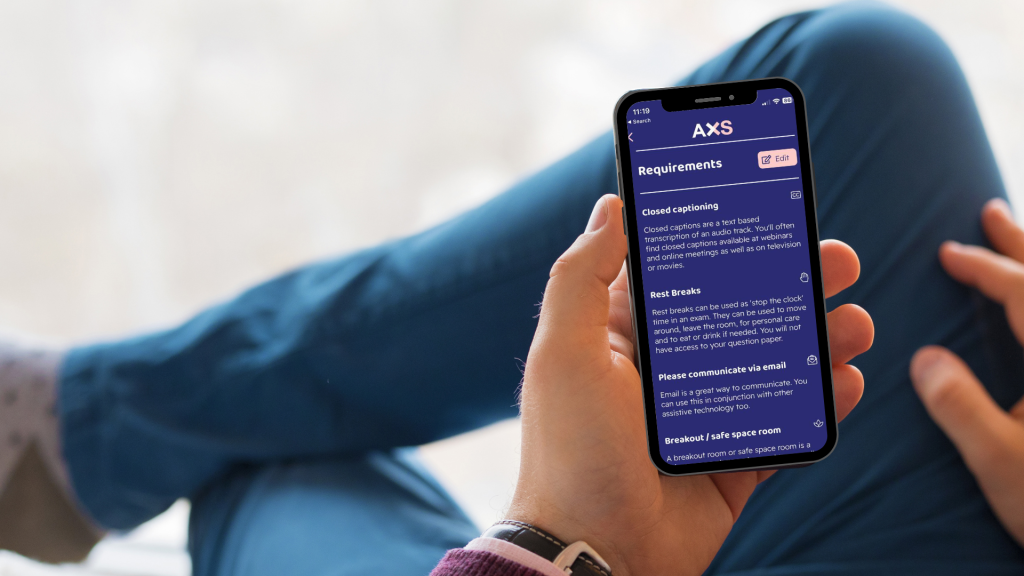
Diversity and Ability’s team of disabled and neurodiverse inclusion experts have the solution: AXS Passport. AXS Passport heralds a new, inclusive approach to passports, with a digital tool that gives everyone the opportunity to share their needs in the way that feels best for them, all while maintaining ownership of their own data.
Using AXS Passport involves signing in via the website or app and simply ticking off the requirements that fit you. It’s specifically designed to include everyone, regardless of whether you identify as disabled or not. You have the ability to share everything from dietary needs, to caring responsibilities, to physical access requirements, all on one digital platform. Plus, it’s completely free for individuals to sign up; create your AXS Passport now!
I would like to offer my time and skills as a communication partner to anyone who would like the chance to chat with me via video or voice call, including people who use alternative and augmentative communication (AAC).
I have a keen interest in technology, especially AAC, and in helping other disabled people. I have experience of working as a teaching assistant with people who use communication aids such as communication boards, sign language, and symbol systems.
I’ve also worked as an advocate, helping disabled people to speak up for themselves. Being disabled myself I understand the difficulties that people may have expressing themselves and the struggle it can be.
If you feel I could support your team in any way, please email dawn@karten-network.org.uk and she will put you in contact with me. I would be happy to arrange regular or one-off calls with individuals or groups. I have DBS approval to work with vulnerable adults.
Please note
The Karten Network is happy to introduce Natasha but can take no responsibility for anything thereafter. It is the organisation’s responsibility to make relevant employment checks in line with their policy and to put plans in place for any support provided.
If you’re involved in an organisation that serves people with disabilities, you’re already aware of the intricate landscape of individual needs and adaptive solutions – and the amazing array of solutions brought forward by innovators looking to make life easier for people with disabilities and those who provide care and support to them.
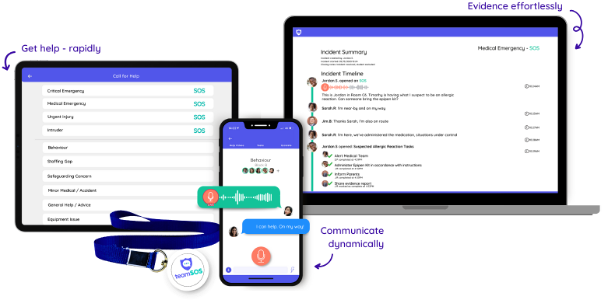
Today we’d like to share our modest (yet revolutionary!) contribution to these efforts with our affordable and all-device accessible app that puts help in the hands of all staff. teamSOS brings invaluable efficiencies to organisations that support individuals with complex needs, providing a streamlined way for organisations to manage, respond and resolve incidents in real-time.
Incident Management: More Than Just Emergencies
The term “incident management” often brings to mind crisis scenarios or immediate medical needs. While these are undoubtedly part of the picture, teamSOS offers so much more than that – offering a streamlined solution to manage every-day interests and concerns. From staffing gaps, to safeguarding concerns, behavioural issues, or medical emergencies, teamSOS is robust enough to handle it all and support and empower staff members every step of the way.
The Advantages Unveiled
Your Organisations Command Centre
Accessible on all devices, teamSOS’s home screen offers a simple, customised interface with one-tap buttons that empower staff to reach the right team in seconds. Our customisable categories allow institutions with complex or unique requirements to adapt the system to their needs, whether that’s behavioural monitoring or tracking therapeutic interventions. We also offer discreet smart buttons for an alternative way to get help fast. For urgent situations, escalation failsafes are built-in so that staff are never left un-heard.
Real-Time Communications
Gone are the days of squawking walkie-talkies, 1-way alerts or co-ordination calls to the office. teamSOS equips all users with innovative tools like live-audio broadcasting to facilitate real-time support and effective collaboration – whether it’s coordinating paraeducators or alerting the healthcare team for a medical emergency, the lines of communication are always open.
Support In-The-Moment
During an incident, teamSOS automatically pulls up your organisation’s relevant guidelines or protocols. For organisations dealing with complex needs, this is incredibly powerful in ensuring staff are supported to take the right steps, and provides an instant record of what was done, and when. With the ability to check off tasks as they go, assign follow up steps to other staff, and more, teamSOS aids in effective and consistent management, alleviating the pressure on staff, and allowing them to focus on delivering the best care possible.
Time-Saving Efficiencies
Say goodbye to post-incident paperwork. This reclaimed time allows staff to focus on what truly matters – providing direct, individualised care
Data-Driven Decisions
teamSOS’s user-friendly analytics enable leadership to identify patterns, optimise processes, and proactively tackle issues, facilitating a smoother operational workflow and compound improvement over time.
A Companion in Staff’s Mission to Provide the Best Care Possible
In our ever-changing world, adopting tools that offer better care is a necessity. teamSOS provides an effective, affordable solution that meets the challenges of organisations serving people with disabilities head-on.
Each year we are given a peek into the near future of mobile technology at the Google I/O and Apple’s WWDC conferences.
This year Apple joined the augmented reality (AR) and mixed reality (MR) space with the launch of Apple Vision Pro. Google, Magic Leap and Microsoft have released AR/MR devices over the past few years with varying degrees of success. Apple is known for only releasing technology when they feel it is refined and functional enough to comply with Apples high standards. It is fair to say Apple’s iPhone, iPad and Watch revolutionised mobile computing. Apple describes the Vision Pro as a new era in spatial computing. Once you put on the headset you are able to either augment your view of the world with photos, videos or apps; or completely immerse yourself into another reality. Unfortunately, the cost of the Vision Pro, expected to be in excess of £3000 when released in the UK in 2024 will limit its adoption. Only time will tell the impact the Vision Pro will have. Nevertheless, the Apple Vision Pro looks incredible and very exciting! I can see huge potential to enhance and enrich the lives of people with disabilities. Apple’s Vision Pro introductory video is well worth a watch.
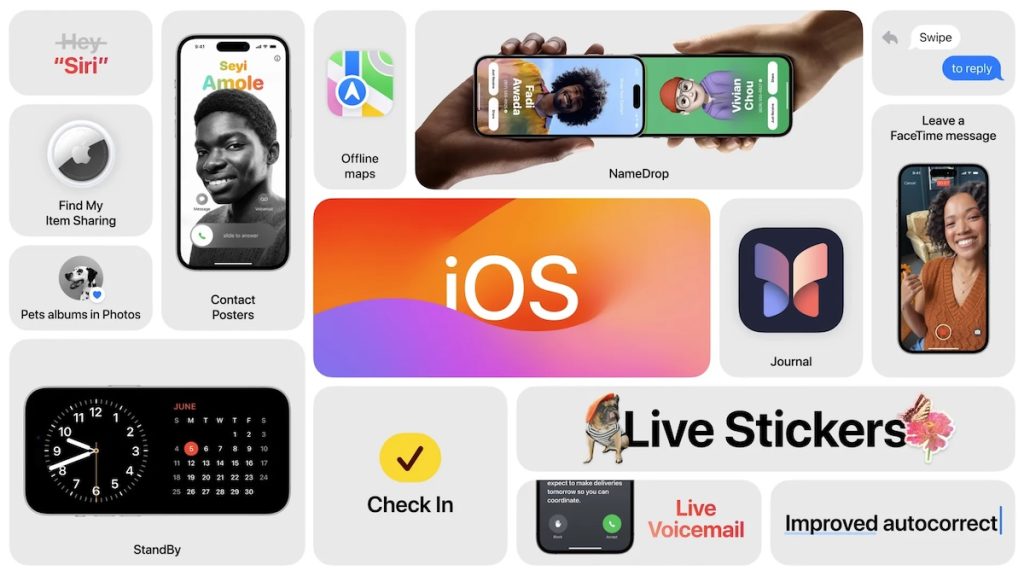
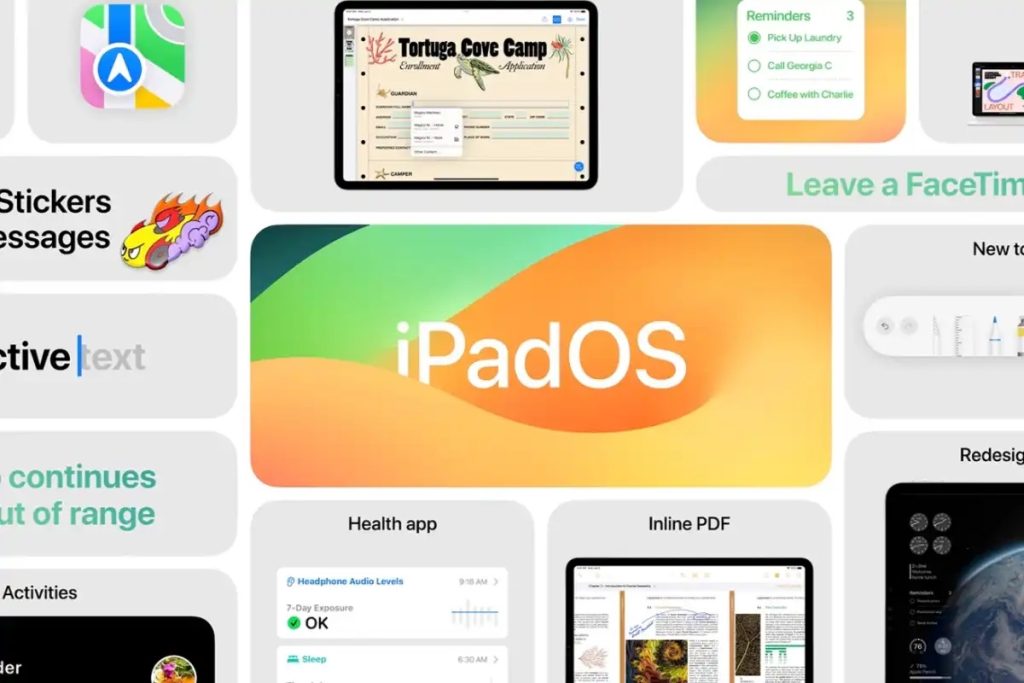
The Vision Pro was not the only announcement at WWDC 2023. Plenty of new hardware was revealed, including new Mac models, and new Apple Silicon chips. As customary, Apple also unveiled the next iteration of its mobile software platforms – iOS 17, iPadOS 17, and watchOS 10.
iOS 17
Many of these improvements are can be described as enhancements to the user experience.
Contact Posters
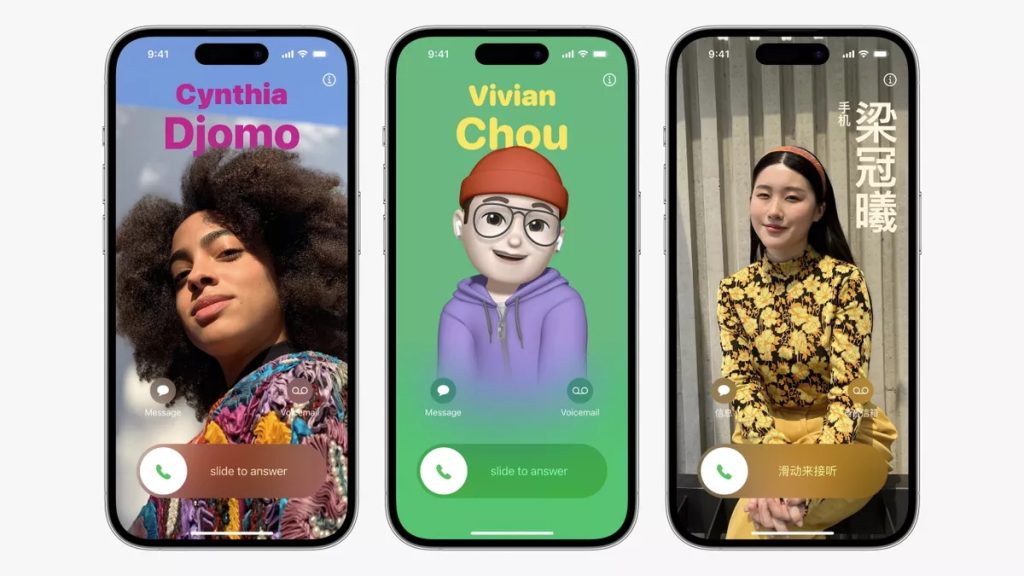
The phone app in iOS 17 has received a big update and now features Contact Posters, these enable you to create personalised images of how you would like your name to appear on another person’s device when making a call, using FaceTime (or other third-party apps), or sharing your contact details.
Live Voicemail
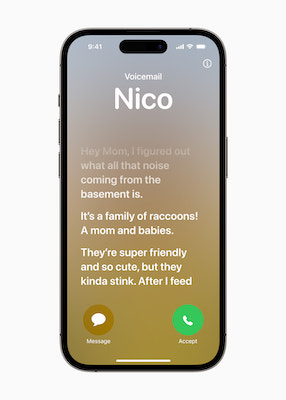
The new Live Voicemail enables you to see a transcript in real-time when someone leaves you a voicemail. Apple also uses this feature to help identify and decline spam calls. To ensure that your information is kept private, all the data remains, and is processed on the device by the Neural Engine.
iMessage and Check-in
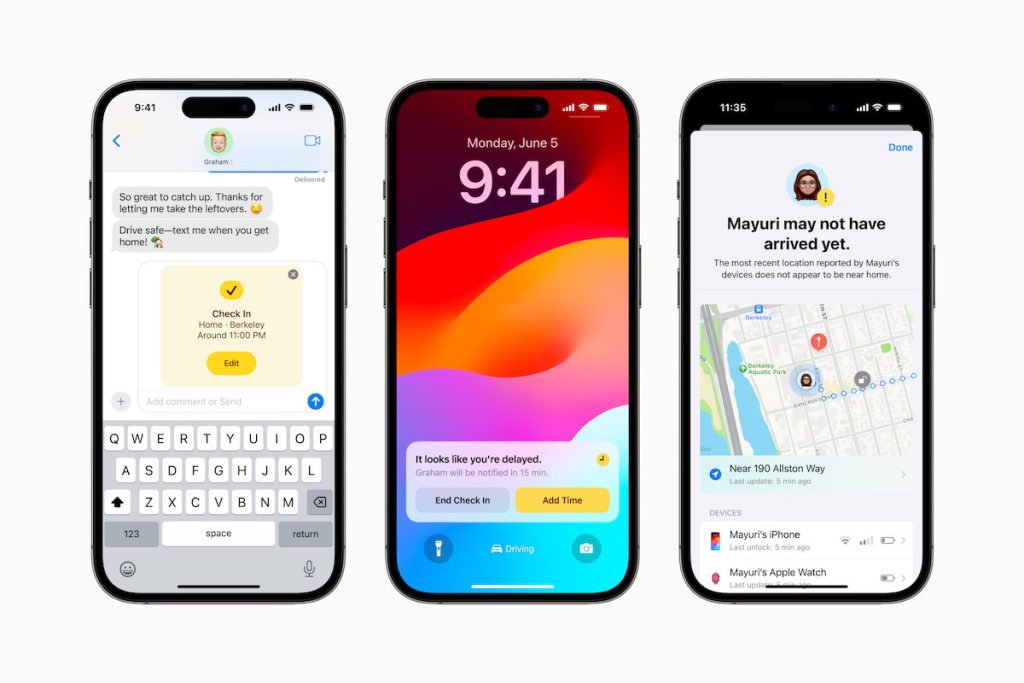
iMessage has also received an update, with a redesigned menu system and the addition of a new sticker experience allowing you to create Live Stickers from your photos or GIFs. But most significant is the new Check-in feature.
Check-in enables you to alert someone that you have arrived at a particular location. What makes Check-in more advanced than simply sending a message when you get there, is the built-in intelligence. Once Check-in is initiated it will calculate the estimate travel time, and if for some reason it takes longer than expect it will send an alert to your specified contact. This alert will include your current location, the battery level of your device and the signal quality. If there is no signal or your phone dies, the person will be able to access your last known location. When you do arrive at your destination, Check-in will automatically send an alert to inform the person that you have reached your destination.
All data used in this feature is encrypted helping to safeguard your privacy. The Check-in feature could be useful for travel training and other scenarios.
Updated AirDrop and new NameDrop
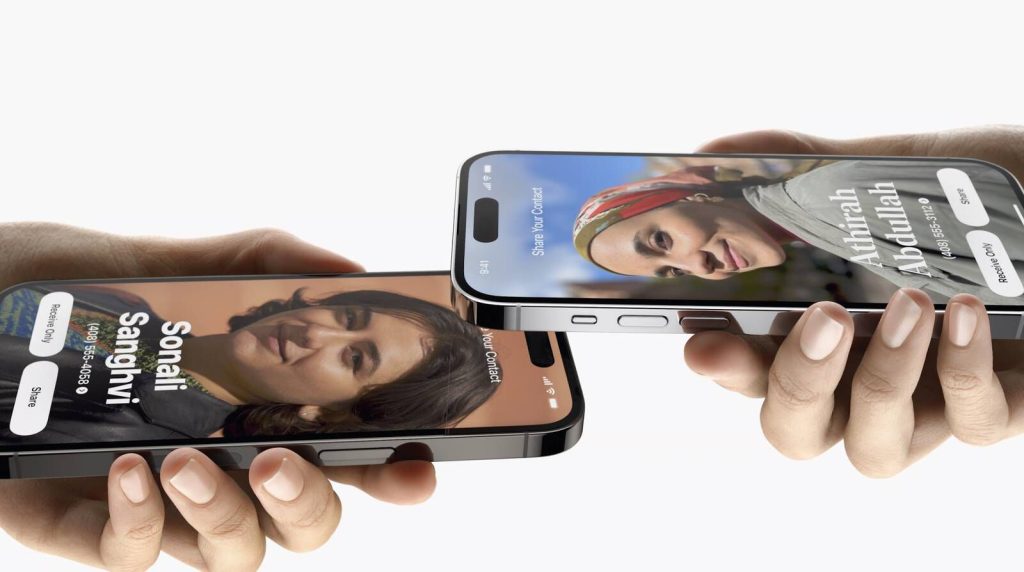
Apple’s wireless sharing feature, AirDrop has also been updated too. It now allows the transfer of files to continue over an internet connection, meaning you no longer need to remain in close proximity to the device sharing files with you. AirDrop has been extended too, with the addition of NameDrop. This enables you to easily share your contact details with someone just by bringing the devices close to each other. While a similar feature has been available in the past, NameDrop has refined this, making it far easier to use. NameDrop is also supported by Apple Watch making it possible to share contacts through Watch too.
Journal app
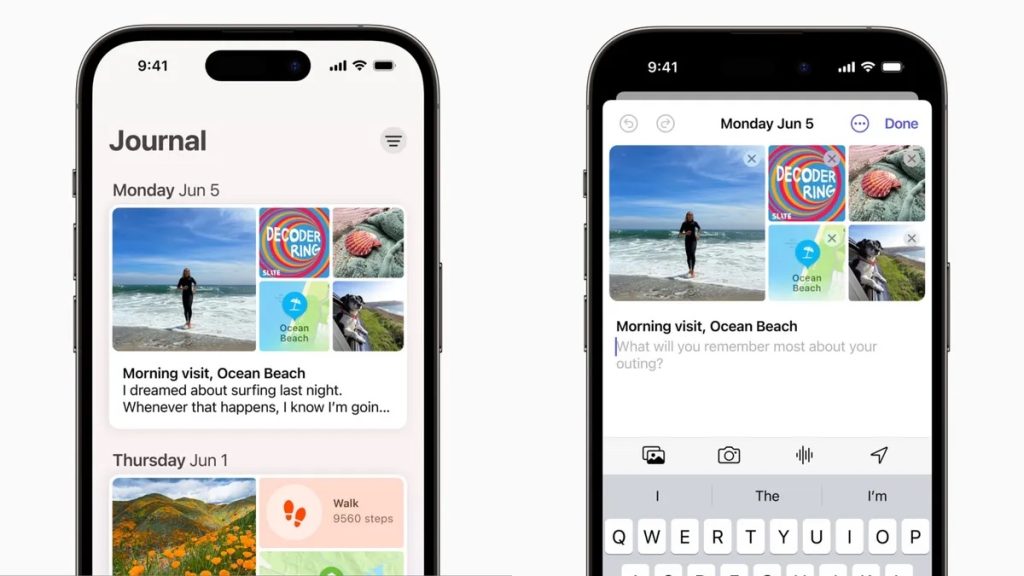
An unexpected addition to iOS is the new Journal app. As the name suggests, this diary app allows you to capture your thoughts and feelings in your own personal digital journal. It uses machine learning to prompt you to add the details of your day and the Journal app integrates with photos and maps allowing you to create rich entries about your day. In keeping with Apple’s commitment to privacy, all processing is done securely on the device.
Autocorrect, prediction and speech recognition
An updated “transformer language model” is included in iOS 17. This means you will see an improvement in Apple’s autocorrect and prediction. Dictation has also been updated with a new speech recognition model making speech recognitions more accurate.
Siri
Siri, Apple’s voice assistant has also received a number of updates, including the option to now be able to simply say “Siri” rather than “Hey Siri”. A nice new accessibility feature is Siri will be able to now read the content of a web page to you. This can be done while the phone is locked too, meaning you could set it to read the page and put your phone down and just listen.
iPadOS 17
iPadOS 17 includes many of the updates included in iOS 17. It also adds a new lock screen feature similar to what, until now, has only been available on iOS. This allows you to create custom iPad lock screens using photos, changing layouts, fonts and how the clock is displayed. Clocks can also be intelligently hidden in the background.
Widgets have been added to iPadOS 17. These widgets can be placed on the lock and home screens. With the bigger screen size of iPads, these widgets are slightly larger than the ones seen on iPhone. These widgets are also interactive, allowing you to actively use them, rather than merely displaying information.
Health app
The Health app has now been added to iPad too. This is not merely an addition from iOS but has been specifically designed for iPad and features larger and more detailed displays of the health data.
Support for PDF
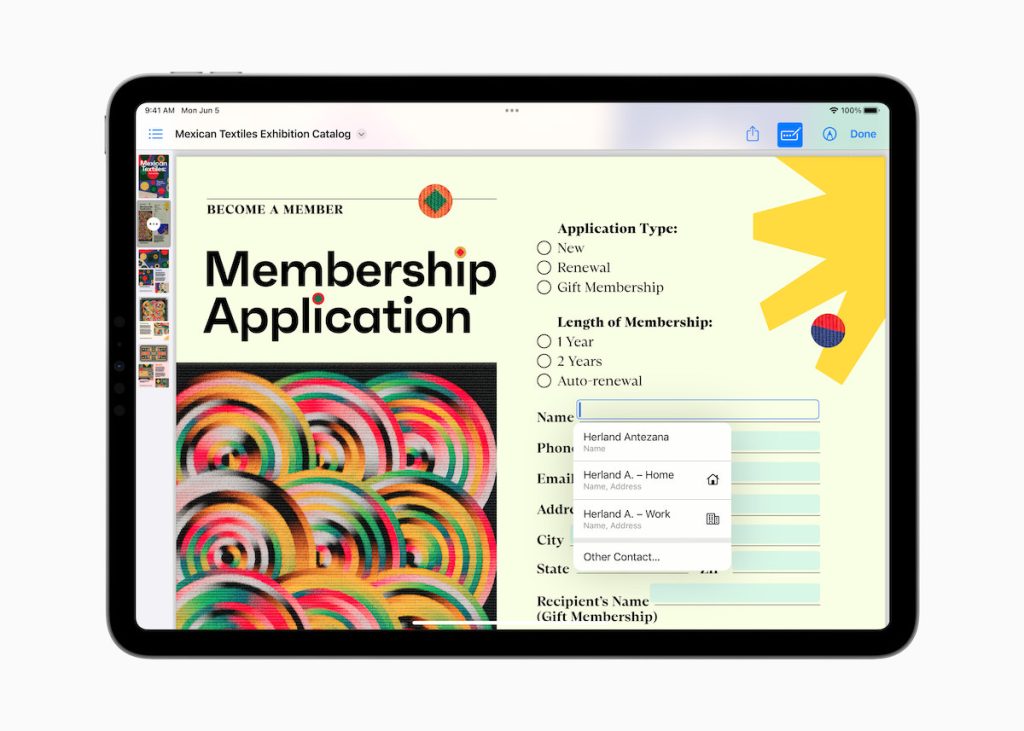
Support for PDF has been improved dramatically in iPadOS 17, making it even easier to view and work with PDFs. It is now possible for text entry sections of PDFs to be detected automatically allowing you to easily make edits and send the file. PDF files can now be stored within the Notes app, even allowing you to store multiple PDFs within a single note and/or work with someone else on the document using Live Collaboration.
Countering Myopia
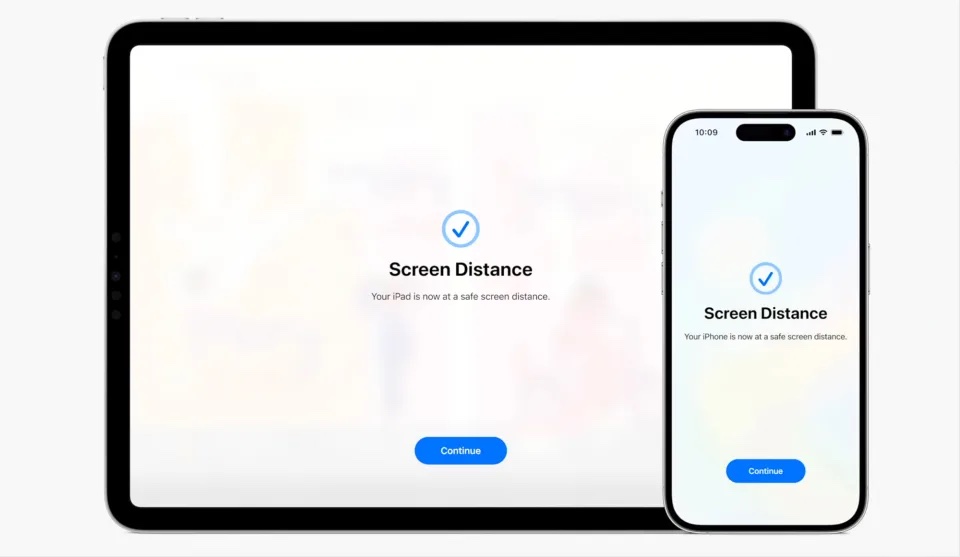
Over the recent years Apple has devoted resources to address various health related issues. This year Apple focused on trying to reduce Myopia (short-sightedness). Studies have indicated that if children spend between 80 and 120 minutes a day outdoors, the chance of developing myopia is reduced.
Apple watchOS 10 will introduce daylight tracking to determine how much time is actually spent outside. In addition to this, a new feature in iOS17 and iPadOS 17 will be able to measure distance between the person’s face and their iPad or iPhone screen. This can be used as a key indicator of potential myopia.
New Accessibility Features
Apple will also be releasing some exciting new accessibility features.
Assistive Access
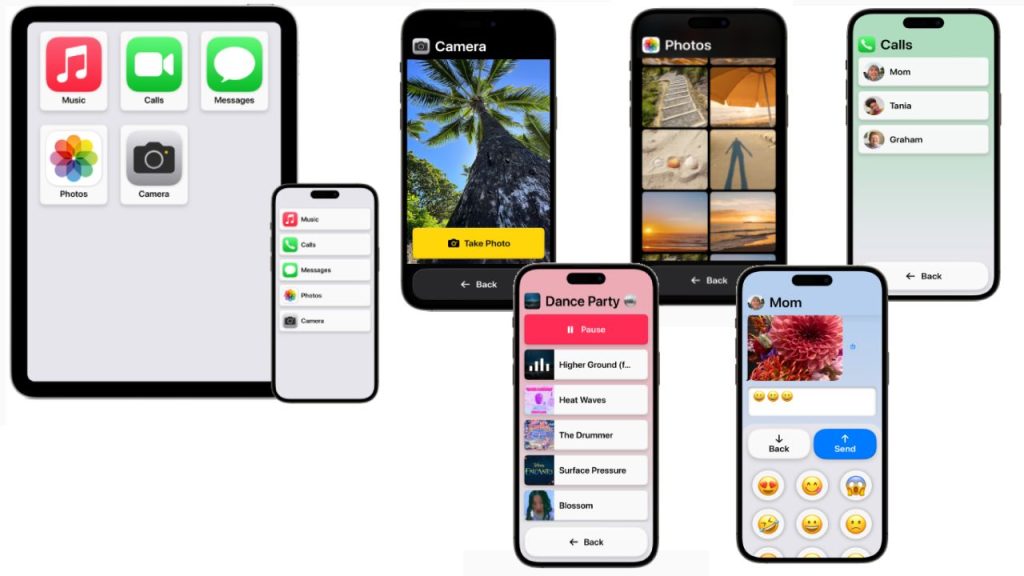
Assistive Access is aimed at reducing the cognitive load, making using iPhone and iPad simpler – focused on a limited number of tasks e.g. taking photos, listening to music, calling someone.
Once Assistive Access is enabled the entire interface is transformed. The simple interface has high contrast buttons and large text labels. The Phone and FaceTime apps get combined into a single Calls app. Tools enable the interface to be further customised, for example Messages can include an emoji-only keyboard and the option to record a video message.
Live Speech
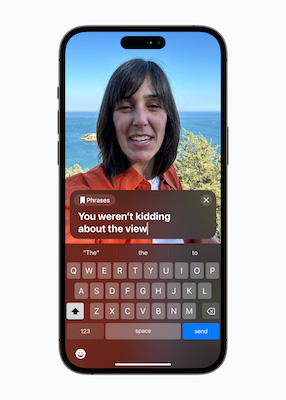
Live Speech is effectively an AAC system built into Apple’s platforms, and will be available on iPhone, iPad, and Mac. Live Speech will enable people to type what they want to say and then have it be spoken out loud during phone and FaceTime calls as well as in person conversations. It will include the option to save commonly used phrases that can be accessed and used.
Personal Voice
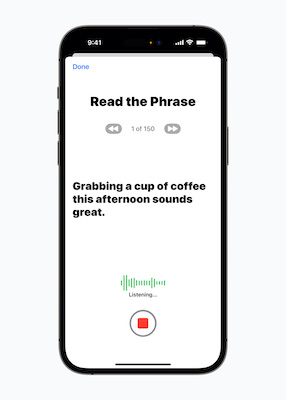
Personal Voice adds voice banking to the iPhone, iPad, and Mac. It is a simple way to create a personal synthetic voice. This can be done in 15 minutes – reading a randomised set of text prompts while recording the audio on your iPhone or iPad. Personal Voice uses on-device machine learning ensuring that the information remains private and secure. It is not clear yet if Personal Voice can be used with third-party AAC apps but it will integrate seamlessly with Live Speech so users can speak with their Personal Voice.
Live Caption
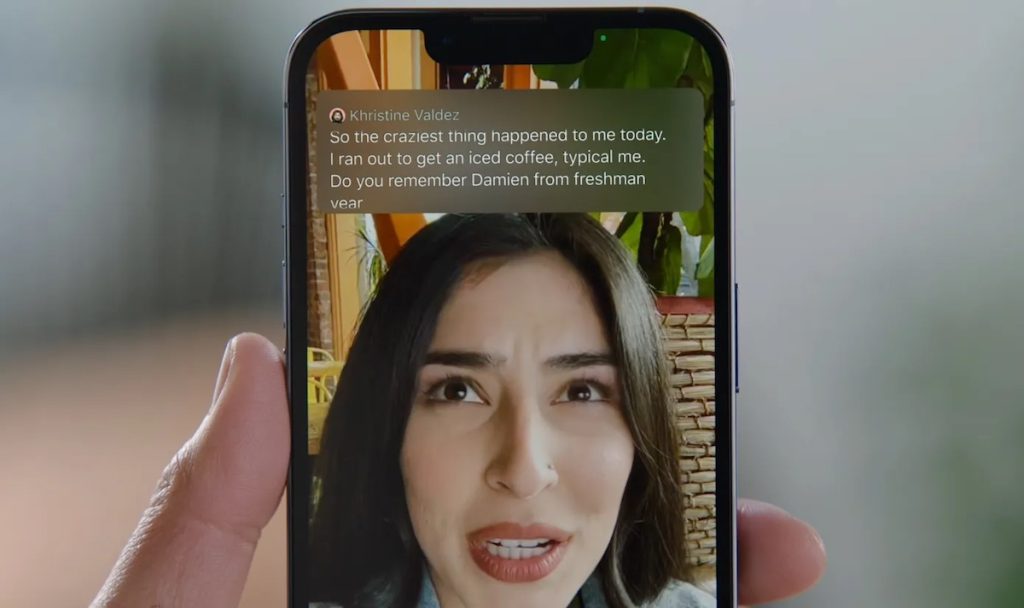
The new Live Caption feature, as the name suggests, will generate captions from audio in real-time. Whether that be from a phone or FaceTime call, social media content or video stream. When used in FaceTime, the captions will automatically be attributed to the person speaking, making it easier to follow the conversation. As with most of Apple’s technology, all the processing happens, and remains on the device ensuring that the person’s data remains private.
Point and Speak
A new feature is to be added to Detection Mode in Magnifier, Point and Speak. This feature enables you to interact with physical objects that have several text labels e.g. a microwave. The person can then hold up their iPhone or iPad with the Magnifier app and moving their finger across the appliance, their iPhone or iPad will read each thing their finger is pointing to. Point and Speak requires a device with a camera and LiDAR Scanner – most new iPhone and iPads have these.
Phonetic suggestions
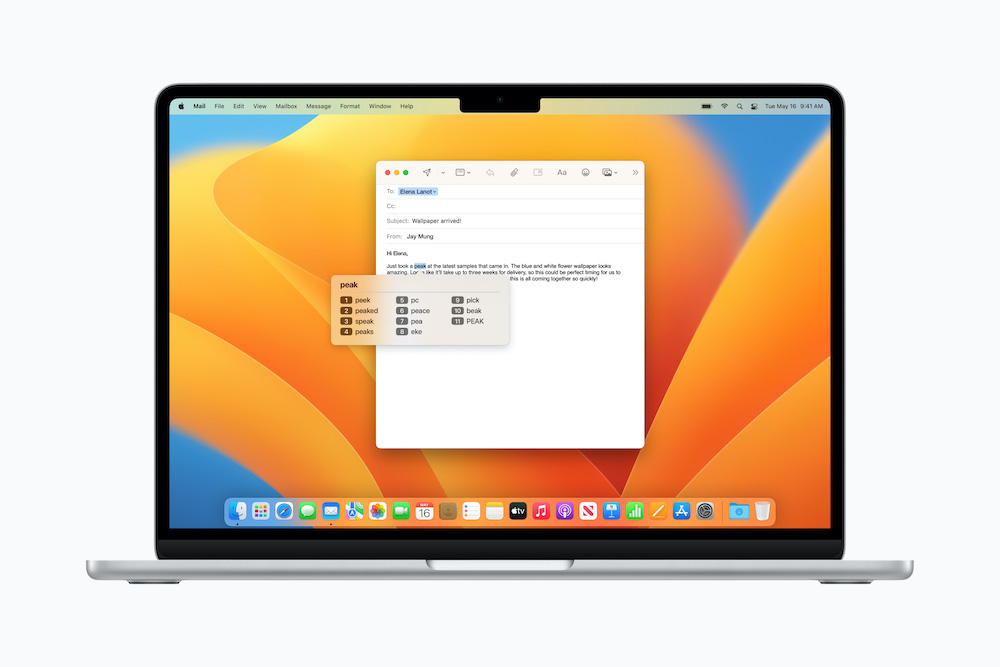
For people who use Voice Control for text editing and as an alternative to typing, Voice Control will now be able to provide phonetic suggestions so you can choose the right word out of several that might sound alike, for example “do,” “due,” and “dew.
Virtual game controller
The Switch Control accessibility feature can now also be used to turn any switch into a virtual game controller allowing the person to play their favourite games on iPhone and iPad
Google I/O 2023
For Google, similar to Apple there were a number of new hardware announcements. These included additions to the Pixel range of devices, namely the Pixel Fold, Pixel Tablet, and the Pixel 7A. But really, it was all about the AI (Artificial Intelligence).
PaLM 2
Google unveiled PaLM 2, the latest version of Google’s large language model (LLM) AI, and a rival systems like OpenAI’s GPT-4.
It was stated that PaLM 2 is stronger in logic and reasoning, thanks to its broad training. It is much better at a range of text-based tasks, such as reasoning, coding, and translation. It was trained on multilingual text spanning over 100 languages.
PaLM 2 is a significant improvement on PaLM 1 which was unveiled in 2022. There are several variants of PaLM 2, with the PaLM 2 Gecko version, reported to be small enough to run on mobile phones. Google revealed that the new model (PaLM 2) is in fact already powering 25 Google services, including the Google’s chatbot, Bard.
Google Bard
Google Bard will now be available to everyone, an no longer limited to those signed up to the waiting list. Google will also be adding a host of new features to Bard, including an easier way to export generated text to Google Docs and Gmail.
Google plans on adding even more functionality to Bard in the future such as AI image generation using Adobe’s AI image generator, Firefly. Bard will also be integrated with third-party services like OpenTable and Instacart.
AI in Android
The AI will make its way into Android too. One of these new features, Magic Compose, will enable you to reply to text messages using responses suggested by AI.
AI powered search – snapshots
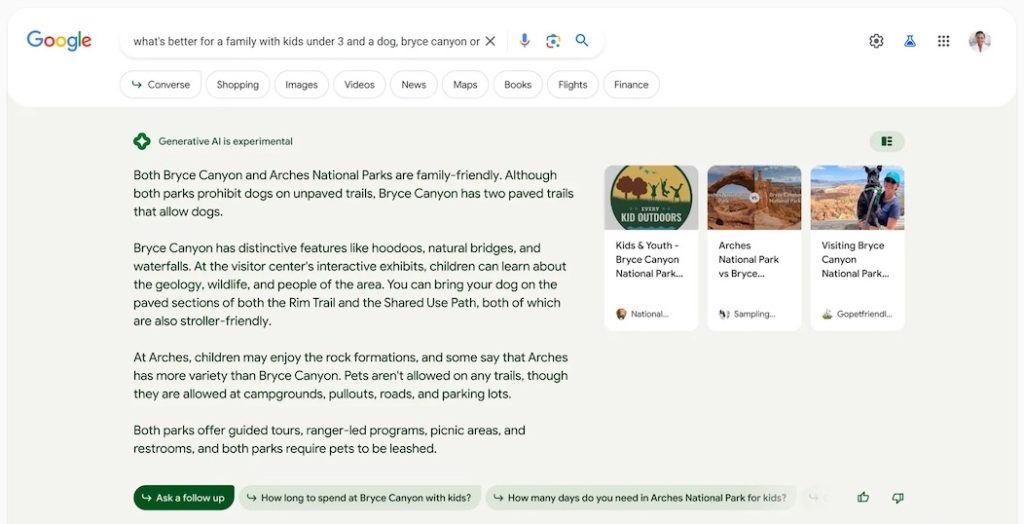
PaLM 2 lies behind Google’s new AI powered search, “snapshots”. Once you decide to use the new feature called Search Generative Experience (SGE), AI powered answers to your search query will appear at the top of the results. You can then further refine the answers returned with follow-up questions.
No doubt we will be seeing more AI powered features across Google’s products and services as it tries to narrow the “AI gap” between the Google and competitors like Microsoft. Microsoft already offer AI features that help you to write e-mails, summarize documents, and even generate slides for presentations.
Get in touch
Finally, I am always interested to hear about how you are using mobile and other smart technology too. If you would like to have a particular topic covered in the next newsletter, or how to use some of the new features mentioned in this article please get in touch. I am also available at any time to offer support and help where I can.
Martin Pistorius
Karten Network Technology Advisor
We use cookies on our website to give you the most relevant experience by remembering your preferences and repeat visits. By clicking “Accept All”, you consent to the use of ALL the cookies. However, you may visit "Cookie Settings" to provide a controlled consent.
This website uses cookies to improve your experience while you navigate through the website. Out of these, the cookies that are categorized as necessary are stored on your browser as they are essential for the working of basic functionalities of the website. We also use third-party cookies that help us analyze and understand how you use this website. These cookies will be stored in your browser only with your consent. You also have the option to opt-out of these cookies. But opting out of some of these cookies may affect your browsing experience.
Necessary cookies are absolutely essential for the website to function properly. These cookies ensure basic functionalities and security features of the website, anonymously.
Cookie
Duration
Description
cookielawinfo-checkbox-analytics
11 months
This cookie is set by GDPR Cookie Consent plugin. The cookie is used to store the user consent for the cookies in the category "Analytics".
cookielawinfo-checkbox-functional
11 months
The cookie is set by GDPR cookie consent to record the user consent for the cookies in the category "Functional".
cookielawinfo-checkbox-necessary
11 months
This cookie is set by GDPR Cookie Consent plugin. The cookies is used to store the user consent for the cookies in the category "Necessary".
cookielawinfo-checkbox-others
11 months
This cookie is set by GDPR Cookie Consent plugin. The cookie is used to store the user consent for the cookies in the category "Other.
cookielawinfo-checkbox-performance
11 months
This cookie is set by GDPR Cookie Consent plugin. The cookie is used to store the user consent for the cookies in the category "Performance".
viewed_cookie_policy
11 months
The cookie is set by the GDPR Cookie Consent plugin and is used to store whether or not user has consented to the use of cookies. It does not store any personal data.
Functional cookies help to perform certain functionalities like sharing the content of the website on social media platforms, collect feedbacks, and other third-party features.
Performance cookies are used to understand and analyze the key performance indexes of the website which helps in delivering a better user experience for the visitors.
Analytical cookies are used to understand how visitors interact with the website. These cookies help provide information on metrics the number of visitors, bounce rate, traffic source, etc.
Advertisement cookies are used to provide visitors with relevant ads and marketing campaigns. These cookies track visitors across websites and collect information to provide customized ads.