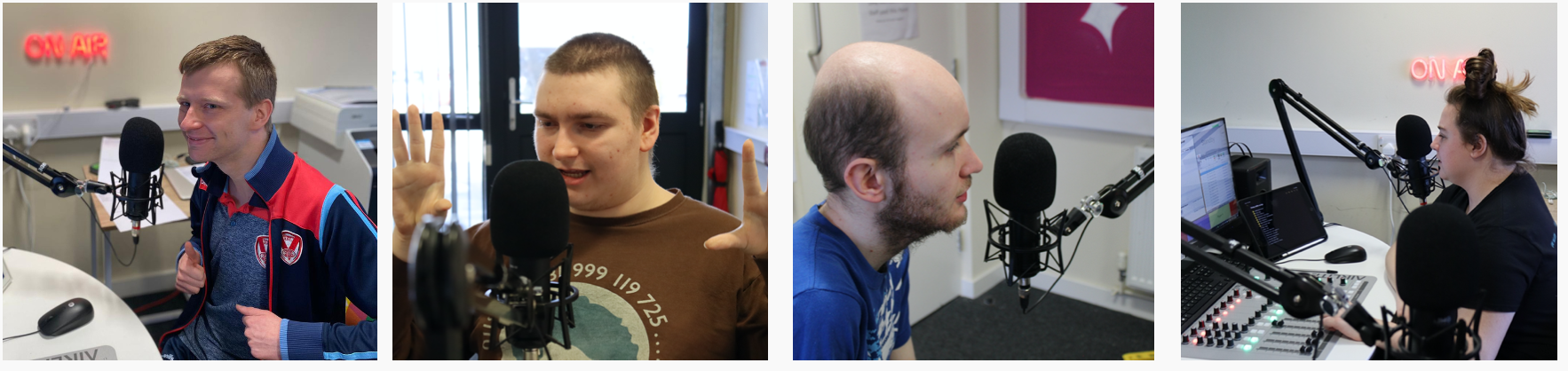
May marked the start of our second year working on the Nuvoic Project, our collaboration with developer Voiceitt, which aims to improve access to voice recognition technologies for people who have dysarthric speech. Voiceitt’s app supports people who want to communicate or control Smart Home technologies using their own voice, but who are often misunderstood by unfamiliar people or mainstream speech recognition. The Karten Network is leading on user involvement and testing in the UK and Ireland.
Updates
In April we were delighted to welcome our newest Technologist, Geena Vabulas, to the Nuvoic Project Team. Geena joins us part-time, bringing fantastic experience from her role as Policy Manager for Assistive Technology at Policy Connect, as well as previous experience in qualitative research and provision of support and training in assistive technology. Welcome Geena!
We’ve continued to work with Karten Centres and other organisations to recruit participants, and now have 46 people enrolled! Since our last update we’re pleased to welcome new participants from Caritas St. Joseph’s, Enable Ireland, FitzRoy, Oakley College and Portland College, as well as three new individuals who’ve joined us directly. They join those already involved individually or through Beaumont College, Cedar Foundation, The Grange Centre, Homefield College, Leonard Cheshire, National Star, New Bridge Horizons, SeeAbility, St John’s College and Young Epilepsy.
Testing is going well. We ask participants to choose useful phrases and smart home commands, train the app to recognise their spoken prompts and practise using them, then tell us what they think, including any problems or ideas for improvement. The Alexa and other Smart Home controls are really popular, especially to play music or radio. All users can access favourite artists or genres via Amazon music or Spotify and those with paid accounts can setup commands to access their personal playlists. One participant uses Voiceitt to access audiobooks via Audible and we’re working with two others to setup Voiceitt to access their Kindle accounts. Some people use Voiceitt to ask about the news, weather or sports results, or tell jokes. Some are using Voiceitt to control appliances like a lava lamp or fan via a smart plug, others are trying out smart bulbs and experimenting with different colour controls. One participant has an environmental control system to operate his windows and blinds, and through Nuvoic we’re supporting him to control these via Voiceitt.
We’re getting lots of useful feedback about the app and sharing this with Voiceitt. In May Voiceitt arranged focus groups, including five of our participants, to discuss design ideas for new gaming features like XP points and achievements. These were designed in response to user feedback, to motivate people to train and use the app by making it more fun to use. Several of these new features are now included in the latest update.
To mark Global Accessibility Awareness Day, Voiceitt posted a clip of one of our participants, Mark Wilkinson from Leonard Cheshire, using Voiceitt to ask Alexa to tell a joke – and highlighting the fun side of accessibility! Mark also features in the clip used by Voiceitt to mark their launch on the AppStore this month.
Thanks so much to everyone involved for all your work so far on testing Voiceitt, and all your great feedback!
Get in touch!
We would love to hear from you if you, your organisation or someone you know may be interested in taking part, or if you’d like more information. Please email our project co-ordinator: liz@karten-network.org.uk, or you can find more information and get in touch via our project web pages.
We hope you manage to read this before you break up for your summer holiday, although I can hardly believe that we have reached this point in the year, somehow all the seasons seem to have rolled into one due to the you-know-what! Big effort not to mention the P-work from me in this edition. I suppose our holiday plans will be very different this year, but they say home is where the heart is and I’m sure you and the people you support will have a lovely time. I hope you enjoy the articles we have included from our Karten Centres. Thank you to all our wonderful contributors!
A quick reminder about the position regarding accessing further financial support from the Ian Karten Charitable Trust. Unfortunately, there will be no further opportunities for Centres to apply for funding for additional equipment for the remainder of 2021. As soon as I can I will provide an update. In the meantime, you are very welcome to make contact with me to discuss your needs and ideas.
The TechAbility website is a great place to look for Assistive Technology support and guidance. The webinar programme is excellent and the webinar recordings are really useful for staff training sessions. TechAbility also provide a range of training courses which are well worth a look. You can access a list of events here. You can find information here about the TechAbility standards, a great tool for self-evaluation of your AT provision and approach. This year’s TechAbility Conference will be held remotely on 10th November 2021, it promises to be an action packed programme. Karten Centres are entitled to free, bespoke consultancy from TechAbility and TechAbility are also rolling out a Champions programme aimed at developing Assistive Technology skills and capacity across the sectors we support. Please contact dawn@karten-network.org.uk for further information.
Treloar’s are lucky enough to have two Karten Centres based at Treloar College. One is known as TreloarPrint and provides a real life working print shop for internal and external customers where students can gain important work experience and learn business skills. Students within the Centre are working towards their City & Guilds NVQ in Business and Administrationqualifications and other students also attend the Centre for work experience placements ensuring a wide range of Treloar’s students benefit. Amelia (pictured) has recently undertaken a work experience placement in TreloarPrint where she has been getting involved in using different software on the computer, printing cards for a customer and learning about the vast paper stock. Work experience opportunities both prepare the students for life beyond Treloar’s at the same time as building their confidence and self-esteem as they put the skills they have learnt into practice.
Gaining future supported employment can be hugely challenging for our students given their complex disabilities. However, we were really pleased to be able to offer Samantha the job of receptionist in TreloarPrint nearly 3 years ago now, after being a student in the Centre some years previously. Samantha (pictured) gained the job on merit and is really flourishing in the role. As well as her job as receptionist Samantha is now mentoring some of the students in the Centre to boost their confidence and communication skills and help them feel more positive about their next steps after Treloar’s. Samantha is just one of many wonderful success stories to come from the TreloarPrint Karten Centre and we have no doubt there will be many more to follow.
The second Karten Centre is called Treloar Enterprise Printing Solutions (TEPS) which provides high quality printing solutions, to business and the local community, on mediums such as china, textiles and paper. We were delighted to be awarded funding from the Karten Network in 2020 to purchase new direct to garment and wide format printer and a replacement sublimation printer.
The direct to garment printer (DTG) has been a revolution. DTG printing is the process of using a modified inkjet printer to apply digital designs directly to fabric. As opposed to using sublimation paper and inks to transfer prints onto materials. The sublimation process is much more labour intensive and the majority of the work cannot be undertaken by our students due to the nature of the equipment and the risks involved with the high temperatures of the heat press and the difficulties operating the heat press itself. Although the DTG printing process still involves heat pressing the rest of the process can be done by our students. The excellent software enables them to make edits to images, line them up correctly on the garment that they are printing to and then start the printing process. The only help required at this point is to place the garment/fabric onto the printer platen. Enabling students to be a part of the actual printing process, encouraging and enabling them to use their IT skills is such a step forward. As we move further out of COVID-19 restrictions more of our TEPs students will be able to take part in the production side of things. One of our students is going to be starting work experience in September and he will be assisting with DTG printing, which he is delighted about as are we.
Our biggest order to date has been to produce 120 prints onto canvas bags for our outdoor learning centre. There was a design competition and the three winning designs were then printed. The runner up design of a hedgehog has proved most popular with staff and visitors and we are still taking requests for these. Again the beauty of the DTG printer and software is it is as easy to run off one design or a 100, which means even small orders can be turned around really quickly. The quality of the print is superb and needless to say all students and customers are delighted.
The Canon Photo printer again has not been utilised as much as we would have hoped due to COVID-19 however since the start of the summer term we have been up and running again, producing prints for staff and teachers. To date, it has been used to produce our students Silver Arts award photos and large scale Beebot Mats and Board games that are used to support the curriculum. The graphics and print quality is absolutely outstanding so we know that once we are printing for customers they too will be as delighted with the results.
Once again the ease of use means that some of our students are able, with minimal support to change the paper roll, and to get designs printing. The old printer was inaccessible due to the height of the machine, and complexity of loading paper. With its self-feed all that is required is a little help from a member of staff to assist the student loading the roll into the machine, the rest of the set up process can be controlled by the students. The wide range of materials that we purchased as part of the funding mean that we are able to offer a wider variety of products from large scale banner, all weather prints to adhesive backed posters. We are looking forward to getting production back up and running to pre COVID-19 levels and beyond.
Once again we are so grateful to the Karten Network for supporting Treloar’s with funding to enable our students to gain transferable skills and knowledge that will enable them to make an easier transition into the world of work in their life beyond Treloar’s.
Equipment purchased from the Karten Network grant was used in the print projects: Face Mask design and print; The Many uses for a Blanket project; the comic book Zine project and the Emotions and Feelings project. We also use the large screen purchased for the interview with Iain and Verity from Coronation Street.
Blanket project
The many uses for a Blanket project.
This was in partnership with Platform arts.
Face Mask design
The Masked artist – Face mask design and print
This was in partnership with Hot Bed Press
The Zine project
The Zine project- Comic book creation and print
This was in partnership with The Heart of glass and Rudy Loewe
Screen printing
Introduction to screen printing
This was in partnership with Artist Kate Hodgson
Emotions and Feelings project
We have also been working with members to create personal feelings and emotions charts. These have been so effective for members who have difficulty expressing their feelings.
Buzz media
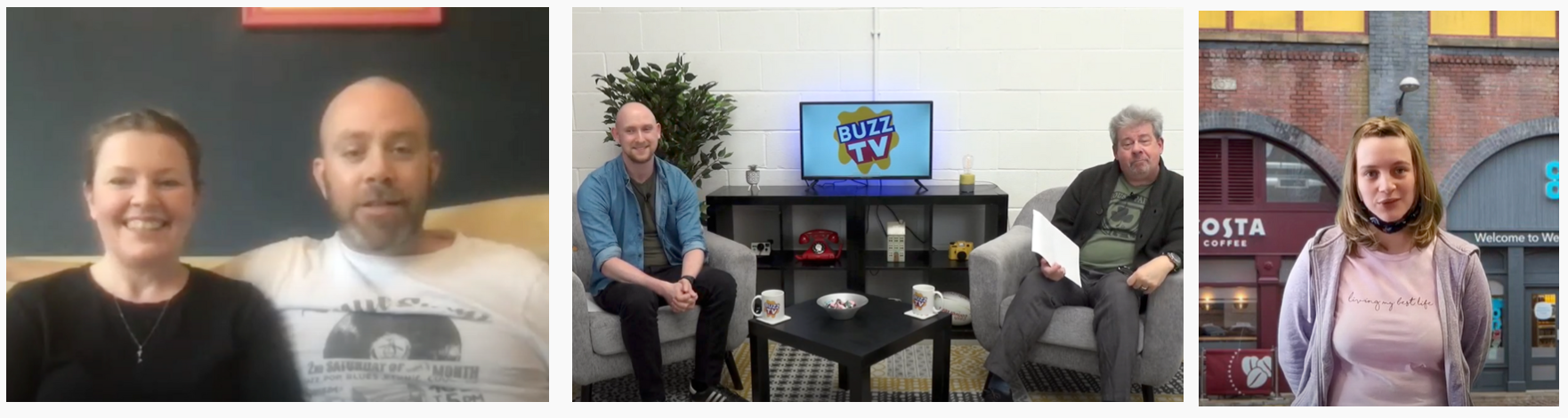
Our media groups have been enjoying getting to grips with planning and broadcasting their Radio Shows.
Buzz TV has recently launched with the interview of Verity and Iain Mc Cloud, writer and Producer of Coronation Street.
Buzz Grub
We have launched our accessible cook along videos, BUZZ GRUB. The videos will be accompanied with accessible recipe cards.
Zack’s Story is a short stop-motion animation that United Response created with the help of people we support to highlight the issues of climate change. In this third chapter of Zack’s story, Zack notices lots of plastic washed up on the beach and in the sea. He sees a documentary about climate change and gets very worried about the effects human behaviour is having on our planet. Keen to help before it’s too late, Zack and his friends think about what they can do to change things for the better.
The Karten photo printer was used to print some textures for the beach scene and one of the potential Karten students was involved in animating.
Discover more about the making of Zack’s Story in our Animation Diaries
Sense College Bedford thanks the Ian Karten Charitable Trust for their very kind and generous donation which is benefiting students of all different abilities through the use of technology.
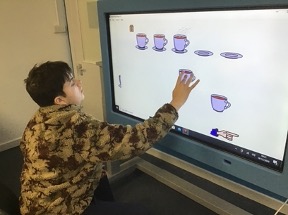
Charlie has been using the big screen to play interactive games that promote fine motor skills and the use of numeracy and literacy. Charlie loves the interactive part of these lessons, this interactive board is Charlie’s favourite piece of equipment as he is very much a cause and effect motivated learner.
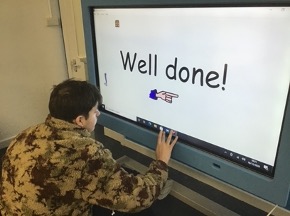
As per the pictures shown, Charlie can be seen pairing the cups to the saucers. This task corresponds nicely to his objectives and his ability to show a clear understanding of contextual numbers and counting.
In addition to this, this task also incorporates the use of literacy in the form of praise (as per the last image) where Charlie has completed the task and is being given praise in the form of “Well done!”.
This allows Charlie to understand clearly that he has finished the task correctly and can move on to the next one. The use of technology has been used to increase Charlie’s educational and psychological wellbeing as it combines something he enjoys in an educational setting to produce a desired outcome for his termly progress.
In December of last year, a new and truly life-changing innovative Wearable Assistive Technology device was launched for visually impaired people by a company called Envision who are based in the Netherlands. The company began by developing a fully accessible app for smart phones which is designed to assist with managing everyday tasks such as:
Reading printed and hand-written text (mail, newspapers etc
Describing what’s around you when you take a picture;
Colour recognition;
Barcode recognition;
Facial recognition;
Locating different objects such as chairs, tables, phone, etc.
The app is now used by many visually impaired people all over the world and is hugely popular. After a lot of positive feedback, Envision decided to integrate the app into a pair of smart glasses. This has now been achieved and I am delighted to say that the Envision Glasses are now available for purchase in the UK. The glasses have all of the app features as well as an explore mode which will tell you what’s around you in real-time and they also have a video-calling feature. This feature really does give these glasses an advantage over other wearable solutions as it allows you to connect with a sighted family member, friend or carer, who can then describe what they see through the camera of the glasses from the screen of their own smart phone. A constant and reliable internet connection is therefore required, but this can easily be achieved either by connecting the glasses through Wi-Fi or via the personal hotspot setting which is found on most up-to-date smart phones. You can also connect headphones or certain hearing-aids to work alongside the glasses either by using Bluetooth or through the USB-C charging port. So I think it’s fair to say at this point, that these glasses really do have everything covered! It’s also worth mentioning that all the information conveyed through the glasses is spoken or audio feedback, but if you are used to listening to a screen-reader on your computer or smart phone, then you shouldn’t have any issues with this. The glasses are operated using a touchpad which is found near the front of the right arm, so again, if you are used to using the VoiceOver or TalkBack Screen-readers on your smart phone or tablet, you will have no issues whatsoever in terms of learning how to use them.
My User Experience
I actually pre-ordered the Envision Glasses and have been using them since November. I can honestly say that they are one of the best purchases I have ever made and are worth every penny. I mainly use them for reading my own mail which is a great experience, as it means I don’t need to keep taking letters and post to my Mum and asking her what they are. I also used the glasses at Christmas to read a hand-written card sent by my neighbour. This is the first time I have been able to do this independently and I was really impressed in terms of how accurately the hand-writing was captured and read. I also use the glasses when out-and-about with my Guide Dog to describe my surroundings. On a recent walk, I went to my local park and took a picture of what was in front of me. I was told that there was a tree next to a bench. I was absolutely amazed by this, as I have walked around that park time-and-time again for the last fifteen years and had no idea that they were there. The video calling is my favourite feature though. I mainly use it when I’m stuck with a particular task such as organising tins in my cupboard or if my computer is not working and I need someone sighted to tell me what is on the screen. I now have all of my family members contact details stored, so if I’m ever struggling, I can just call one of them directly from the glasses and they can help me out. Think of the possibilities! I have always had difficulty knowing when to step-out to get on buses as I had no idea what number of bus was approaching. Not anymore! I’ll just call my Mum and she will be able to see the bus approaching through the camera of my glasses and keep me right. I also have serious problems finding an empty seat when I eventually manage to find the correct bus. Not anymore! Again, I can just call a family member and they can direct me to an empty seat. The possibilities are endless and to be honest, the only thing that will hold you back when using these glasses is your own imagination.
The really cool thing? This is only the beginning! Work is currently being done so that you will be able to control the glasses using your voice and there may even be the possibility of a navigation feature before too long, exciting stuff!
The Envision Glasses currently retail at £2695. Sight And Sound Technology are the UK distributor. However, we do work closely with Sight And Sound, so if you would like a demonstration or for more information, please contact Stuart Beveridge.
Google and Apple, the two major mobile technology competitors held their annual development conferences in May and June respectively. While aimed at developers, Google I/O and WWDC are often the platform for major announcements and this year was no exception.
Google I/O
With Google cancelling Google I/O last year it was good to see the event back. Some of the noteworthy announcements were:
Project Starline
Project Starline provides a glimpse into the future of video calling. The system builds on three research areas – depth sensors and cameras; compression and streaming algorithms; and Light field display. These are combined to produce an extremely detailed 3D image that is rendered in real-time, without the need for 3D glasses to be worn.
Google is quoted as saying that it’s applying its research in machine learning, computer vision, spatial audio, and real-time compression to build the futuristic system. The result creates the effect of a person sitting across from you.
Currently, the system is only being used internally at Google and there are no plans to release the system commercially. However, access to the technology has been given to some of Google’s enterprise partners.
LaMDA
LaMDA (Language Model for Dialogue Applications) is the next generation of artificial intelligence (AI) conversational bots. LaMDA is based on Google’s transformer architecture which analyses how words relate to each other in order to predict what to say. However, unlike previous systems LaMDA can manage the open-ended nature of human conversations.
Natural conversations are derived by connecting topics, often in unexpected ways. LaMDA makes a major step towards being able to cope with this. This would mean that conversational bots could engage in natural conversations with people.
In simple terms, LaMDA makes it possible for computers to better understand natural language. This means in time the technology will make its way into search and voice assistants creating a better and more “human” interaction.
Google Wear.
Google have failed to really capture the smart watch market – with Apple Watch proving more popular. Google will attempt to change this by their acquisition of Fitbit and the merger of Samsung’s Tizen operating system with Google’s Wear OS. This new operating system will now simply be called Wear. This promises to deliver a wider range of smart watches with better capabilities. It is reported that the next Samsung Galaxy Watch will run this new software.
Android 12
Perhaps the main announcement at Google I/O was Android 12. Reported to be the biggest change to Android since the implementation of Google’s “Material Design” in 2014. The new “Material You” transforms the device interface. Creating a personalised and clearer interface with new widgets, simpler settings menu, larger and bolder quick settings tiles. A 22% reduction in processing time the new interface is more responsive with smoother animations.
Notifications have been revamped to present a clearer at-a-glance view. There is also a new snooze feature which allows you to snooze specific notifications for a set amount of time.
There is a new lock screen featuring a large digital clock that adapts, reducing in size to show any notifications.
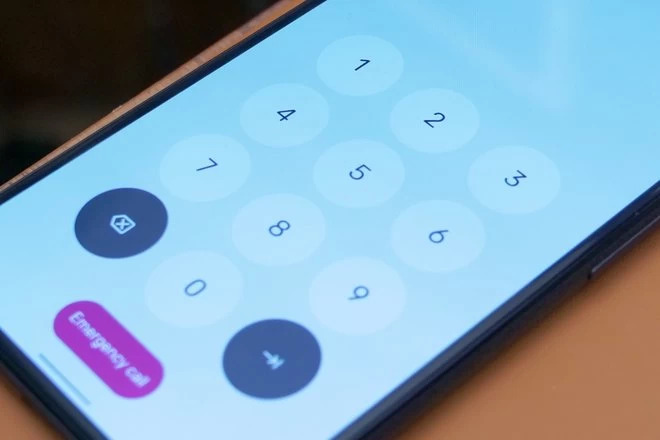
A new fresh look to the PIN code keypad has been included with large round buttons.
The new one-handed mode, as the name suggests, when enabled makes it easier to use the phone, particularly those with larger screens using just one hand.
While picture-in-picture is not new, new controls will make it possible to enlarge the window without going full-screen.
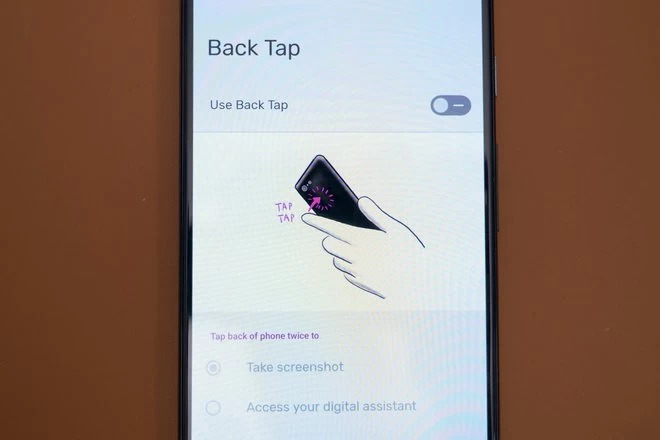
Specifically for Google Pixel phones, Android 12 will enable you to double-tap the back of the phone to perform a programmed action like, take a screenshot, launch Google Assistant, open the recent apps, pause or resume media playback.
Privacy is a hot topic amongst mobile devices at the moment with the somewhat controversial release of iOS 14.5. Google has joined the party with their new “Privacy Dashboard” in Android 12. The dashboard will allow you to see what apps have accessed certain permissions. It also includes the option to quickly disable all app access to your camera and microphone.
When an app is first launched and requests access to your location you can now decide to have it only get access to an approximate rather than precise location.
Behind the scenes the Private Compute Core ensures that all audio and language processing are done on the device and can’t be shared over the network.
A new built-in app will also soon be available that will enable android phones to be used as a remote to control any television running Android TV.
More improvements and features that have not been mentioned above will be included in Android 12. Currently the Android 12 public beta is available for download with an official release expected in September this year.
WWDC
iOS 14.5
While most major announcements typically happen at WWDC, Apple released iOS 14.5 in April. This caused some controversy notably with Facebook because of Apple’s App Tracking Transparency privacy feature. App Tracking Transparency allows you control which apps are able to track your activity across other companies’ apps and websites. This data is typically used to display personalised advertisements or shared with data brokers.
Other mentionable changes in iOS14 include support for Apple’s new AirTag. This £2 sized tracker can be attached to objects like your keys, wallet, bag, etc. You can then use the Find My app to locate the object using visual, audible, and haptic feedback to guide you directly to the AirTag.
iOS 15
At WWDC 2021 Apple announced the coming release of iOS 15. As with every new version of the operating system this includes a host of improvements and new features. Some of these are:
FaceTime
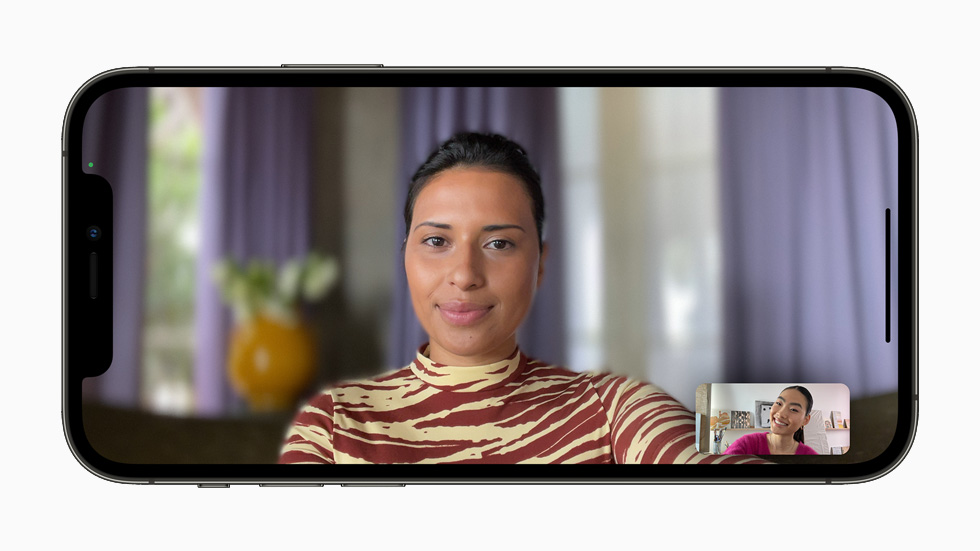
A significant update to FaceTime. For the first time, FaceTime is now supported across platforms making it possible to use FaceTime on Windows and Android through a browser. Similar to Zoom, it is now possible to schedule individual FaceTime calls and send a link to join the call. FaceTime now also supports portrait mode to blur backgrounds, and a grid view to speak to multiple people at the same time. The new spatial audio feature creates a 3D audio experience allowing you to get a sense of where the person is on the screen during group calls.
ShareTime, enables users to now share music or their screen during a FaceTime call.
iMessage
iMessage has been redesigned and now includes features that photos received in iMessage are grouped into galleries. Links that are sent to you get automatically saved in “shared with you” so they are in one place and can be access later. This works with Apple Music, Safari, Apple Podcasts, Apple TV and Apple News.
While notifications continue to be displayed on the lock screen, a new feature now collects the notifications and displays them in a custom summary, ordered by priority.
If “do not disturb” or a new “focus” mode are enabled this status will now be shared with other users, like an away message.
Focus mode
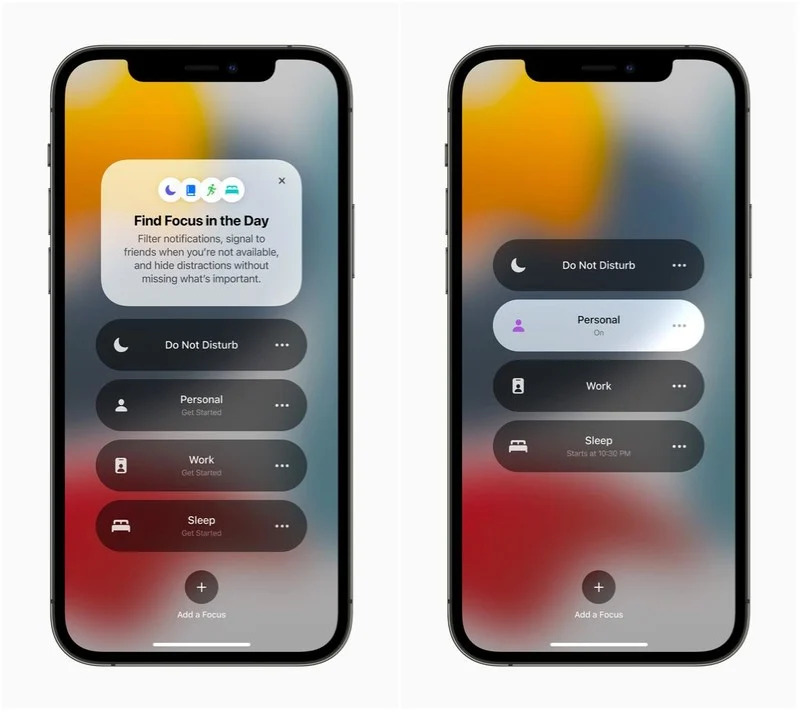
The new Focus mode filters and hides notifications and apps based on specific user preferences. Focus, also uses on-device intelligence to suggest which people and apps are allowed to notify them. These suggestions factor in the person’s context, for example work hours or when winding down for bed. Once Focus is set on one Apple device, it gets automatically applied to any other Apple devices the person may have.
Live Text
A new feature in the Camera app, called Live Text can automatically identify and scan text in photographs. This text can then be copied and extracted to use in other apps.
Wallet
The Wallet has been updated to now support the inclusion of corporate ID badges, keys to get into hotels and houses with smart homes.
Safari
Apple’s Safari browser on the iPhone has received a major update with a redesigned tab interface and support for the same extensions used in the desktop version.
iPadOS 15
Similar to iOS 15 for iPhone, the iPad operating system will also be updated to iPadOS 15. Included in the new version are new ways to rearrange iPad apps, put widgets on the home screen and the App Library feature – something that until now was only available on iPhone.
A new multitasking interface that makes it easier to place two apps side by side on the iPad screen.
The Apple notes app is now able to better interface with other apps. Swiping up from the bottom corner of the iPad will now launch the “Quick Notes” feature. This enables you to quickly make notes using the Apple Pencil.
A new version of the Translate app has been added to iPadOS 15. This app enables people to have a conversation and have it translated on-screen in real time.
Apple’s Swift Playgrounds app which is designed to help people learn how to code (program) has been updated and it is now possible to create full apps, that can be submitted to the App Store.
Both iOS 15 and iPadOS 15 are expected to be released in September this year.
Many more announcements covering other products were made during WWDC. It remains exciting to see the ongoing advances in technology and its potential to improve people’s lives.
As always, I am interested to hear about how you are using mobile and other smart technology. If you would like to have a particular topic covered in the next newsletter, please let me know. I am also available at any time to support and help where I can.
We use cookies on our website to give you the most relevant experience by remembering your preferences and repeat visits. By clicking “Accept All”, you consent to the use of ALL the cookies. However, you may visit "Cookie Settings" to provide a controlled consent.
This website uses cookies to improve your experience while you navigate through the website. Out of these, the cookies that are categorized as necessary are stored on your browser as they are essential for the working of basic functionalities of the website. We also use third-party cookies that help us analyze and understand how you use this website. These cookies will be stored in your browser only with your consent. You also have the option to opt-out of these cookies. But opting out of some of these cookies may affect your browsing experience.
Necessary cookies are absolutely essential for the website to function properly. These cookies ensure basic functionalities and security features of the website, anonymously.
Cookie
Duration
Description
cookielawinfo-checkbox-analytics
11 months
This cookie is set by GDPR Cookie Consent plugin. The cookie is used to store the user consent for the cookies in the category "Analytics".
cookielawinfo-checkbox-functional
11 months
The cookie is set by GDPR cookie consent to record the user consent for the cookies in the category "Functional".
cookielawinfo-checkbox-necessary
11 months
This cookie is set by GDPR Cookie Consent plugin. The cookies is used to store the user consent for the cookies in the category "Necessary".
cookielawinfo-checkbox-others
11 months
This cookie is set by GDPR Cookie Consent plugin. The cookie is used to store the user consent for the cookies in the category "Other.
cookielawinfo-checkbox-performance
11 months
This cookie is set by GDPR Cookie Consent plugin. The cookie is used to store the user consent for the cookies in the category "Performance".
viewed_cookie_policy
11 months
The cookie is set by the GDPR Cookie Consent plugin and is used to store whether or not user has consented to the use of cookies. It does not store any personal data.
Functional cookies help to perform certain functionalities like sharing the content of the website on social media platforms, collect feedbacks, and other third-party features.
Performance cookies are used to understand and analyze the key performance indexes of the website which helps in delivering a better user experience for the visitors.
Analytical cookies are used to understand how visitors interact with the website. These cookies help provide information on metrics the number of visitors, bounce rate, traffic source, etc.
Advertisement cookies are used to provide visitors with relevant ads and marketing campaigns. These cookies track visitors across websites and collect information to provide customized ads.