Welcome to the summer edition of the Karten Network’s newsletter. We are very grateful to contributors who have shared articles for inclusion in this issue, we hope you enjoy reading the newsletter. As I write, the sun is streaming through my office window, and I am hoping that maybe summer has arrived just in time for the holiday period!
Farewell to David Finch
Earlier this month we said farewell to one of our longstanding Trustees, David Finch. David has generously volunteered as a Trustee and was influential in developing the strategic direction of the Karten Network and in determining a new model of governance as the Network transitioned into a charitable entity. David had many skills we were able to draw on having worked within specialist education in the UK for over 25 years as a teacher, manager and senior director. He is a passionate driver for enabling technology, specialist teacher education and international development. We know David will continue to be interested in the work of the Karten Network. Thank you for all you have done David, from your friends and colleagues across the Karten Network we wish you all the very best for the future.
Social Media
We are giving some thought to further developing the Karten Network’s use of social media platforms and increasing our social media presence. But we would like to align our activities with the views of our Karten Centre users and staff. Please share ideas you have for how we should be engaging with social media by emailing dawn@karten-network.org.uk.
Trustee Vacancy
We are looking to strengthen and complement the Karten Network Board with the addition of new Trustees with relevant interests and experiences. The Board of Trustees will play a key role in the development of the charity, setting the overall strategic direction and providing scrutiny to processes and decisions as well as ensuring standards of governance are upheld.
If you are interested in this exciting opportunity please contact dawn@karten-network.org.uk to arrange an informal discussion about the role. Following a discussion, expressions of interest will be invited, to be received by 6th September 2024.
We have recently adopted our local railway station. We work in partnership with St Helens Rotary club.
We have built seven planters that now sit on both platforms. We will over the coming months produce artwork that will complement the planters representing St Helens through the ages.
Our Towns Sound
This is a project that we are involved in. This is facilitated through Shakespeare North. The project is looking to record dialects and sayings throughout the Liverpool City region.
As part of this project, we are developing a performance to be held at The Shakespeare North Theatre.
As part of the project Matt the lead on the project wanted something that would be able to capture and record the sayings and dialects. Matt had the idea of a telephone box. He approached our members and creatives to see if this would be possible. Indeed, it was.
We used the wide format printer to print images from St Helens and neighbouring Prescot. Our Glow Forge printer cut the crowns for the telephone box.
The telephone box is currently touring the region capturing the sounds of our region.
Café Laziz
We have recently developed a partnership with café Laziz.
The café is set up for recently settled refugees and asylum seekers to work and train in and integrate with the local community.
The café is open to the public to try new cuisines from around the world.
Our members share volunteer opportunities, and we are engaged to provide all their printing needs.
The printing is allowed due to funding from the Ian Karten Charitable Trust.
Building in the success of previous conferences, TechAbility2024 will give you multiple opportunities to learn from leading practitioners in the field of Assistive Technology. As ever, all presentations and workshops will be grounded in practice and research. Alongside this will be opportunities to meet with Assistive Technology suppliers and discuss the solutions they provide.
This year, the conference will take place in Leeds, which has excellent transport links to the whole of the UK. Based on your feedback there will be extra opportunities for discussion among delegates.
Two hot topic sessions will be run by our keynote speaker, Jane Seale, Open University who has a national and international reputation as an expert in the fields of disability, technology and inclusion.
TechAbility Standards: Developing an AI tool with Open University
Thank you for all those in developing this tool to take the TechAbility Standards and create an audit tool using Artificial Intelligence. The TechAbility Standards are the guide to what good looks like with organisations using Assistive Technology, everything from what tools to use, to how to support transition for users.
You can also hear about our proposed next steps, which include updating the TechAbility Standards and looking at how we roll these out further within the Educational Assistive Technology world.
The Open University’s CALRG (Computers and Learning Research Group)
TechAbility Champions: Karten centres supporting each other
The TechAbility champions program currently has 72 members, nominated from Karten Centres and Natspec Colleges.
TechAbility shared their new mobile app cards for Android devices with the Champions getting the first preview, the Apple equivalent is expected over the summer. They also shared various resources, including JISC’s AI essential materials, information on Ofsted’s approach to AI, updates on the AXS accessibility passport, and the use of escape rooms in education.
Members of the program continue to support each other by exchanging information on topics such as Alexa/Google Home devices, job descriptions for new Assistive Technology assistant roles, and tips for using Microsoft Edge keyboard shortcuts to access AI. They are also collaborating on methods for building CVs.
The TechAbility conference is expected to have a strong input from the Champions, demonstrating how the programme improves engagement. Does your Karten centre have a TechAbility Champion, or would you like to know more? Email Neil Harrod-Beck and he will be more than happy to help you.
Our New Bridge Enterprise have had another amazing year, developing a new product to add to their long list of products. This year has seen the birth of the Snugglioz! Snugglioz aim to be a calming and stress relieving teddy by scanning a QR code and revealing a heartfelt message. As ever, the students have been using the local markets to sell their products and presented at the annual Young Enterprise Dragon’s Den event.
The students have used the Karten funded printing equipment and camera equipment to produce high quality promotional flyers, banners and branding for their huge catalogue of products.
In addition to the banners, flyers, business cards printing, we have started to produce vinyl wall prints for schools across our Trust and we aim to start promoting this to schools across the region. These wall prints are so powerful and really enhance the environment of any room. Take a look at some of the students at work and some of the designs going up.
The video production enterprise is going from strength to strength, providing a huge catalogue of promotional films for our Mult Academy Trust, with a new library of Destination Champion films but also gaining commissions across the country.
The students recently received a paid commission to film the Evidence for Learning Conference in Leicester. This involved an overnight stay the night before and a full day of filming workshops, presentations and Interviews and editing them for EfL to promote across their social media platforms. Exmples of the videos created can be viewed on the New Bridge Group & MAT Promotional Channel YouTube.
Another Karten funded project that we have seen impact with is the use of the virtual forklift truck simulator. This exciting machine has really engaged some of our post-16 students to want to venture into work within warehouse logistics and potentially go on to become a forklift truck driver. Ok, so we haven’t any qualified fork lift truck drivers yet, but just to be able to get them interested in warehouse logistics and succeed in a work placement as a warehouse operative is a starting point. Here we can see how well Imran did and how this inspired him to gain confidence within a work placement at The Range.
You can find more information about the products on the NBEnterprise website and their social media channels too.
We can’t thank the Ian Karten Charitable Trust enough for all their support. We see the impact of each of the funded projects every day. The opportunities our young people have had because of the equipment they have available to them would not be possible without the ongoing support over the years. Thank you.
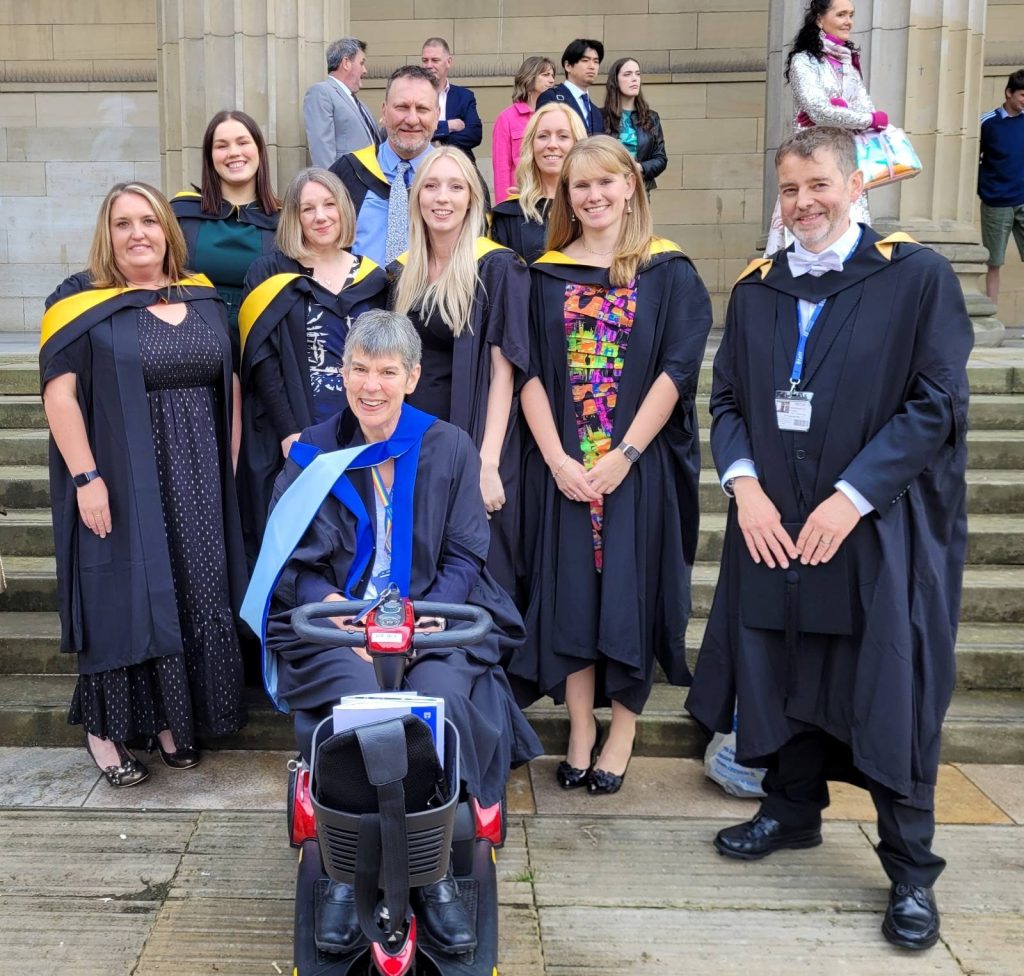
The second cohort of MSc EduAT students graduated on the 18th of June 2024. The group crossed the Caird Hall stage with other students graduating from the School of Science and Engineering.
The programme team are very proud of our graduates, all members of the group undertook project dissertation work that directly improved the provision of Assistive Technology services in the organisations they work within. Examples of project work included a review of how students who are deaf or hard of hearing accessed assistive technology support in a higher education organisation, evaluating the effectiveness of training and support for teachers to write high quality AT goals and targets in a specialist college context, an investigation as to the suitability of mainstream environmental controls in a specialist college and evaluating the requirements for and impact of assistive technology training in a special school. Other work focussed on assistive technology for literacy, developing switch access skills and the inclusion of virtual reality technology in a special school.
The graduating group work in specialist schools and colleges and in higher education. The MSc EduAT is taken by students who work in specialist and mainstream schools and colleges, including general further education colleges and in higher education organisations. Students are also employed in private AT practice, in social care and third sector organisations and in health contexts. This broad range of professional experiences results in dynamic cohorts who are drawn from education and teaching, health and therapy and various technology-based roles. The EduAT programme team have found that the cohorts develop as self-directing learning groups who support each other cohesively and provide a valuable supportive professional context to each other, this is seen as a very respected outcome alongside developing new knowledge and skills in assistive technology.
The course has been designed to support students to learn about the assessment, provisioning, ongoing support, and review of Assistive Technology in a range of contexts.
Daniel, one of our Creative Media students who studies in our Karten Centre, came first in the Giant Slalom event and fourth overall in alpine skiing at the recent Special Olympics GB National Winter Games held in Italy.
Located in Folgaria, in the northern Italian region of Trentino-Alto Adige, the week-long competition offered 73 athletes the opportunity to compete in alpine skiing and ice skating.
Daniel, currently in his second year at QAC, has been skiing for over ten years through Special Olympics Great Britain, the largest provider of sports training and competition for children and adults with intellectual disabilities. He has enjoyed competing in winter sports overseas on several occasions and in over fifty regional ski competitions in the UK. Following his success in Italy, Daniel also competed in a regional Special Olympics Ski competition held in Brentwood, Essex, on 28 April, winning a gold and silver medal.
At Homefield College, we take immense pride in nurturing talent and providing real-world experiences that shape our students’ futures. One shining example of this is Luke, a Pathway 2 student who has been excelling in his internal work experience with our IT support team.
Luke’s dedication and skills have been nothing short of remarkable. Here’s a glimpse into his impressive contributions:
Upgrading Technology: Luke has been instrumental in downloading and installing Windows 11 on laptops, ensuring our systems are up-to-date with the latest software.
Preparing Devices for Sale: He has efficiently wiped laptops clean, preparing them for resale and contributing to our sustainability efforts.
Maintaining Smooth Operations: Luke has played a key role in making sure all site computers are running smoothly, providing essential support to our daily operations.
In addition to these tasks, Luke showcased his initiative by independently helping a staff member transfer important photos of student progress from their mobile device to a secure SharePoint area. This not only highlights his technical skills but also his willingness to go above and beyond to assist others.
Luke’s achievements don’t stop there. He has mastered the IT Zendesk ticket and asset management systems, demonstrating his capability in handling complex tools and processes. Moreover, Luke has taken charge of the HP £200 laptop cashback project. His responsibilities include ensuring that five older laptops are fully operational and ready to be shipped to HP with the necessary documentation. This initiative alone is set to save the college an impressive £1000 off the purchase price of five new laptops.
We extend our heartfelt congratulations to Luke for his exceptional performance and look forward to seeing his continued success in the field of IT. Keep up the fantastic work, Luke!
Bry is non-verbal, with very limited movement and she tends to withdraw from people if her mood is low. In order to support Bry we have provided one-to-one sessions in the sensory room, which have helped her because the sensory experiences are distracting and helps her to re-engage with her surroundings and has allowed more social interaction with her carers.
The use of the new sensory equipment has enabled Bry to communicate her choices more clearly through eye pointing. She indicates clearly what holds her interest through her gaze and facial expression if she is not interested, Bry will look away or not respond. Her preferences tend to be visual, which has made the projected interactive images provided by the Omi Reflex projector particularly beneficial, as Bry can look at them directly and track their movements across the screen.
Because of Bry’s very limited movement, the use of the mobile magic carpet has been adapted for her by projecting images on a tabletop which is extended by using a white sheet over her lap so she can look down on the pictures and touch the image movements to cause an effect. When Bry is completely engaged, her arms and hands relax, enabling her to press a switch to operate an interactive toy or bubble machine. She demonstrates a clear understanding of cause and effect by repeating the action without prompting if she enjoys the result, giving a tiny smile at the end.
The refreshed sensory provision has had a very positive impact for Bry it has helped her reestablish some old skills and enhanced her levels of engagement and well-being. What the staff have noticed is that the more Bry engages with the sensory provision in the home, the more Bry is able to transfer the communication skills learnt to other areas and activities using her eye movements.
Case Study Laura – Ravenswood Support Worker
Laura, one of the support workers at Pamela Barnet, has been working closely with the new sensory equipment. Through direct practical application, she has increased her understanding of the methods of communication best suited to the individuals she supports. This understanding has transferred into her daily tasks, making life easier in the home.
For many years, Ravenswood has benefited from the Karten Network funded sensory room in the precinct. Norwood is keen that knowledge is more widely applied by staff to enable the people we support. The renewed interest in the sensory area has provided Laura with development opportunities to create new sensory activities. This new responsibility has enhanced her role as she can use new equipment to add to the care provided, increasing engagement, regulation and communication in imaginative ways to benefit the people she supports.
Laura has reported that she’s noticed a renewed uptake in staff members taking individuals to the sensory room since the new equipment has arrived. The people we support have been using the facilities more regularly which has increased their alertness and engagement.
Laura explained that having more flexibility with the range of equipment allowed staff to respond more spontaneously to the needs of the people in their care, providing calming activities should someone be distressed. It also enabled staff to offer alternative sensory activities during bad weather or when other activities are cancelled. Also, being able to move the mobile projectors along with smaller items means the equipment is more fully used.
Laura has been planning with Wendy, future sensory themes and is keen to link other activities in and outside the home. For example, using a jungle theme with sensory stories link them with jungle art projects to decorate the home, taste sessions if appropriate, and an off-site visit to the Living Rainforest Experience.
Laura said, “I am keen to get a more structured timetable for the sensory room in place so all the residents can benefit more regularly from the enhanced facility. I have seen the benefits of the sensory provision for different individuals, and their sensory preferences should form part of their person-centred activity planning.”
Impact
The purchase of the additional mobile sensory equipment has enabled more variety and flexibility, as certain activities can be taken to individual flats or bedrooms as needed. For example, Jay* had become quite distressed and the Mobile Magic Carpet and fibre optics were taken to his room. This created a calming sensory activity which helped him to refocus, improving his mood and regulation. An additional positive outcome was the increased confidence of the staff to respond in a proactive way. The flexibility, simplicity and ease of use of items such as the Magic-Carpet and Omi-Reflex projector have encouraged more use of the equipment, therefore benefiting the people we support.
Staff have been able to refresh their approaches to working with the people we support in the sensory room. Closer observation of the responses from the people we support has increased staff understanding of individuals sensory preferences, communication methods and social interaction.
Staff have been enabled to develop more detailed ‘sensory profiles and how to work with me’ documents so new or agency staff have a reference point when engaging with an individual in the sensory room. This continues as a developmental piece of work.
With the investment in new equipment, a further outcome has been that the Pamela Barnet home has appointed a member of staff to focus on and co-ordinate the sensory activities provided. This has helped to embed and drive the thematic sensory approach so that good practice is developed with the staff, while ensuring full use of the equipment.
The impact of the new mobile sensory equipment has resulted in an increase in equipment being used.
Development includes further thematic approaches not only in the sensory space but linked with other activities around the home. The aim is to create immersive experiences in the form of events, including a themed sensory story space in decorated areas around the home created by in house art activities, themed food and music.
Encouraging staff to take imaginative, creative ideas that incorporate sensory diets will- further benefit the people we support.
Next Steps for sensory provision at Ravenwood
To embed the use of the sensory provision within individual’s person-centred plan. Completing sensory profiles.
Continue to widen staff awareness and skills within the sensory provision through ongoing training.
Plan new sensory activities for the coming year and keep the momentum going!
Norwood’s use of Assistive Technology (AT) is at a critical point. Transitioning from older analogue to digital technology. Aiming to consolidate and embed its extensive organisational knowledge and expertise gained over the past decade. By prioritising user engagement, empowering individuals, and fostering a culture of knowledge sharing, Norwood can create a future where digital technology serves as a powerful tool for enhancing the lives of the individuals we support.
We are tremendously grateful to The Karten Network for your continued support. We appreciate your ongoing partnership as we work to enhance the lives of those in our in our community.
BID Services is a charity which works to remove barriers and empower those who are D/deaf, hard of hearing, sight impaired, deafblind or have other disabilities to live full lives. Our team in Leeds has setup a mobile Karten Centre which can not only offer access to technology and support at our city centre office in Leeds but can also be taken to our community hubs across the Leeds area where we deliver services closer to our clients. The mobile Karten Centre is already helping us support people to overcome the digital divide on both mainstream technology and bespoke solutions for our clients.
We spend a lot of time introducing people to the multiplicity of technologies that can play a part in supporting the independence of our service users, but there is the constant threat of a small change breaking the solution that has been relied on for years. A Screenreader is an incredibly powerful tool, it can make the difference between independently accessing the digital world or missing out on that world as it becomes ever more prevalent. Screenreaders are constantly updated, whether built into the operating system such as Apple’s VoiceOver or Microsoft’s Narrator or created by a third party like Freedom Scientific’s JAWS for Windows, but sometimes a fundamental change happens to the software we all use. Although it can be irritating in the extreme to non-disabled people it can completely break a tried and trusted method used by the disabled user.
Recently, Google Mail withdrew their basic HTML view from their Gmail website, and this has caused no end of problems for some Screenreader users, although quite correctly Google insisted that the standard webpage was accessible it required at least one Screenreader to be used very differently than most users would be used to. For those who haven’t come across one, a Screenreader provides synthesised speech output as a user interacts with the webpage. As it can be used by people without any useful sight it can be controlled completely by the keyboard when using a laptop, or by a different set of gestures when using a mobile device. Its effectiveness when navigating a webpage is limited however by how accessible the page is, how well web standards have been applied by the designers and of course the amount of content filling the page. A Screenreader is also such a powerful tool that the learning curve to become proficient in all situations is steep and of course a client will usually learn how to drive the software to the extent they need to complete their everyday tasks. Although skills gained in one area should translate to a different application, we become comfortable in the everyday. This is true of reading a webpage. There are a multitude of keyboard shortcuts so that a user can jump between elements and not find themselves limited to reading the page from top to bottom.
So, when the change was made to Gmail, one of our clients who uses JAWS suddenly found themselves outside their comfort zone and unable to deal with their email when accessing the webpage. They found themselves lost on the page as previous shortcuts took their focus to strange new places. In the past they had relied on a muscle memory that involved pressing keys in a remembered order to get to the email list or the reply button and even though the elements were still available they were lost to the mental picture that had previously provided a framework to the page. Our client grew more frustrated with the inability to progress and was unable to let go of the previous way of working to clear the way to engage with the new. After many weekly sessions with no success, it was time to start looking at alternatives. JAWS is considered by many to be the most well-developed and widely used Screenreader for the Windows platform and it follows a principle of supporting access to the applications and webpages in the most comprehensive way. But as the Gmail page shows sometimes that comprehensive access comes with an almost overwhelming amount of information. Within the Visually Impaired technology world applications on mobile devices tend to be streamlined by design, more suited to smaller screens and this can simplify the user experience. After looking at a number of mobile solutions the client tried out a Synapptic device which is a bespoke mobile phone sitting on the Android platform but using software to give a straightforward user experience suitable for those who are struggling with mainstream accessible technologies. Even though the client was learning a new system, this was more intuitive than amending their previous understanding and they soon were managing their email independently.
Being able to work through a change in circumstances, especially when it is forced on a client through the constant updating inherent in the world of technology is such a vital part of what we can provide through our Karten Centre rather than sending people away with solutions that cannot grow with the client experience.
We would like to say a huge thank you to The Ian Karten Charitable Trust for your ongoing support and helping us develop our mobile Karten Centre in Leeds so that we can provide the best possible support to our clients.
To find out more about our services in Leeds and our Karten Centre, find us at: Leeds – BID Services
In early summer people from all over the world gathered to attend two of the major developer conferences – Apple’s Worldwide Developers Conference (WWDC) and Google’s Google I/O. These events serve as the platform to announce what new advances we can expect to see on our devices in the near future. Perhaps unsurprisingly the advances and integration of artificial intelligence (AI) dominated both conferences. In this article I have highlighted some of the more interesting announcements.
WWDC 2024
Apple’s Worldwide Developers Conference (WWDC) 2024 showcased an impressive array of technological advancements, with a clear emphasis on artificial intelligence (AI). However, Apple’s commitment to creating technology that is not only cutting-edge but also inclusive and adaptive to the needs of all users continues.
Accessibility Innovations
Accessibility has long been a cornerstone of Apple’s design philosophy, and WWDC 2024 was no exception. This year, Apple introduced several groundbreaking features aimed at enhancing the user experience for individuals with disabilities. Below are some of these features. I have included some that appeared in press releases prior to WWDC.
Eye Tracking
This revolutionary feature empowers users with limited mobility by enabling complete device control through eye movements. The iPad or iPhone’s front camera tracks eye positions, allowing users to navigate the interface, interact with apps, and even type using their eyes. This is a significant leap forward in providing independent device access for individuals with physical disabilities. In keeping with Apple’s emphasis on privacy all data used to set up and control this feature is kept securely on device and is not shared with Apple. How well this compares to dedicated eye tracking systems remains to be seen. But certainly, opens up another exciting way to interact with your device, assuming it supports this feature.
Music Haptics
Designed to broaden the musical experience for those who are deaf or hard of hearing, Music Haptics leverages the iPhone’s Taptic Engine to translate music into a series of vibrations. These vibrations correspond to the music’s rhythm and intensity, creating a new way to feel the music and appreciate its nuances. This innovative approach opens up music enjoyment for a wider audience.
Vocal Shortcuts
Going beyond traditional touch or voice commands, Vocal Shortcuts cater to users who might find them challenging e.g. those with atypical speech. This feature allows people to create custom sounds that trigger specific actions on their device. Imagine snapping your fingers to take a photo or uttering an indistinguishable word to activate voice control. Vocal Shortcuts open doors for a hands-free and potentially voice-free interaction method, empowering users in unique ways.
Vehicle Motion Cues
Depiction of Apple’s Vehicle Motion Cues
Vehicle Motion Cues aim to counteract motion sickness while using your iPhone or iPad in the car. This feature utilizes the device’s sensors to detect motion and subtly adjusts display settings to combat nausea and dizziness. By reducing on-screen motion, Vehicle Motion Cues creates a more comfortable in-car experience for passengers prone to motion sickness, allowing them to enjoy games, movies, or reading without feeling unwell.
VisionOS Advancements
While specifics remain undisclosed, Apple indicated upcoming improvements to VisionOS, the operating system powering their assistive technology device, the Vision Pro. These enhancements aim to further empower users with visual impairments. It is anticipated that advancements in areas like screen narration, object recognition, and voice control. This will make the Vision Pro an even more valuable tool for daily living, allowing users with visual impairments to navigate their surroundings, access information, and perform everyday tasks with greater ease and independence.
Apple Vision Pro, now available in the UK is reported by some to be the of the most accessible device produced by Apple yet, and a testament to Apple’s commitment to accessible and inclusive design.
The Dawn of Apple Intelligence
Perhaps the most intriguing announcement was Apple Intelligence. While apple has utilised, it is unique AI in other forms (machine learning, powered by Apple’s neural engine) for years it has been slow to join the major tech companies in the AI boom. However, legal issues may mean it could be a while before Apple Intelligence appears on supported devices in Europe.
Apple has also taken the approach of working with partners to bring AI to their systems, in particular Open AI. It has been reported that this approach could allow for people to choose which AI (e.g., Google’s Gemini) they wish to use in future.
Irrespective of which LLM (large language model – the artificial intelligence) Apple Intelligence, is integrated with, it is an ambitious A.I. system designed to be more than just a digital helper. While specifics are still under development, Apple promises an A.I. experience that goes beyond basic tasks. Imagine an assistant that anticipates your needs, proactively suggesting actions, and seamlessly connects tasks across your Apple devices. This personalised approach to A.I. has the potential to significantly alter how we interact with technology in our daily lives.
Unlike virtual assistants that respond to specific commands, Apple Intelligence aspires to be proactive and anticipate your needs. Imagine an A.I. that scans your emails for upcoming travel plans and proactively suggests creating a packing list or currency converter app download. It might interact with your smart fridge, analysing your supplies and recommend adding items to your shopping list.
A major concern with A.I. assistants is your privacy. In keeping with Apple’s drive to ensure your privacy, Apple Intelligence addresses this by prioritizing on-device processing. This means your data stays on your iPhone or iPad, with only anonymised or encrypted information sent to Apple’s secure servers for more complex tasks. This focus on privacy allows you to leverage the power of A.I. with peace of mind.
Apple Intelligence goes beyond simply understanding your words; it aims to grasp your world. By analysing your emails, photos, messages, and even browsing history, it can build a contextual understanding of your life. Imagine asking “What time is mum’s train arriving?” Apple Intelligence, having gleaned “Mum” from your contacts and the train details from your inbox, can provide the answer without you needing to specify where you found the information. This contextual awareness could make interacting with your devices feel more natural and intuitive.
Apple Intelligence is not just about managing tasks; it aspires to be a creative partner. It boasts writing tools powered by A.I. that can help you rewrite sentences for clarity, summarize lengthy articles, or even generate different creative text formats like poems or code. This could be an advantage for students, writers, or anyone who wants to explore different creative avenues.
While specifics are still under development, Apple Intelligence is slated for a developer beta later in 2024 with a full launch in 2025. This glimpse into the future of A.I. assistants suggest a more personalised and helpful way to interact with technology. Apple Intelligence has the potential to become an indispensable partner in our daily lives, streamlining tasks, understanding our needs, and even fostering creativity.
At WWDC 2024 Apple unveiled several AI-driven features designed to enhance user experience across its ecosystem they include:
Image Playground
Apple’s Image Playground, an AI-powered tool that lets you create playful images directly within Apple’s existing apps. By describing concepts, choosing themes, or referencing people in your photos, Image Playground then generates unique illustrations, animations, or sketches. This user-friendly feature prioritizes fun and personalization, offering a range of artistic styles to match your creative vision. With Apple’s on-device processing for privacy, Image Playground empowers you to add a spark of AI generated flair to your messages, notes, presentations, and more.
Genmoji
While the not a standalone app, the Genmoji feature expected to be included in the Messages app and possibly elsewhere. It will allow you to generate your own custom emojis by entering a descriptive prompt. For example, “a t-rex wearing a tutu on a surfboard”.
AI-Enhanced Photos and Videos
The Photos app will now include advanced AI capabilities that automatically enhance images and videos, making them clearer and more vibrant. This feature is particularly useful for users with visual impairments, as it adjusts the content to be more distinguishable and enjoyable.
Siri 2.0
The latest iteration of Apple’s voice assistant, Siri 2.0, leverages advanced AI to provide more contextually aware and conversational interactions. Siri can now understand and process more complex queries, offering more accurate and relevant responses. This upgrade makes Siri not only more useful but also more accessible to users with varying needs.
Other announcements
While there were many more improvements and innovations announced at WWDC the last two I would like to mention are:
Calculator app for iPad
Apple’s Calculator for iPad in action, including Maths Notes
For years, there wasn’t native iPad Calculator app. It is reported that Steve Jobs was never satisfied with the calculator app for iPad, feeling it lacked something. However, Apple has finally announced that iPadOS 18 boasts a built-in Calculator app!
This addition is a game-changer for students, professionals, and anyone who needs to crunch numbers on the go. No more hunting for third-party apps or relying on web-based solutions. The built-in Calculator app puts essential calculations at your fingertips, seamlessly integrated into the iPadOS experience.
Apple is not simply porting a phone app to a larger screen. The Calculator app is designed to take advantage of the iPad’s spacious display. Expect a well-organized layout with clear buttons and ample space for calculations. This makes it easier to see what you are doing, reducing errors and improving overall usability.
While the core functionality focuses on addition, subtraction, multiplication, and division, the Calculator app offers additional features:
Scientific Mode: For those who need more advanced functions, a scientific mode could be included, providing access to trigonometry, logarithms, and other complex calculations.
Unit Conversion: Imagine easily converting between units of measurement like temperature, length, or currency right within the app. This eliminates the need for separate conversion tools, simplifying everyday tasks.
History Tape: Keep track of your calculations with a history tape feature. This allows you to review previous calculations, double-check your work, or pick up where you left off on a complex problem.
The built-in Calculator app might integrate with other iPadOS apps, allowing you to seamlessly copy and paste calculations between them. Imagine performing calculations in the Calculator app and then easily pasting the results into a spreadsheet or a notes document. This streamlines workflows and eliminates the need for manual data entry.
To compliment the Calculator app Apple’s announced the innovative Math Notes feature introduced in iPadOS 18. This built-in Calculator function goes beyond basic calculations. Simply write out your math problems with your Apple Pencil on the iPad screen and watch as Math Notes recognizes your handwriting and solves them in real-time! No more clunky typing or struggling with equations. Math Notes can handle everything from basic arithmetic to complex functions. It even understands variables, allowing you to explore different scenarios within your equations. Plus, the ability to solve problems directly on your notes keeps your work organized and eliminates the need for separate scrap paper. The experience is further enhanced by the new Smart Script feature which smooths and straightens your handwriting as you write, making it instantly neater and easier to read.
Standalone Passwords App
Managing passwords securely across a multitude of websites and apps can be a constant struggle. Apple addressed this with the introduction of a standalone Passwords app, a significant improvement on the previously buried functionality within Settings.
No more digging through menus! The Passwords app offers a centralized location to view, manage, and store all your login information. This includes website usernames and passwords, Wi-Fi network passwords, and potentially even passkeys, a new emerging secure login method.
The app categorizes your logins clearly, making it easy to find the specific credentials you need. Imagine separate sections for frequently accessed websites, social media accounts, and email logins, allowing for quick retrieval and organization.
Building on Apple’s existing security features like iCloud Keychain, the Passwords app is designed to keep your data safe. Features like strong password generation and automatic filling of login information across apps streamline the process while maintaining security.
The Passwords app integrates with other Apple products. You can expect features like:
Cross-device Syncing: Access your passwords from any Apple device, be it your iPhone, iPad, or Mac. Your login information stays up-to-date and readily available, no matter which device you’re using.
AutoFill on Browsers: The app integrates with Safari and other browsers, automatically filling in login information when you visit a website. This eliminates the need to remember complex passwords or manually type them in, saving you time and frustration.
Windows Compatibility: Even if you use a Windows PC alongside your Apple devices, you’re not left out. The Passwords app can be accessed through the iCloud for Windows app, ensuring you have your logins at your fingertips regardless of platform.
The Passwords app directly challenges third-party password managers like 1Password and LastPass. With its focus on simplicity, security, and integration within the Apple ecosystem, it has the potential to become a go-to solution for Apple users who want a secure and convenient way to manage their login credentials.
Google I/O
Similar to WWDC, Google’s annual developer conference, I/O, focused heavily on artificial intelligence, and its integration into Google products. The announcements focused more on the evolution of Google’s AI than new developments. That said, there have been significant advances to Google AI, Gemini. In fact, Gemini seemed to dominate the conference.
Gemini 1.5 signifies Google’s continued commitment to pushing the boundaries of AI. Powerful AI models use a Large Language Model (LLM), this means the model is fed massive amounts of text data to understand and generate human language. In context of large language models (LLMs) like Gemini 1.5. The latest version of has a 2 million Token Context Window. In simple terms an AI “token” means a unit of information that it has learned from. A “Context Window”is the amount of data the LLM considers when generating a response or completing a task. Imagine it like a window that the LLM uses to peek at the surrounding information to understand the current prompt or question.
One of the key strengths of Gemini 1.5 is its ability to understand and process information within a much larger context. Compared to its predecessor, Gemini 1.0, it boasts a significantly longer context window, allowing it to grasp the nuances of information spread across vast amounts of text, code, audio, or video. Unlike many AI models focused solely on text, Gemini 1.5 is a true multimodal powerhouse. It can process and understand information presented in various formats, including images, audio, and video. This versatility allows it to tackle a wider range of tasks. For example, imagine describing a scene you want to create in a video; Gemini 1.5 could analyse your description and generate visuals based on your input.
Gemini 1.5 is not a single entity, but rather a family of models with varying capabilities. Google offers a mid-sized “Pro” version optimized for a wide range of tasks and a “Flash” version focused on speed and efficiency. This allows developers to choose the Gemini model best suited for their specific needs. The Gemini family also includes Gemini Nano. This lightweight version allows Gemini to be used in the Chrome browser and could significantly enhance web browsing experiences by offering advanced capabilities like real-time translation, content summarisation, and code generation. It also allows for Gemini to be included on mobile devices.
In fact, Gemini will be integrated throughout Google’s products such as Gmail and Docs.
Revamped Search Engine
The advances also mean a revamped Search Engine built using the AI. This could be a major game-changer in how people find information online. Google is also working on Gemini agents to complete tasks like meal or trip planning. You would be able to type queries like “Plan a meal for a family of four for three days”. The AI will then provide you with recipes and links for the three days.
Ask Photos
Gemini is also making its way into Google Photos. While still in the experimental phase the Ask Photos feature will allow users to search across their Google Photos collection using natural language queries that leverage an AI’s understanding of their photo’s content and other metadata. While it has been possible to search for specific people, places, or things in the photos, thanks to natural language processing, the AI upgrade will make finding the right content more intuitive and less of a manual search process.
Imagen 3
Imagen 3 is Google’s latest and most advanced text-to-image generation model. It builds upon its predecessors, offering a significant leap in image quality. It can generate incredibly realistic and detailed images that closely resemble photographs. Imagine describing a fantastical landscape with waterfalls cascading down mountains shrouded in mist, and Imagen 3 could generate an image that captures the scene with breathtaking detail.
Google would like this advanced AI model to be a tool that empowers everyone to unleash their creativity. By simply describing your concept in text, you can generate unique and visually captivating images. This opens possibilities for:
Storytelling and illustration: Bring your stories and ideas to life with stunning visuals. Generate illustrations for your blog post, create storyboards for your animation project, or visualize your next marketing campaign.
Design and Prototyping: Imagen 3 can be a valuable tool for designers and product developers. Quickly generate mock-ups and prototypes of your design ideas without needing to spend hours crafting them manually.
Education and Exploration: Imagine exploring historical events or scientific concepts through AI-generated visuals. Imagen 3 has the potential to revolutionize the learning experience by making abstract concepts more tangible and engaging.
Imagen 3 goes beyond just generating images based on simple text descriptions. Imagen 3 allows you to take an existing picture and add elements to it, change the background, or adjust the overall style. Imagine taking a vacation photo and adding a fantastical creature into the scene for a touch of whimsy.
Imagen 3 is designed to run entirely on your device, so your prompts and the generated images remain private and secure. This ensures you maintain control over your creative process and protects your data and privacy.
One of the more exciting announces was Veo. Google DeepMind’s Veo, is a groundbreaking text-to-video generation model. This innovative AI tool takes your textual descriptions and transforms them into dynamic and visually stunning videos.
While other AI models excel at generating realistic images, Veo goes a step further by creating videos complete with motion, lighting effects, and even camera movements. Describe a bustling city street at night, and Veo might generate a video displaying the neon lights, moving cars, and bustling crowds.
This technology holds immense potential. You could bring your stories and ideas to life with captivating animated sequences. Imagine creating storyboards for your animation project or generating explainer videos for your blog post.
While details about Veo’s public availability are limited, its development signifies a significant leap in AI-powered video creation. As this technology continues to evolve, we can expect even more sophisticated and user-friendly tools that will revolutionize the way we create video content.
Google’s Veo paves the way for a future where creating videos becomes more accessible and intuitive. With the power of AI-powered text-to-video generation, anyone with a creative vision will have the potential to bring their ideas to life on screen.
LearnLM
Google unveiled LearnLM, this is an interesting use of AI to support education allowing questions to be asked about a YouTube video, or a quiz to be created. While this is still in the experimental phase, it is already powering features across Google products, including in YouTube, Google’s Gemini apps, Google Search and Google Classroom.
Project Astra
Finally, Google’s Project Astra, aimed and developing Google’s future vision for AI that combines multiple sensory inputs (sight, sound, voice, text) and has the potential to revolutionize human-computer interaction. It is well worth taking a moment to watch the videos showing Gemini Live. What is impressive of the video is not only the speed of processing but the fact that the system is able to capture, store and use the information to answer a question like, “Do you remember where you saw my glasses?”. This shows the huge potential future digital assistants could have.
Whether from Google, Apple, Microsoft, Amazon or elsewhere it is clear that AI will continue to permeate our lives. As always, I would like to hear about how you are using mobile, and other technology, and AI too. If you would like to have a particular topic covered in the next newsletter, please let me know. Finally, please feel free to contact me if you have a question or need technical help and support.
Martin Pistorius
Karten Network Technology Advisor
We use cookies on our website to give you the most relevant experience by remembering your preferences and repeat visits. By clicking “Accept All”, you consent to the use of ALL the cookies. However, you may visit "Cookie Settings" to provide a controlled consent.
This website uses cookies to improve your experience while you navigate through the website. Out of these, the cookies that are categorized as necessary are stored on your browser as they are essential for the working of basic functionalities of the website. We also use third-party cookies that help us analyze and understand how you use this website. These cookies will be stored in your browser only with your consent. You also have the option to opt-out of these cookies. But opting out of some of these cookies may affect your browsing experience.
Necessary cookies are absolutely essential for the website to function properly. These cookies ensure basic functionalities and security features of the website, anonymously.
Cookie
Duration
Description
cookielawinfo-checkbox-analytics
11 months
This cookie is set by GDPR Cookie Consent plugin. The cookie is used to store the user consent for the cookies in the category "Analytics".
cookielawinfo-checkbox-functional
11 months
The cookie is set by GDPR cookie consent to record the user consent for the cookies in the category "Functional".
cookielawinfo-checkbox-necessary
11 months
This cookie is set by GDPR Cookie Consent plugin. The cookies is used to store the user consent for the cookies in the category "Necessary".
cookielawinfo-checkbox-others
11 months
This cookie is set by GDPR Cookie Consent plugin. The cookie is used to store the user consent for the cookies in the category "Other.
cookielawinfo-checkbox-performance
11 months
This cookie is set by GDPR Cookie Consent plugin. The cookie is used to store the user consent for the cookies in the category "Performance".
viewed_cookie_policy
11 months
The cookie is set by the GDPR Cookie Consent plugin and is used to store whether or not user has consented to the use of cookies. It does not store any personal data.
Functional cookies help to perform certain functionalities like sharing the content of the website on social media platforms, collect feedbacks, and other third-party features.
Performance cookies are used to understand and analyze the key performance indexes of the website which helps in delivering a better user experience for the visitors.
Analytical cookies are used to understand how visitors interact with the website. These cookies help provide information on metrics the number of visitors, bounce rate, traffic source, etc.
Advertisement cookies are used to provide visitors with relevant ads and marketing campaigns. These cookies track visitors across websites and collect information to provide customized ads.