Welcome to our Winter Newsletter. Another issue full of interesting news from across the Network, an update from the Nuvoic project team, advice about creating, editing and sharing Alexa routines from our Technology Adviser, Martin Pistorius, information about events, webinars and much more. Our “In the Spotlight” article features The Hamlet in Wigan, a very special organisation whose trainees work really hard to produce high quality, personalised goods. If your organisation would like to be considered to be in the spotlight in the next newsletter please get in touch with me to discuss dawn@karten-network.org.uk.
Smart Home Forum
The Karten Network’s next smart home forum is being hosted at Portland College near Mansfield in Nottinghamshire on 22nd February 2023.
Portland has a smart home enabled bungalow where they use a range of products interacting with household equipment, this YouTube link provides further information.
Portland also has the first ever Smile Home installed on campus and we will have the CEO of the company with us to show us around and tell us more.
Outline programme:
12.30 Arrival and lunch
13.30 – 15.30 Smart Home Forum incorporating visits to Maples and the Smile Home
15.30 Optional tour of the college for people who would like to look around
This is an in person event and places are limited, if you would like to attend please email dawn@karten-network.org.uk to reserve your place by 13th February 2023.
Karten Centre Beneficiary event – save the date!
We will be holding an event on 3rd May hosted by Jewish Care at their fabulous Golders Green location. London based Karten centres will be invited directly, but if you would like to know more please contact dawn@karten-network.org.uk. The idea is to bring Karten Centre users together to support them to talk about their experiences of using technology. We hope the occasion will encourage social interaction and sharing across centres in a supportive and informal way. And of course we will be laying on a lovely lunch. We could do similar events in other regions, so do let me know if you would like to try an event like this in your area.
Ian Karten Charitable Trust – Lifetime Contribution Awards
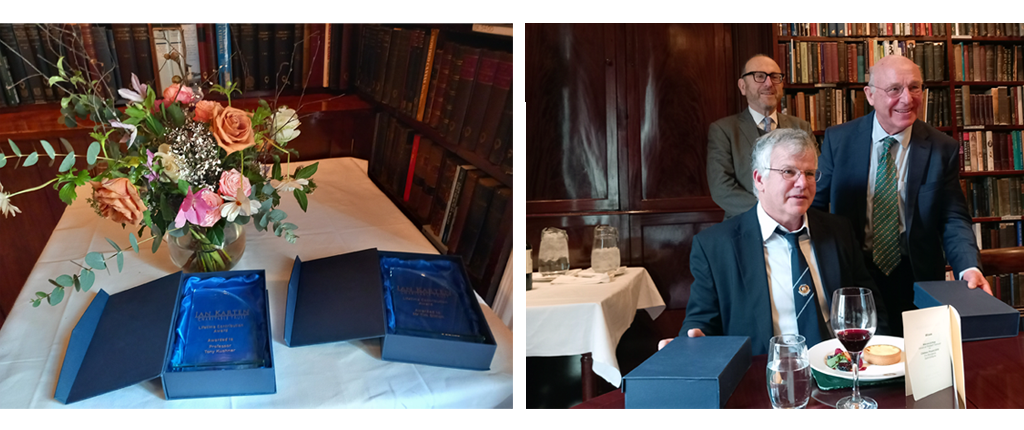
In January we held a lunch at The Athenaeum Club London to celebrate the substantive contributions of Mr Tim Simon, previous Chair of the Trust and Professor Tony Kushner, The Parkes Institute, University of Southampton. Both recipients of the Lifetime Contribution Awards were delighted to receive the awards that were designed and made by students at our Karten Centre at New Bridge Enterprises in Oldham.
Pictured are the super awards and Anthony Davis, Chair of the Ian Karten Charitable Trust with award recipients Tim and Tony.
In September 2020, St. John’s College was grateful to be awarded funding by the Ian Karten Charitable Trust to purchase equipment and resources for the Inklusion print room, on-site at the college in Brighton.
Bernard Akehurst the Print Shop technician says: “Since our most recent funding from the Karten Trust, we have been able to vastly expand our learning opportunities. More products, more varied projects, and more student engagement.”
Inklusion website
Development of the Inklusion website www.inklusionprint.co.uk was a key part of the project. Brighton-based Creative Blend helped to establish the site and maintain it for us.
The Inklusion print shop produces and sells everything from mugs, t-shirts and cards to bags, jigsaws and art prints.
“Now that we have the website, students can follow the whole process, from design to production and despatch. They take the product photography, edit and upload to the site, with customer information, pricing, and stock levels.”
Student designs
Hoppy Birthday, by James
Fox and Sloth By Alice
West Pier, Brighton by Patrick, Luke, Sam and James
Ricoh Ri100
Our students really engage when using the new DTG (direct to garment) printer.
Designs they have made, using various art techniques, are scanned in and, via Photoshop, printed onto t-shirts and tote bags.
Curio cutting, embossing and etching tool
Several of our greeting cards have a customisable element.
The students collect the relevant information from the customer order that comes through the online shop and design the piece needed on the specialised software. They then print and load the cutting mat into the cutter.
The card is then made up using double sided sticky pads to add a 3D effect.
Graphtec 7000-60
Single-colour designs are put together on the Graphtec Studio software and exported to the Graphtec 7000-60 Vinyl Cutter Plotter – below.
Some students are really engaged, when using this equipment. It is quite mesmerising to watch the blade going to and fro.
After the vinyl has been cut, it has to be weeded. A lot of our learners enjoy this part of the process, finding it calming.
The intricate nature of the picking and the concentration needed to pull out the waste material, necessary to reveal the design, is a great aid to focusing for many of the learners.
The patience needed helps them in other sessions, as well and improves their overall learning.
Cap press
The finished design is then transferred to the garment, in this case (below) a baseball cap, but often it is work clothes, aprons or fluorescent tabards.
Screen printing
The repetitive nature of the task, along with the very tactile element of screen-printing (below), is very popular and is a great way of engaging some of our less creative students.
Conclusion
The positive impact made by opportunities offered by the equipment and technology your generous grant enabled us buy has been of enormous – for all our students. Everything from initial idea through marketing and sales, down to the packaging and happy dispatch outings to the post office, has given our learners the chance to enthusiastically participate and learn vocational skills that will benefit them long into their futures.
Thank you from all the learners, trustees, and staff at St. John’s for all your ongoing support.
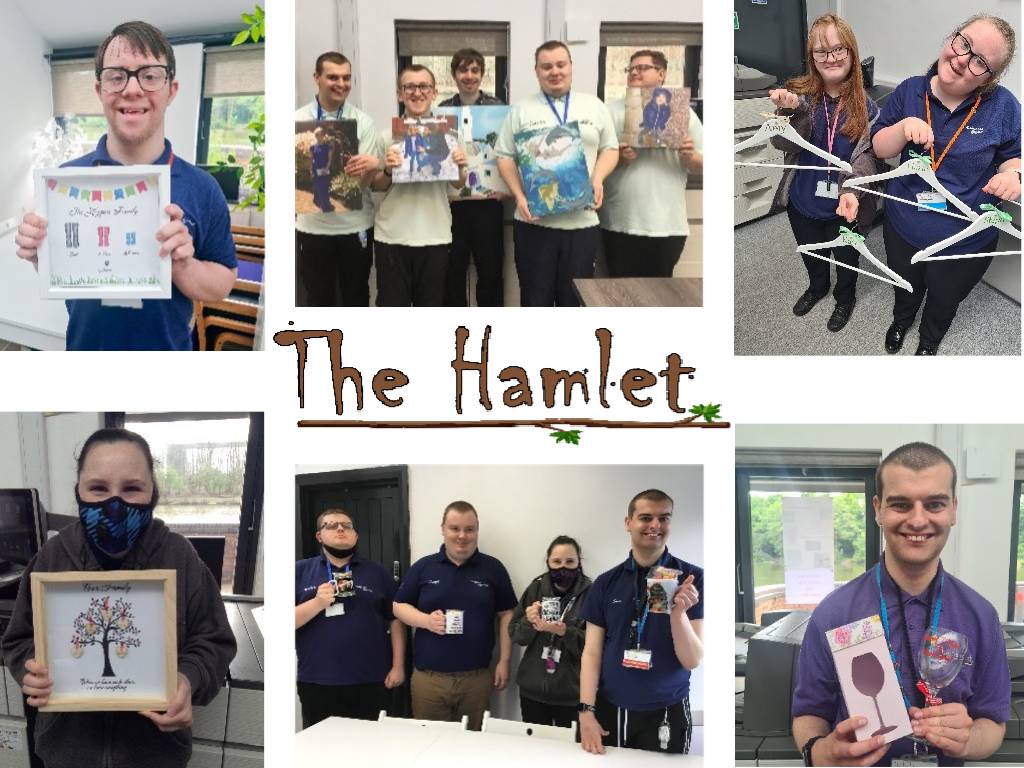
Lakeside printing at The Hamlet has just been going from strength to strength.
Running up to Christmas, Lakeside became a hub of excitement, making thousands of Christmas cards, T-Shirts and mugs for some local schools. The trainees worked in a production line with everyone having a roll, from using Photoshop to design, to using the heat presses to create or the final roll of packaging and quality control.
With the equipment that was donated from The Karten Network, Lakeside is fast becoming the place to go for printing in the area.
The list of products we create is extending. From personalised framed images to baby grows, T-Shirts, jigsaws, glass chopping boards etc. there are gifts and products for every occasion.
For our trainees to have the opportunity to produce quality products that are bought by the public is fantastic. To see their faces when someone purchases their designs is the most rewarding feeling imaginable. Being open to the general public gives not only our trainees the chance to feel empowered, but also gives the public the opportunity to see the skills and talents that our young people truly have.
I am a firm believer that it’s hard to be what you don’t see, which is why representation is so important!
Former England rugby player Rob Burrow recently read CBeebies Bedtime stories on International Day of Persons with Disabilities. But why is this significant?
After winning 8 super league titles with the Leeds Rhinos, Rob was diagnosed with Motor neurone disease in 2019. Rob now uses an Eye Gaze computer with The Grid technology to speak for him, allowing him to use his eyes to select the words on the screen he wants to say, and the tablet will read it out loud.
In the BBC news segment reporting the story they speak to Lucy, a young girl who herself uses a computer to communicate. Lucy and her mum explain how Lucy has watched Bedtime Stories her whole life but has never recognised herself in the readers before.
Rob marks the first non-verbal storyteller on the legendary children’s show but not the 1st reader with a disability. He joins amputee Alex Brooker and hearing impaired actress Rose Ayling-Ellis who have both read stories this year.
The story BBC chose was ‘Tilda Tries Again’. An inspirational story about a little girl who overcomes challenges when her world turns upside down. It’s a lovely book about perseverance, resilience and determination even when things feel impossible. Something I’m sure everyone can relate to.
Well done BBC and Rob for taking this important, inclusive step which will hopefully go towards breaking down barriers for the next generation.
Hayley Ross, Digital Skill Tutor Jewish Care Explore.
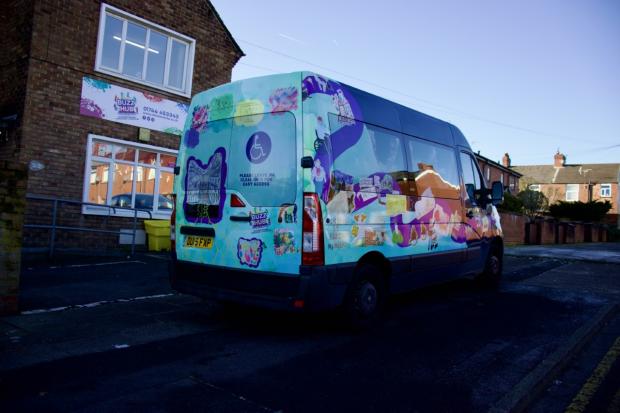
Buzz Hub members, an organisation aimed at creating opportunities for disabled people, and artist Rudy Loewe, collaborated on the Envisaging Futures artwork which people can now spot around St Helens.
The graphic artwork is displayed on one of the Buzz Hub’s community vans and was created to highlight invisible disabilities and represent the personalities at the organisation.
The artist has previously collaborated with the organisation, with Buzz Hub excited to work with Ruby, who has been selected for contemporary visual art festival Liverpool Biennial this year.
David Webster, partnerships and opportunities manager at Buzz Hub, said:
“When the Heart of Glass approached us around this project, Rudy visited Buzz Hub on two or three occasions developing artwork, where members did self portraits and artwork representing different areas of our service.
Everything that is on the bus has been created by our members. It’s been an inspiration that members have an opportunity to see their artwork in a living form and is seen by members of the public on a daily basis.
I think it will spark a lot of interest as it travels around St Helens.”
Fundify is the search Engine for Grant Funding. We are grateful to the Karten Network for their assistance to find Beta testers for the Fundify platform.
Fundify has now gone live and the service is FREE for individuals with a disability.
There is also a PAID version for UK charities who have a need to fundraise from grants. As a token of thanks, Fundify would be very happy to offer any Karten Network members 25% off. Please send an e-mail to jeff@fundify.org.uk instead of signing up online.
North London disability charity CPotential have reached their Diamond Anniversary this year, since forming in 1963. For 60 years, they have consistently helped children and young people with movement disorders, and their families, which is certainly something to celebrate.
CPotential is an innovative organisation, having transformed themselves over the last 3 years, into a sought-after one-stop-shop of integrated rehabilitation for babies, children and young people with conditions such as cerebral palsy, global developmental delay and acquired brain injury. This exciting development hasn’t been without challenges, one being, the pandemic. However, the team marched on with their fresh strategy and they’ve never looked back.
The charity’s multi-disciplinary clinical team have a unique way of working together and devise individualised therapy plans, tailored to each person’s needs. Combined goals are set with the team all working to achieve the same result in any sessions, ensuring the person reaches their full potential. CPotential therapy plans include a carefully selected blend of therapies such as Physiotherapy, DMI (Dynamic Movement Intervention), Conductive Education, Occupational Therapy, Speech and Language Therapy, Constraint Induced Movement Therapy (CIMT) and Music Therapy.
To complement their core therapies, the team use a range of highly evidence-based equipment, such as Galileo whole body vibration plates, LiteGait, iJoy and Spider therapy cages, as well as introduce additional therapies such as Aquatic Therapy, Immersive Story Therapy and LEGO Therapy.
CPotential therapies have a wealth of benefits, and can improve:
Mobility, independence and quality of life,
Body awareness and sensory processing
Communication skills
Interaction and engagement
Muscle strength and balance
Social and emotional development
Functional and self-care skills for everyday activities, such as walking, dressing and eating.
Having an outward focus to ensure the needs of families are met, CPotential have formed partnerships with Mind in Haringey, Irwin Mitchell Solicitors, Slater and Gordon Lawyers, Tree of Hope specialist care funding charity and coaches in wellbeing to provide expert counselling, wellbeing courses, legal, educational and financial advice.
The charity is not only making soundwaves in the disability sector, but specifically with their Music Therapy programme, generously supported by the Amy Winehouse Foundation. Last November, Amy’s parents, Janis Winehouse-Collins and Mitch Winehouse attended a music therapy room naming event in Muswell Hill with Trustees from the Foundation and friends, in honour of Amy’s love of music and children.
Jane Winehouse, Managing Trustee of the Amy Winehouse Foundation said “we are delighted to continue our long-standing support for music therapy at CPotential. This is life-changing work and a charity that we are proud to be associated with. And to now have the music room named in Amy’s honour is a beautiful tribute. We know that Amy would be so happy that her legacy brings so much joy to so many children.”
Brett Parker, CEO at CPotential said “we are overwhelmed by the continued support from the Foundation and Amy’s family, so naming our music therapy room in Amy’s honour is the least we can do for their generosity.”
Music Therapy makes a significant impact on people’s physical, cognitive and emotional development, and gives children and young people their own voice through musical interaction. When some people are unable to communicate verbally due to their disability, music helps them connect to the world around them.
For more information about CPotential’s integrated therapy services and support, please visit cpotential.org.uk
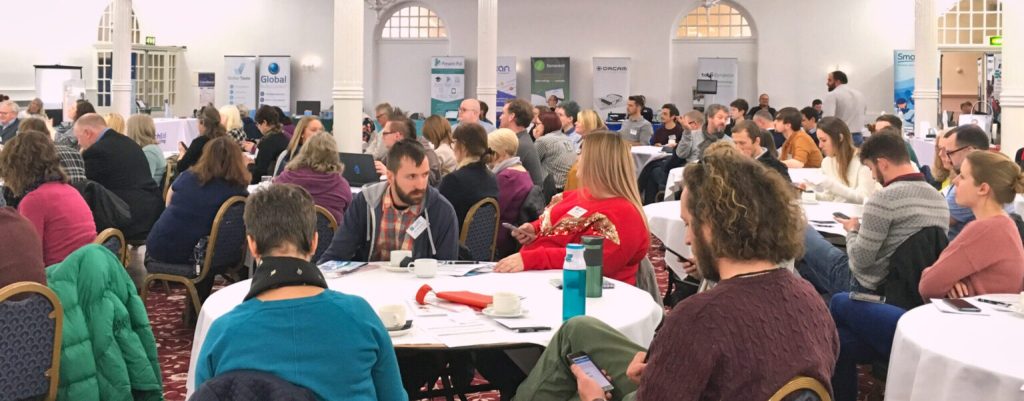
Almost 200 People gathered for the TechAbility conference in November last year. TechAbility22 was an amazing opportunity for people to learn and develop their skills in assistive technology. It was also a great chance to network with others working in the field.
Just a few of the highlights were:
12 Presentations from practitioners which covered a wide range of topics including: use of iPads by learners with highly complex needs, young people’s use of digital mental health tools, how to make the most of mobile technologies, using smart home solutions and how to make gaming accessible
16 Exhibitors showing how their products made a difference for disabled people when integrated into education and care settings
1 Keynote speech from Zoe Clark who shared her wide experience of working in multidisciplinary teams to deliver assistive technology solutions
1 High quality lunch and lots of refreshments (well, no one can learn on an empty stomach!)
Feedback showed that 97% of delegates would be applying learning from the conference in their work. TechAbility’s goal is to improve outcomes for the people you support so this excellent to hear.
We are currently confirming a venue for TechAbility23 in November. Make sure to keep an eye on the newsletter for more news about this year’s exciting and informative TechAbility conference. In the meantime, make sure to take advantage of the other webinar and training opportunities over the next few months. These are detailed in the events section below.
Disability Adjustments Passports
Updates were given to the All Party Parliamentary Group for Assistive Technology in November 2022 at Westminster. TechAbility were joined by TechAbility Champions from both Portland College and Queen Alexander to partake in the event and were able to ask questions regarding expanding this to further education and beyond.
Disability Adjustments passports can help employers to understand adjustments and in-work support, support access to work applications and reduce the need to reassess when moving into employment or between jobs. We’ll let you know when we hear of the next steps!
Tobii Dynavox is the market leader in assistive communication. Their custom designed communication aids and corresponding support system enable people with disabilities such as cerebral palsy, ALS/MND, autism, spinal cord injury and aphasia to communicate and live their lives.
In this webinar we will be exploring the AAC (Augmentative and Alternative Communication) aspects of Tobii products including communication packages and their features.
Alice Langley, an experienced Speech Language Therapist and Training Manager for Tobii Dynavox in the UK, will be taking us through the webinar with time for questions at the end.
Tobii Dynavox is the market leader in assistive communication. Their custom designed communication aids and corresponding support system enable people with disabilities such as cerebral palsy, ALS/MND, autism, spinal cord injury and aphasia to communicate and live their lives.
In this webinar we will be exploring the specific tools and features that can help with independence in education, work and for living.
Alice Langley, an experienced Speech Language Therapist and Training Manager for Tobii Dynavox in the UK, will be taking us through the webinar with time for questions at the end.
9 February 2023 This workshop introduces delegates to technologies which will enable learners to access desktop and laptop computers, tablets and phones
23 March 2023 Computers, tablets and phones have a wealth of accessibility options already built into the operating systems. All teaching and learning support staff should have an awareness of these features so they can remove barriers for learners
27 April 2023 Join one of our Assistive Technologists to discuss ten quick fire topics covering a wide range of assistive hardware, software and techniques
3 May 2023 This training will guide college leaders through long and short term goals to enable your teams to remove barriers to using technology, supporting learners to succeed.
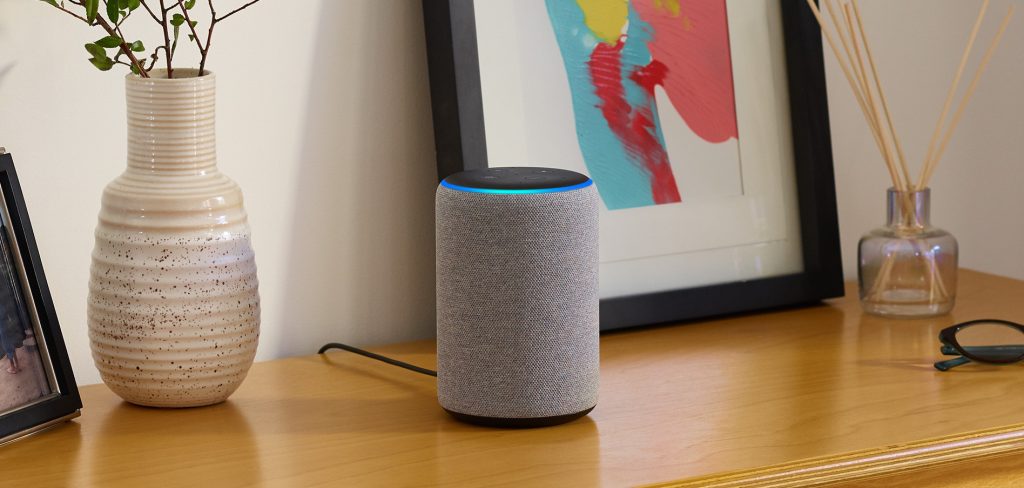
Amazon’s Echo devices have become increasingly common in our lives. They are primarily known for Amazon’s artificial intelligence voice assistant, Alexa. However, the power of these relatively cheap devices extends far beyond asking Alexa what the weather is like outside. Apart from some of the earlier versions of the Echo dots, they can be used as a hub to connect, control, and manage smart devices – although some smart devices will require an additional hub.
With the list of “Works with Alexa” devices increasing, I will not go into details of the devices available. But these include smart plugs, smart switches, smart lights, cameras, smart blinds, small appliances etc.
Many of the newer versions of the Echo dot include ultra-sonic and temperature sensors too. Some of the Echo show devices allow you to use the built-in camera as a sensor. There are also a multitude of third-party motion, temperature, and other sensors available.
To harness the power of these you can create a “Routine”. In simple terms a routine is a set of instructions that get triggered by something e.g. time of day, movement, a voice command etc.
Creating a routine
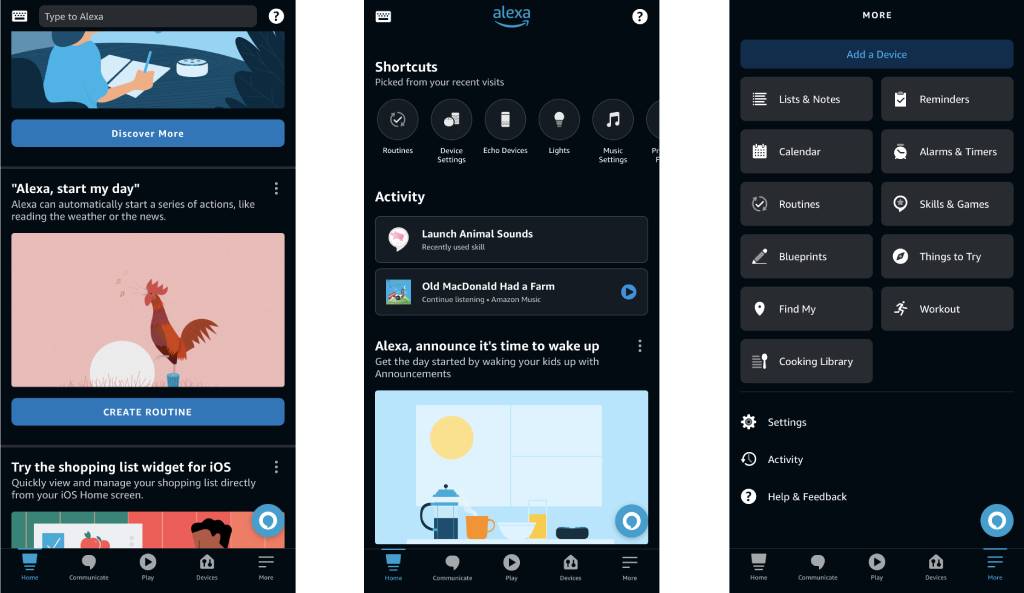
To create a routine, you will need the Alexa app (available for both iOS and Android) and the Amazon account associated with the Echo device/s.
First, ensure that the Alexa app is installed and you have signed in.
To create a routine from scratch, in the Alexa app:
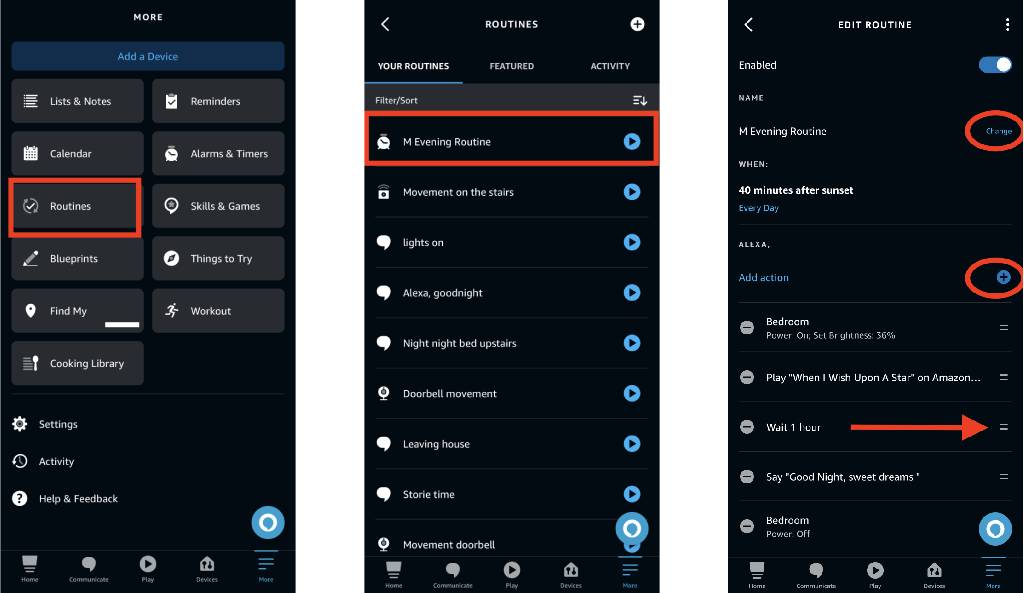
1. From the Alexa app home screen, tap on “More” 2. Tap on “Routines” 3. Tap the plus sign
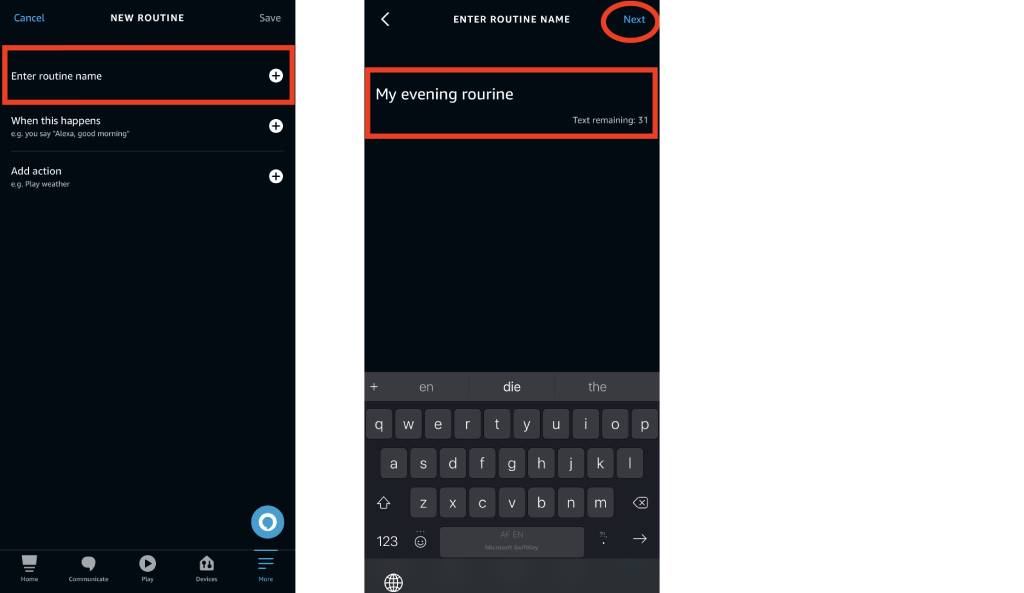
4. Tap the plus sign next to “Enter routine name”. 5. Type a name for your routine. You can currently have up to 200 routines per Amazon account, so I do recommend choosing a name that is quite descriptive. 6. Tap “Next”
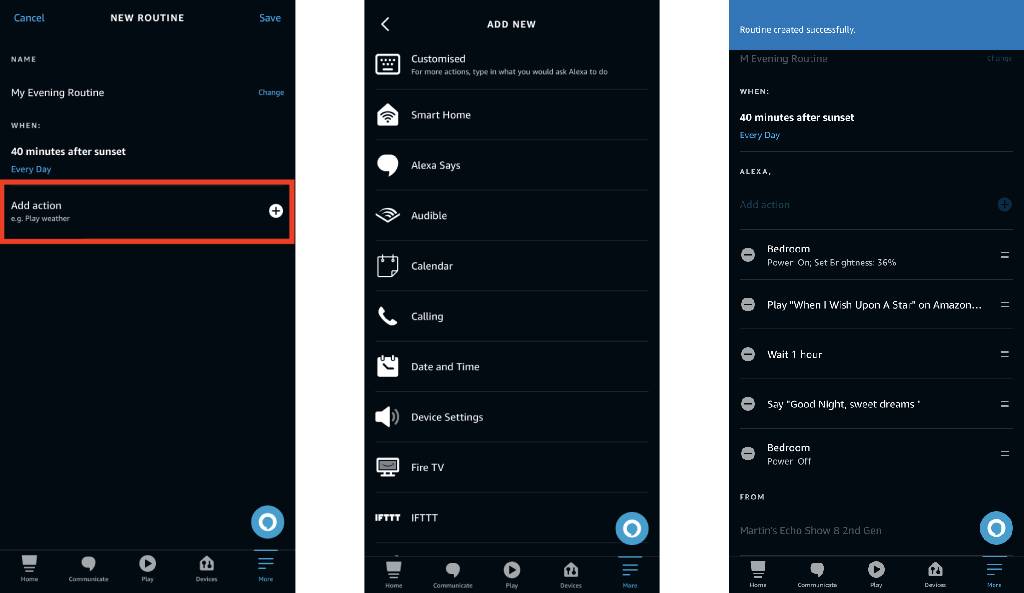
7. Tap the plus sign next to “When this happens”. This is what triggers the routine. If it’s a voice command, you can add up to 7 variations of the phrase. In the example below I have chosen to have the routine trigger by time, specifically 40 minutes after sunset.
8. Tap the plus sign next to “Add action”. These can range from a simple spoken response to, playing music and controlling devices. You can also launch a Skill. This step can be repeated multiple times to build up complex routines. One nice feature is the option to add a delay in the routine. This allows you to for example, turn on a light, wait an hour, then play some music and then turn the light off. 9. If you have multiple devices you can set the “From” to control which Echo device responds to the routine – either “The device you speak to” or a specific Echo device. Unfortunately, routine names and phrases used to trigger them must be unique. Routines are also global, associated with the Alexa Amazon account, and not specific to a particular device. This means you can for example, only set up a routine to turn on the lights in a specific room when you say “Alexa turn on the lights” once. If you want to set up the same function you will need to choose a different routine name and phrase. 10. Tap “Save” to save your routine. Wait for a few moments for the devices to update.
Pre-made templates
You can choose to use one of the pre-made templates such as “Begin my day”. These are shown on the Alexa home screen when you first start using the app. They can also be found by:
From the Alexa app home screen, tap on “More”
Tap on “Routines”
Tap on the “Featured” tab
These templates can be edited to suit your needs.
Editing a routine
To edit a routine that you have created:
From the Alexa app home screen, tap on “More”
Tap on “Routines”
Tap on the routine you want to edit
Tap on either “Change”, “View/Edit” the plus or minus. The order of multiple actions can also be changed.
Copy Actions to New Routine
If you have a routine that performs a particular action for example turning lights on, and you want to create another routine to turn lights off, you can copy and edit that routine. To do this:
From the Alexa app home screen, tap on “More”
Tap on “Routines”
Tap on the routine you want to edit
Tap the 3 dots at the top right of the screen
Tap “Copy Actions to New Routine”
Enter a name for the routine and make the changes
Tap “Save”
Sharing a routine
Routines can also be shared. To do this:
From the Alexa app home screen, tap on “More”
Tap on “Routines”
Tap on the routine you want to share
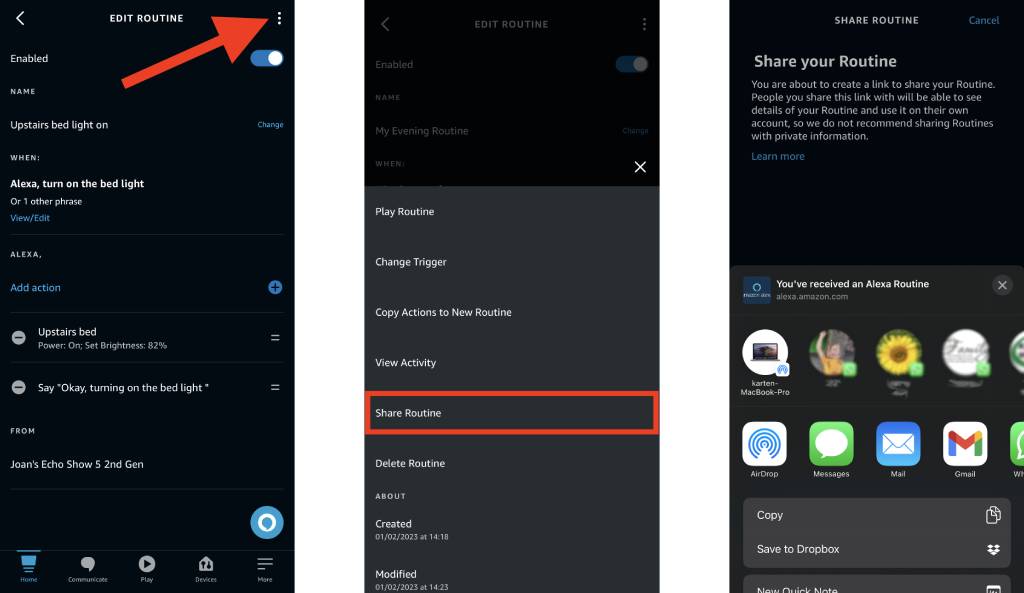
Tap the 3 dots at the top right of the screen
Tap “Share Routine”
You will be prompted to with a warning informing you that you will be sharing information. While it’s important to always be responsible when sharing information, you can rest easy knowing that all network and account details will be removed. Device name will be anonymised e.g. “Hallway Motion Sensor” will be changed to “motion sensor,”. If you are still happy to share your routine, tap “Continue”.
You will now be presented with various ways to share the routine. Select the one that best suits your needs. Effectively, a URL is created.
Once the person receives the link, they will need to open it on a device that has the Alexa app installed. A screen will appear asking to either reject (“No, Thanks”) the Routine or “View Routine”. If you are not expecting a routine to be shared with you always tap “No, Thanks”.
Tap “View Routine” and edit or remove the fields highlighted by orange text and tap “Save.
There are countless possibilities that can be created using routines and I hope you enjoy experimenting with them.
Microsoft365 Support Survey
The Karten Network, in association with TechAbility intend offering free support for Microsoft365 (previously called Office365) to Karten Network member organisations. To help us plan for this we kindly request that you complete this short online survey: https://survey.karten-network.org.uk
As always, I am keen to hear about how you are using mobile and other smart technology. If you would like to have a particular topic covered in the next newsletter, please let me know. Finally, I am available to provide help, support and advice to any of the Karten Centres.
Martin Pistorius Karten Network Technology Advisor
We use cookies on our website to give you the most relevant experience by remembering your preferences and repeat visits. By clicking “Accept All”, you consent to the use of ALL the cookies. However, you may visit "Cookie Settings" to provide a controlled consent.
This website uses cookies to improve your experience while you navigate through the website. Out of these, the cookies that are categorized as necessary are stored on your browser as they are essential for the working of basic functionalities of the website. We also use third-party cookies that help us analyze and understand how you use this website. These cookies will be stored in your browser only with your consent. You also have the option to opt-out of these cookies. But opting out of some of these cookies may affect your browsing experience.
Necessary cookies are absolutely essential for the website to function properly. These cookies ensure basic functionalities and security features of the website, anonymously.
Cookie
Duration
Description
cookielawinfo-checkbox-analytics
11 months
This cookie is set by GDPR Cookie Consent plugin. The cookie is used to store the user consent for the cookies in the category "Analytics".
cookielawinfo-checkbox-functional
11 months
The cookie is set by GDPR cookie consent to record the user consent for the cookies in the category "Functional".
cookielawinfo-checkbox-necessary
11 months
This cookie is set by GDPR Cookie Consent plugin. The cookies is used to store the user consent for the cookies in the category "Necessary".
cookielawinfo-checkbox-others
11 months
This cookie is set by GDPR Cookie Consent plugin. The cookie is used to store the user consent for the cookies in the category "Other.
cookielawinfo-checkbox-performance
11 months
This cookie is set by GDPR Cookie Consent plugin. The cookie is used to store the user consent for the cookies in the category "Performance".
viewed_cookie_policy
11 months
The cookie is set by the GDPR Cookie Consent plugin and is used to store whether or not user has consented to the use of cookies. It does not store any personal data.
Functional cookies help to perform certain functionalities like sharing the content of the website on social media platforms, collect feedbacks, and other third-party features.
Performance cookies are used to understand and analyze the key performance indexes of the website which helps in delivering a better user experience for the visitors.
Analytical cookies are used to understand how visitors interact with the website. These cookies help provide information on metrics the number of visitors, bounce rate, traffic source, etc.
Advertisement cookies are used to provide visitors with relevant ads and marketing campaigns. These cookies track visitors across websites and collect information to provide customized ads.