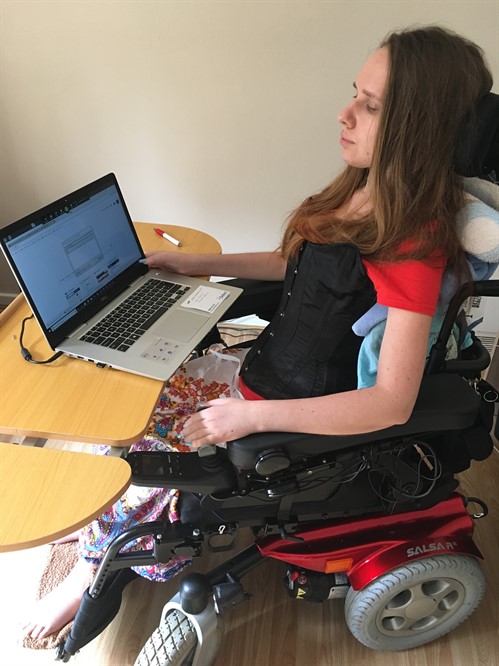
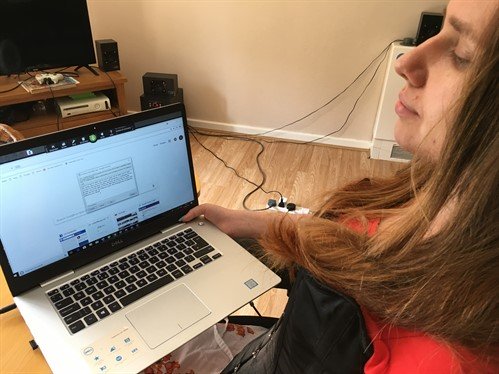
The Karten Trust grant awarded to Toynton campus has had a substantial impact upon the campus as a whole by increasing the availability and use of digital tools for learners to communicate and to access the curriculum.
For learners with a range of disabilities that have been unable to access the college campus the purchase of iPads, webcams and microphones has provided the opportunity to receive a form of face-to-face delivery. This has had a significant and positive impact on inclusion for learners, and has also supported lecturers to deliver across site and into the learner’s home – something which would have been otherwise impossible.
As a result of the Karten grant, we are able to support and signpost learners, showing how they can access this equipment within their own home. This will allow them to transfer their skills in preparation for future independent lives.
Through Enterprise sessions, learners have been able to explore the assistive technology and have recently begun to use programmes such as Minecraft for education on the iPads to identify shapes within core skills, and work towards qualifications. Using the technology develops the learner’s cognitive skills and we have seen an increase in learners using collaboration and problem-solving skills throughout other areas – supporting and encouraging their peers in social and emotional scenarios.
Case studies
Leah W
Leah has ADHD and delayed cognitive development. In support of any activity, Leah accesses the computer with a mixed colour upper case keyboard independently, and can complete tasks within busy environments with minimal adult support. Leah is developing her orthographic knowledge, and uses the keyboard to locate letters to support her spelling and to develop her reading skills.
Leah is easily distracted by noise due to a sensory issue. The headset grant-funded by the Karten Trust has supported Leah to self-regulate and enable behaviour independence. She accesses the computer independently, using the accessible keyboard to play music and avoid distractions from within the teaching and learning environment to focus and work towards qualifications while increasing her metacognitive skills.
Learner X
Learner X has cranionasal dysplasia with a visual weakening in both eyes: this has resulted in short-sighted vision and a requirement for large print. Throughout any activity the Zoomax magnifier converts the task into the font size required. The Zoomax is portable and supports X to develop independence and improve literacy skills.
Learner X’s aspiration is to work within the hospitality industry. At Linkage, hospitality sessions take place in an industrial kitchen, and embedding the talking equipment into the kitchen has supported X to access the course with minimal staff support. This learner has developed the skills to prepare hot and cold snacks using the equipment to a high standard, and is working towards a City and Guilds qualification. Learner X is looking for work experience within the industry with a view to gaining paid employment applying visual impairment strategies learnt within the college environment.
Through the TechAbility training, staff had the skills and knowledge to implement user experience virtualisation for learner X, personalising the approach to meet individual needs. Social interaction skills for X have developed over the academic year; and through using baked-in accessibility features and assistive technology, X has expanded listening skills, increased communication and reduced the level of support required within the sessions.
Photos of activities held in the Karten centres and outside of the classroom
The photo below demonstrates using the iPad within a media and horticulture session to take photos. Learners at Toynton have embraced the additional technology within sessions, and support peers to use it. Learners have developed online safety skills in an ever-changing digital environment.
The Maples bungalow had always been a place for learners to develop their independence skills, although over time has become worn and outdated.
Our Karten trust funding to revamp and repurpose the Maples into a Smart Home provision helped us to modernise and consider purposeful, meaningful opportunities using a range of assistive equipment.
Once our bid was approved by the Karten trust board we furnished the Maples Bungalow with equipment that would give learners the opportunity to meet their outcomes.
Maples office
To enable learners to develop their independence; the use of voice technology was the main purpose of the development.
The Smart Home was zoned into 5 spaces: kitchen, lounge, chill-out room, bedroom and office.
Each room offering a different experience.
Maples chill-out room
Using the Alexa Dot, Alexa show and Samsung SmartThings apps with equipment such as: robotic vacuum, televisions, heating, blinds, lights and lamps, bubble tube, washing machines, fridge and door cameras; learners have been able to control the environment, develop communication skills, problem solve, follow instructions and develop their independence skills in a functional home setting.
Currently 40 learners over 5 days have access to the Smart Home.
Some sessions are led by the Speech and Language Therapy Team. This statement has been provided by the Speech and Language Therapy Team:
“The speech and language therapy team have been running sessions with groups of learners in the Maples Bungalow each week.
These sessions have been focusing on functional communication skills to support real-life activities e.g. making a drink, cleaning the kitchen.
The bungalow provides creative and unique opportunities to support learners with different needs. For learners with physical/access needs who cannot complete household tasks independently, sessions have focused on using language to instruct Alexa or another person to do a task e.g. instructing Alexa to turn the kettle on or instructing another person to get a mug from the cupboard. This allows these learners to be active participants in their household activities.“
For those who communicate using AAC devices, learners were taught to use their device to speak to and control Alexa. A range of commands were taught, including changing the lights, turning on/off the vacuum cleaner and turning on the kettle. This was often incredibly motivating for learners, who quickly learnt that their AAC ‘voice’ has the power to change and manipulate the environment.
Speech and language therapists often face challenges concerning the retention and generalisation of skills which are taught within therapy sessions. The Maples Bungalow provides the opportunity for taught skills to be practiced in a home setting, allowing for generalisation practice to occur on campus. To support carryover of skills further, resources and strategies which were learnt in the bungalow are sent home for further practice and application.” – Speech and Language Therapy Team Portland College
Case Study – AAC Tutor
George came to college last year with an eye gaze communication device and Grid 3 software. He has since undertaken a weekly AAC/SLT session and is making progress.
George has had varying topics programmed to his device to encourage his communication. Topic that have been added relate to his interests of football, music, and cause and effect.
At the start of this process George was reluctant to use the device. Over time he has become more engaged, and willing to work with the equipment, choosing from either direct access, eye gaze or modelling from staff.
More recently George has accessed the Maples Bungalow to use the Alexa to control his environment. He enjoys choosing instructions on his device, so that he can control the environment by changing the colour of the lights and opening the blinds.
He particularly enjoys this session, often loudly vocalising when he enters the bungalow. He will direct staff to where he wants to be positioned in the room to ensure he gets the best view of the environmental changes.
With the continued use of the Maples Bungalow it is hoped that Georges motivation to control is environmental will increase and this will lead to developing his communication skills.
Rob changing the lightsOliver checking ingredientsMolly washing the tea towels
John lives on site at The Meath and while he enjoys the variety of activities on offer at our dedicated Skills Centre, he has a natural leaning towards and interest in IT. He is fascinated by how things work and has huge capacity for finding out more about topics of interest, having spoken to John it is apparent that using the Skills Centre IT suite is a huge source of life enrichment. While John is happy to celebrate success made at the gym, he gains much of his sense of purpose and achievement from his progress in IT sessions which combine research, literacy, communication, design, and IT skills. The process of working on these projects helps him to maintain cognitive function, while typing helps to maintain his fine motor skills. John uses standard equipment and Microsoft word. He can work from a regular keyboard and screen; we support clients with a broad range of abilities and needs and many of our less able users require larger keyboards to work from in addition to specialist software, for clients who are visually impaired.
John has carefully and methodically been supported to produce three detailed research ‘how it works’ topic books on subjects of his choosing, these are: the Honda Car, the Television and the Denis bus (both motorised and electric). John’s research was enhanced by visits to Brooklands transport museum (home to the national bus museum) and even a trip to PC world is a source of great fascination and information for him.
The pandemic and many lockdowns have been an especially challenging time for many of the people we support and for John, having access to the IT suite was a huge factor in him maintaining good mental health during lockdowns. John has achieved much of his latest research book during lockdown periods and it gave him drive and focus during a difficult time.
John is extremely grateful to have easy access to the equipment on site and his two IT sessions are always the highlight of his week. He has set his sights on a new project book about The Hovercraft and plans on taking the Hovercraft on a day trip to the Isle of Wight for some field trip research. As John is also a keen and skilled photographer, he hopes to use some of his own photography in his next project. One of his learning objectives is also to use IT to prepare some presentations about his research topics; here IT will be utilised to enable John to improve in communication and presentation skills which is are areas that he feels less confident in.
Now that the IT sessions take place outside of lockdown, Activity Leader Rachel hopes to introduce some video editing software to enable the group to create their own short videos which explain and celebrate the progress they have made in IT or other sessions.
This year at Sense College we have had a re-imagining of Learner Voice. Students were asked to volunteer to be Student / Learner Reps for each area and Pathway (Vocational, Creative and Enterprise and Sensory, Interns, FE Students and Flexible Futures) and in our first meeting on March 10th the reps decided to call themselves College Ambassadors.
Technology enabled Ambassadors to do a range of activities that would not have been, otherwise, possible. These activities have also highlighted where we need to develop the use of technology further. Here are some of the activities that have been carried out this year.
Work placement
One of the College Ambassadors representing the Interns started a learner voice work placement. The intern carried out a range of weekly tasks that included creating a half termly newsletter, carrying out surveys, analysing feedback from the surveys, and maintaining the College Ambassadors / Learner Voice boards.
When carrying out interviews the student used a dictaphone and an iPad to record the questions and answers. This student has Cerebral Palsy with a mild communication difficulty, as well as difficulties with typing, spelling and grammar. Standard speech to text technologies will not work for him, but technology such as Voiceitt would have helped him to be more independent. This is something we may need to purchase in the future.
Surveys and Learner Feedback
Feedback from students regarding the outdoor spaces led to some fantastic ideas being proposed as well as the creation of different garden areas. These garden areas are slowly being worked on by students, as well as staff.
Feedback from students has also led to the painting of a wooden fence in order to turn it into an art installation. The two students involved in the art project used an iPad to take photos of the area and to draw designs onto the photos. The art work should be finished before the end of the academic year.
The outdoor spaces look so much better, even though they are not quite finished. These improvements will continue next year, and we hope to use technology to help make the outdoor areas even more accessible and inclusive.
The College Ambassadors also did a number of surveys to gain feedback about a range of topics. One of the surveys was about students’ experiences of working at home during lockdown as well as the experiences of students who continued to attend College. This information was placed into a bar chart and sent to the College Management Team and to the Governors.
Surveys were available in print, large print, Braille and widget, but it would have been more accessible with the use of voting technology where students could tap the screen to indicate their responses. Additionally, voting technology would help the Ambassadors to get more feedback more quickly and more often when compared with paper based surveys. This is an important area of development for us.
Question Time
All College Ambassadors were invited to take part in a Question Time session, using Teams, with the College Management Team as well as with the Governors.
The Ambassadors shared their questions and suggestions during the meetings and shared answers and actions from the meetings with the students in their Pathways. Suggestions included having more vegan and dairy free options in the Bell Bar, requesting more iPads for each Pathway and having a card reader instead of paying with cash. Ambassadors now have a list of actions including finding out how many students have a debit card and how many prefer to pay in cash. This will then be fed back to the College Management Team and Governors and a decision made.
Newsletter and blog
The first College Voice newsletter was created with lots of interesting articles about being a College Ambassador and a peer buddy, as well as interviews with the Principal and Work Placement officer. The newsletter will continue to be created half termly, and next year the College Ambassadors will also create a whole College Learner Voice blog. The blog and newsletter will be managed by a small group of students as part of a marketing work placement. More iPads and / or tablets would help the students with this activity, so this is an area for development at College.
Development plans
During the rest of this academic year, and into next year we will continue to work on incorporating learner voice into all activities, including sessions, interviews with new staff, meeting and greeting visitors and prospective students and creating a film about the importance of learner voice using the College Media Hub’s filming equipment and editing software.
In sessions students will be asked to evaluate the session and voting technology and the use of switches would help to make sure all students are heard. With any interviews or meeting of visitors students with communication difficulties will be able to use an AAC devise, iPad or tablet to ensure that students from different Pathways can take part.
Next year we also want the College Ambassadors to continue with all the activities we carried out this year, but develop those further. For example we would like College Ambassadors to run Green awareness events, take part in the College’s self-assessment report, and hold Learner Voice events for current and prospective students. Technology will play an important role in the continued development of learner voice at Sense College Loughborough.
Sense College Bedford thanks the Ian Karten Charitable Trust for their very kind and generous donation which is benefiting students of all different abilities through the use of technology.
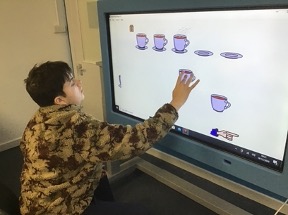
Charlie has been using the big screen to play interactive games that promote fine motor skills and the use of numeracy and literacy. Charlie loves the interactive part of these lessons, this interactive board is Charlie’s favourite piece of equipment as he is very much a cause and effect motivated learner.
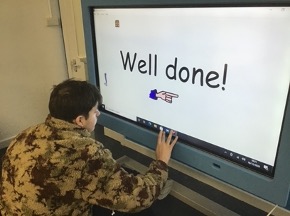
As per the pictures shown, Charlie can be seen pairing the cups to the saucers. This task corresponds nicely to his objectives and his ability to show a clear understanding of contextual numbers and counting.
In addition to this, this task also incorporates the use of literacy in the form of praise (as per the last image) where Charlie has completed the task and is being given praise in the form of “Well done!”.
This allows Charlie to understand clearly that he has finished the task correctly and can move on to the next one. The use of technology has been used to increase Charlie’s educational and psychological wellbeing as it combines something he enjoys in an educational setting to produce a desired outcome for his termly progress.
Communicare247 is a health and social care service provider which delivers connected care solutions built by the community, for the community.
Using effective Internet of things and mobile technologies, including voice-activated speakers, smart phones, smart wearables, sensors and location technologies, Communicare247 enables the UK’s most vulnerable people to live safely and independently in their own homes and communities for longer.
These technologies, coupled with a fully featured online care platform, brings reassurance to citizens and their families, whilst providing valuable health and activity data to care providers which can be used to manage health and enhance care delivery.
Case Study – Communicare247 helps Sanderson High travel independently
Communicare247 partnered with Sanderson High School, an additional support needs (ASN) school to create a service which would help their pupils build confidence whilst travelling independently.
Using the Freedom Device with location-enabled alerting, the pupils were able to travel independently, using public transport, between home and the classroom. Reassurance that direct support from their teacher was only a button press away, increased the pupils, parents, and teachers confidence in their ability to travel alone.
With Communicare247’s support, the school has achieved a 50% increase in the number of alumni who are now able to travel using public transport, instead of private transport methods.
Learners using a Prowise board, microphone and MOVE camera to participate in a performing arts lesson via Zoom. This has brought the sessions to life, enhanced and increased communication and significantly helped support learners to maintain their courses of study whilst fully complying with the Coronavirus restrictions.
The Karten Trust grant awarded to Linkage’s Weelsby campus has had a significant impact upon the Linkage blended learning approach. Learners are now able to regularly access the equipment beyond the Karten centres, and this has enabled learners to develop their skills and led to a reduction in support required from teaching staff when completing a range of tasks and activities. To date 73 of the 83 learners at the Weelsby campus (88%) have accessed equipment funded by the grant outside of formal Karten centre sessions.
Prior to the lockdown in March 2020 the media group of 15 learners planned, developed and facilitated an exhibition to showcase their fantastic work. Some of the group were working towards a qualification in Creative Media Production and creating images was a key aspect of their course of study. The theme for the photography project had been ‘Nature’. Having some beautiful grounds, we were very lucky to be able to capture images of nature every week with slightly different themes and purposes, for example macro photography, remembrance photography, landscape photography, autumn, Halloween, and Christmas. The images were a mixture of original and edited images all created by the learners. Showcasing their work really boosted their confidence and pride in their work and ability.
The exhibition was promoted to families, other Linkage services and a range of stakeholders. Visitor data was collated and in total 94 people accessed the exhibition. Feedback from attendees was extremely positive with students receiving specific individual feedback regarding the high quality of their work.
Linkage have embedded the equipment purchased within the assessment process. Learners have experienced interactive assessment sessions and virtual campus tours have also taken place.
Four digital champions are undertaking Jisc training to develop their skills, understanding and use of a variety of learning resources. Information and expertise is being shared through the peer review and development group of specialist colleges within the East Midlands.
Staff have this year attended the online TechAbility conference in November covering innovative practices surrounding assistive technology, participated in training as part of the EdTech Hub and attended captioning training delivered by Natspec.
We are also in the process of working with Liz Howarth from the Karten Network as part of the Nuvoic project to support, test and feedback on accessible smart home control for people with dysarthric speech.
We are endeavouring to build our relationship with the Karten Network, and have been developing the roll out of cross-campus competitions using the Karten centres with a view to opening these up to the network.
Case study: Chaz L
Chaz has significant visual impairment which includes an involuntary oscillation of the eyes, which causes her vision to be blurred and indistinct. She is registered as disabled, although wants to be seen as with an ability which is different.
Chaz benefits from the Zoomax magnifier on a daily basis, which enables her to perform tasks independently, and develop a range of skills including communication and functional skills by using the equipment within a retail environment in preparation for her external work experience.
The increase in availability of iPads and the centralised booking system has also benefited Chaz, as previously she has struggled to sustain focus. She now regularly uses an iPad with the assistive technology apps to support her progress across the curriculum, and has also used it within personal social and development lessons to increase her confidence in planning travel routes.
Case study: Emma W
Emma W is using the mixed colour upper and lower case keyboards. Emma W has significant learning difficulties and has difficulties with fine and gross motor co-ordination. The keyboards have enabled her to grow in confidence, and to easily identify letters, which is really improving Emma’s communication and literacy skills.
Our participants have enjoyed experimenting with the new learning methods, equipment and services we have been able to provide since our successful application of the Karten application in September 2019. We have been privileged to be able to purchase an Epson wide format printer, height adjustable desks, a Tajima Sai embroidery machine, sewing Machine, semi-automatic creaser, a projector, a screen to project onto, iPad pro air tablets with keyboards and iPad arms so we can connect them to the participants desks. All of this equipment has significantly improved the learning experience for our participants as well as the range of services available to our customers.
Impact of Orchardville Works Karten Centre on our participants
Orchardville Works is a Social Enterprise of Orchardville, a charity organisation that believes that with the right support anyone with a learning disability or autism can reach their employment aspirations. In total we support over 500 adults with learning disability or autism in Northern Ireland. Our main employment project is called Ignite2, each Participant that joins Orchardville follows a journey to help them achieve their goals by developing personal, social and employability skills.
Some participants feel ready to head straight to paid employment with the support of their appointed employment officer, others feel they need some more time to develop their skills further. Fortunately, we can provide on the job work experience in a safe and supported environment. Orchardville currently has 5 Social Enterprises (3 x cafes across Belfast, Orchardville Cleans & Orchardville Works)
To enable work experience at Orchardville Works (OW), we take in live jobs from customers which can range from goodie bag packing, fulfilling mail, digital printing, wide format printing, t-shirt printing and embroidery. We employ four Vocational mentors who provide individual training and support where required to enable our participants to progress and develop their skills.
With a strong emphasis on self-sufficiency, OW provides training experience across a variety of tasks for up to 60 participants weekly. OW has built on its core printing and packing activities to successfully launch new products including natural linen scarves, sold online and in store, which are fringed and packaged by our participants. In addition, a new embroidery machine has enhanced our branded uniform offering, providing more diverse work experience and training for participants. OW fulfils printing and hand packing orders for more than 100 customers annually, with a 25% rise in new customer relationships in 2019/20 as a result of the Karten equipment.
Case Study
As a result of the successful Karten application and the newly purchased embroidery machine we have been able to work with a wider customer base by offering branded workwear. Some of our new customers in this area include The Ulster Flying Club, Rex Detailing and PWC.
Many of our participants have expressed an interest in learning how to use the machine. Owen Galbraith has been attending OW since March 2018 and has been working hard to develop his employability skills. At Orchardville Works we encourage all our participants to learn the importance of punctuality, attention to detail and quality control, wearing a uniform and working as part of a team. Over the past two years Owen has made significant progress in these areas and has been successful in gaining external paid employment as an admin assistant. Owen has remained with us at Orchardville Works and continues to develop his skills further, each week he attends he is becoming more enthusiastic about attempting new tasks and challenges, most recently Owen has been working on the embroidery machine helping to produce the Black Santa hats for PWC.
Belfast’s Black Santa Sit-Out charity appeal
Each December, thousands of visitors come to the steps of Belfast’s St Anne’s Cathedral and donate money to the Sit-Out fund, which almost 200 charities across Northern Ireland benefit from.
This year due to Covid-19 restrictions, the campaign was instead promoted across social media and the Sit-Out’s brand new website.
The beanie hats produced by Orchardville Works are not only a fantastic brand recognition for Orchardville but it also provides Owen with purposeful activity while he is training with us.
Our participants have continued to use the tablets provided by Karten, for video learning techniques, it has been invaluable at providing an alternative method of communicating a task from the vocational mentor to the participant.
Video learning techniques
Darren can be seen here using the video learning technique to assemble a packaging box for Tayto.
We have also been able to provide online ecommerce as a result of the wide format machine, this is a new and exciting area for Orchardville Works and the team have enjoyed being part of the process by wrapping the canvas, packaging and despatch.
The funding and equipment supplied by Karten Network has been invaluable to Orchardville Works in many ways, it has helped us move forward into new market areas as well as providing additional learning experiences for the participants attending. We have been able to connect with new customers that we couldn’t before as we can offer more services.
The Cedar Foundation is an organisation based in Northern Ireland that supports people living with disability, autism & brain injury (https://www.cedar-foundation.org/). It has two Karten CTEC Centres, one based in Belfast and the other in Ballymena.
As part of its Inclusion Works programme Cedar provides person centred assessment, training and support to adults to enable their full participation in society. The following outlines one of Cedar’s participant’s experience on her journey…
Rebekah is one of Cedar’s Inclusion Works participants who has received training in The Cedar Foundation’s Belfast, Karten CTEC Centre. After initial assessment for Assistive Technology and IT Support Rebekah participated in work the placement with Cedar’s Communications Team. This enabled Rebekah to raise awareness of ABI & relate her ongoing story of recovery through social media and her online blog. This is Rebekah’s story…
“My name is Rebekah and I am 28 years old. When I was 24, I had a car accident when I was going to my horse-riding lesson. The accident left me with an Acquired Brain Injury which affects the left-hand side of my body. I was in a coma for 4 months in the Royal Victoria Hospital and in January 2017 I was transferred to the Regional Acquired Brain Injury Unit (RABIU) in Musgrave Park Hospital. While at RABIU I underwent assessment and rehabilitation and was discharged September 2017.
I came out feeling broken and had no confidence – unsure of who I was, the left side of my body wasn’t working, and I felt angry and frustrated! I have always had the support of my fiancé and family which has been irreplaceable.
In November 2018, my Occupational Therapist from the Community Brain Injury Team (CBIT) referred me to the Cedar Foundation’s Inclusion Works Service Belfast (IWB). I had previously heard good reports about the Cedar Foundation from a good friend whose son had attended there as a service user.
I started on the IWB Programme in January 2019. I was introduced to my Case Officer, Helen Savage, who has been very supportive and attentive. When I started Cedar, I was unsure what I would like to do. Initially I met with Helen weekly, we discussed my goals and ways to help me build my confidence and stamina. Prior to my accident I was extremely independent and worked full-time.
Photos of Rebecka at work and play
I started attending ICT classes in Cedar’s Karten CTEC Suite. I found this very beneficial as I write a blog about my experience of living with a Brain Injury. Joe Cash (IT Tutor) supported me with online social media and exploring assistive technology options. I was also provided with support to try out online courses. This enabled me to explore remote learning options and helped me to refresh my previous learning.
Prior to my accident I had achieved a 1st Class Honours degree in Communication and Public Relations. As a result, Helen set up a work placement with Cedar’s Communications Team. I thoroughly enjoyed this placement and felt I had taken the first step to looking at work since my accident. I helped with updating Cedar’s Facebook and Twitter page. These opportunities helped to build on my self-confidence, resilience and communication skills.
I hope my placement will resume soon – after Covid-19! In the meantime I will continue to focus on my hobbies (Art and Cooking) and update my daily blog – https://rebroken.blog/. Please check my blog out.
Meeting the Cedar team has been a great experience and they have been very supportive, helping me to improve my confidence, especially in exploring my workplace options in the future :-) “.
We have 12 participants (adults with learning disabilities or autism) per day that come to us to learn work skills in a safe and supported real working environment. To enable this work experience, we take in live jobs from customers which can be anything from goodie bag packing, fulfilling mail, digital printing, t-shirt printing and embroidery.
We have 4 vocational mentors who provide individual training and support where required to enable our participants to progress and develop their skills with the aspiration of paid employment. In our most recent Karten application we applied for tablets so that we could provide video learning techniques to some of our participants who prefer visual instructions as opposed to verbal. A successful example of this was the assembly of Tayto boxes (part of their valentines campaign- send a packet to someone you love).
A staff member recorded the correct assembly process and set it up for our participants to play and rewind the video as many times as they need in order to complete the task correctly. This method was a success, especially for our participants who don’t feel comfortable asking for help.
We are currently working on other videos that will help support our participants in other areas, including embroidery, other product assembly and print finishing.
S,
33, has been integrated in the Aliza Center for six years. S’ sits in a
wheelchair, and his movement is lacking in all four limbs. However, his cognitive
functioning is mediocre, which often frustrates him. For years S’ complained
that he can’t walk and can’t eat alone. He asked a lot: “Why can’t I eat
alone? Why can’t I walk?”. As a center, we tried to give S’ as much
emotional support as we could, but it was clear that S’ needed significant
personal empowerment.
The
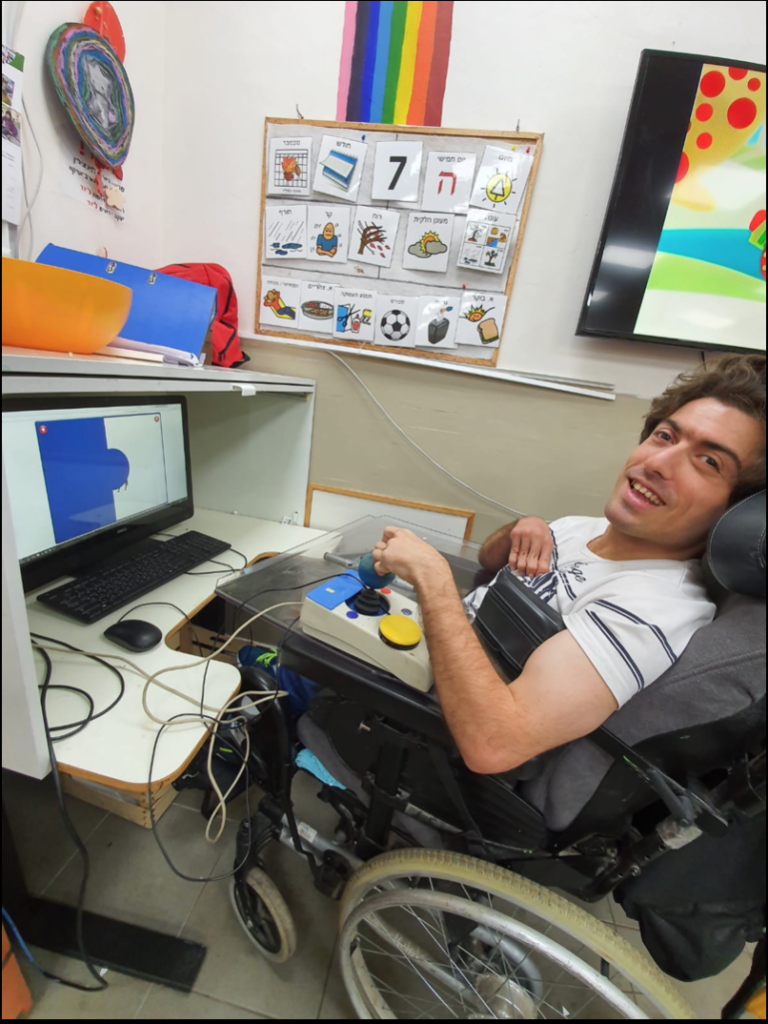
solution came unexpectedly, through cognitive work: S’ worked on the computer
on the Gingim gaming site using a switch, in simple action-reaction games, due
to the motor difficulty. In order to promote him to more complex games, he
began to practice working with a joystick; S’ began the work in individual
therapy with an occupational therapist, and gradually the use of the joystick
was transferred to the staff. He now plays on the computer almost daily.
Not only does the joystick allows S’
independence in using the computer and a higher level of cognitive practice –
it has also allowed him immense personal empowerment, which filled him with
pride and joy. Gradually, the complaints about eating and walking disappeared,
and the questions changed: “When do I play on the computer? Have you seen
how I play on the computer? Do you know that I play on the computer alone?”
Today S’ plays on the computer almost
completely independently, practicing high motor and cognitive skills – but most
importantly: he is much happier, satisfied and self-confident.
During each year of activity an ITM
(interdisciplinary team meeting) is held for every client, to which all
concerned with the client’s care are invited – the center staff, the health
care team, the social worker, the client’s family and of course the clients
themselves. During the meeting we discuss the client’s progress during the year,
the application of their personal program, successes and difficulties, and
raises questions and ideas for further work in the coming year.
Since
many of our clients do not communicate verbally, they are often unable to fully
express their thoughts on their personal program, and request for any changes to
be made. Therefore, we have designed a communication board for each client using
the TouchChat app, which focuses on their personal program and allows them to
express their thoughts and wishes. Even verbal clients benefit from the
communication board, as it helps them with visual representation.
As preparation for the ITM, each client sits with a staff member, and through the communication board, discusses their personal program – what goals they likes or dislikes, whether they feels they have progressed on a particular goal, and if there are any changes they would like to make. The answers are recorded and attached to reports prepared for the meeting by the various professionals.
In this way, the client’s voice is heard, and they are able to take an active part in designing their personal program. We see our center as a community where all members have an equal voice, and the ability to influence the reality around them.
The Shalva National
Center in Jerusalem, Israel has been developing award-winning rehabilitative
and inclusion programs for children with disabilities for thirty years.
Recently, the organization has also incorporated an array of adult services;
including employment and vocational training programs, volunteer military
service with the Israel Defence Forces, social support, and independent living
in the community. In the years prior to launching their adult services, Shalva laid
the groundwork to create the optimal opportunities for their clients. In 2016,
Shalva partnered with the Ian Karten Foundation, the Dan Marino Foundation, and
the University of Southern California’s Institute of Creative Technology to
create a unique therapy solution based on virtual reality software called SHALVA
VITA. The SHALVA VITA program utilizes interactive avatars to simulate job
interviews for adults with disabilities in order to prepare them for a
successful transition into the mainstream job market.
Following an initial
pilot initiative, the VITA program is currently in the process of being
implemented across Shalva’s employment and vocational training programs. This
March, the SHALVA VITA program will be presented at the annual International
Down Syndrome Day Conference co-hosted by Shalva and the Hadassah Medical
Center, with approximately 500 disability professionals and members of the
broader community expected to be in attendance.
The Karten Network’s
March 2019 newsletter featured a Shalva VITA client named Ella who participated
in the VITA pilot program. Nearly one year later, Ella relays the life-changing
experience in her own words:
Ella an Employee at Shalva
Authored by: Ella Greco, January 2020
My name is Ella. I’m 24 years old and this
year has been a very exciting year for me because I moved to an independent
living apartment with other roommates. It’s my first time living outside my
family home, but so far it’s going well. I have a professional camera and I
took a photography course so I like to take pictures of things in my life. I
also like to go out with my boyfriend and talk with him on WhatsApp. During the
day, my favorite thing to do is working at the jewelry studio at Shalva. I like
to keep busy and have full days with lots of activities, especially since I get
bored quickly from doing the same thing for a long time. When I’m making
jewelry, it’s not like that so much. I can do it for a long time and plan out
different designs and patterns and then create them in the jewelry. I think
it’s because I like being creative and because its very relaxing in the jewelry
studio. We turn on music and we work quietly and its really fun and relaxing.
The jewelry studio is at Shalva but we work
with YVEL. Orna teaches us how to string pearls and we make necklaces and
bracelets that are sold in Shalva’s gift shop I also like working in the
creative workshop making ceramics.
[YVEL is a luxury jewelry brand which specializes in artistic pearl jewelry creations. YVEL has partnered with Shalva’s creative workshop to train adults with disabilities in creating pearl jewelry. YVEL founder and jewelry designer, Orna Levy provides personal instruction to Shalva’s employees in the art of stringing pearls. The unique, high-end pieces are sold at the Shalva SHOP and at craft fairs across Israel.]
Last year I started working with Liron using VITA. [Liron is Shalva’s Director of Research and Development who coordinated the SHALVA VITA pilot program.] There are characters on the screen and they ask you questions for job interviews. Even though VITA is about job interviews, I think it has helped me in conversations with Shimrit and the friends at the Shalva workshop. [Shimrit is the director of the creative workshop at Shalva and serves as the employees’ primary superior. In the process of creating marketable crafts, she guides the employees in practicing workplace etiquette and communication skills.]
The
hardest question for me in the VITA interview was to tell about my strengths
and weaknesses. I never thought about describing myself like that before. And
they also asked me that question at SHEKEL when I was interviewed for the
independent living apartment. [SHEKEL is another Jerusalem-based organization
that operates independent living apartments for adults with disabilities]. When
they asked me about my strengths and weaknesses and what would make me a good
roommate, I remembered the question from VITA and I think VITA helps prepare
for other kinds of interviews too, not just job interviews. It’s also more than
that; when you practice the questions in VITA, it teaches you things for life:
how to listen to others, how to talk in a way that other people will listen to
you, how to talk about things that are challenging for you.
E (27 years) lives with his parents. E has low vision due to a premature birth and holds a Certificate of Blindness. In addition, he has been diagnosed with Cerebral Palsy. He walks with the aid of a walker and has difficulty with motor skills.
E began a back office job working for a major health service company as well as the Community Center in the town where he lives. He was referred to Migdal Or’s computer classes in Jerusalem for design and customization of assistive technology. During the assessment that was carried out by Migdal Or, it was revealed that E was not familiar with basic computer applications and assistive technology, and, as such, was dependent on others to perform the tasks assigned to him during the course of his work.
As a result of this, in June he began a 3-month technology course in order to learn how to operate a computer independently with assistive technology and to use applications relevant to his role at the Health Service and Community Center. This would eventually help him to expand his responsibilities.
E improved his skills in Word (which were very basic prior to the course) and learned to use Excel and Outlook. Likewise, he learned to use keyboard short cuts to operate the screen reader program, NVDA, for when he is unable to depend on his sight. In addition, during the course, E gained skills in the use of the iPhone which helps him carry out various activities. “Due to the course, I can work faster” he says, “I can perform tasks all by myself”.
Following the course, E’s case manager reported that he now comes to work knowledgeable and self-confident – a stark contrast prior to undertaking the course. Today, he is more independent and tries to overcome challenges on his own. She added that as a result of the skills he learned on the course, E’s manager expanded his responsibilities and added new tasks.
E’s mother expressed great satisfaction with Migdal Or’s computer class. She reported that he receives positive feedback in both his workplaces and he feels great satisfaction in being a working person, and is able to give and be of help, not only receive help. She described with emotion how he gets up in the morning and goes to work happy. They could not imagine the magnitude of the change that has transpired in him.
In 2015 I had a fall from a horse that left me paralysed from the shoulders down. Whilst I was a patient in Stoke Mandeville Spinal Injury Centre, Andrew, Aspire’s Assistive Technology Manager, provided me with essential tools that I still use very effectively now.
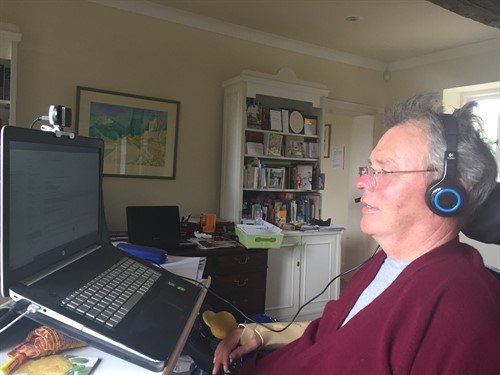
With Smart Nav I can move the cursor around the screen by moving my head; a dot on my glasses is tracked by an infrared camera. It gives me really good control over the cursor and it works well with Dragon voice recognition software. Andrew helped me to operate it initially; at times it felt like learning to type again, and I’m still learning new commands now. I have learnt it can be important to check how accurately Dragon has taken down your words. There was a period when I began to receive rather strange emails back from close friends. On re-reading emails that I had sent out, where I had dictated “XXX”, Dragon had written “expect sex”!
With these tools, I am able to read and write emails and do everything I need to on my computer. It’s meant I can continue my work as a Non-Executive Director Search Consultant. I run my own business, mostly working from home, but with a staff of seven.
Assistive Technology has been a life-saver; it’s meant I can get back to work at a time when I suspect otherwise things would have been very difficult. It also allows me to read books independently and do everything else we all use computers for. The only limitation I have is how long I can sit in front of a screen.
I’ve always loved animals. Back home in Lithuania, my house was filled with cats, dogs, rabbits, spiders and snakes! I’ve always wanted to be a veterinary surgeon even from a small child; my first job was working with horses.
At the time of my accident, I was on my way to meet my boyfriend when I was hit by a car. It left me with no use of my legs and small movement in my hands and neck. Due to my experience working with animals, I understood what it was to have a spinal cord injury. I was familiar with what it looked like to have this type of injury. Most of the time, we would put the animal to sleep if this happened. My first reaction when I found out that I was now paralysed was to get on with it. I needed to deal with this new situation and face it.
I was in hospital for about six months and transferred to Stanmore as soon as I was stabilised. Whilst I was in Stanmore, my Occupational Therapy team introduced me to the Aspire’s Assistive Technology Programme. I wanted to be able to use a computer; I wanted to be able to do something by myself.
Andrew, Aspire’s Assistive Technology Manager, showed me how to use a SmartNav and Dragon. I found SmartNav quite interesting. I was able to control a mouse using my head. When I first tried it felt like something out of a science fiction movie. After a couple of sessions, I was able get to grips with it pretty quickly. The equipment plus a laptop was left with me inbetween sessions so I was able to do lots of practice on my own. I was quickly using it to communicate with my friends, read and send emails. Andrew also showed me a program where I was also able to try drawing using the computer. It made me realise how many tools were actually out there.
I knew that when I finally got out of hospital and home, I would want the same set up. Whilst I waited for it to arrive, I used the EVA Facial mouse which I also tried with Andrew whilst I was in hospital. This uses my facial expressions to operate my computer. I’ve now got a SmartNav at home and with it I’m able to communicate with friends and family, use Facebook, email.
I’ve also been able to do some online training as well. I don’t think I will ever be able to go back to being a veterinarian surgeon but it will always be an interest of mine.
Fife College were successful in obtaining a grant from the Karten Trust at the start of the academic year in 2018. As part of this the college were awarded funding for a number of pieces of assistive technology to support students with additional support needs, these included laptops, digital recorders, C-Pen readers, Pearl Camera and assistive software such as Brain in Hand, JAWS and Sonocent.
This equipment was received and distributed to the Student Learning Hubs on each of the Fife College campuses to ensure that all students had the opportunity to access the equipment. Sonocent was rolled out over all campus computers and 6 students were identified to be part of the Brain in Hand Pilot. The College’s Assistive Technologist attended the Brain in Hand training and is now one of only 2 BiH trainers based in Scotland’s Colleges.
Case Studies
Brain in Hand
Student A – Beauty TherapyThe Inclusion Team were introduced to Student A after she had a severe anxiety attack at College after a misunderstanding in class which resulted in her being referred to an emergency psychiatrist for immediate treatment. Student A had previously been managing to cope with her anxiety levels within the college environment and had not required additional support.
Student A was then introduced to the College’s Assistive Technologist, Michele, who initially met with the student and her father to demonstrate Brain in Hand and how this would benefit her. The organisation, planning and both the traffic light response and the alert system allowing the system to contact her traffic light responder directly was met with enthusiasm.
Brain in Hand allows the user to input situations that they find difficult to cope with and break them down into exactly why they find these difficult. Then, there is a conversation about what has helped or hindered them in the difficult circumstances in the past and what they feel will be useful in the future. This makes it completely personal to the student’s own circumstances.
In this instance, Student A was ready to leave her course. Student A had previously been at another college and had had to leave before completion by recommendation of her Psychiatrist. Student A was determined to try her best to stay and complete the course.
In order to become proficient with BiH Student A received three training sessions with Michele, each of these lasting between two to three hours, and with support of her parents has been able to utilise this tool.
Student A is now very competent at adding details of her day to day life in and out of college. She has her daily routine from waking up, through meal times and her bed time and medication routine, along with any parts she finds difficult and how she can overcome them.
Student A also has her timetable for college embedded in Brain in Hand and if there are any parts of the daily college routine she finds difficult; she has easy access to the solutions. These include hyperlinks which will put her straight into contact with college staff and to her parent’s phone.
Student A also has travel links and external agencies contacts with whom she works with outside college saved within the Brain in Hand app.
Student A feels that by using Brain in Hand, it has given her the confidence to manage her life inside and outside college, including things such as keeping track of homework and when assessments are due and also to manage any disputes that may occur within her college day.
Student A states that having this support and the continued support from Michele has ensured that she has been able to remain on her course as it has provided her a helpful way to manage many situations that she previously would not have coped with. This has also led to a reduction in calls to NHS Direct when she is feeling as though she cannot cope and stopped her reaching this point by allowing early intervention and self-managing difficult situations that she would have previously found impossible.
Student B – Drama and Theatre Studies
Student B has recently completed their HND with the support of Brain in Hand, when in the course of carrying out DSA Needs Assessment, the assessor sought advice from the College’s Assistive Technologist to assess whether Brain in Hand would be an appropriate recommendation to the challenges that the student faced due to their Autistic Spectrum Condition.
Previously, Student B would leave any situation that they felt uncomfortable in, this regularly included walking out of classes, distraught, if they did not understand what was being expected from them. This often led to them leaving college from the day and heading straight home, or having loud outbursts in public areas of the college.
Michele initially met with the student and one of their parents to demonstrate Brain in Hand and what it could help with. The organisation, planning and both the traffic light response and the alert system allowing the system to contact their traffic light responder directly was met with cautious interest.
Brain in Hand allows the user to put in situations they find difficult and break them down into exactly why they find these difficult. Then there is a conversation about what has helped or hindered them in the difficult circumstances in the past and what they feel will be useful in the future. This makes it completely personal to the student’s own circumstances.
In this instance the student was ready to leave their course and had previously faced disciplinary action due to the outbursts and swearing at members of staff.
Student B had three training sessions with Michele on the use and benefits of Brain in Hand. The National Autistic Society was chosen as the most appropriate provider to provide the traffic light response.
Student B is now very competent at adding details of their day to day life in and out of college. They have added every aspect of college life, from class timetables to lunch and break times, they have embedded links to parent’s phone numbers, links to staff emails, phone numbers to contact the college if their bus is running late, a link that leads to their bus route online and to the transport provider’s website which shows if there are any issues with the particular bus service the student uses. They also add in their homework and any assessments or exams and the times they intend using to study or carry out the homework provided. They have included any difficulties they have had previously and how they feel they can be best resolved, including a number of solutions for each scenario. They add in any difficulties they face with the appropriate contacts, which allows them to confidently feel they can face most events.
This has led to Student B having less disruptive outbursts and feeling safer and happier in the college environment and it to be less confusing if there are unexpected changes or events. Simply as they have had in their phone what they should do.
They also use it for unusual events out with the normal routine externally to college, with things such as family weddings and holidays being added in to help them with the disruption to routine and after discussion with family to know what to expect in advance. In terms of retention it has, according to the student, helped them come into college and no longer want to leave.
C-Pen
Student C
Student C has Dyslexia and struggles with all aspects of reading, retaining information and writing. She has been at college for 2 years however the first courses were both practical and had very little written coursework, this has now increased significantly since starting a level 6 course.
Student C approached Inclusion during her first week as she was unable to read any of the notes that she had been given by her lecturer and needed someone to go through this with her. Student C had regular study support and a reader/scribe in all her theory classes but she was struggling as she was unable to work at home as there was no support available and craved independence. After meeting with the Lead Adviser to express her worries Student C was shown the C-Pen Reader, this was met with a great deal of enthusiasm. Student C trialled this in several of her classes and found that she was quickly relying on this, she was able to become a more independent learner in class and this, in conjunction with the other Assistive Technology she was introduced to, helped to build her confidence in learning and personal human support was able to be minimised to assessments only. Student C passed her course and is now looking forward to starting an HNC in the new academic year.
C-Pen
Class FAB
Within the Fabrication and Welding classes there are a group of 6 students all with reading difficulties that benefit from having shared support in classes by an Inclusion Assistant. However, she was unable to support all students at the same time, the students in this class all benefited from borrowing C-Pen Readers and Digital recorders. They were able to work independently while waiting on 1-1 support from their class lecturers or the Inclusion Assistant, after classes these students would then have study support to show them how to turn their recorded notes into suitable formats to aid with recall and revision.
Sonocent
Student D
Student D was really struggling keeping up with note taking in class. They found when they went home in the evening and tried to study for assessments, they were lacking a lot of the information on paper and key things they knew had been mentioned repeatedly. They had a diagnosis of dyslexia and anxiety, this in turn increased their anxiety.
By being trained on Sonocent Audio Notetaker, this meant they could just type in key points in the text area and listen back to the recording of the class. As time increased and they became more familiar with the software they managed to colour code the audio recordings of their lectures. This meant they were able to listen back to the information and write or type out any parts they felt were necessary.
This increased their confidence and they were able to take part in class discussions, whereas previously they were just trying to keep up with the notetaking and concentrating solely on that in class. It also meant they had all the notes from their classes for each day, in an organised system which was easily accessible.
They were able to easily access the information they required to study, meaning as well as a decrease in anxiety they were able to keep up to date with homework and this all has reduced their anxiety.
The Support Centre for students with disabilities in the Centre for
Academic Equality and Inclusion at Ono academic college (OAC), strive to
provide universal technological accommodation based on Universal Design for
Learning (UDL) principles, while maintaining a strong commitment to providing
students with personal accommodations. The generous fund by the “Ian
Karten Charitable Trust” in October 2018, enabled OAC to provide an
improved learning environment for a large scope of students with disabilities.
The improvements included:
Acoustic
improvements in the support centers’ main office, study rooms and technology
room.
Improved sound
systems in 14 lecture halls.
Hearing loop
systems in 6 lecture halls.
Hearing loop
system in 8 service stations.
The devices were installed in two campuses of OAC.
The acoustic adjustments affected the organization at three levels:
(i) Direct impact on staff and students; (ii) Increased awareness to students
with disabilities and accessibility; (iii) Prioritization of accessibility at management
level. Below are two case studies which reflect the impact.
Case studies
“Aisha”
“Aisha”, age 35, is a first-year Management MA student. She has a
hearing disability caused by a bacterial infection which erupted at age 31. She
uses a hearing aid and, in some cases, needs transcription of lectures.
During the registration process it was important for “Aisha” to
understand what supports are available on campus to aid her hearing disability.
The fact that OAC had lecturer halls with acoustic improvements and with
Hearing loop systems convinced her to register and start studying in our
institution.
“Aisha” class was assigned to study in lecture halls with hearing
loops and in the acoustic lecture halls. To hear clearly in the acoustic lecture
halls, she used a personal FM hearing loop from the technology room. In the
courses where she needed transcription, the lecturer used an automatic
transcription application. The quality of the sound system and especially the
microphones made the transcription more accurate and useful for “Aisha”.
We were glad to discover that “Aisha”
finished her first semester with excellent grades. She also reported high
levels of satisfaction from her learning experience and participation and
especially her ability to take part in class discussions. This year, there are
two more students with hearing disabilities that started learning at OAC following
on her recommendation.
“Michael”
“Michael”, age 43, is a second-year B.Ed. student. He has a paralyzed hand and PTSD – Post traumatic stress disorder, both due to an accident at work. Until the accident “Michael” worked as a coffee machine installer, the accident led him to stop working and begin a long process of rehabilitation. As part of the rehabilitation he decided to turn to academic studies and fulfill an old dream – gain academic education and become an educator.
“Michael” approached the students support center during the first
week of the academic year. He reported that he is very distracted during the
classes. Because of the PTSD, he feels more comfortable sitting in the back of
the hall, and has trouble hearing and understanding the lecturers. Also, he
reported that he has difficulties in using the support center. He felt
uncomfortable sharing personal information with the consultants and didn’t use
the study rooms and technology room because he couldn’t detach himself from the
background noises and focus on the conversation and on learning.
After the installation of the equipment in the second semester of the year, we made sure that “Michael” will study in the acoustic halls. We also updated him about the improvements that were made in the support center and encouraged him to come and study there. “Michael” reported a significant improvement in his learning experience in the lecture halls and in the support center. Before the renovation in the lecture halls, “Michael” almost didn’t attend courses because he felt insufficient while sitting there, and now his attendance has increased. He reports that he can now be in the classroom, sit in the back, hear and understand the lecturers and gain greater understanding of the learning material. Furthermore, “Michael” started studying in the support center. He uses the study rooms and the technology room, where he mostly summarizes study materials using concept-maps applications. His increased presence in the support center enabled a significate professional accompaniment that included personal conversations together with academic mentoring.
A pilot study of automatic transcription in the
classroom
Automatic transcription application is a relatively new development
that had become more and more common in recent years for free personal use in
apps on the smartphones, tablets and computers. Actually, it is known also as
voice recognition software. These transcription programs convert speech into
text transcripts for use in other applications.
In the field of Assistive Technology, we all know the Dragon
Dictation which was one of the first software that had been developed by Nauace
more than 20 years ago, however unfortunately until about five years ago it had
no Hebrew support.
During the last year in the OAC, we carried out a pilot study
trying to use Automatic transcription in the classroom during online lectures
for students with hearing disabilities (like Aisha, who is described above) and
for students with dysgraphia who can’t take notes during the lecture. The
lecturer uses a wireless microphone (which is a part of the sound system) that
connect to a computer with Automatic transcription software, and the lecture is
transcribed online to a word document. We had tried two types of automatic
software – “Koldan” and an internet free software base on google
speech to text engine (https://speechnotes.co/).
The pilot study showed us that voice recognition software are not yet performing at the same level as human transcriptionists, it depends on the quality of the microphones, and the accuracy in Hebrew, which is still not good enough, therefore the transcribed output needs editing. We continue with this pilot because we know that the technology is improving by frequency of using and in some cases, it might be cost effective for the students
Summary
In this article we have demonstrate the technological and
environmental adjustments for Students with Hearing Disabilities and for
Students with Cognitive Disabilities at the Ono Academic College that were
implemented thanks to the generous contribution by the “Ian Karten
Charitable Trust”. The use of acoustic adjustments were presented in two
case studies and in addition a short report of a pilot study about Automatic
transcription in the classroom that has been used for students with dysgraphia.
In the future we would like to expand implementation of adjustments and
automatic transcription to all campuses of OAC and to purchase more
technologies, which can improve the studying experience and the accessibility
of learning materials to a wider range of students with disabilities.
“Technology is the tool to help achieve goals, it’s not the goal itself.” (From C Sutherland workshop VIEW Conference 2019)
Recently, we have been considering the details of the proposed new Ofsted inspection framework, in particular, the Quality of Education and in this article, I thought it would be interesting to reflect on how working in our two new Technology Hubs is enabling students to achieve their goals by looking at the:
Intent
Implementation
Impact
Intent
When we
applied for the Karten Network grant the intention was to develop an innovative
way for the College to use technology, to enhance the curriculum and encourage
all students to embrace technology in order to prepare them for as fulfilling
an adult life as possible by maximising their independence. The use of technology was the tool for
students to achieve their vocational and living goals and included skills to
move into employment, voluntary work, mainstream education or active
involvement in community activities. We
wanted more students to use the equipment and technology in order to develop
skills that they can take away to use in their lives outside college.
Implementation
At
RNIB College Loughborough we have now had our Media and Sight Loss Hubs up and
running for 5 months, and we have been rather busy.
The equipment that was
purchased for the Sight Loss Hub is out with students. In fact, the cabinet that holds the equipment
is practically empty, which is positive.
The Enterprises have access to
iPhones and iPads, and the Microsoft Seeing AI app is being used to help
several students with sight loss read labels and prices, thereby making them
more independent. One of the iPhones is currently being used by a Sports
Massage student. He uses the Microsoft
Seeing AI, as well as other accessibility features on the iPhone, as a note
taker, to complete client forms and to remind him when his assignments are due.
The Samsung Synapptic phones and tablets
are being used by three students, on work placement to access telephone numbers
and to help them in their studies.
Students and staff in the
Sight Loss hub have been involved in 25 different projects where the technology
was demonstrated and participants were able to try out the range of equipment
or talk to students and staff about the access technology. These projects have ranged from designing
accessible games to looking at the built environment for people with sight
loss. We have helped to design make up,
looked at tactile outdoor spaces, tested different textiles and worked with three
local schools to help them design a VI friendly product for a competition run
by a local business.
“Thank you for letting the students visit the RNIB yesterday they told me they had a really great time and the visit has really helped them focus their designs for the Viztech challenge.” (Quote from school visitors)
We have also delivered training
a number of times to FE Colleges and to local businesses, including sharing
knowledge and expertise with colleagues from another Karten Network member in
Manchester. The Sight Loss Hub is
currently working with a PhD student who is doing research on the use of
technology for those with sight loss.
The most popular and useful
piece of technology seems to be the Orcam and Microsoft Seeing AI – and it is
good to be able to show both ends of the budget and compare the two.
In the Media Hub we are currently
working on setting up YouTube reviews of equipment for people with sight
loss. The films will demonstrate how to
use different access technology and provide a review of the product. This group of students are independently
working on this project called VI-Zards and hopefully these films will soon be
available on YouTube. Our other projects
include adverts for the Enterprises, a film explaining what steps the College
has taken to be more environmentally and a film that shows the amount of sugar
in different drinks. We are hoping to
launch the film with a blind taste test of a popular soft drink. We are also working on our second podcast and
have created our second half termly newsletter entitled Eye Opener.
The Media Hub has also been
asked to create a film for Leicestershire Police on how the Emergency Services
deal with people with Autism. We have
made this film using simple drawings and will be showing the film at a meeting
at Leicestershire Police HQ. This has
been a very exciting project for us.
We recently had a University Film
and Media student (Izzy) in for half a term work placement. Izzy worked with our students and created a
RNIB College Promotional film that is currently playing in our Reception area. We have also had students from the local FE
College in for work placement in the Media Hub.
“I did a 10-week placement with the RNIB College in Loughborough every Wednesday. I was involved in teaching, guiding and assisting the students with media work, including photography, filming, editing and script-writing. It was an enjoyable but intense task. I was working with two groups and we produced a promotional film for the College and I also assisted with a stop motion film.” (Quote from Izzy C)
Impact
Case studies
Jacob (Kuba) M
Kuba has been our most
prolific Sight Loss Hub technology user. Kuba is studying Animal Care and has sight
loss. He currently uses the Orcam My Eye
Reader, iLoview portable video magnifier and the Samsung tablet with Synapptic
software. Kuba is part of the Media Hub
team working on the VI-Zards VI technology reviews.
“Technology at RNIB College to help visually impaired people is amazing. It is very easy to use and helps me a lot, especially with reading. During my time at RNIB Loughborough I have had opportunities to use different types of equipment, for example the Orcam version 8. This has helped me access a lot of written materials I would otherwise not have been able to access. Also, the Orcam is very small, attaches to my glasses and is hands-free. I even used it at the National History Museum in London and it read the descriptions of the exhibits to me.
My other favourite piece of technology is Synapptic software on the College tablet. It is good because it transforms the tablet into a visually impaired friendly one, which enlarges all the icons and reads stuff out for you. It has helped me not only at RNIB but also at my other College.
Being at RNIB has given me some really good opportunities for learning Braille. I have learnt how to use a Perkins keyboard which is used to write in Braille.
I have really enjoyed trying these different things and they have really helped me.” (Jacob Kuba M)
Niah D
Niah works on Reception in a large local company and uses the magnifier on the Synapptic mobile phone to assist her in making calls, booking flights and other administration duties. Niah is planning to move on to our Supported Internship Programme next year to work in the same work place as she has done so well.
“Some of the numbers in the Reception staff extension booklet are a bit smaller but I use the phone magnifier to read the numbers so that I can make phone calls.” (Niah D)
Erin R
Erin is in her second year and
is studying Creative Arts in the local FE College. Erin was a reluctant technology user but she
has started to use the Synapptic tablet.
She now uses it to write notes, memos and email her family.
“When I started using the tablet I was a bit nervous. I like using it now and it makes me laugh. I write jokes on it on notepad, I take photographs of different things – like I made jam coconut buns and took photos of them. I email my mum and auntie. At the end, once I’ve learned it I find it easy.” (Erin R)
Laura S
Laura has worked in the Media
Hub since the start of the year. She has
progressed from film crew and has now been the Director for our Internet Safety
Film and some of the adverts. She will
also be Directing the VI-zards films. Laura
has been very pro-active when working on the different films and has led a
small group of students when filming, telling them what to do and completing
shot lists. Laura has gained a lot of
confidence to take a lead role in the session.
“I like working on the films and being the Director. I am good at telling the others what to do and I like going out and making the films. I did the Internet Safety film – I was the director and used the iPad to film. I also was acting in the film. The films we have made are good.” (Laura S)
The overall impact of the
Karten Network grant at RNIB College Loughborough has been substantial.
“We are delighted with the impact the Media and Sight Loss Hubs have made in such a short time. Our students are really enjoying using the equipment and we can already see the difference it is making to their lives.” (June Murray, Principal)
We use cookies on our website to give you the most relevant experience by remembering your preferences and repeat visits. By clicking “Accept All”, you consent to the use of ALL the cookies. However, you may visit "Cookie Settings" to provide a controlled consent.
This website uses cookies to improve your experience while you navigate through the website. Out of these, the cookies that are categorized as necessary are stored on your browser as they are essential for the working of basic functionalities of the website. We also use third-party cookies that help us analyze and understand how you use this website. These cookies will be stored in your browser only with your consent. You also have the option to opt-out of these cookies. But opting out of some of these cookies may affect your browsing experience.
Necessary cookies are absolutely essential for the website to function properly. These cookies ensure basic functionalities and security features of the website, anonymously.
Cookie
Duration
Description
cookielawinfo-checkbox-analytics
11 months
This cookie is set by GDPR Cookie Consent plugin. The cookie is used to store the user consent for the cookies in the category "Analytics".
cookielawinfo-checkbox-functional
11 months
The cookie is set by GDPR cookie consent to record the user consent for the cookies in the category "Functional".
cookielawinfo-checkbox-necessary
11 months
This cookie is set by GDPR Cookie Consent plugin. The cookies is used to store the user consent for the cookies in the category "Necessary".
cookielawinfo-checkbox-others
11 months
This cookie is set by GDPR Cookie Consent plugin. The cookie is used to store the user consent for the cookies in the category "Other.
cookielawinfo-checkbox-performance
11 months
This cookie is set by GDPR Cookie Consent plugin. The cookie is used to store the user consent for the cookies in the category "Performance".
viewed_cookie_policy
11 months
The cookie is set by the GDPR Cookie Consent plugin and is used to store whether or not user has consented to the use of cookies. It does not store any personal data.
Functional cookies help to perform certain functionalities like sharing the content of the website on social media platforms, collect feedbacks, and other third-party features.
Performance cookies are used to understand and analyze the key performance indexes of the website which helps in delivering a better user experience for the visitors.
Analytical cookies are used to understand how visitors interact with the website. These cookies help provide information on metrics the number of visitors, bounce rate, traffic source, etc.
Advertisement cookies are used to provide visitors with relevant ads and marketing campaigns. These cookies track visitors across websites and collect information to provide customized ads.