
Stuart Beveridge, the Assistive Technology Trainer at seescape has provided an expert review of the following products.
Victor Reader Trek

Last November, the company Humanware released their latest product called the Victor Reader Trek. This is a combination of two of Humanware’s most popular products, the Victor Reader Stream and the Trekker Breeze. The product is basically an audiobook player and GPS system compacted into one small and easy to use device. There is so much more to this product though as it can also be used to play podcasts, listen to radio stations and record voice memos. To put it simply, it is an entertainment and navigation system, all rolled into one. It is small enough to actually fit into a jacket pocket and can be operated one handed. This is made possible because of buttons which are all differently shaped and have easy to distinguish tactile markings which make them easy to locate by touch alone. The trek also has built-in bluetooth which means you can pair it with a set of bluetooth headphones for ease of use. In addition, the trek has an update feature which means that it is almost certainly a future proof device as additional content can be added in the coming years. There will also be frequent map updates, so that you have the latest information about your surrounding area curtesy of the TomTom map system which is fully supported within the device.
How does Victor Reader Trek work?
The victor Reader Trek has three different modes which you can switch between at the touch of one button. These modes are:
- Offline bookshelf mode,
- Online bookshelf mode and orientation mode.
- Offline bookshelf
Within this mode you are able to listen to audiobooks, daisy and other forms of text books which you can load onto the Trek via an sd card. This mode also allows you to record voice notes such as memos, shopping lists and can even in some cases be used to record lectures if you are a student.
Online mode
Within this mode, you can listen to radio stations through the internet, download and play podcasts, search wikipedia for facts and update the product to the latest version.
Orientation mode
This is the GPS orientation system. You would use this mode when travelling either on foot or by vehicle. When in this mode you are kept up to date about your current surroundings. Streets, interesting locations around you and a detailed description of upcoming intersections are all announced. There is also a fantastic feature which allows you to landmark areas which are important to you and when you approach them in the future, they are announced to you. You are also able to plan and get turn by turn instructions for speciffic roots both when in a vehicle or when walking.
Please note that the orientation mode should be used alongside another mobility aid such as a cane or guide dog.
First impressions
I have been using this product now for around serveral months and am really enjoying almost all of it’s features. I think it’s main appeal for me is the fact that you can easily toggle between the three different modes at the press of a button. This means that the potential of the product is huge because while you are using public transport, you can be listening to an audiobook or podcast while at the same time have full knowledge of the streets around you at all times. The fact that the product also supports bluetooth means that you can also use bone conducting (aftershock) headphones, which means that your ears are completely free to focus on traffic when crossing roads. The battery life of the product is also much better than expected.
Price
The Victor Reader Trek currently retails at £545. If you would also like to purchas the Trekz Titanium Aftershock Headphones, which are also supplied by Humanware and come highly recommended, they are an additional £80.
Dyson 360 Eye
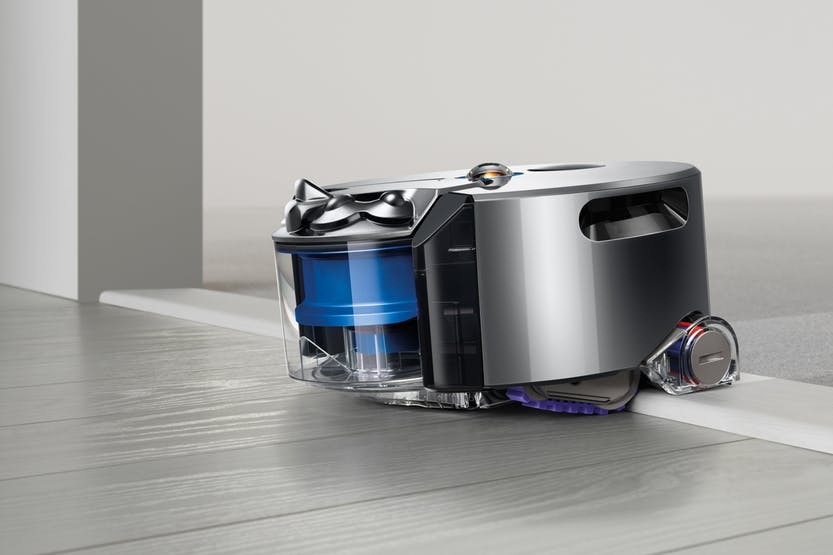
Tired of hoovering every day or missing chunks of dirt, dust and possibly other mess such as pet hair? I certainly was, and solved this solution by purchasing a Dyson 360 Eye robot vacuum cleaner.
This self-navigating dirt destroyer is designed to clean every floor of your house at the simple touch of a button. It’s powerful enough to clean well on all floor types and surfaces, smart enough to navigate efficiently from room to room on one level and simple enough for anyone to use. Setting it up is also a breeze. Just plug in the pleasingly small and discreet charger/docking station, place.
The already assembled robot hoover on it and, when it’s charged, hit the button on its top to start cleaning. It’s as simple as that. Note that for best results you do need to make sure your floors are tidy, but if there is enough room for the robot to successfully navigate, you have nothing to worry about.
So how does it work?
The Dyson Eye 360 is small, compact and runs on rubber tracks rather than wheels. It gets its name from the tiny 360-degree camera which sits on top and it’s this camera that is the key.
Essentially, it means that the hoover can see in every direction simultaneously, which helps it to not only map out where it’s going, but also to avoid obstacles. It still bumps into things now and again, particularly items below its camera line, but the Dyson knows where it’s going in relation to where it’s been.
In terms of its approach to cleaning, it’s methodical, calculating and efficient meaning that it covers as much of your floors as possible. It picks its starting point and slowly works its way outwards in squares, each time overlapping a little with its previous path so it doesn’t miss anything. The fascinating thing about it is that when it is running out of charge, it goes back to its docking station, recharges, and then remembers all of the places it had previously cleaned and just carries on hoovering the rest of the house. There’s really no limit to where the robot can clean, just close your doors on any of the rooms you don’t want it to go and they will be avoided.
The Dyson Link app
You also have the ability to connect your Dyson robot to an app on your smart phone. The app which is fully accessible for iPhone users,
Allows you to use your phone to perform useful features. At the point of writing this article, the app is also available for Android users however I have been unable to thoroughly test it so am unsure how accessible it actually is with the TalkBack screen reader. The app allows you to start and end cleaning sessions remotely, control the cleaning schedule, and view what your robot did in each session. That’s it.
Let’s finally discuss how I feel it performs and give my conclusion.
I send the 360 Eye out every day before I leave the house for work. It cleans the whole of my one bedroom bungalow meticulously covering every available space. The one drawback of it is that it doesn’t clean skirting boards, so you will still need a manual hoover of some description, but on the whole, my life is made so much easier with the Dyson robot in it. Another small consideration is the 360 Eye works best in daylight or decent artificial light. Since it relies on a camera to navigate, the Dyson is more sensitive to changes in lighting as it cleans. It has two infrared “headlights” to help combat low-light areas, but it still works best when it can see clearly.
Now for the “big but”, price. Eight hundred pounds is a lot to spend on anything. However, the benefits out way the cost. It is, without doubt, a luxury. But it delivers and does so with minimum fuss and from my point of view is life changing.
In Your Pocket
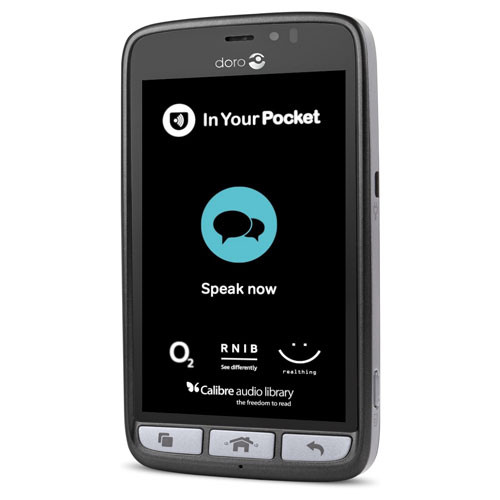
In February this year we acquired a new gadget which is ideal for anyone who struggles to use either push button or touch screen mobile phones. The In Your Pocket is a fully Voice Activated mobile phone which allows you to make and answer phone calls, send and read text messages, create contacts, listen to newspapers and audiobooks, get weather information, tell the time, hear your current location and streets around you and much more. All of this is achieved entirely by using your voice. This is a solution for anyone who would just like technology that is simple and easy to use with hardly any learning required.
How it works
The phone is operated by simply pressing a tactile button found at the bottom of the screen. After you press the button, you simply speak to the phone naturally and give it a command. So for example, some basic voice commands include:
Phone Seescape”, “send a text message to Stuart”, “create a new contact”, “What is the date”, “read the Guardian, “what is the weather forecast”, “Where am I”etc.
Pricing
The In Your Pocket runs exclusively on the O2 network and if you purchase the phone you would be subscribing to a fixed contract over two years at £22 per month. This price plan gives you three GB of data and unlimited calls and texts to any number. If you run out of mobile data, don’t worry, it will just renew the next month and you will not incur any hidden charges as the price plan is designed so that you will never go over your allowance. Note that you can also connect to Wi-Fi which should save you using a lot of mobile data.
Future plans
Later this year, the developers are planning to add even more features to the phone which will be installed automatically as soon as they become available. These include enhanced weather information, as well as a personal diary function and the ability to set alarms.
OptiGrill
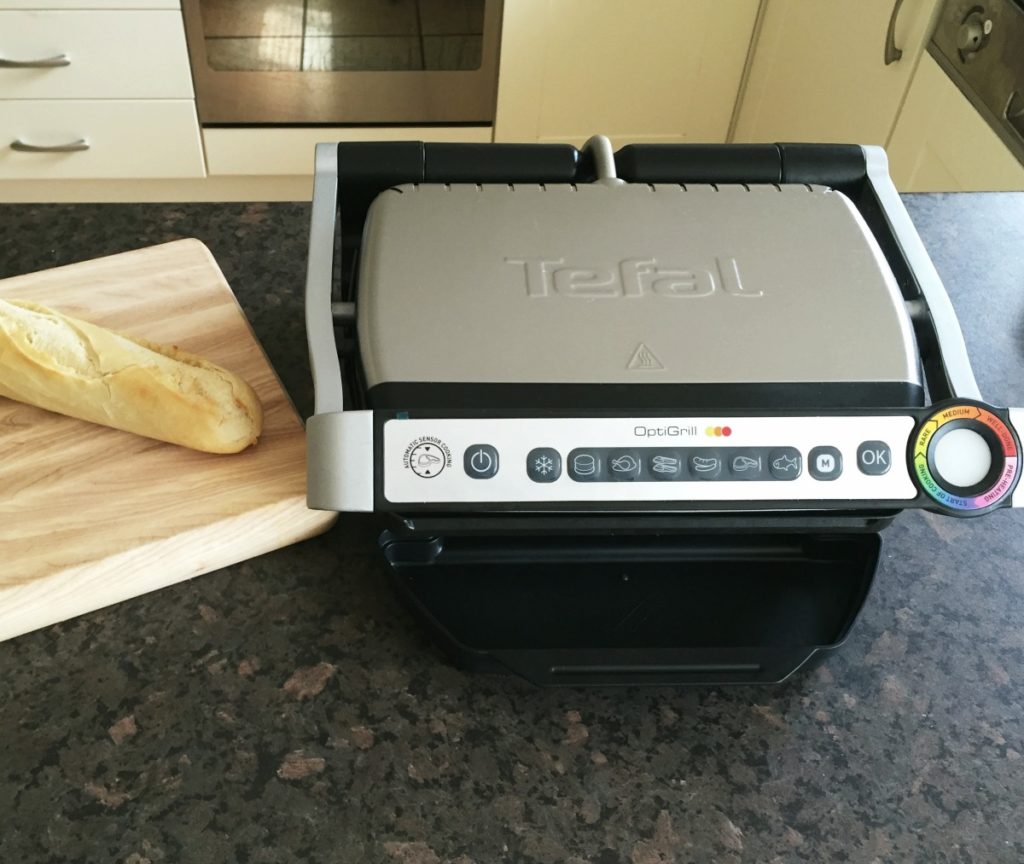
As we are approaching the festive period, I would like to draw your attention to a new gadget I recently bought myself. Using this device, I can now cook confidently and independently without the risk of either burning or under cooking food. This new revolutionary product is the OptiGrill and is made by the company Tefal.
The Tefal OptiGrill is an electrically heated grill similar to the George Foreman grill. However, unlike the George Foreman grill, the OptiGrill is a smart grill! It will cook meat, poltry, fish and even sea food, vegetables and toasted sandwiches. Another great feature of this grill, is that it will also cook food from frozen as well.
How does it work?
The OptiGrill’s controls are found on the handle. From left to right there’s the On/Off button and dedicated programmes for cooking specific food such as defrost, burgers, chicken, bacon, sausage, steak, and fish. There’s also a manual mode and finally an OK button when you are ready to start cooking. Right at the end is the LED cooking indicator that uses different colours of lights to represent stages of the cooking process.
When you open the llid you’ll find the removable non-stick plates. The bottom plate is slightly angled so any grease or oil can run down into the dripping tray, which means healthier eating.
To cook, first turn the grill on and then select the type of food you want to cook. Then press the ok button, and the grill will begin heating up. When it is ready, it will give a series of beeping sounds. You can then lift the lid and place the food on to the grill and then close the lid. Now the magic part, the grill will do the cooking for you. There are sensors inside the grill to measure the weight and the thickness of the food you are cooking. You can cook food to rare, medium and well done standards. The grill will give audible beeps to indicate each cooking stage. Just cook it to your liking.
As I eat a lot of meat and fish, I am loving the OptiGrill. I use it everyday, and the thing I really like is the fact that all the guess work is taken out of cooking. Also, the grill is easy to clean as you can remove the plates and clean them either in the sink or by putting them through the dishwasher. I also love the fact that the food doesn’t dry out. Food such as steak and chicken still retain a lot of their juices and moisture, even when cooked to well done standard. The fact that the device has a massive stick out handle for using to lift the lid is another added bonus. The risk of burning yourself is seriously diminished, although I would advise some caution to begin with.
Price
There are two types of OptiGrill. The small version is priced at £110 and the larger version is currently £120. Depending on your family circumstances, it would be up to you which one you prefer.
Please also note that while we don’t actually have an OptiGrill at our centre, I would be more than happy to discuss this technology with you. Also note that if there is enough interest in this device, we will purchase the OptiGrill to demonstrate to clients at our premises in Wilson Avenue in the future.
Article meta data
Clicking on any of the links in this section will take you to other articles that have been tagged in the same category.
- This article was written by the seescape Karten Centre
- Featured in the Karten Autumn 2019 Newsletter
- This article is listed in the following subject areas: Centre News, Technology