
Alexa Gets Smarter: What You Need to Know About Alexa+

For many of the people we support, Amazon’s Echo devices have long been more than a convenient gadget. The ability to control the home environment, set reminders, play music, or simply ask a question without needing to navigate a touchscreen or keyboard has made Alexa genuinely useful for disabled people, particularly those with physical or communication access needs. So, when Amazon makes a significant change to Alexa, it is worth paying close attention.
In February 2025, Amazon announced Alexa+, a substantially upgraded version of its voice assistant powered by generative artificial intelligence. After a period of early access in the United States, Alexa+ arrived in the United Kingdom on 19 March 2026, making the UK the first European country to receive the upgrade. This article explains what Alexa+ is, what is different about it, how to access it, what devices it runs on, and what it may mean for the people we support.
What Is Alexa+?

The original Alexa, launched in 2014, operated on a command-and-response model. You would ask a specific question or give a specific instruction, and Alexa would respond, or not, depending on whether it recognised the phrasing. It was capable and genuinely useful, but it was also brittle. A slightly different way of asking the same question could yield no result, and there was no sense of continuity between one exchange and the next.
Alexa+ changes this in a fundamental way. It is built on large language models, the same underlying technology behind AI chatbots such as ChatGPT and Google Gemini. Amazon has combined its own Nova AI models with models from Anthropic to power the new assistant. The result is a version of Alexa that can hold a real conversation, understand follow-up questions without needing to repeat the wake word (e.g. “Alexa”), remember context across a session, and retain preferences over time.
If you tell Alexa+ your preferred name, the name of your dog, or that you always want reminders in the morning rather than the evening, it will remember. This kind of persistent, personalised memory is a meaningful shift from the stateless interactions of classic Alexa.
Alexa+ can also take actions on your behalf, in what is sometimes described as agentic behaviour. In the UK, this currently includes actions such as making restaurant reservations through OpenTable, with more partners such as Just Eat and additional services reported to be coming soon. The UK version has also been specifically localised: Amazon trained it on 40 regional dialects and worked to ensure it understands British nuance, vocabulary, and cultural context, rather than simply translating from a US-centric model.
What to Expect in Practice

Two things are immediately noticeable when switching to Alexa+. The first is that the voice has changed slightly. It has a somewhat different quality to the classic Alexa voice, which some people may welcome, and others may find takes some getting used to. For people who have a strong familiarity with the original voice, or who find changes in routine unsettling, it is worth flagging this in advance rather than letting it come as a surprise.
The second, and more practically significant, is a processing delay. Because Alexa+ uses large language models running in the cloud rather than the faster lookup approach of classic Alexa, there is a brief pause after you speak before a response begins. In everyday use this is typically a matter of seconds, but it is long enough to change the rhythm of an interaction. Someone who speaks to Alexa and then hears silence may reasonably assume their request was not heard and repeat it, which can produce a confused or doubled response.
This is worth explaining to the people you support, and to family members or carers who help set up or use the device alongside them. The pause does not mean something has gone wrong; it means Alexa+ is thinking. Once people are aware of it, it becomes much easier to manage. That said, it is a real limitation of the current implementation, and it will be interesting to see whether Amazon is able to reduce latency over time as the service matures.
Accessibility: What Carries Over, and What Is New
It is important to say clearly that the existing accessibility features of Alexa-enabled devices are not being removed. These features, some of which are less well known than they deserve to be, remain available through the device’s settings and continue to provide meaningful support across a range of needs.
For people with limited or no speech, Tap to Alexa allows interaction through on-screen tiles on Echo Show devices, without needing to use voice at all. VoiceView provides a screen reader for Echo Show devices, reading out text and interface elements. Adaptive Listening gives people extra time to finish speaking before Alexa responds, which is particularly useful for anyone whose speech is slower or less consistent. Captioning can display Alexa’s spoken responses as text on screen. For people with visual impairments, options such as screen magnification, colour inversion, and colour correction are available, alongside the Show and Tell feature, which uses the Echo Show’s camera to identify packaged items.
These features are available via Settings > Accessibility on any Echo Show device. Amazon also maintains an Accessibility Hub at amazon.co.uk/alexaaccessibility, which provides an overview of what is available and guidance on setting things up.
What Alexa+ adds on top of this is a conversational intelligence that may make the core experience considerably more useful for many disabled people. For someone who finds rigid command structures difficult, whether because of a cognitive difference, speech variation, or simply the way they naturally communicate, a system that can interpret a wider range of phrasings and follow a natural conversational thread is a practical improvement, not merely a technical one.
I have not tested Alexa+ directly with my own AAC device yet. My observations so far come from watching others use it. On that basis, the more flexible language understanding does appear to make interactions feel less constrained. Whether it performs well specifically with AAC output, or with the kind of atypical speech patterns that some AAC users also have, is a question that deserves further exploration.
A Note on Communal and Shared Settings

Many of the settings Karten Network members work in are not single-user home environments. Alexa devices are used in care homes, day centres, supported living properties, and other communal spaces where multiple people may interact with the same device. Alexa+ introduces some considerations that are worth thinking through in these contexts.
The personalisation and memory features of Alexa+ are designed around an individual user tied to an Amazon account. In a shared setting, this raises practical questions: whose preferences does the device learn? How does the device handle different people asking for different things? And is it appropriate for a shared device to retain personal information about multiple individuals, particularly where some of those individuals may have limited capacity to understand or consent to data being stored?
These are not reasons to avoid Alexa+ in communal settings, but they are reasons to think carefully about how devices are configured and what account and privacy settings are applied. Classic Alexa’s stateless approach, with no memory and no personalisation, was in some ways better suited to shared use. It will be interesting to see whether Amazon develops specific guidance or configuration options for multi-user and care environments as Alexa+ matures.
Cost and How to Access It
Alexa+ costs £19.99 per month as a standalone subscription. However, it is included at no extra cost for Amazon Prime members, and Prime itself costs £8.99 per month or £95 per year. If someone you support is already a Prime subscriber, Alexa+ is effectively already available to them.
During the current Early Access period, Alexa+ is free for all users, including those without a Prime membership, though Amazon has not confirmed how long this period will last.
To access Alexa+ in the UK, there are currently two routes. If you purchase one of the new compatible Echo devices, including the Echo Dot Max, Echo Studio (2025), Echo Show 8 (4th generation) or Echo Show 11, Early Access is granted automatically. If you already own a compatible device, you can register your interest at www.amazon.co.uk/newalexa and wait for an invitation. Amazon has indicated that a web browser version of Alexa+ is also coming, though no specific date has been confirmed for that.
Which Devices Are Compatible?
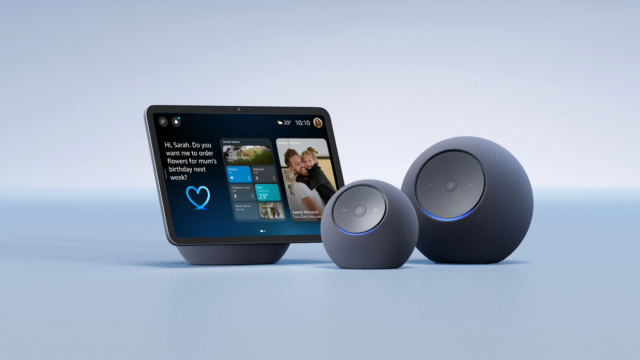
Amazon says Alexa+ will work on most Echo devices. That is broadly reassuring for people who already have Echo hardware. Alexa+ is available on recent Echo smart speakers, Echo Show smart displays, and compatible Fire TV devices. Fire tablet support has been confirmed for the US version of Alexa+ but has not been announced for the UK launch at this stage.
However, older devices are excluded. The first-generation Echo Dot, original Echo Spot, first and second-generation Echo Show displays, and the discontinued Amazon Tap will not receive Alexa+. These devices may continue to function for basic voice commands and music, but they will not benefit from the new AI capabilities and are unlikely to receive further software updates.
It is also worth noting that some features may arrive on different devices at different times as the rollout continues.
If you are unsure whether a specific device is compatible, the most reliable check is Amazon’s own compatibility page, or, if the device is already registered to an Amazon account, checking the Settings menu for an update prompt or Early Access notification.
A Few Things to Consider
Alexa+ raises some questions that are worth thinking through, particularly for practitioners supporting people in care or residential settings.
The first is privacy. Alexa+ requires a persistent internet connection, and Amazon ended its limited local voice-processing option on supported Echo devices in March 2025. The assistant retains memory of past conversations and stated preferences. For many people, this personalisation is the point: the more Alexa+ knows about someone, the more useful it can become. But it also means that more personal data is being held and processed by Amazon. It is worth discussing with people and their families or support teams what they are comfortable with and ensuring that any device is set up with clear account controls.
The second is the question of access and cost. The free Prime inclusion is genuinely helpful, and the Early Access free period extends that further. But for people on lower incomes, or those who are not already within Amazon’s ecosystem, £19.99 a month is not a trivial sum. It will be interesting to see whether Amazon introduces any concessions for people with disabilities or those receiving benefits, as has happened with other subscription services.
Finally, it is worth keeping expectations measured. Early reviews of Alexa+ have been generally positive, and the improvements in conversational intelligence are real. But it is a service that is still developing, and not every feature is fully available yet.
As always, I am keen to hear how you are using Alexa+, or classic Alexa, in your setting, and whether the upgrade makes a meaningful difference to the people you support. I am particularly interested to hear from anyone who has tried Alexa+ with AAC devices or in communal care environments. If you would like a particular topic covered in the next newsletter, please let me know. Finally, please feel free to contact me if you have a question or need technical help and support.
Article meta data
Clicking on any of the links in this section will take you to other articles that have been tagged in the same category.
- Featured in the Karten Spring 2026 Newsletter
- This article is listed in the following subject areas: Technology, Update from Technology Advisor