
As the mobile technology advisor for the Karten Network, I strive to support and assist Karten Centres and members of the Karten Network with their mobile technology. Recently while providing support to one centre I became aware that a feature within iOS could reduce Apple devices to expensive paperweights.
In iOS 7 Apple introduced Activation Lock (sometimes referred to as “iCloud lock”). This was developed in response to the US Smartphone Theft Prevention Act of 2015. This legislation, in an attempt to discourage smartphone theft, requires device manufacturers to implement an aptly named “kill switch”; allowing device users to remotely wipe and lock devices. Further changes to California law resulted in Activation Lock being enabled by default in iOS 8 or later.

Activation Lock forms part of a larger protection system typically referred to as Factory Reset Protection (FRP), and most notably the native iOS app “Find my iPhone” Find my iPad”, “Find my iPod”… in fact most Apple products can be included in this system.
Activation Lock, as well as being a deterrent by making stolen devices useless, aims to keep your device secure, even if it’s lost or stolen, and Find my iDevice, can improve your chances of recovering it. Even if you use the system to erase your device remotely.
Activation Lock works by registering your device on Apple’s activation servers and linking it to your Apple ID when you turn on Find my iDevice (e.g. Find My iPhone).
From this point on, the device is automatically protected and will require either the device’s passcode or your Apple ID password to disable Activation Lock. Even if the device is reset to its factory default using DFU (Device Firmware Update) mode – this can be used to reset the passcode, the device still won’t be able to be reactivated and used without first removing the Activation Lock.
Earlier versions of Activation Lock had some vulnerabilities that could be exploited to bypass Activation lock. However, these have been fixed by Apple making the system very good at what it is designed to do – prevent someone else from ever using your device. This within the context of a lot of Karten Centres creates a potential problem, particularly where devices are set up by one member of staff using their iTunes (Apple ID) account and then leaving the organisation. These devices can’t then be added to a mobile device management system (MDM) as they are locked to the person’s Apple ID. Typically what then happens is either to update the device or remove a passcode the device is reset using DFU mode and gets stuck in the Activate device loop.
While there are online services that claim to be able to remove Activation Lock, these can be unreliable and not recommended, not to mention expensive. Currently, the only reliable way to remove Activation Lock is to use Apple Care or take the device/s to an Apple store. You will however be required to prove that you purchased the device from a reputable source and own the device.
Apple have attempted to address this issue by introducing Managed Apple IDs with Apple School Manager and Apple Business Manager programmes. These Apple IDs are similar to your personal Apple ID however, they are associated with an organisation rather than an individual. These IDs can also be customised and have restrictions applied to them, for example preventing them from being used to make purchases in the Apple App store.
Activation Lock can be disabled in most MDM systems; or by “Supervising” the device through Apple Configurator; or by turning off Find my iPad within settings.
While Activation Lock still has a place within the Karten Centre context, I strongly recommend that organisations have a policy and procedure to safely and securely store each iPads Apple ID, password and passcode as well as proof of purchase. Not only to avoid having devices reduced to expensive paperweights but that should the person responsible for the iDevices leave or become incapacitated that the next person charged with managing the iDevices has the necessary information to do so.
watchOS 5.2
Point releases of software, in other words the version number after the period typically contain bug fixes and performance enhancements, usually there nothing to get excited about. However, watchOS 5.2 released at the end of March included something to get the heart beating a bit quicker – the introduction of the ECG app.
Only available on Apple Watch Series 4, the ECG app enables you to take your own ECG in just 30 seconds simply by opening the app and placing your finger on the digital crown. The ECG data is then saved in the iPhone’s Health app and can be exported as a PDF to share with your doctor.
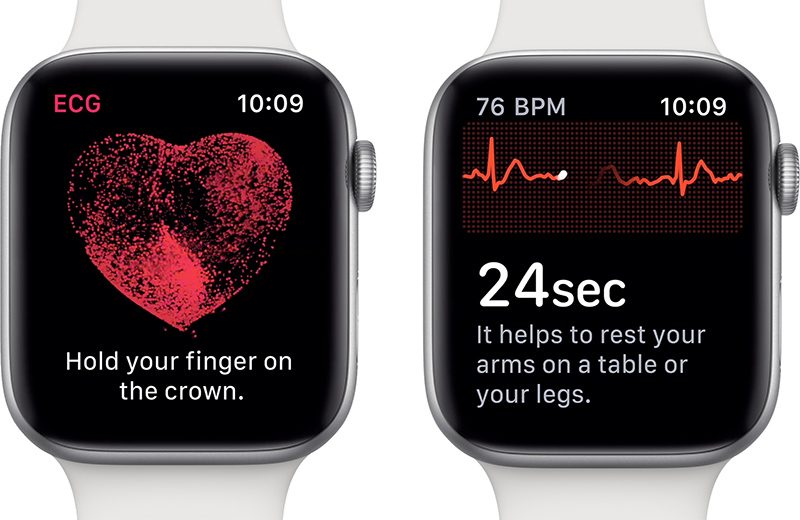
A clinical trail conducted by Apple with 600 participants reported that the ECG app was able to detect Atrial fibrillation (quivering or irregular heartbeat – that can lead to blood clots, stroke, heart failure and other heart-related complications) with 98.3 percent accuracy and a sinus rhythm (normal heartbeat with the upper and lower chamber of the heart beating in sync) with 99.6 percent accuracy.
Also included in watchOS 5.2 are Irregular heart rhythm notifications, this monitors the heart rhythm in the background and notifies you if an irregular heart rhythm is detected over 5 times in 65 minutes. This feature is available on Apple Watch Series 1 and above. Apple concerned that Receiving the right notification at the right time can be the difference between someone going to a doctor or ignoring it tested the Irregular heart rhythm notifications feature with over 400000 people.
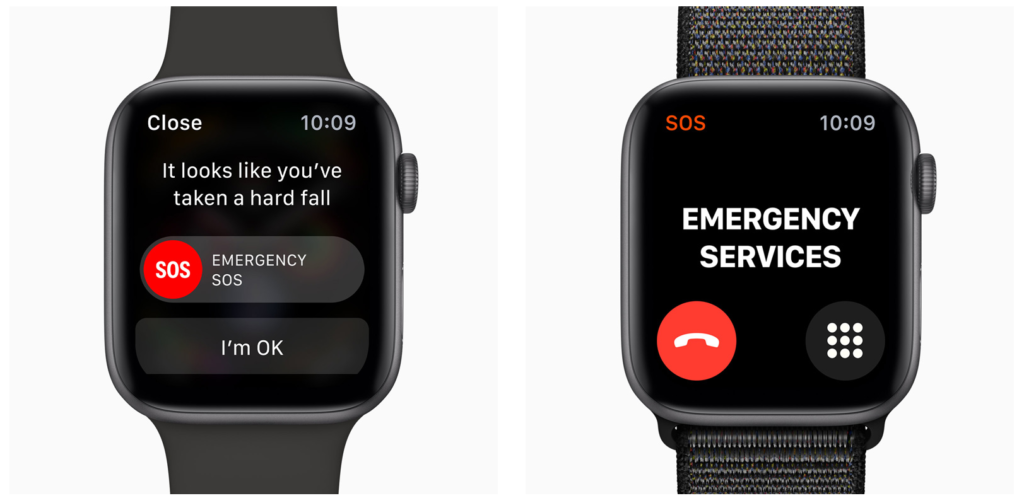
These newly enabled features along with the Fall Detection available in Apple Watch Series 4, and Emergency SOS make the Apple watch far more than merely a cool way to tell the time, particularly for people with disabilities.
As always, I am interested to hear about how you are using mobile and other smart technology in your centre. I am also available to support and help where I can.
Martin Pistorius
Karten Network Mobile Technology Advisor
Article meta data
Clicking on any of the links in this section will take you to other articles that have been tagged in the same category.
- Featured in the Karten Spring 2019 Newsletter
- This article is listed in the following subject areas: Technology, Update from Technology Advisor