My name is Faigie and I am a student in Langdon College.
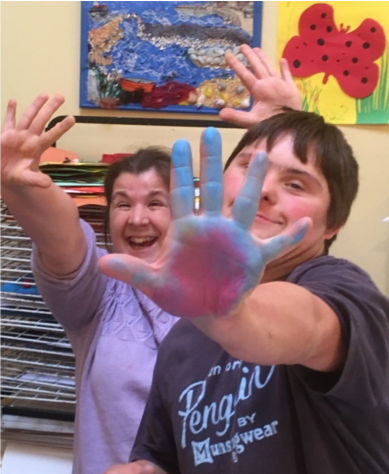
We received an order by email to LC Print to make a personalised coaster, a tea-towel, a mug, a T-Shirt, and a bag. The customer sent us a picture of her dogs that she wanted creating into artwork and then printing. We traced the photograph then painted it in watercolours then outlined in a black sharpie marker. We scanned the finished artwork into the computer then printed it onto specialist paper. We printed it onto the products that the customer requested, packaged the parcel and posted it using the Evri delivery service.
I enjoy doing projects like this because it is fun working as a team with my friends. By working in the Karten Room I have developed my patience and communication skills ready for the world of work.
Hello Everyone! I can hardly believe we are already into April and hurtling towards our Spring Break. It’s been an exciting year so far for the Karten Network with some incredible achievements in our Centres, I hope you enjoy and are inspired by the articles within this Newsletter.
Trustees met towards the end of March 2019 and awarded grants to a number of centres for additional equipment. There were some really interesting applications and it was good to see Virtual Reality featuring in two of them. A new Karten Centre was established at Boveridge College in Dorset, so I would like to extend a warm welcome to the Karten Network to them.
Webinar recordings
A reminder that TechAbility Webinar recordings can be accessed from the link below. The recordings are really useful to support staff training and development activities.
The 2019 TechAbility Conference will be held on 21st November at the Rowton Hotel in Birmingham. As part of a very full programme of events there will be a specific Karten Network slot and lots of opportunities to Network.
Coming soon ….
We are currently planning a series of pilot Karten Events for the people you support. More details to follow, but essentially they will be mini-conferences to enable Karten Centre beneficiaries to get together and share their experiences. The first event will be held on 12 June and will be hosted by Jewish Care.
Can the people you support be the public face of the Karten Network?
High-resolution images (photo consent essential) are required for the production of materials to showcase excellence across our Karten Centres. Please email pictures to dawn@karten-network.org.uk
Dawn Green Karten Network and Development Co-ordinator
Adults and children with a visual impairment and specific learning difficulties choose Dolphin accessibility products for their personal, professional and educational use. Dolphin’s solutions support individuals with blindness, partial sight, mild sight loss, low vision, degenerative eye conditions, SpLD including dyslexia, low literacy skills, learning disabilities and age-related conditions. Dolphin aims to empower users with all degrees of sight loss, computer skills, reading aptitude and physical ability, through our Windows software and free apps including SuperNova, GuideConnect, EasyReader and EasyConverter Express.
By using Dolphin’s accessibility software, individuals with varying levels of visual impairment and technological experience can do everyday things easily on computers, tablets and smartphones – you can read, browse, work, learn and communicate in the way that best suits you. You can read more below about our family of products.
SuperNova provides the World’s best magnification, speech and screen reading for Windows. Supernova grows with your needs and your sight – for life. We offer three editions, so you can find your perfect solution.
Ensure you’re always productive, in touch and in control with SuperNova, whether reading your letters and other hard copy documents, shopping online with the latest web browsers or creating spreadsheets and slideshows in Microsoft Office. Advanced yet intuitive, SuperNova Magnifier is flexible for every task, and you can pick your blend of magnification, screen reading and braille.
Ensure you’re always productive, in touch and in control with SuperNova, whether reading your letters and other hard copy documents, shopping online with the latest web browsers or creating spreadsheets and slideshows in Microsoft Office. Advanced yet intuitive, SuperNova Magnifier is flexible for every task, and you can pick your blend of magnification, screen reading and braille.
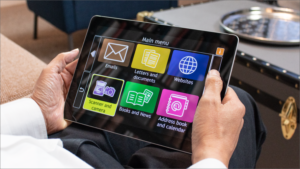
GuideConnect is simple talking technology for sight loss, which delivers effortless email, entertainment and internet. GuideConnect is a talking digital assistant that brings you closer to family and friends. It helps you manage your everyday life and have fun.
Simple internet access makes it easy to find information, be entertained and stay up-to-date with what’s happening in the world. GuideConnect is thoughtfully designed by and for people with sight loss, enabling you to enlarge the text or have it read to you. There are straightforward menus and lots of help. GuideConnect is available as a download on a tablet, laptop or desktop, or for your TV.
EasyReader is the World’s most accessible reading app. Designed for people with blindness, low vision and dyslexia/SpLD, EasyReader is available for iOS and Android smartphones and tablets and, crucially, it’s FREE.
EasyReader is the simplest way to access audiobooks, talking magazines and podcasts. If you have low vision you can make text as large as your sight requires, adjusting colours, highlights and contrast to suit. If you are blind you can add speech to books with no inbuilt narration. If you have dyslexia you can reduce glare, read with dyslexia-friendly fonts and colours, and enjoy perfectly synchronised text and audio. EasyReader offers access to 20+ digital libraries including epubBooks, RNIB Bookshare and RNIB Overdrive.
EasyConverter Express enables you to convert Word docs to large print, braille, MP3 and ePub. Fulfil your legal requirements and promote accessibility.
EasyConverter Express is an essential toolkit to create the widest range of accessible documents – braille, large print, MP3 and ePub. Avoid the expense and delays in outsourcing transcriptions. Choose EasyConverter Express and you will be able to confidently and effortlessly deliver accessible information to all your service users. EasyConverter Express is affordable and simple to use, converting Word documents to accessible information on demand and in seconds.
A Pony Named Charlie is the 2nd
audio book Hedleys Radio has created for Angela Hobbs. It tells the tale of Charlie as he grows up
on a farm and later moves to the New Forest with Angela. The story is narrated by Frankie, and
although he has recorded many podcasts for Hedleys Radio before, voice acting
was a whole new role. To bring the story
to life the team added sound effects such as birds tweeting, minibus engines
and waves at the seashore. The team worked
incredibly hard to ensure that every sound was expertly recorded and placed in just
the right spot. The project took over 6 months to complete and the whole team
are very proud of what they have achieved.
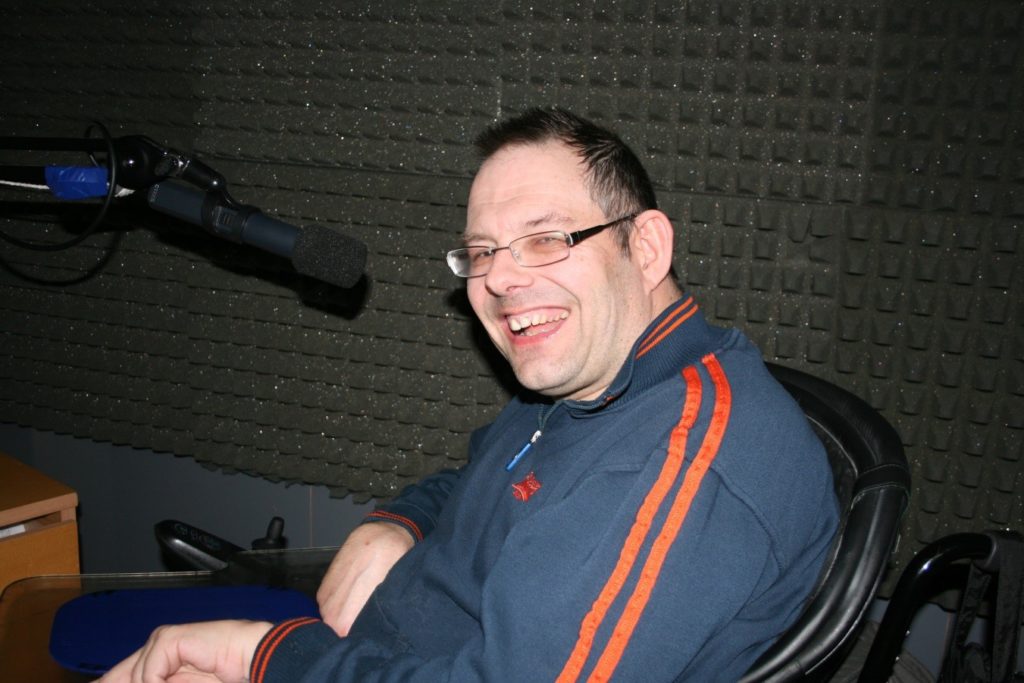
Frankie recording the part of Charlie. Frankie had not narrated an audio book before,
it took a lot of time and patience but he soon developed his techniques and
improved his voice acting skills.
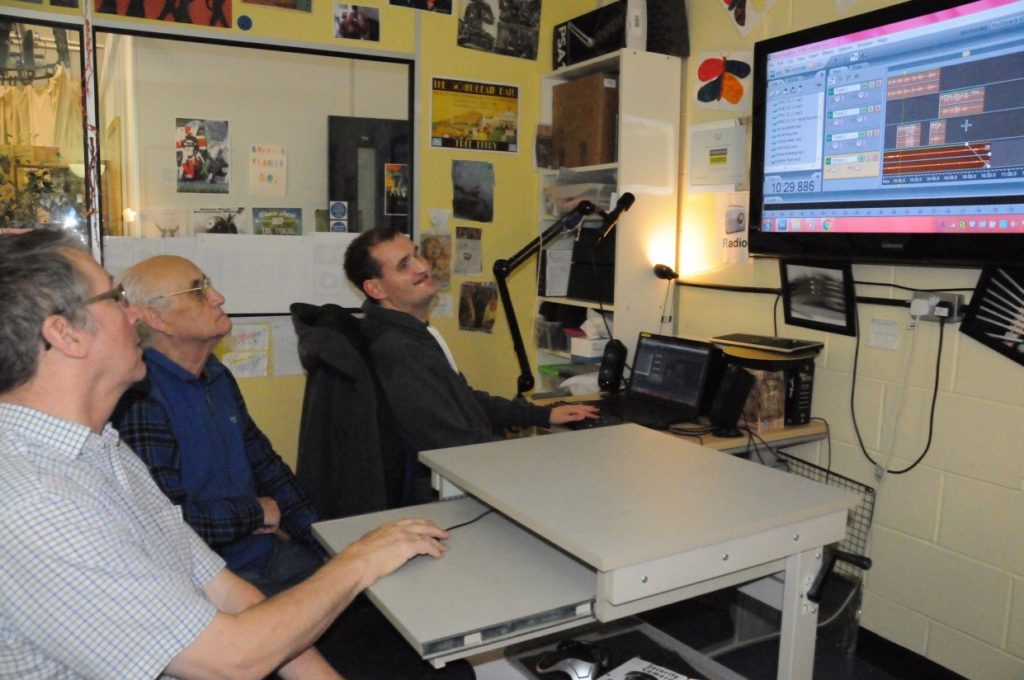
Trevor, Brian & Jamie editing chapter 3 in Adobe
Audition. All three are very meticulous
about the placement of the files we put in.
Daryn, Brian, Gabrielle & Frankie (otherwise known
as Charlie) all showed great patience in both editing the audio and when recording
it. Gabrielle has a fantastic ear for detail and can spot the smallest of
errors.
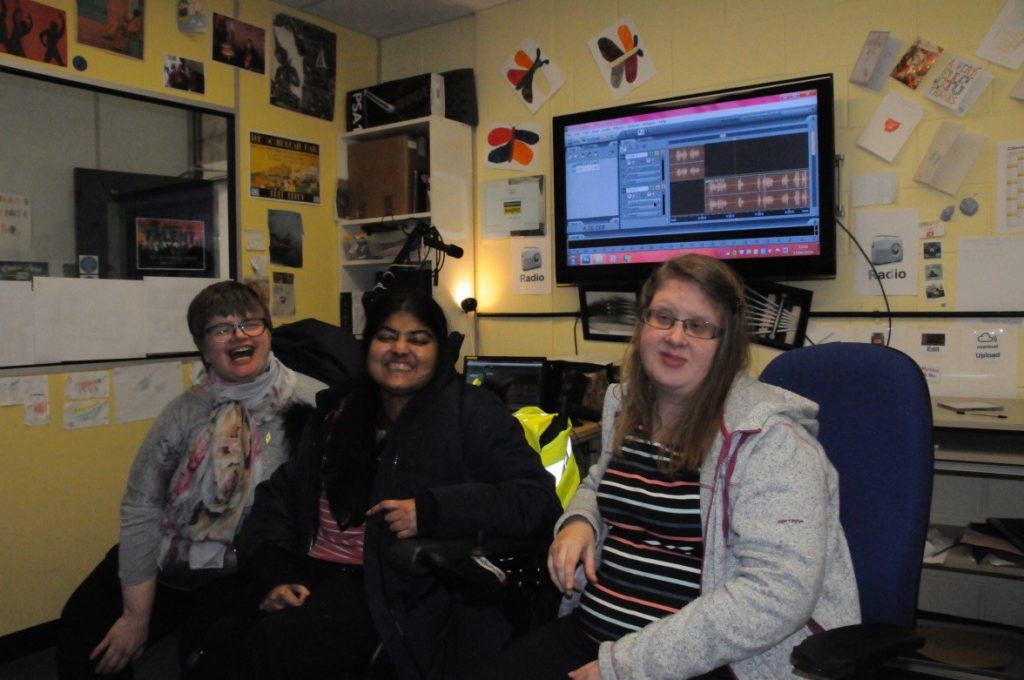
Debbie, Rahima & Louise after editing some of the
audio. Louise has ridden horses in the
past and therefore very knowledgeable when we were looking for and recording new
sound effects.
Daryn re-creating the sound of horse’s hooves on grass,
using cloth stuffed inside plastic cups.
Full Production team: Frankie, Daryn, Gabrielle, Brian, Trevor, Jamie, Rahima, Debbie, Louise, Ed, Rachel
Towards the end of 2018, BID Services was thrilled to be accepted as a new Karten Centre and awarded a grant to purchase new technology and equipment to support our Employment Service for clients who have sensory impairments. Up to that point, we had some old computers which were forever crashing, causing frustration for clients and staff and making delivery very challenging.
The Employment Service was originally set up for deaf/hard
of hearing clients, aimed at helping them move closer to the job market through
learning how to navigate job searches online, complete applications, become
more confident using computers and gain 1:1 support to help them achieve their
employment goals. We now also deliver Personal Social Development sessions,
helping prepare people for work and increase their confidence, self-esteem and awareness
of the working world and deliver British Sign Language classes, having recently
started delivering sessions for deaf clients with no recognised language and
international signers.
However, we were being held back by technology, we needed
more interactive kit, new computers and importantly, we wanted to open up the
service to people with visual impairments, something which also affects some of
our hearing impaired clients. Therefore the grant from the Ian Karten
Charitable Trust and support of the Karten Network was fantastic news. Over the
last few months we have purchased various pieces of equipment including
laptops, an interactive smart board and software and hardware to help people
with visual impairments such as JAWS and magnifiers.
We’ve had the laptops and smart board in place for a couple
of months now and have already seen a huge impact for our clients. But who
better to tell you about how important this equipment is to our clients than
them?! Here’s a short video they’ve put together.
We’re looking forward to updating you all again down the
line but if you want any more information about the Employment Service, please
contact Mark Woodall or Adam Breeze at mark.woodall@bid.org.uk
/ adam.breeze@bid.org.uk, 0121 246
6100.
The original Ian Karten Centre (IKC) at Treloar College was set up in September 2001 to provide a real working environment in which to offer a range of qualifications. Known externally as ‘TreloarPrint’ for marketing purposes, this successful and popular enterprise provides a high-quality printing and finishing service at competitive rates for a wide range of customers. The IKC provides traditional printed products – including business cards, letterheads, compliment slips, booklets, manuals, newsletters, flyers and posters, calendars, menus, greeting cards, postcards, invitations, leaflets, envelopes and labels. The students carry out mailshots for customers where appropriate. The Centre also offers a design service for more straightforward products and has an excellent reputation for miles around.
The IKC allows our students to undertake vocational courses in a real, supportive working environment; specifically, our students can undertake City & Guilds qualifications. In turn, they provide the students with genuine work experience to enhance their work-based understanding, team working and problem solving as well as the development of communication and literacy, ICT, numeracy, and other employability, practical and social skills. The enterprise enables our students to increase their knowledge and understanding of work at the same time as engaging in a real business that generates a surplus which is channelled back into the business.
Whether acting as the
receptionist for the IKC, taking incoming calls from customers, preparing
quotes and seeing a print job through to completion and delivery our students
are actively engaged in a spectrum of job roles. These work experience opportunities both
prepare them for life beyond Treloar’s at the same time as building their
confidence and self-esteem as they put the skills they have learnt at Treloar’s
into practice.
New
booklet-making machine
We have been able to
develop the IKC over the years with the generous support of The Karten Network
together with our own investment. In
2018 we identified an urgent need for a new booklet-maker and were thrilled
when The Karten Network agreed to generously provide funding towards a new
machine. This new booklet-maker replaced
the old one which was over 5 years old, not very accessible for our students, and
was becoming unreliable which, given our ever-increasing customer base, was no
longer able to meet all customer requests.
We were delighted to
take delivery of the new booklet-maker in October 2018 which is more accessible
for our students, produces better quality booklets quicker, enables us to
produce larger booklets and has better paper handling and consistency.
About 80% of the
students who currently work and train in the IKC now have the capability to use
the new machine and it enables them to take a much more active part in the
printing process, including:
Programming the machine.
Controlling the operation of the machine.
Effectively producing completed and trimmed booklets.
More readily removing sets of completed booklets from
the machine and package them up.
Students are now
able to produce a greater range of printed materials more cost-effectively and
to a higher standard. By using the new
booklet-maker they are being trained to operate the latest printing machinery
and learn new skills which they can apply to the world of work after they leave
Treloar’s. Furthermore, as less staff
and student time is needed per print job, they can be released to do other
tasks, resulting in more efficient use of staff time and a greater variety of
tasks for students. A huge success all round!
Toby
using the new booklet-maker
One of our students, Toby has been getting to work using the new booklet-making machine to help create 150 booklets for a local church. You can see how easy it is for him in his wheelchair to have the controlling PC at a very accessible height. Toby is also pressing the ‘go’ button to set it all running. Both of these tasks would have been impossible for him with the old machine. He is also able to retrieve the finished booklets as they come out. Here are Toby’s thoughts on the booklet-maker – “The booklet-maker is very good at helping us make good booklets. It is pretty accessible because the controller is on an arm which can come towards me so I can control the buttons.”
Customer
experience
The booklet maker machine has been hard at work and is
already completing around 20 large jobs a month. Our customers have been delighted with the
booklets which have been created on the machine and the following are some of
their comments:
Church History Booklets: “Thank you very much. We collected the booklets this morning and they are
superbly printed! Thanks again for your
excellent service.”
Poetry Booklets: “Thank
you! I am very, very happy. Be
very proud! Will bring a cheque in later in the week.”
Thank
you
“We
would like to express our gratitude and thanks to The Karten Network for
generously providing funding towards the new booklet-maker machine. We were rapidly outgrowing our old system and
found that it was totally inaccessible for our students and struggled to cope
with our demands. The new machine is much
more accessible for our students in wheelchairs and allows us to tackle more
complex jobs as well as cope readily with the typical day-to-day bulk
newsletters and the like. Best of all it
provides even more learning opportunities for our students – thank you for
making this possible” Jerry Cullum,
Coordinator TreloarPrint.
All at Treloar’s are exceptionally grateful for the ongoing generosity
of The Karten Network which has allowed us to set-up and maintain this IKC as
an excellent learning model for our students.
We very much hope you enjoy reading the enclosed report and the positive
impact the recent equipment so generously funded by The Karten Network is having
on our truly inspirational students.
It’s been an incredible 3 months for our Karten funded
enterprise. If you missed any of our previous posts we run video production and
print enterprises using the equipment funded by Karten. This year the big push has
been the new eco-friendly product – the ‘Sea Clear’ bag. The student-led
enterprise is helping raise awareness of the huge amount of plastic in our
oceans by producing their very own bags for life. The product has been a huge
success, printing and selling over 500 bags so far and spreading this important
message across a range of social media platforms.
Anyway, the last few months have involved going out on the
road and promoting the message across the Greater Manchester region. In
February the students set up a trade stall at the Trafford Centre as part of
the Young Enterprise Company Programme and competed with colleges from all over
the North West…and won the award ‘Highly Commended Company’. This was just the
start. The students have gone on to set up stalls at The Spindles shopping
centre, and delivered a 5-minute business presentation to over 200 people at
the Grange Arts theatre in March. This was a huge achievement for all 4
students (Jordan, Josh, Abigail and Kevin) who have never done anything like
that before. They were brilliant! And they plan to tour schools across the
region in the summer term, to promote their product and educate young people about
the plastic in our oceans. On top of all this success they also won another
award through Young Enterprise for ‘Best Customer Service’.
It has been an amazing journey so far and I can’t wait to
see what happens next. Will keep you posted.
Take a look at some of the photos of their journey so far
and continue to spread the word and follow them via multiple platforms…
Fitzroy Maltings is a popular day centre in Fakenham, Norfolk, currently attended by 54 adults (ages 18-70) with a wide range of learning and associated physical disabilities, autism and dementia. Many of the attendees have very complex needs and challenging behaviour requiring one-to-one support. The team of dedicated, well-trained staff tailor support to each member, helping them to be active, and to socialise, learn and enjoy the things that are important to them as individuals.
The wide range of activities at the centre,
including art, cooking, baking, gardening and music, are all supported by Karten-funded
computers and iPads. Computers are also used to gain ASDAN qualifications.
It was originally established as a Karten
Centre in 2010 and it has been continually improved since. The latest upgrade
in 2018 has taken the technology offering to a whole new level, with members
enjoying puzzles and games like air hockey and karaoke on a CleverTouch, and
enjoying interacting with the Khoros, a multi-sensory musical instrument.
The staff team have
also benefited from Virtual Reality headsets which are being used in training –
with programmes like the Autism Virtual Reality App helping them to understand
how it might feel to have autism. Support workers at the Maltings often deal
with challenging behaviour as a consequence of members having profound
disabilities and sensory impairments. Using this app has been extremely helpful
in gaining an understanding of what is behind such behaviour, thereby helping
staff to be even more responsive and sensitive to members’ needs.
Meet
the members
Tim
Tim loves gardening and his enjoyment of
this activity at the Maltings has been significantly enhanced by having access
to an iPad. Tim uses the iPad to look up different flowers and plan out what he
is going to grow.
Yasmin
Yasmin has severe learning disabilities
and sensory impairments so she can often be overwhelmed. She has particularly
benefitted from the CleverTouch, which she uses to calm down if she starts to
feel sensory overload. If Yasmin is struggling, staff set up the Aquarium app
and classical music for her on the CleverTouch and give her some time without
other members to immerse herself in this experience which she finds very
calming.
Talking about the improved offering,
Kerensa Palmer, Deputy Manager at Fitzroy, says: “The Karten funding has made a massive difference to our members’
day-to-day lives – providing much-needed access to technology for educational
and therapeutic use. It has also given members a lot of fun and extra
opportunities to socialise.”
Fitzroy has recently employed its first
ever Assistive Technologist, Carrie Sant, who will be helping staff at its
Karten centres to make even greater use of assistive technology – watch this
space!
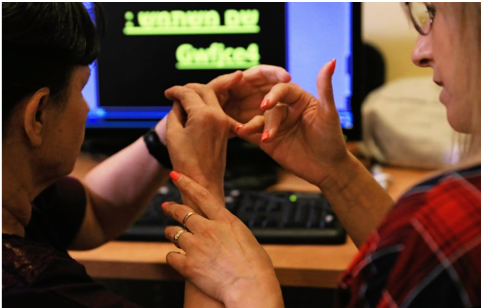
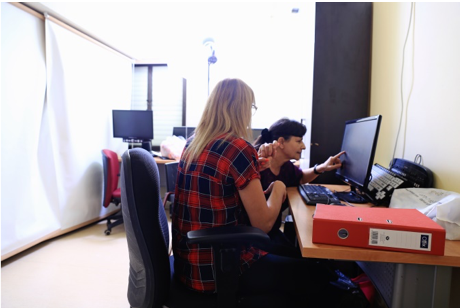
Our Karten CTEC is the only Karten CTEC dedicated to teaching Israelis with deaf-blindness vital computer skills. Thanks to the Ian Karten Charitable Trust 35-40 deaf-blind individuals a year learn skills, via one on one instruction, which make a real and immediate difference in their lives, open up the hearing–sighted world, provide access to information and enable direct, effective and independent communication. Most of our 7 teachers are themselves deaf-blind, deaf, severally visually impaired, or hard of hearing and blind. One, Rachel, won the Karten Award for Personal Achievement in 2009. Rachel was originally a student at our Karten CTEC and after further training returned as a teacher. She specializes in students with a very basic level of reading comprehension, basic communication skills and limited residual vision.
We’d like to share a few recent stories about her and her deaf-blind students. The events described here were made possible by the equipment that we were fortunate to receive from the Ian Karten Charitable Trust.
Mazal is deaf (from birth), has limited residual
vision and is functionally illiterate. Her husband is deaf-blind and is
somewhat intellectually disabled. As a result, prior to her studies at our
Karten CTEC in Tel Aviv, Mazal was completely dependent on her children for
every phone call. She could only communicate independently if she was face to
face with the other person.
Studying in our Karten CTEC changed Mazal’s
life dramatically. First, she learned how to use an accessible mobile phone and
began to communicate independently via video calls and Whatsapp. She uses
Whatsapp primarily to send icons, for example a weekly “Shabbat Shalom” (Have a
good Sabbath) icon or a “Happy holiday” icon or to send pictures of her
grandchildren etc. She was thrilled to be able to independently contact and
stay in touch with her deaf-blind friends from our Social
Rehabilitation-Recreation Club.
She also learned how by using a computer she can overcome her limited vision to enjoy cooking and baking videos, surf the internet and more …. These new skills have made a tremendous difference in her quality of life.
Ruthie has Usher syndrome (congenital deafness and progressive loss of vision). She was very independent until a serious car accident left her with half of her body paralyzed and very restricted mobility. After a year of physical rehabilitation she began to study with Rachel at our Karten CTEC. She particularly benefited from learning how to use a variety of services online, including making her own doctors and physical therapy appointments, online grocery shopping and other online purchases. This profoundly changed her life, enabling her to return to and in some ways even surpass her level of independence prior to the accident.
A third student, Fira, began her studies at
home in Jerusalem with a deaf teacher, Tracy. Fira, who like Ruthie (and Rachel
herself) has Usher Syndrome. She is a deaf-blind immigrant to Israel and
communicates in Russian Sign Language as her primary language and Israeli Sign
Language as her secondary language. After she mastered the basics at home and
increased her self confidence, she began to study with Rachel at our
Karten CTEC in Tel Aviv. Fira has learned to use a variety of online
services. For example, she can now pay her municipal taxes, water bills etc
online, including applying for and getting the discounts that she is entitled
to receive, The fact that she can do these basic activities independently, and
is no longer dependent on her husband, has immensely boosted her self confidence,
both overall and as an immigrant. Also, she feels that the ability to directly
access services, especially those related to health and social services,
enables her to protect her privacy. No longer is she dependent on others to
call and/or go to offices for (or with her) in order to get things done. Her
new knowledge has also improved cooperation with her daughter’s school, as she
can now email the teachers directly, by herself.
These three examples offer a small glimpse
into the world of difference that the equipment donated by the Ian Karten
Charitable Trust makes in the lives of our students. Thank you!
Norwood’s Complementary Services and Assistive Technology Team joined forces to successfully bid for funding from the Karten Network. We wanted to expand our use of technology to provide additional wellbeing opportunities with a focus on reaching more people with complex needs. The aim of the project was to provide a tranquil, flexible space that could be adapted to allow different themes and activities. This would enhance services by providing new opportunities alongside combining new technology with some existing activities increasing reach and meeting a wider range of needs.
We had
already seen the benefits of assistive technology from the work undertaken by
Norwood’s Assistive Technology Team and felt that by adding further technology
we could positively enhance social opportunities that would stimulate interest,
curiosity, engagement and experiential learning; immersing people in an alternative
world where they can relax and express themselves freely while exploring their
visual, auditory, tactile and olfactory senses. This approach would give the
opportunity for the people we work with to experience Mindfulness in a way that
is meaningful to them; allowing them a space to just be, in the present moment
with the aim to relieve stress and enhance the sense of wellbeing. By combining
the new equipment funded by the Karten Network with existing sensory resources
we have been able to create the beautiful environments featured.
Project Launch
Hanukkah
Celebration Week commencing 3rd December 2018.
We
wanted to launch the project with a fanfare and make sure we quickly captured
people’s imaginations and interest. Therefore the launch was combined with the
week of the Hanukkah Fair which provided a range of other activities which we
knew would attract people maximising the footfall and encouraging people to
engage.
The theme chosen to
celebrate was Hershel and the Hanukkah Goblins. This sensory story experience
was constructed based on the story by Eric Kimmel. The tented area was dressed
as the old Synagogue on the hill using printed shower curtains, metallic
fabrics and space blankets. Fake vines tumbled over the window and doorway. The
area was lit using battery operated candles and tube lights.
To open the Synagogue door a Big Mack
switch was pressed to give a creaky sound. Inside the Synagogue were various
sensory items, a Goblin throne with colour changing light up cushion, a jar of
Hanukkah Gilt, a jar with the smell of pickles and some puppets to represent
the Goblin inhabitants. Spaces outside
of the tented area reflected wintry village scenes, around which were spaced
interactive cause and effect toys such as dancing and singing snowmen, light up
spinning Dreidels and other snowy themed objects. Fake snow was chilled in the
freezer and used as a tactile sensory prop. In the corner sat the King of the
Goblins, a home made life size puppet. Apps on the Interactive Magic Carpet and
different sounds were used to enhance and add atmosphere to details of the
story.
Winter Wonderland Theme
14th – 31st January
Winter
Wonderland was a homemade sensory tale based around waking up in the morning,
drawing back the curtains to be surprised by a new world covered in snow.
Events then proceeded from feeding the cause and effect singing birds to
trekking through the snow to the park to meet with friends, having a snowball
fight and building a snowman. The tented area was turned into an ice cave using
foil blankets, battery operated blue fibre optic lights. Inside the cave lived
the interactive dancing polar bear.
A
total of 34 individual sessions were offered lasting up to an hour each and
were available to be booked on a 1-1 or group basis. Take up was excellent and 19
individuals benefitted visiting the space for a total of 37 visits.
In addition when the opportunity arose
spontaneous sessions were offered encouraging people who may not have booked the
session or might have been reluctant to engage. This enabled a further 8 people
to participate on 18 separate occasions.
Journey
into Space Theme 11th
– 28th February
Our journey to space was another homemade story. We blasted off on our mission to Jupiter using a countdown on a Big Mack switch. This time the tented area was dressed as a space capsule using printed images of the control panels with the infinity tunnel to add depth to the controls. The surrounding areas were decorated with images of space, inflatable planets, fibre optics, projections onto an umbrella and various light effect and tactile space themed sensory items. Drama was created during the telling of the story using interactive apps on the Magic Carpet such as Asteroid Storm.
A total of 30 individual sessions were
offered which lasted up to an hour each and were available to be booked on a
1-1 or group basis. Take up was excellent and 15 individuals benefitted visiting
the space for a total of 32 visits.
In
addition when the opportunity arose spontaneous sessions were offered
encouraging people who may not have booked a session or might have initially been
reluctant to engage. This enabled a further 8 people to participate on 11
separate occasions.
Lenny
Lenny who is now in his 70’s has lived at Norwood Ravenswood Village since he was a very young man. He used to be very active, attending many of the different activities and classes that were provided by the on-site team. He not only enjoyed the challenges of the activities but also loved to chat to his staff, volunteers and friends.
Unfortunately, Lenny now has the onset of Dementia which is affecting his ability to engage and participate. He can become very anxious and confused at times, finding it difficult to focus or relax. Lenny was referred by his home to access the sensory space as it was thought that it could be beneficial to his well being.
At first, Lenny was very unwilling to come in. Therefore the approach taken was to bring smaller sensory items to him while he spent time in the Café with the idea to trigger some interest from Lenny and at the same time building a relationship with him so he felt more comfortable. A very life like cat puppet was used to engage Lenny as he loves to interact with the puppet, petting it and talking to it. This helped Lenny to relax and he was more willing to go into the sensory space if he knew the cat was going to be there.
With support, Lenny is now accessing the space on a regular basis. He has been very engaged, exploring and experimenting with many of the sensory items that are presented to him. Often within the sensory storytelling there is something that will trigger a memory which he likes to discuss. The most profound impact for Lenny has been that he has found a tranquil space inside the inner tent where he has chosen to sit and relax quite comfortably for periods of time. He likes to observe the colouring changing lights and took a particular liking to a very soft tactile mood cushion which has colour changing lights.
Chris
Chris is a young man who has attended
Norwood’s Ravenswood Village on a daily basis for a number of years to
participate in Complementary Service activities. He is a very social young man
who is always anxious to communicate with you. He likes to give you eye
contact, communicating through gesture and vocalisation and he likes it when
you sign good morning to him. Frequently he will sign back and offer you the
most wonderful smile.
Chris spends quite a lot of time in the Café area with some of his peers doing different activities. Over a period of time, he had been observing people going in and out of the sensory space. He kept looking over, appearing very interested. I started to invite him in on a regular basis to experience the new environments and explore some of the sensory items. He has demonstrated a particular interest in the magic carpet. He likes to release his feet from his footplates and use his foot movements to cause a change on the magic carpet. With changing responses of movement, sound or colour on the magic carpet to his movements his actions become more targeted. His pace and frequency of movement will change if he finds it very amusing. He will enthusiastically lift his arms and laugh with delight.
Another
aspect of the sensory stories that has appealed to Chris’s playful nature has
been the use of puppets. He likes you to interact with him using the puppet.
Using gesture he will request to activate the puppet himself then will attempt to
mirror your actions with the puppet placed on his hand. When using the puppets
he has also initiated interactions with some of his peers.
Benefits of Social interaction
One of the benefits of having a very special sensory place where people can come together to participate in a sensory story with peers or simply immerse themselves in a sensory, imaginative world has been the new opportunities for social engagement. When coming into the space people tend to relax and lose some of their inhibitions. Many very positive interactions have taken place between the people we support and staff as a result.
Mark Hunt, Operations Manager at Ravenswood said, ‘The service is well used and enjoyed by many of the people living at Ravenswood because the equipment is easily adaptable to meet the wide variety of needs that people have. The themed sessions are very well received and can be tailored to meet the sensory needs of the people in the session so that everyone is involved as much as they want to.’
This is a living project that has been designed to grow and evolve to reflect the interests of those participating, therefore, we have only just begun the journey. The scope is unlimited and we are really excited to continue on our path.
Angela Hobbs, Trustee and Administrator of the Ian Karten Charitable
Trust has written a second book, this time about her pony ‘Charlie.’ It will
appeal to anyone who loves horses and ponies, maybe participating in riding and
pony care.
It is a true story, through Charlie’s observations and thoughts, of his
life from early memories to the present day. It is presented with warmth and
humour and provides an insight into the lives of these noble creatures.
A big thank you to the Hedley’s Foundation Radio Team in North Shields
for recording and producing the audio version of the book in their Karten Media
Suite. The Hedley’s team also produced a link on Twitter, which was available
to download in time for World Book Day on 7th March 2019.
Another big thank you to Martin Pistorius, the Karten Mobile Technical
Advisor, for all his technical support in enabling the links to be available on
the Karten website, Jiscmail, Facebook and Twitter.
Angela’s book has also been accepted by the charity ‘Seeing Ear.’ They
have produced it in audio format and it is now available for blind and visually
impaired people to download from their library collection.
The Hamlet is an adult vocational learning centre for young adults (aged 19 to 25) living with a range of additional needs. Born out of a necessity to reimagine Hope School & College’s post-19 provision, The Hamlet’s raison d’être is to provide a working environment in which young people with additional needs can learn and grow, ensuring that when they leave us they leave with the skills necessary to attain, maintain and thrive in employment. After a successful pilot year housed at Hope (alongside their other successful Grange provision) we have now moved into our own premises at the idyllic Three Sisters Recreation Area in Ashton, taking over the former rangers’ house and visitors’ centre, and are well on our way to establishing ourselves in the heart of a thriving community.
Our journey to this point has not been without its challenges. Once we secured the premises through Wigan Council, extensive remodelling and decoration was required throughout both buildings to bring them up to the necessary standard to be the home of the Hamlet dream. Whist the majority of this renovation was supported and made possible by donations, our trainees gave what time and effort they could.
Decisions on which working environments (vocations) The Hamlet offers are hugely informed by our trainees; their input (over the course of numerous meetings, discussions and consultations) brought us to the conclusion that IT, Graphic design and print production were fields they would like to explore and gain competency in. This was the beginning of Lakeside Printing.
Our trainees worked hard to get The Hamlet up to codeSecond year Oliver Jourdan-Smith: “I helped Gemma brush the floor.”
The renovations took up the entire academic year. Meanwhile, we got to work at The Grange. Around the same time, we were securing the lease on the Hamlet buildings, we got in touch with The Karten Network in the hope that they would support us in funding the equipment to get Lakeside off the ground. Thanks to Karten Network funding we were able to purchase equipment necessary to turn ourselves into a fully-functional print and design outfit, capable of completing projects for the public, for corporate clients and fulfil the promotional and decorative needs of our other vocations. Andrew Wrigley, now in his second year on the Hamlet team remembers: “It was quite hard to envision what Gemma [Crompton – Provision lead] had in mind. We had literally nothing to start with. We had to find basic equipment like tables and chairs. We were looking for a TV and couch so we could have something to do in our free time.” Karten’s support enabled us to secure a wide-format printer, heated presses and a plotter cutter for our manufacturing side of operations and two iPads and two PCs equipped with Photoshop® software for our design arm. Thanks to this, though we were still waiting for The Hamlet to take shape physically, the goals and aspirations of our team and trainees were on the road to becoming reality.
Andrew Wrigley (Year 2) putting in the toil to clear the weeds from our future outdoor seating area
Karten’s investment in the Hamlet and Lakeside is already bearing fruit. Our young people are already developing their skills in design and manufacturing, producing canvases and mugs for the public. Most recently we have secured a corporate client, producing promotional material for a teaching agency that specialise in staff with experience working with children and young people with additional needs (SEN Recruitment). The funding also bought us a CTOUCH® interactive screen which makes designing accessible and hands-on and also complements our conference suite, ensuring that The Hamlet is a viable, attractive and competitive offering to those looking for meeting rooms and facilities.
“You get to design your own stuff and make your own ideas up” Matthew Farnworth on the CTOUCH® purchased thanks to KartenOur café “The Nest” is now serving customers five days a week and has been warmly received by visitors to the site. “Our new signs show our customers which way to go” Daniel Derbyshire and the team erected the signage for The Hamlet vocations to let the public know we’re open for business
Though
still in its infancy, The Hamlet is well on its way to achieving its long term
intentions. We look to become a busy, thriving hub and beacon for young people
with additional needs in our area. However much we grow, we will always
remember that Karten helped us along the way and we are happy to be part of a
network with such a noble aim.
Daniel: “We make canvasses for people to put in their homes” Canvasses and other products we make in Lakeside rely on the wide format printer. Lakeside is now decorated and equipped for design, manufacture and salesOur heat press allows us to make t-shirts like this one, made by first year Amy Molyneux “Lakeside Printing’s shop and customer service counter is also open to the public. Matthew Farnworth says “I look forward to working behind the counter as I can work hard and keep busy”. Lakeside’s shop offers our trainees an invaluable opportunity to work face to face with the general public in a safe nurturing environment.
Meet VITA a training avatar to help people prepare for job interviews in a non-threatening way by providing virtual job interview simulations.
Preliminary Introduction
Name: Ella G
Date of Birth: May 1, 1996
Ella’s self-description:
Ella is the daughter of David (a PE teacher) and Noga (who works in
tourism) and has an older brother. She shared that she lives in her parents’
home but that she dreams of living with a partner and living independently. It
is clear that she feels loved and secure in her family framework.
She studied at the Ramat Sharet elementary school in a
special-education class. According to Ella, she was diagnosed with ADHD, and
previously took Ritalin but due to its effects on her mood (depression),
decided of her own volition to stop taking it in grade 10. Since then she has
described constant improvement and growth with age. She completed her high
school education at the Keshet school and has few social connections from
there.
After high school she began national service at a number of
institutions without successfully maintaining positions at any of them
(“El Halev”, “Maon”, “Beit Elisheva”) and finally
completed a year and a half of service at the Jerusalem Theater, where she felt
very bored and was frequently absent.
Ella spends her free time enjoying a wide variety of activities,
she’s studying belly dancing and even performs, and she’s taking a course on
film in which she created a movie about herself and her partner. She enjoys
having a busy schedule.
Generally Ella feels that she is high-functioning and has many
capabilities.
Indications of upcoming challenges: Difficulty maintaining diligence and focus, particularly when she’s not interested or “bored”.
Professional Background
Work experience
Ella says that she has held
several job interviews of different kinds and is confident in her ability to
deliver the required message pleasantly and without shyness.
She worked at “Lev
Smadar” in the framework of the SHEKEL program but did not enjoy it and
did not remain working there.
As part of her National Service
she worked at the Jerusalem Theater.
Background in professional training
Will begin a chef’s course at
Shalva shortly in collaboration with the “Taamim” culinary institute.
She previously completed the
first two stages of a pastry-making course (at the same time as her National
Service).
She completed two photography
courses during her high school studies.
Professional ambitions
Ella is very passionate about starting to work and she has three
target fields in which she would like to work:
Office work
Reception and hosting
Pastry-making
Preliminary strategies for VITA following initial conversation with
Ella
Ella requires a varied
professional environment to feel interested and challenged and to help her remain
focused throughout her training and future employment. Furthermore, she needs
to practice consistently and acquire a personal awareness of her degree of
diligence also concerning mundane tasks in her personal life. Acquiring this
skill will benefit her success in navigating “real life” situations.
A clear schedule with mapped
goals will greatly assist Ella. All topics of routine and organization are
critical to her ability to understand completely what tasks are required for
her to complete vis-à-vis the tasks of the people around her.
Small Screen Session
Training transcript
Therapist: We’re going over the questions from the VITA program, I’ll introduce myself and conduct a job interview with you. We are just practising and can stop whenever we want. This is a dry run.
Ella: I’m Ella, age 23, from Jerusalem, what else do I have to say?
Therapist: Anything you want to say about yourself
Ella: I studied at the Keshet school
Therapist: Do you have any basic, general questions? Generally, they ask for a short description and then they ask for more details.
Ella: I’m Ella, age 23, from Jerusalem, and I would be happy to hear in this job interview what you are offering.
Therapist: I will start asking you questions to get to know you better.
How do you feel about your
interpersonal skills?
Was that a difficult question? Did you
understand?
Ella: I understood, I’m good at this.
Therapist: Can you give me an example?
Start with yourself. I’m an optimistic
person.
Ella: I’m an optimistic person. I light up my surroundings. I have a lot of friends.
Therapist: So when we talked about your interpersonal skills, it’s important to be detailed.
Ella: I’m persistent and hardworking.
Therapist: Right, so you’ll work on your diligence, and you can say that you bring a good atmosphere and you have initiative.
What are other strong points of yours?
What things are you good at?
It’s a good idea to mention things
related to work, and you also need things connected to the job you’re
interviewing for. For example, being a chef is different from office work.
So what can you tell me?
Ella: I studied pastry-making.
Therapist: Very clean is important, aesthetics are important to me. In pastry-making it’s important to note aesthetics. It’s also important to emphasize your ability to follow instructions. For example, when working with a recipe it is very important to follow instructions.
Do you have any points you want to
improve about yourself?
Ella: Diligence.
Therapist: Honestly, I wouldn’t say that in an interview because that’s a subject that raises doubts for the manager.
Ella: It’s fine, I want to.
Therapist: If I ask your previous employer or your teacher about you, what would they say?
Ella: That I’m not diligent.
Therapist: Why start with something negative? Let’s focus on the positive – that you’re friendly, organized, light up the room.
We like to know that our employees
have ambitions. Where do you see yourself five years from now?
Ella: That I have a bakery with pastries and I hire people.
Therapist: Our guests appreciate a positive approach and being treated warmly. Can you tell me about a time when your positive attitude helped you succeed? We want to know that you have a positive approach to clients. When were you positive and it help you?
Ella: I don’t remember.
Therapist: It helped you with me, the fact that you smile made the connection between us stronger.
Ella: It helps me with my studies.
Therapist: How does being smiley help with your studies? Can I help you? You said you have a busy schedule.
Ella: Tell Shimrit (my boss at Shalva), that I have a busy schedule.
Therapist: Yes, and your pleasant spirit makes it possible.
What does an employee need to be a
good worker?
Ella: Being able to take criticism and being diligent.
Therapist: What days can you work?
Is there anything else you would like
to ask?
Afterwards we’ll prepare an
explanation about the program, about the characters there are, and the way you
can choose a suitable character.
We’re ending for today
Tell me if there’s something important
to you that you wanted to say.
Ella: To start to work! Is there something soon?
Therapist: I think so but sometimes you need to go through a process.
Observations:
It was fascinating to watch Ella’s readiness to work
and her involvement in the learning process.
As you can see from the transcript we stopped to plan
how to say and phrase things.
Large-screen Session
VITA: How are you?
Ella: I’m fine
VITA: Can you tell me a bit about yourself?
Ella: My name is Ella, I’m 23, from Jerusalem, I studied… Should I say?
Therapist: You can say a bit
Ella: I studied at a high school
Therapist: You can say the name of your high school
Ella: Keshet
Therapist: After that, National Service
Ella: I did my service at the Jerusalem Theater
Therapist: And now I’m looking for work
Ella: I’m looking for work in the field
Therapist: Let’s also add that you worked in the field of office administration
Ella: The field of office administration
VITA: What are your strong points?
Ella: Do you remember what I told you?
Therapist: Try to think of something you’re good at
Ella: Smiling for example. I am very smiley, I help people when they need it
Therapist: Those are things connected to your personality. You need to mention strengths connected to your work
Ella: Should I talk about diligence?
Therapist: Like what?
Ella: I want to improve my diligence. I do what I am supposed to do and I get criticism.
VITA: Everyone wants to improve something in themselves, what do you want to improve?
Ella: My diligence and that’s it.
Therapist: Is that something that’s very important to you?
Ella: Very
VITA: That was an excellent answer, what are your plans for the future? Do you have professional ambitions?
Ella: I would be happy to share them! My ambitions are a professional cooking class and if it exists a professional office class.
Therapist: What you shared was something you want to learn. Here you have to highlight something you would like to work in and now you say what your professional aspirations are.
Ella: In terms of working in an office, I would like to work independently in an office; to answer the phone, to scan things.
Therapist: I would like to arrive at the office, to find out my tasks, and to do them independently. Let’s go over the question again.
Ella: Go back?
Therapist: Yes
Ella: Okay so my ambition is to work in a professional office independently like filing things and scanning things and answering the phone and so on.
VITA: And now just one more question, how will you get to work?
Ella: Yes, on the bus. I’m independent, very independent.
VITA: I want to thank you, do you have any questions?
Ella: No, actually, I don’t have any questions. Everything is fine.
VITA: I think I got answers.
Ella: Thank you too.
What’s her name?
Therapist: Meira
I want to refine it – when the boss gives you an opportunity to ask
questions you should take advantage. What should you ask?
Ella: Like what are the work hours?
Therapist: Right!
Ella: Meira, what are the work hours?
Therapist: From 9 to 2.
Ella: That’s what she says?
Therapist: We didn’t plan it, but she could say that.
Therapist: What else should you ask?
Ella: What’s the salary, for instance.
Right, Meira, what’s the salary?
Therapist: That’s an important question. You can also ask about training – who will train you. since you don’t know everything.
That was really great
Ella: Did I do okay?
Therapist: You were better than okay.
How did you feel?
Ella: Fine. I have confidence in myself about interviews.
Therapist: You mean that you have a good experiences from interviews and it contributes to your confidence.
Summary of session and observations:
It was fascinating to watch Ella’s learning process.
Throughout the use of the VITA program, we stopped to practice and
phrase the answers correctly. I think there is potential to learn. We need to
check how well lessons are internalized over time and of course implement them
successfully in an actual job interview.
As the mobile technology advisor for the Karten Network, I strive to support and assist Karten Centres and members of the Karten Network with their mobile technology. Recently while providing support to one centre I became aware that a feature within iOS could reduce Apple devices to expensive paperweights.
In iOS 7 Apple introduced Activation Lock (sometimes referred to as “iCloud lock”). This was developed in response to the US Smartphone Theft Prevention Act of 2015. This legislation, in an attempt to discourage smartphone theft, requires device manufacturers to implement an aptly named “kill switch”; allowing device users to remotely wipe and lock devices. Further changes to California law resulted in Activation Lock being enabled by default in iOS 8 or later.
Activation
Lock forms part of a larger protection system typically referred to as Factory
Reset Protection (FRP), and most notably the native iOS app “Find my iPhone”
Find my iPad”, “Find my iPod”… in fact most Apple products can be included in
this system.
Activation
Lock, as well as being a deterrent by making stolen devices useless, aims to keep
your device secure, even if it’s lost or stolen, and Find my iDevice, can
improve your chances of recovering it. Even if you use the system to erase your
device remotely.
Activation
Lock works by registering your device on Apple’s activation servers and linking
it to your Apple ID when you turn on Find my iDevice (e.g. Find My iPhone).
From
this point on, the device is automatically protected and will require either the
device’s passcode or your Apple ID password to disable Activation Lock. Even if
the device is reset to its factory default using DFU (Device Firmware Update)
mode – this can be used to reset the passcode, the device still won’t be able
to be reactivated and used without first removing the Activation Lock.
Earlier
versions of Activation Lock had some vulnerabilities that could be exploited to
bypass Activation lock. However, these have been fixed by Apple making the system
very good at what it is designed to do – prevent someone else from ever using
your device. This within the context of a lot of Karten Centres creates a
potential problem, particularly where devices are set up by one member of staff
using their iTunes (Apple ID) account and then leaving the organisation. These
devices can’t then be added to a mobile device management system (MDM) as they
are locked to the person’s Apple ID. Typically what then happens is either to
update the device or remove a passcode the device is reset using DFU mode and
gets stuck in the Activate device loop.
While
there are online services that claim to be able to remove Activation Lock,
these can be unreliable and not recommended, not to mention expensive.
Currently, the only reliable way to remove Activation Lock is to use Apple Care
or take the device/s to an Apple store. You will however be required to prove
that you purchased the device from a reputable source and own the device.
Apple
have attempted to address this issue by introducing Managed Apple IDs with Apple
School Manager and Apple Business Manager programmes. These Apple
IDs are similar to your personal Apple ID however, they are associated with an organisation
rather than an individual. These IDs can also be customised and have
restrictions applied to them, for example preventing them from being used to make
purchases in the Apple App store.
Activation
Lock can be disabled in most MDM systems; or by “Supervising” the device
through Apple Configurator; or by turning off Find my iPad within settings.
While Activation Lock still has a place within the Karten Centre context, I strongly recommend that organisations have a policy and procedure to safely and securely store each iPads Apple ID, password and passcode as well as proof of purchase. Not only to avoid having devices reduced to expensive paperweights but that should the person responsible for the iDevices leave or become incapacitated that the next person charged with managing the iDevices has the necessary information to do so.
watchOS
5.2
Point
releases of software, in other words the version number after the period
typically contain bug fixes and performance enhancements, usually there nothing
to get excited about. However, watchOS 5.2 released at the end of March included
something to get the heart beating a bit quicker – the introduction of the ECG
app.
Only
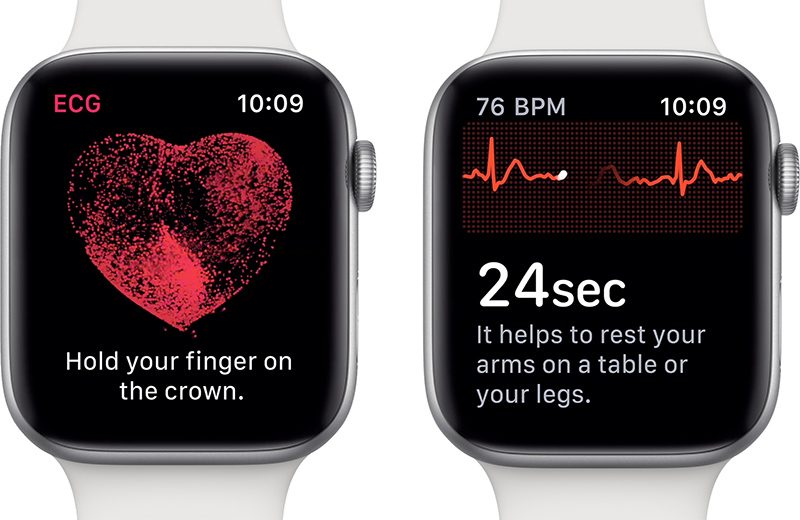
available on Apple Watch Series 4, the ECG app enables you to take your own ECG
in just 30 seconds simply by opening the app and placing your finger on the
digital crown. The ECG data is then saved in the iPhone’s Health app and can be
exported as a PDF to share with your doctor.
A
clinical trail conducted by Apple with 600 participants reported that the ECG
app was able to detect Atrial fibrillation (quivering or irregular
heartbeat – that can lead to blood clots, stroke, heart failure and other
heart-related complications) with 98.3 percent accuracy and a sinus rhythm
(normal heartbeat with the upper and lower chamber of the heart beating in
sync) with 99.6 percent accuracy.
Also
included in watchOS 5.2 are Irregular heart rhythm notifications, this monitors
the heart rhythm in the background and notifies you if an irregular
heart rhythm is detected over 5 times in 65 minutes. This feature is
available on Apple Watch Series 1 and above. Apple concerned that Receiving the
right notification at the right time can be the difference between someone going
to a doctor or ignoring it tested the Irregular heart rhythm notifications
feature with over 400000 people.
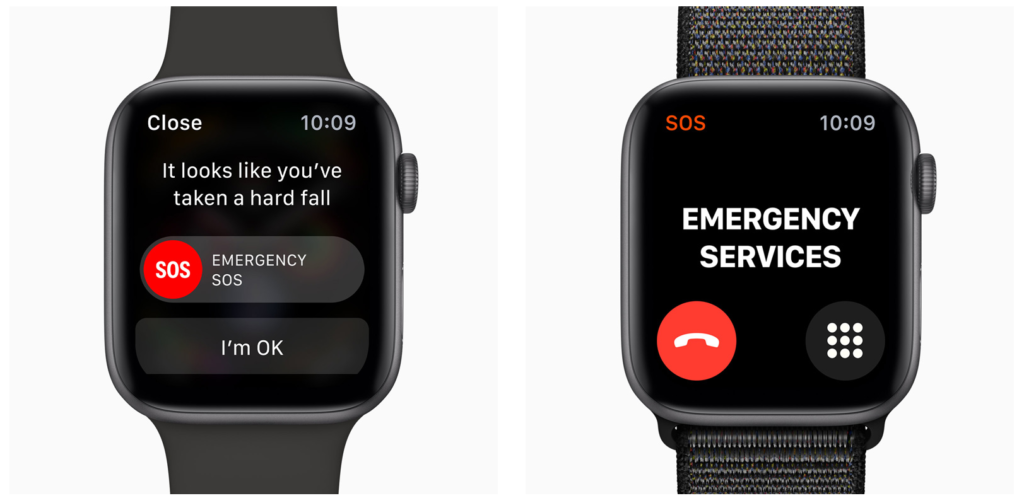
These newly enabled features along with the Fall Detection available in Apple Watch Series 4, and Emergency SOS make the Apple watch far more than merely a cool way to tell the time, particularly for people with disabilities.
As
always, I am interested to hear about how you are using mobile and other smart
technology in your centre. I am also available to support and help where I can.
Martin Pistorius Karten Network Mobile Technology Advisor
Four National Star students appeared on BBC’s
The One Show in their quest for their own ‘voice’ for their communication
devices.
These are high tech communication systems that
synthesise speech from text to produce a ‘voice’, enabling those with no natural
voice or communication difficulties to express themselves.
About 6,000 young people nationally depend on
communication devices (AAC) as their voices. At National Star 22% of students
use a communication device.
Comedian Lost Voice Guy, Lee Ridley, who also
uses a communication device, visited National Star to talk to the four about
the challenges they face.
Ted Barnard–Edwards, Nathan Groves, Talia
McDowell and Jack Smith all want regional accents to reflect where they live
but there are very few age-appropriate regional voices for communication
devices.
A customised voice costs around £500, which many
families cannot afford. National Star speech and language therapists have been
searching the country for age-appropriate regional accents and have discovered
there is not much choice.
To enable students to have their own voice
National Star is establishing a Technology Fund which will help fund projects
and work with students to find suitable voice donors.
‘It doesn’t sound like me. I’m originally from just outside Larne in Northern Ireland, but the only Irish accents available are southern Irish which is completely different and just listening to myself now I sound like an aul doll (or old woman if you didn’t understand that), I’m only 19!,’ said Talia.
Nathan, 22, who has a generic Welsh accent,
wants a regional Cwmbran accent.
‘I’m from Cwmbran, most people where I live have an accent that doesn’t sound anything like this voice. It makes me sound like a middle–aged man,’ he said.
Jack, 22, said: ‘I sound boring and not like my family. I am from Wolverhampton – the Black Country.’
‘I’m a boccia player. I want people to know it’s me talking,’ said Ted, 17, who wants a Berkshire accent. ‘My own voice will help people recognise me. Especially when I’m receiving my medal at the Paralympics!’
The One Show found a voice donor for Jack who is
now proudly using his Black Country accent on his AAC device. He also got to
announce the players at a Wolverhampton Wanderers match, a team he has followed
since he was a child.
Hundreds of people responded to The One Show
appeal to find voices for the other three students and the BBC will return to
National Star later in the year when Nathan, Ted and Talia have their own
unique voices.
A further appeal to find 17-year-old Cain Webb a
Gloucester voice for his communicator has resulted in scores of responses from
the public after he appeared on BBC Points West.
Cain is so frustrated by the limited choice of voices that he uses the Queen’s voice. ‘I would like an accent and a voice that allows me to feel more confident talking to girls my own age,’ said Cain.
Technology Fund
National Star is establishing a Technology Fund
which will help fund projects such as this and other life-enhancing technology
which enables young people with complex disabilities to have a voice, access
learning and control their environments.
To find out more about our Technology Fund please contact the Fundraising team at fundraising@nationalstar.org or call 01242 524478.
National Star is looking for potential voice donors for other students. To find out more please email: findmyvoice@nationalstar.org
The Support Centre for students with disabilities in the Centre for
Academic Equality and Inclusion at Ono academic college (OAC), strive to
provide universal technological accommodation based on Universal Design for
Learning (UDL) principles, while maintaining a strong commitment to providing
students with personal accommodations. The generous fund by the “Ian
Karten Charitable Trust” in October 2018, enabled OAC to provide an
improved learning environment for a large scope of students with disabilities.
The improvements included:
Acoustic
improvements in the support centers’ main office, study rooms and technology
room.
Improved sound
systems in 14 lecture halls.
Hearing loop
systems in 6 lecture halls.
Hearing loop
system in 8 service stations.
The devices were installed in two campuses of OAC.
The acoustic adjustments affected the organization at three levels:
(i) Direct impact on staff and students; (ii) Increased awareness to students
with disabilities and accessibility; (iii) Prioritization of accessibility at management
level. Below are two case studies which reflect the impact.
Case studies
“Aisha”
“Aisha”, age 35, is a first-year Management MA student. She has a
hearing disability caused by a bacterial infection which erupted at age 31. She
uses a hearing aid and, in some cases, needs transcription of lectures.
During the registration process it was important for “Aisha” to
understand what supports are available on campus to aid her hearing disability.
The fact that OAC had lecturer halls with acoustic improvements and with
Hearing loop systems convinced her to register and start studying in our
institution.
“Aisha” class was assigned to study in lecture halls with hearing
loops and in the acoustic lecture halls. To hear clearly in the acoustic lecture
halls, she used a personal FM hearing loop from the technology room. In the
courses where she needed transcription, the lecturer used an automatic
transcription application. The quality of the sound system and especially the
microphones made the transcription more accurate and useful for “Aisha”.
We were glad to discover that “Aisha”
finished her first semester with excellent grades. She also reported high
levels of satisfaction from her learning experience and participation and
especially her ability to take part in class discussions. This year, there are
two more students with hearing disabilities that started learning at OAC following
on her recommendation.
“Michael”
“Michael”, age 43, is a second-year B.Ed. student. He has a paralyzed hand and PTSD – Post traumatic stress disorder, both due to an accident at work. Until the accident “Michael” worked as a coffee machine installer, the accident led him to stop working and begin a long process of rehabilitation. As part of the rehabilitation he decided to turn to academic studies and fulfill an old dream – gain academic education and become an educator.
“Michael” approached the students support center during the first
week of the academic year. He reported that he is very distracted during the
classes. Because of the PTSD, he feels more comfortable sitting in the back of
the hall, and has trouble hearing and understanding the lecturers. Also, he
reported that he has difficulties in using the support center. He felt
uncomfortable sharing personal information with the consultants and didn’t use
the study rooms and technology room because he couldn’t detach himself from the
background noises and focus on the conversation and on learning.
After the installation of the equipment in the second semester of the year, we made sure that “Michael” will study in the acoustic halls. We also updated him about the improvements that were made in the support center and encouraged him to come and study there. “Michael” reported a significant improvement in his learning experience in the lecture halls and in the support center. Before the renovation in the lecture halls, “Michael” almost didn’t attend courses because he felt insufficient while sitting there, and now his attendance has increased. He reports that he can now be in the classroom, sit in the back, hear and understand the lecturers and gain greater understanding of the learning material. Furthermore, “Michael” started studying in the support center. He uses the study rooms and the technology room, where he mostly summarizes study materials using concept-maps applications. His increased presence in the support center enabled a significate professional accompaniment that included personal conversations together with academic mentoring.
A pilot study of automatic transcription in the
classroom
Automatic transcription application is a relatively new development
that had become more and more common in recent years for free personal use in
apps on the smartphones, tablets and computers. Actually, it is known also as
voice recognition software. These transcription programs convert speech into
text transcripts for use in other applications.
In the field of Assistive Technology, we all know the Dragon
Dictation which was one of the first software that had been developed by Nauace
more than 20 years ago, however unfortunately until about five years ago it had
no Hebrew support.
During the last year in the OAC, we carried out a pilot study
trying to use Automatic transcription in the classroom during online lectures
for students with hearing disabilities (like Aisha, who is described above) and
for students with dysgraphia who can’t take notes during the lecture. The
lecturer uses a wireless microphone (which is a part of the sound system) that
connect to a computer with Automatic transcription software, and the lecture is
transcribed online to a word document. We had tried two types of automatic
software – “Koldan” and an internet free software base on google
speech to text engine (https://speechnotes.co/).
The pilot study showed us that voice recognition software are not yet performing at the same level as human transcriptionists, it depends on the quality of the microphones, and the accuracy in Hebrew, which is still not good enough, therefore the transcribed output needs editing. We continue with this pilot because we know that the technology is improving by frequency of using and in some cases, it might be cost effective for the students
Summary
In this article we have demonstrate the technological and
environmental adjustments for Students with Hearing Disabilities and for
Students with Cognitive Disabilities at the Ono Academic College that were
implemented thanks to the generous contribution by the “Ian Karten
Charitable Trust”. The use of acoustic adjustments were presented in two
case studies and in addition a short report of a pilot study about Automatic
transcription in the classroom that has been used for students with dysgraphia.
In the future we would like to expand implementation of adjustments and
automatic transcription to all campuses of OAC and to purchase more
technologies, which can improve the studying experience and the accessibility
of learning materials to a wider range of students with disabilities.
Care for Veterans (formerly The Queen Alexandra Hospital Home) was kindly awarded a grant The Ian Karten Charitable Trust in September 2018. We are extremely thankful for the grant which has helped us to purchase new equipment, enhancing our care and rehabilitation services for the benefit of our residents.
To demonstrate the impact the grant is having on residents here at Care for Veterans, we would like to tell you Tyron’s story.
Tyron first started coming to Care for
Veterans in 2013 for respite care, following two strokes which left him with
severe left-sided weakness. It was after his second stroke that he was also
diagnosed with Multiple Sclerosis. As his condition began to decline, he would
come to Care for Veterans more regularly, eventually becoming a permanent
resident in January 2017.
Now aged 51, Tyron works with our therapy
teams on maintaining his mobility and independence as much as possible. He is
unable to walk and relies on a power assisted wheelchair to navigate around
Care for Veterans and when out in the community. Tyron also needs to be hoisted
in and out of his wheelchair, so as his physical needs are becoming greater our
aim is to find new methods of allowing him to be as independent as possible.
For example, his speech has been particularly affected by his condition, and as
a result he struggles at times to communicate effectively. Our occupational
therapists have helped Tyron to use the voice amplifier as supplied by the Ian
Karten Charitable Trust’s grant. The microphone sits comfortably around his
neck and strengthens his voice, so that he can be heard and his wishes
understood.
Tryon has restricted movement in his arms
and so has greatly benefited from using the golf ball stylus to access his
phone and iPad. He uses his iPad regularly to chat with friends and family and
enjoys online shopping. The stylus has been an essential tool in keeping Tyron
connected socially, which impacts his happiness and overall well-being. Over
time as his grip changes, different adapters will be trialled accordingly.
Another benefit of the grant to Tyron, has
been the environmental controls set up in his room. He has a bright yellow ‘buddy
button’ installed on a stand in his bedroom, which allows him to control
infrared devices, such as his fan, tv and light switch. The fact that it is
bright and easy to access means that he does not have to ask for assistance in
order to change the environment around him, which is important for his
self-esteem and confidence. Assistive technology such as the equipment supplied
by the Ian Karten grant is especially vital to residents like Tyron, who have a
degenerative condition, as they can be adapted over time according to his needs.
As Tyron’s speech declines, the occupational therapists and speech and language
therapists will be able to introduce AAC programmes such as Grid Pro 18, so
that he continues to have a voice. We want Tyron to remain as empowered and independent
as possible, and so as his needs evolve, so will our methods of using the
technology provided.
Last year, Tyron
took part in the Worthing 10K with the Care for Veterans Fantastic Fifty
runners taking turns to push his wheelchair along the course. He loved taking
part, waving to the crowd and cheering everyone along. Tyron continues to work
hard with the therapy teams at Care for Veterans and is a huge inspiration to
everyone here.
Thank
you!
From all of us here at Care for Veterans, thank you so much to everyone at The Ian Karten Charitable Trust.
“Technology is the tool to help achieve goals, it’s not the goal itself.” (From C Sutherland workshop VIEW Conference 2019)
Recently, we have been considering the details of the proposed new Ofsted inspection framework, in particular, the Quality of Education and in this article, I thought it would be interesting to reflect on how working in our two new Technology Hubs is enabling students to achieve their goals by looking at the:
Intent
Implementation
Impact
Intent
When we
applied for the Karten Network grant the intention was to develop an innovative
way for the College to use technology, to enhance the curriculum and encourage
all students to embrace technology in order to prepare them for as fulfilling
an adult life as possible by maximising their independence. The use of technology was the tool for
students to achieve their vocational and living goals and included skills to
move into employment, voluntary work, mainstream education or active
involvement in community activities. We
wanted more students to use the equipment and technology in order to develop
skills that they can take away to use in their lives outside college.
Implementation
At
RNIB College Loughborough we have now had our Media and Sight Loss Hubs up and
running for 5 months, and we have been rather busy.
The equipment that was
purchased for the Sight Loss Hub is out with students. In fact, the cabinet that holds the equipment
is practically empty, which is positive.
The Enterprises have access to
iPhones and iPads, and the Microsoft Seeing AI app is being used to help
several students with sight loss read labels and prices, thereby making them
more independent. One of the iPhones is currently being used by a Sports
Massage student. He uses the Microsoft
Seeing AI, as well as other accessibility features on the iPhone, as a note
taker, to complete client forms and to remind him when his assignments are due.
The Samsung Synapptic phones and tablets
are being used by three students, on work placement to access telephone numbers
and to help them in their studies.
Students and staff in the
Sight Loss hub have been involved in 25 different projects where the technology
was demonstrated and participants were able to try out the range of equipment
or talk to students and staff about the access technology. These projects have ranged from designing
accessible games to looking at the built environment for people with sight
loss. We have helped to design make up,
looked at tactile outdoor spaces, tested different textiles and worked with three
local schools to help them design a VI friendly product for a competition run
by a local business.
“Thank you for letting the students visit the RNIB yesterday they told me they had a really great time and the visit has really helped them focus their designs for the Viztech challenge.” (Quote from school visitors)
We have also delivered training
a number of times to FE Colleges and to local businesses, including sharing
knowledge and expertise with colleagues from another Karten Network member in
Manchester. The Sight Loss Hub is
currently working with a PhD student who is doing research on the use of
technology for those with sight loss.
The most popular and useful
piece of technology seems to be the Orcam and Microsoft Seeing AI – and it is
good to be able to show both ends of the budget and compare the two.
In the Media Hub we are currently
working on setting up YouTube reviews of equipment for people with sight
loss. The films will demonstrate how to
use different access technology and provide a review of the product. This group of students are independently
working on this project called VI-Zards and hopefully these films will soon be
available on YouTube. Our other projects
include adverts for the Enterprises, a film explaining what steps the College
has taken to be more environmentally and a film that shows the amount of sugar
in different drinks. We are hoping to
launch the film with a blind taste test of a popular soft drink. We are also working on our second podcast and
have created our second half termly newsletter entitled Eye Opener.
The Media Hub has also been
asked to create a film for Leicestershire Police on how the Emergency Services
deal with people with Autism. We have
made this film using simple drawings and will be showing the film at a meeting
at Leicestershire Police HQ. This has
been a very exciting project for us.
We recently had a University Film
and Media student (Izzy) in for half a term work placement. Izzy worked with our students and created a
RNIB College Promotional film that is currently playing in our Reception area. We have also had students from the local FE
College in for work placement in the Media Hub.
“I did a 10-week placement with the RNIB College in Loughborough every Wednesday. I was involved in teaching, guiding and assisting the students with media work, including photography, filming, editing and script-writing. It was an enjoyable but intense task. I was working with two groups and we produced a promotional film for the College and I also assisted with a stop motion film.” (Quote from Izzy C)
Impact
Case studies
Jacob (Kuba) M
Kuba has been our most
prolific Sight Loss Hub technology user. Kuba is studying Animal Care and has sight
loss. He currently uses the Orcam My Eye
Reader, iLoview portable video magnifier and the Samsung tablet with Synapptic
software. Kuba is part of the Media Hub
team working on the VI-Zards VI technology reviews.
“Technology at RNIB College to help visually impaired people is amazing. It is very easy to use and helps me a lot, especially with reading. During my time at RNIB Loughborough I have had opportunities to use different types of equipment, for example the Orcam version 8. This has helped me access a lot of written materials I would otherwise not have been able to access. Also, the Orcam is very small, attaches to my glasses and is hands-free. I even used it at the National History Museum in London and it read the descriptions of the exhibits to me.
My other favourite piece of technology is Synapptic software on the College tablet. It is good because it transforms the tablet into a visually impaired friendly one, which enlarges all the icons and reads stuff out for you. It has helped me not only at RNIB but also at my other College.
Being at RNIB has given me some really good opportunities for learning Braille. I have learnt how to use a Perkins keyboard which is used to write in Braille.
I have really enjoyed trying these different things and they have really helped me.” (Jacob Kuba M)
Niah D
Niah works on Reception in a large local company and uses the magnifier on the Synapptic mobile phone to assist her in making calls, booking flights and other administration duties. Niah is planning to move on to our Supported Internship Programme next year to work in the same work place as she has done so well.
“Some of the numbers in the Reception staff extension booklet are a bit smaller but I use the phone magnifier to read the numbers so that I can make phone calls.” (Niah D)
Erin R
Erin is in her second year and
is studying Creative Arts in the local FE College. Erin was a reluctant technology user but she
has started to use the Synapptic tablet.
She now uses it to write notes, memos and email her family.
“When I started using the tablet I was a bit nervous. I like using it now and it makes me laugh. I write jokes on it on notepad, I take photographs of different things – like I made jam coconut buns and took photos of them. I email my mum and auntie. At the end, once I’ve learned it I find it easy.” (Erin R)
Laura S
Laura has worked in the Media
Hub since the start of the year. She has
progressed from film crew and has now been the Director for our Internet Safety
Film and some of the adverts. She will
also be Directing the VI-zards films. Laura
has been very pro-active when working on the different films and has led a
small group of students when filming, telling them what to do and completing
shot lists. Laura has gained a lot of
confidence to take a lead role in the session.
“I like working on the films and being the Director. I am good at telling the others what to do and I like going out and making the films. I did the Internet Safety film – I was the director and used the iPad to film. I also was acting in the film. The films we have made are good.” (Laura S)
The overall impact of the
Karten Network grant at RNIB College Loughborough has been substantial.
“We are delighted with the impact the Media and Sight Loss Hubs have made in such a short time. Our students are really enjoying using the equipment and we can already see the difference it is making to their lives.” (June Murray, Principal)
FitzRoy is a national charity providing services and support to adults with learning disabilities, autism and ABI. I started with FitzRoy in January of this year in a newly developed role as an assistive technologist, a role which was created with support from Dawn Green, the Karten Network Development Co-ordinator. I have a background in occupational therapy and I’ve worked with people with a range of impairments, specialising in assistive technology once I graduated as an OT. I know I had a lot to bring to the role and a lot to learn!
The Karten Network has provided essential support, connecting me with other specialists in the field to share knowledge and best practice as well as providing access to online training and other resources. Joining the Special Interest Group for Digital Design and Manufacture has introduced me to the world of 3D printing in relation to adapting technology to meet the unique needs of the individual and I am excited about the potential this has for future innovation at FitzRoy.
I will be raising awareness of and promoting the use of assistive technology across FitzRoy’s services including supported living, registered care homes and day services. Assistive technology at FitzRoy will encompass anything from an adapted can opener or one cup kettle to an iPad with switch access or a communication aid to enhance social interactions.
In my first months I have been able to see how tech equipment at the Karten Centres and other services is making a huge difference, from enabling the people we support to develop new skills by playing games on the interactive Clevertouch screens to using iPads as part of everyday activities to enhance access, engagement and communication.
In the coming months I will be advising on the integration of assistive technology into a new registered care home and an activity space within one of our nursing homes, co-ordinating the roll out of communication aids for a number of the people we support, as well as continuing to provide advice, signposting and support on an individual basis across the organisation.
We use cookies on our website to give you the most relevant experience by remembering your preferences and repeat visits. By clicking “Accept All”, you consent to the use of ALL the cookies. However, you may visit "Cookie Settings" to provide a controlled consent.
This website uses cookies to improve your experience while you navigate through the website. Out of these, the cookies that are categorized as necessary are stored on your browser as they are essential for the working of basic functionalities of the website. We also use third-party cookies that help us analyze and understand how you use this website. These cookies will be stored in your browser only with your consent. You also have the option to opt-out of these cookies. But opting out of some of these cookies may affect your browsing experience.
Necessary cookies are absolutely essential for the website to function properly. These cookies ensure basic functionalities and security features of the website, anonymously.
Cookie
Duration
Description
cookielawinfo-checkbox-analytics
11 months
This cookie is set by GDPR Cookie Consent plugin. The cookie is used to store the user consent for the cookies in the category "Analytics".
cookielawinfo-checkbox-functional
11 months
The cookie is set by GDPR cookie consent to record the user consent for the cookies in the category "Functional".
cookielawinfo-checkbox-necessary
11 months
This cookie is set by GDPR Cookie Consent plugin. The cookies is used to store the user consent for the cookies in the category "Necessary".
cookielawinfo-checkbox-others
11 months
This cookie is set by GDPR Cookie Consent plugin. The cookie is used to store the user consent for the cookies in the category "Other.
cookielawinfo-checkbox-performance
11 months
This cookie is set by GDPR Cookie Consent plugin. The cookie is used to store the user consent for the cookies in the category "Performance".
viewed_cookie_policy
11 months
The cookie is set by the GDPR Cookie Consent plugin and is used to store whether or not user has consented to the use of cookies. It does not store any personal data.
Functional cookies help to perform certain functionalities like sharing the content of the website on social media platforms, collect feedbacks, and other third-party features.
Performance cookies are used to understand and analyze the key performance indexes of the website which helps in delivering a better user experience for the visitors.
Analytical cookies are used to understand how visitors interact with the website. These cookies help provide information on metrics the number of visitors, bounce rate, traffic source, etc.
Advertisement cookies are used to provide visitors with relevant ads and marketing campaigns. These cookies track visitors across websites and collect information to provide customized ads.