Nuvoic TechAbility Ian Karten Charitable Trust
Skip to Content
login
karten Network Logo

Supporting organisations working with disabled people

  • Home
  • About Us
    • Introduction
    • Trustees
    • Support Team
    • Minutes of Board Meetings
    • Karten Centre DVD
  • Research
  • Centres
    • Karten Centre Search
    • All Centres
    • Eire
    • England
      • East Midlands
      • East of England
      • London
      • North East
      • North West
      • South East
      • South West
      • West Midlands
      • Yorkshire and The Humber
    • Israel
    • Northern Ireland
    • Scotland
    • Wales
    • Success Stories
    • Equipment Donation
    • Apply for support
  • News
    • Newsletters
  • Resources
    • Mobile Technology Resource
    • eSafety
    • Useful links
    • Webinars
    • Talent and Technology Report
    • Audio Books
    • Event Handouts
  • Job Vacancies
  • Events
  • Contact Us
  • Home
  • About Us
    • Introduction
    • Trustees
    • Support Team
    • Minutes of Board Meetings
    • Karten Centre DVD
  • Research
  • Centres
    • Karten Centre Search
    • All Centres
    • Eire
    • England
      • East Midlands
      • East of England
      • London
      • North East
      • North West
      • South East
      • South West
      • West Midlands
      • Yorkshire and The Humber
    • Israel
    • Northern Ireland
    • Scotland
    • Wales
    • Success Stories
    • Equipment Donation
    • Apply for support
  • News
    • Newsletters
  • Resources
    • Mobile Technology Resource
    • eSafety
    • Useful links
    • Webinars
    • Talent and Technology Report
    • Audio Books
    • Event Handouts
  • Job Vacancies
  • Events
  • Contact Us

Using an iPad as a “CCTV” for people with visual impairments

LnRiLXlvdXR1YmV7bWluLXdpZHRoOjEwMHB4fS50Yi15b3V0dWJlPmRpdnt3aWR0aDoxMDAlO3Bvc2l0aW9uOnJlbGF0aXZlfS50Yi15b3V0dWJlPmRpdj5pZnJhbWV7Ym94LXNpemluZzpib3JkZXItYm94O3dpZHRoOjEwMCU7aGVpZ2h0OjEwMCU7cG9zaXRpb246YWJzb2x1dGU7dG9wOjA7bGVmdDowfSAudGIteW91dHViZVtkYXRhLXRvb2xzZXQtYmxvY2tzLXlvdXR1YmU9ImM2MmFkODQyZDg3NjY1N2ExZTE4ZjE5MTdmNjQ5YjQ0Il0geyB3aWR0aDogODAlOyB9IC50Yi15b3V0dWJlW2RhdGEtdG9vbHNldC1ibG9ja3MteW91dHViZT0iYzYyYWQ4NDJkODc2NjU3YTFlMThmMTkxN2Y2NDliNDQiXSA+IGRpdiB7IHBhZGRpbmctdG9wOiBjYWxjKDEwMCUvMTYqOSk7IH0gQG1lZGlhIG9ubHkgc2NyZWVuIGFuZCAobWF4LXdpZHRoOiA3ODFweCkgeyAudGIteW91dHViZXttaW4td2lkdGg6MTAwcHh9LnRiLXlvdXR1YmU+ZGl2e3dpZHRoOjEwMCU7cG9zaXRpb246cmVsYXRpdmV9LnRiLXlvdXR1YmU+ZGl2PmlmcmFtZXtib3gtc2l6aW5nOmJvcmRlci1ib3g7d2lkdGg6MTAwJTtoZWlnaHQ6MTAwJTtwb3NpdGlvbjphYnNvbHV0ZTt0b3A6MDtsZWZ0OjB9IH0gQG1lZGlhIG9ubHkgc2NyZWVuIGFuZCAobWF4LXdpZHRoOiA1OTlweCkgeyAudGIteW91dHViZXttaW4td2lkdGg6MTAwcHh9LnRiLXlvdXR1YmU+ZGl2e3dpZHRoOjEwMCU7cG9zaXRpb246cmVsYXRpdmV9LnRiLXlvdXR1YmU+ZGl2PmlmcmFtZXtib3gtc2l6aW5nOmJvcmRlci1ib3g7d2lkdGg6MTAwJTtoZWlnaHQ6MTAwJTtwb3NpdGlvbjphYnNvbHV0ZTt0b3A6MDtsZWZ0OjB9IH0g

For many people with low vision, a CCTV (closed-circuit television) is a familiar and trusted assistive tool. In this context, “CCTV” does not mean security cameras. It refers to an electronic magnification device used to enlarge text, documents, and everyday objects to support reading and writing. These systems come in desktop and portable versions, and they can make a significant difference to independence at home, in education, and at work.  

In recent years, the iPad has become a practical alternative to dedicated CCTV devices for some users. With the right setup, it can provide high-quality magnification, flexible viewing options, and access to a broader range of accessibility tools in one device.  

What a traditional CCTV does well
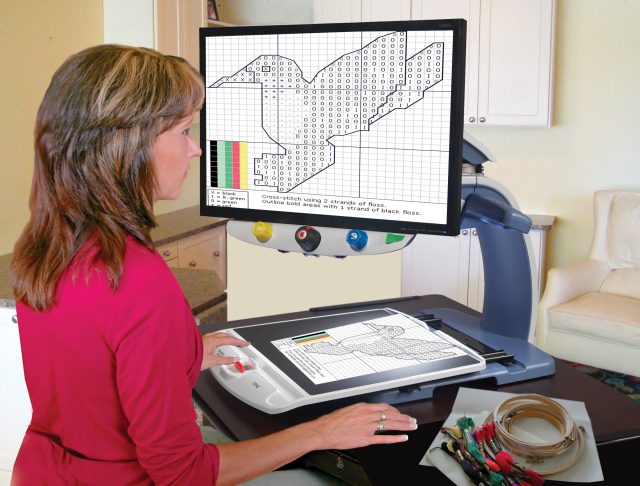
Person using a desktop electronic magnifier (CCTV) to view an enlarged cross-stitch pattern displayed on a large screen above the reading surface.

A dedicated CCTV is designed primarily for magnification. It uses a camera to capture what is on a desk or in front of the user, then displays it on a screen with adjustable zoom and contrast. Many people rely on it for reading mail, filling in forms, looking at labels, and writing, because it provides stable positioning and consistent performance. Desktop units can be particularly helpful for long reading sessions or sustained writing tasks.  

Why consider an iPad instead

The iPad can offer a cost-effective and multi-purpose option, especially if a person already owns one or can access one through school, work, or a service. In addition to magnification, it also supports a wide range of iOS accessibility features, including VoiceOver and dynamic zoom options. Unlike a single-purpose CCTV, the iPad can also be used for communication, learning, entertainment, and daily planning, which may reduce the need for multiple devices.  

Another advantage is personalisation. Users can adjust magnification and contrast to match their needs and preferences, and iPads benefit from regular software updates that can improve performance and accessibility over time.  

Making the iPad work like a CCTV

A key practical adaptation is using a stand. With a stable stand, the iPad can be positioned above reading material for hands-free use, which is especially useful for reading and writing tasks. This setup can feel more like a traditional CCTV experience, because it keeps the camera steady and frees the user’s hands to turn pages, write, or handle items.  

When paired with appropriate magnification and camera-based apps, the iPad can support common CCTV tasks such as enlarging printed text, viewing objects on a table, and adjusting contrast for improved readability.  

How it compares to a dedicated CCTV
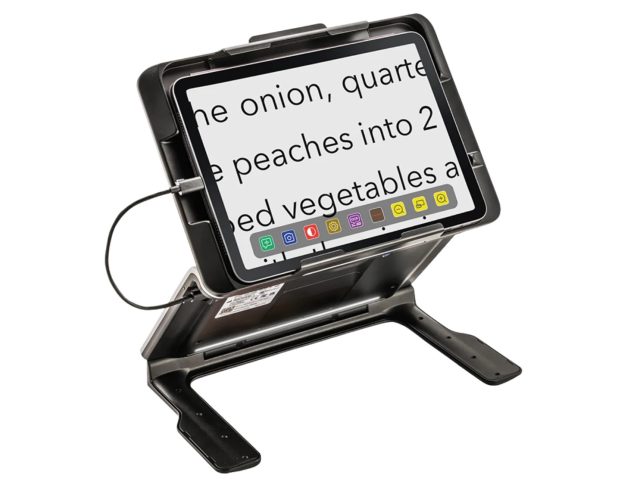
iPad Tablet mounted on an adjustable stand, displaying enlarged text on screen to demonstrate its use as a digital magnifier for reading.

A quick comparison is helpful here. In general, an iPad-based setup tends to score highly for portability, display quality, and personalisation. Dedicated electronic magnifiers (often called CCTVs) can vary in portability depending on the model, and they are typically more expensive. Where the iPad can really stand out is in the extra functionality it can offer alongside magnification, such as OCR (text recognition) and a wider range of built-in accessibility features, while many dedicated devices remain focused primarily on magnification and contrast.

When a dedicated CCTV may still be the better fit

An iPad will not replace every CCTV use case. Some people benefit from the simplicity and purpose-built design of a dedicated device, especially for long sessions of reading and writing, or when a stable desk-based setup is essential. Others may prefer the physical controls and specialised ergonomics of traditional systems. The best choice often depends on the person, their vision, their daily activities, and what support they have for setup and training.  

Video demonstration

If you would like to see the setup in action, there is a short YouTube demonstration in Hebrew that walks through using an iPad in a CCTV-style setup. Even if you do not speak Hebrew, the visuals can be useful for understanding how the iPad is positioned on a stand and how the camera-based magnification is used in practice. Depending on your YouTube settings, you may also be able to enable English subtitles, although the translation may not always be accurate.

Article meta data

Clicking on any of the links in this section will take you to other articles that have been tagged in the same category.

  • This article was written by the Migdal Or Karten Centre
  • Featured in the Karten Winter 2026 Newsletter
  • This article is listed in the following subject areas: Centre News, Technology

Post navigation

Matan – a case study
Tish’s New Device
  • Website Feedback
  • Site Map
  • Cookies
  • Accessibility
  • Privacy
  • Data Protection Policy
  • Disclaimer

© 2026. Karten Network

We use cookies on our website to give you the most relevant experience by remembering your preferences and repeat visits. By clicking “Accept All”, you consent to the use of ALL the cookies. However, you may visit "Cookie Settings" to provide a controlled consent.
Cookie SettingsAccept All
Manage consent

Privacy Overview

This website uses cookies to improve your experience while you navigate through the website. Out of these, the cookies that are categorized as necessary are stored on your browser as they are essential for the working of basic functionalities of the website. We also use third-party cookies that help us analyze and understand how you use this website. These cookies will be stored in your browser only with your consent. You also have the option to opt-out of these cookies. But opting out of some of these cookies may affect your browsing experience.
Necessary
Always Enabled
Necessary cookies are absolutely essential for the website to function properly. These cookies ensure basic functionalities and security features of the website, anonymously.
CookieDurationDescription
cookielawinfo-checkbox-analytics11 monthsThis cookie is set by GDPR Cookie Consent plugin. The cookie is used to store the user consent for the cookies in the category "Analytics".
cookielawinfo-checkbox-functional11 monthsThe cookie is set by GDPR cookie consent to record the user consent for the cookies in the category "Functional".
cookielawinfo-checkbox-necessary11 monthsThis cookie is set by GDPR Cookie Consent plugin. The cookies is used to store the user consent for the cookies in the category "Necessary".
cookielawinfo-checkbox-others11 monthsThis cookie is set by GDPR Cookie Consent plugin. The cookie is used to store the user consent for the cookies in the category "Other.
cookielawinfo-checkbox-performance11 monthsThis cookie is set by GDPR Cookie Consent plugin. The cookie is used to store the user consent for the cookies in the category "Performance".
viewed_cookie_policy11 monthsThe cookie is set by the GDPR Cookie Consent plugin and is used to store whether or not user has consented to the use of cookies. It does not store any personal data.
Functional
Functional cookies help to perform certain functionalities like sharing the content of the website on social media platforms, collect feedbacks, and other third-party features.
Performance
Performance cookies are used to understand and analyze the key performance indexes of the website which helps in delivering a better user experience for the visitors.
Analytics
Analytical cookies are used to understand how visitors interact with the website. These cookies help provide information on metrics the number of visitors, bounce rate, traffic source, etc.
Advertisement
Advertisement cookies are used to provide visitors with relevant ads and marketing campaigns. These cookies track visitors across websites and collect information to provide customized ads.
Others
Other uncategorized cookies are those that are being analyzed and have not been classified into a category as yet.
SAVE & ACCEPT