This is one of my favourite media activities but also a bit of a hobby.
Before college I had minimal skills with stop-motion, but college helped me to improve.I prefer to create my animation videos with Transformers models or Lego.
I use a variety of video editors depending on the scenario – currently my favourite is CapCut. There isn’t much to work with on the college software currently though as the programs are quite limited.
The process starts off with using an iPad, although you can use a phone. Then it’s a painstaking process of slowly taking photos and making tiny adjustments to the figures and props, then rinse and repeat the process.
Sometimes these animation projects can take a few days, sometimes a few weeks or even a whole term. Then there’s the process of actually getting the video edited.
All of my stop-motion animations during the last two years had my friend Oliver involved as Assistant Director / Art and Special Effects Choreographer.
The May 4th Special video for Star Wars Day was uploaded to the college Facebook page and is some of mine and Oliver’s best work.
Well we really are hurtling towards Christmas and a very well deserved Winter Holiday. I love this time of year, the energy and creativity in your organisations is always inspirational with so many festivities and so much for your service users and learners to enjoy.
The turn of the year marks a significant time for the Karten Network as we say farewell to Arwyn Jones who has been the Network Chair since 2016. We are hugely grateful for Arwyn’s commitment, dedication, knowledge and leadership during this time and would like to say an enormous thank you for everything he has done and all the time he has so generously given as a volunteer.
Stepping into Arwyn’s shoes as our new Chair is Joanne Rees-Proud. Some of you will already know Joanne who has been Principal at Hedleys College since 2014 and became Head of Service for Hedleys Horizons, Hedleys’ adult social care Lifelong Learning Service, in 2020. We are excited about the further development of the Karten Network under Joanne’s leadership as Chair.
We have a quantity of technology to be redeployed across existing Karten Centres early in the new year. The equipment includes iPads, iPhones, iPods, Amazon Echo dots, Smart TV, Smart bulbs, Smart speakers, monitors, mounts, microphones etc. The equipment was previously used in the Nuvoic project but now the project has come to an end we would like to see it being put to good use in Karten Centres. There are 8 bundles of equipment to be redistributed, details of which will be shared early in the new year. Whilst all equipment has been checked and reset, we cannot make any guarantees, but we believe all items to be in good working order. Interested Karten Centres will be required to express an interest in one or more of the equipment bundles, saying how they plan to use it and the impact it would have in their service.
Finally, I think I have now spoken to everyone who is planning on submitting a Karten Grant application for additional equipment to be considered at the Trustees’ meeting to be held in March 2024. The deadline for submissions is 19th January 2024.
Wishing you and your families all the very best for the festive season and for a happy and peaceful 2024!
Lakeside Printing at The Hamlet is a Karten Centre where young adults aged 19 – 25 with SEND are supported to develop their IT skills in a working environment. Through the support of Karten Network, Lakeside Printing has a range of IT equipment and software that is used by the Trainees to make and sell bespoke, personalised gifts including door hangers and photo slates. The general IT skills learnt in Lakeside Printing can be transferred to the Trainees’ daily lives whilst the more complex skills such as sublimation can be used to make many more products, which opens up endless creative opportunities.
The Trainees follow a step-by-step picture guide to create all of the products with beautiful end results! These picture guides not only develop IT skills but also allow the Trainees to have the opportunity to work independently and make a product from start to finish without support. Some Trainees have progressed so much using this system that they no longer need the visual prompts and can even support other Trainees to make the products. The sense of pride the Trainees experience when delivering their independently made product to a customer is immense and adds an extra personalised touch for those who visit Lakeside Printing.
All of the work done in Lakeside Printing would not be possible if it wasn’t for the amazing support of the Karten Network. Their grants have helped to purchase the equipment and software we need to continue ourwork and provide Trainees with a unique learning opportunity.
At the beginning of the year, Evija from Highland Culture collective ran a 12 session photography course, where 4 students learnt about all the different types of photography including cyanotype (one of the earliest styles of photography), portrait, landscape, movement, time lapse, micro, learning how to use Digital cameras, mobile phones. This is not all but shows the variety.
Once the photographs were taken, the service users then worked on editing their photography using applications already included in the computer software and Photoshop.
Once edited the service users were given the opportunity to print these off, frame them and exhibit them in the Cantraybridge’s café, which is open to the public. There were many inspired individuals, and they were given the opportunity to show what they had created. Some individuals had one to one support, and others preferred to work alone, with little input, using the digital tools provided and would only require advice now and again.
After a month of the exhibit the service users were then given the chance to sell their products, which are still on sale today, and we are hoping for further courses as this was so successful and really kept the attention of the students, allowing them to enhance their creativity and confidence.
Sean, was introduced to our organisation in 2017 when, as a service user with support needs asked Cantraybridge to assist with funding and support.
Sean showed great interest and ability in information technology and was very keen to learn 3D modelling and printing, Photoshop and video editing to name but a few.
As Sean, is neurodivergent and requires time and patience to help him process information, he requires a breakdown of information, quiet time, and a relaxing environment where there are no pressures. He has proven very adept in seeing and producing detail and his work is never complete, until he has eradicated any flaws/faults/ glitches. This can be time consuming, but he will not give up until he has found a solution.
In observing Seans’ skills, he was assisted and supported using assistive technology and his one-to-one sessions to build on his knowledge and understanding of the Digital World. If he wanted to know how something worked, he would research online.
Through lockdown, he was assisted by his one-to-one support through Zoom meetings and shared applications to produce over 100 face visors for the NHS using his own 3D printer.
After the pandemic Sean was supported in an extended work trial with a leading game developer whose games sell over the world. This was set up by Cantraybridge. He tested games and made the company aware of any glitches, flaws, bugs in the product and helped iron them out. He was very professional in his outlook to this work and after showing off his abilities, Cantraybridge then took this to the next stage and offered Sean a few hours of paid work to assist in the Digital studio, which is funded by the Karten Network.
Sean is now working regularly in the Digital Studio assisting the trainer to teach the service users 3D modelling applications and how to use the 3D printer to create the models that the service users have designed.
He is also in the middle of trying to fix a second-hand 3D printer that was donated to the College and again, will not stop until it is working.
In November 2020, while standing on Broadway Market I was caught in the crossfire between rival gangs and shot through the neck which shattered my spine and left me with a C4 Spinal Cord Injury. This has meant I am paralysed from the chest down with little arm movement and no hand dexterity. I spent 1½ months at the Royal London and was then moved to the London Spinal Injury Centre in Stanmore where I started my rehabilitation and met the team at Aspire.
Due to my limited arm movement and lack of hand function I was really struggling to use my phone, let alone a computer, which was particularly difficult as it was during Covid when friends and family were not allowed to visit and so I was so reliant on the nurses and healthcare assistants to do simple tasks like press a button.
I was then introduced to Andrew, Aspire’s Assistive Technology Manager, who helped me try out different computer mice and various types of equipment so I could decide which I was most comfortable with. I now use a Head Mouse, a Micro Light Switch and Dragon speech recognition software as well as Apple’s voice dictation iPhone technology.
All of these tools helped me connect with my family whilst I was in hospital and started me on the road to greater independence.
I was discharged at the end of April 2021 and was able to borrow a Head Mouse for a while before I could get one of my own, which I did thanks to a grant from the Frenkel Topping Foundation.
This has completely changed the way I live and given me independence and autonomy over my life. Not only do I use this technology daily to complete simple tasks, like sending emails, shopping and social media but I have gone back to work part-time as an e-commerce website analyst in the fashion retail industry. None of this would have been possible without Andrew’s help!
A huge part of my rehabilitation and life is art. This started at Stanmore, using hand splints where I found my line again and these tools enabled me to make marks and experiment. I have now expanded on using hand splints, in combination with my iMouse and graphics tablet to create new works of art. This practice has not only helped to improve the limited movement in my arms, building strength and articulation, but more importantly, it’s become a form of personal expression that has helped me to reconnect to my identity.
I am now delighted to have had my first debut exhibition, which ran from 28th September to 3rd October 2023, at the Nunnery Gallery in East London. My work embodies themes of control, restriction, growth, and personal narrative as I explore my relationship to identity and disability through paint, fabric, sculpture, film, and light, using technology to assist me in creating work.
There is a serious lack of representation of disabled people in the arts, from poor accessibility through to institutional ableism. I am strident in my commitment to raise public awareness about paralysis, to platform my own experiences of living with a disability, to share grief, loss, resilience and hope and give insight into struggles of independence in today’s inaccessible world.
Follow Natalie’s journey on Instagram @sneaky_biggers.
Our creative members have been hard at work creating many festive items for our Christmas Market. Lots of the items on display were created thanks to funding from the Ian Karten Charitable trust.
The photographs of the stall showcases the amazing talents of our creative members.
Wishing you all a wonderful Christmas and a Happy New Year.
Dan has been a learner at St John’s College for 4 years. He is one of our Printshop users and as part of his learning plan, has recently been tasked with keeping the Inklusion website (as pictured below) up to date. To enable him to carry this out, the Printshop team have been supporting him to learn the data input skills and steps of the process involved. With the ever-growing demand from employers for computer skills, data input is a vital skill that is in universally high demand in the workplace.
The funding to build the site was kindly provided by The Ian Karten Charitable Trust two years ago. We always aspire to equip our learners with the knowledge and skills they need to compete for jobs when they leave St. John’s, and our Karten Centre is a vital element of our careers support programme
Dan began with taking and uploading images to our Inklusion website. With support, he took photographs of new products in our range, which includes mugs, t-shirts, bags, and fine art prints. He then used Adobe Photoshop to reduce the size of each image from 300 dpi to 72dpi (dots per inch), which is an important step to promote faster loading speed on the website. Dan then removed the image’s background and made it transparent which resulted in a ‘web-ready’ .png file, which will have a crisp, clean appearance on the website. He then uploaded the web-ready image to the Media Library of our website’s admin section (picture shows Dan working), and from there, it can be picked up on the new product page.
The next step was for Dan to input the essential data for items in our online shop which included: description of the product; name of the artist that made it; price; number held in stock; and product category. Once all the details are logged and published on the site, his final task is to double check to confirm all the details are correct and visible to customers. Dan also makes full use of the equipment and is very keen on all aspects of design and production.
Below are images of some of the items he has made and posted onto the site:
Dan has become very proficient in this and enjoys the responsibility of this important task which is playing a key role in his learning and development at St John’s College.
Thanks to the support from The Ian Karten Charitable Trust, clients at Queen Elizabeth’s Foundation for Disabled People’s (QEF) are benefitting from a new sensory room.
QEF’s Care and Rehabilitation Centre (CRC) was officially opened by The Duchess of Edinburgh in 2021 and the fantastic new sensory room at the CRC helps clients with acquired brain, stroke, incomplete spinal injury or neurological illness develop new skills and express their creativity using the interactive technology.
The sensory room is used daily by our Psychology Team who said.
“We love using the sensory room for client groups such as relaxation; the clients can benefit from the use of mood lighting and relaxing sounds to allow them to unwind and practice mindfulness as well as getting away from a sometimes-chaotic timetable. The sensory room can also be beneficial for our clients in prolonged disorders of consciousness, and the use of the interactive floor projector; this allows us and clients to interact with tasks in different ways and can help sessions greatly.”
What a great example of how technology can aid rehabilitation.
With the festive season upon us, I thought to provide a sprinkling of stocking filler tips to bring some cheer while using the technology you use on a regular basis.
Microsoft Teams
Muting
Anyone who has used Microsoft Teams will be all too familiar with “You’re on mute”. What you may not know is you can help them out, by unmuting them. You will however need to either be the meeting organiser or have been assigned as presenter. If you have either of these roles, you will be able to unmute a fellow participant by clicking on their name and selecting the Unmute Participant. Similarly, you can choose to mute them too.
Note: Microsoft Teams will by default mute anyone joining a meeting in progress when there are 5 or more participants. This is aimed at reducing distraction.
Rich-text Messages
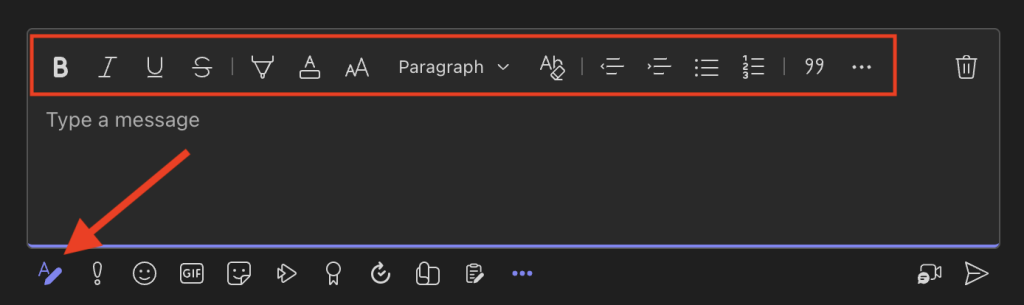
There may be times when it would help to add format and structure to messages. To do this, simply click on the ‘A’ icon/button on the bottom left of the text entry window. This will expand the text window and provide you with options to add format and structure to the text, before sending it.
Keyboard Shortcuts
Keyboard shortcuts can be a quick and easy way to use an application. They can also be used to setup assistive technology (e.g. The Grid) to perform various actions. Three common ones are:
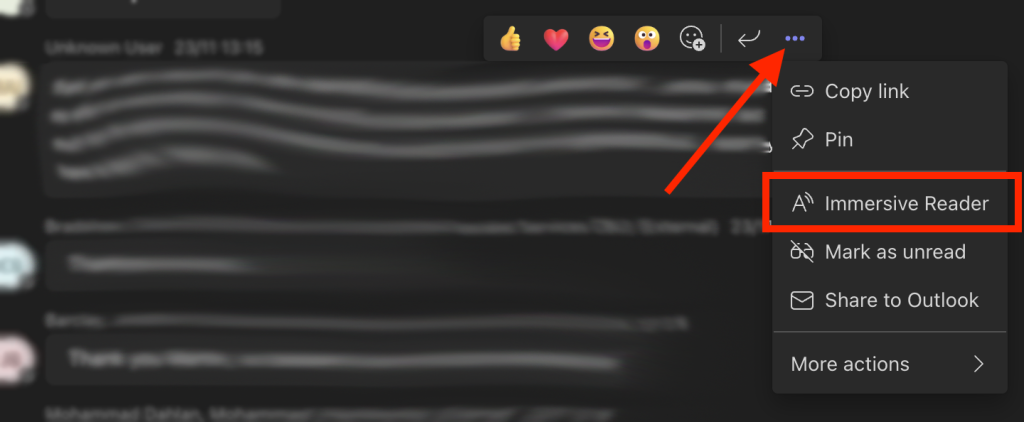
Microsoft Immersive Reader enables you to adjust how the text is displayed, removing distractions as well as being able to have the text spoken aloud. You can launch the Immersive Reader option by hovering over a message with your cursor and clicking the ellipsis. Note that Immersive Reader may be found under the “More actions” the first time you use it.
The live transcriptions feature, as the name suggests, generates a transcription of everything said during a meeting/call. This could make the meeting more accessible and help others who missed part of the meeting. It will also make captions available in the post-meeting recording.
This feature, however, can only be activated from the desktop (i.e. not in a browser) version of Teams. It also typically needs to be enabled from within your Microsoft 365 Teams Admin section. This may require asking IT or the person who administers your Microsoft 365 tenancy to do so.
To start Live Transcriptions:
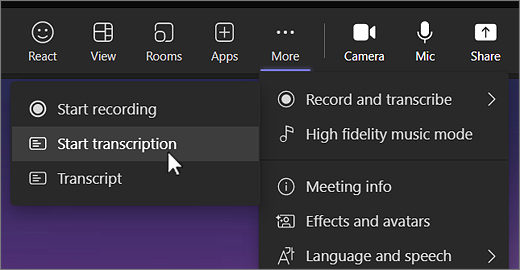
Go to the meeting controls and select “More actions”
Choose “Record and transcribe”, and select “Start transcription”.
All the participants will see a notification that the meeting is being transcribed. The transcript appears on the right side of the screen.
Note: If you also want to record the meeting, select More options again and this time choose Start recording.
Live Captions
Live captions will display all the words spoken as text on the screen. The font size and position can be customised to suit.
To start Live Captions:
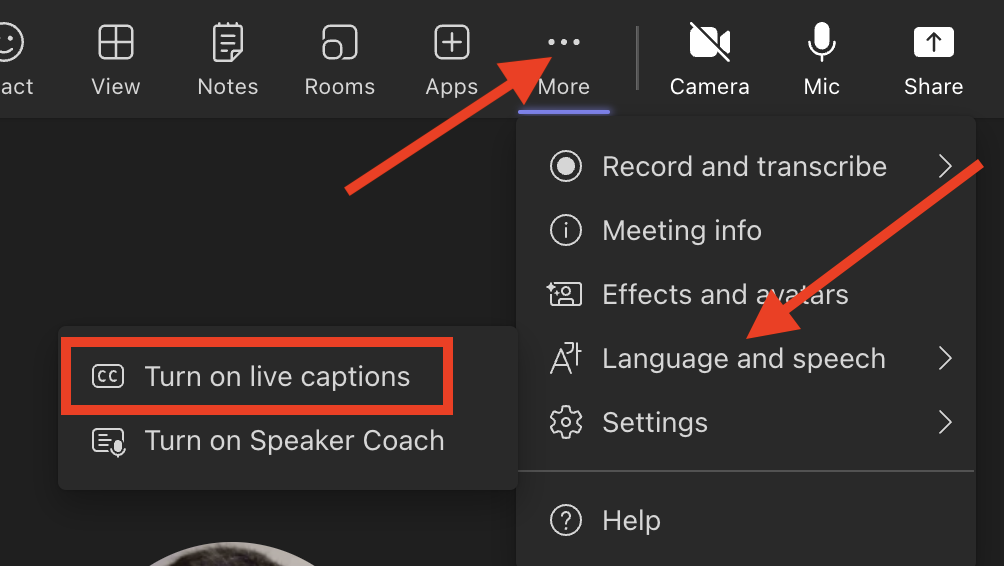
During a meeting. Go to the meeting controls and select “More actions”
Select “Language and speech”, and then “turn on live captions”.
Live captions can be toggled off at any time during the meeting by repeating the process.
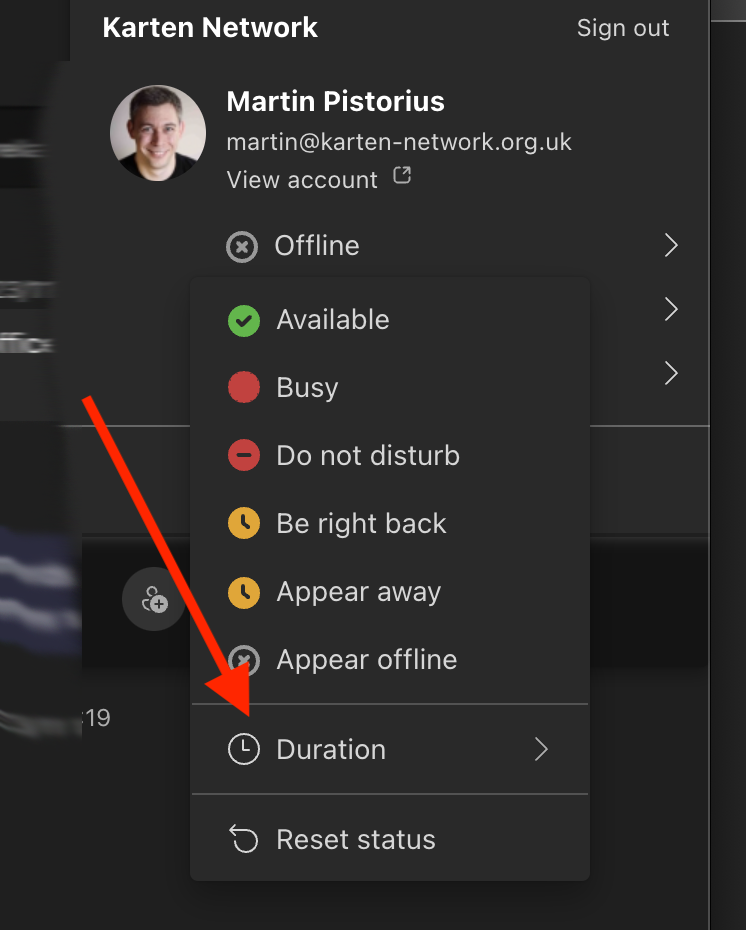
Set status duration
By defaults Teams changes your status after 5 minutes (e.g. from Busy to Away.) You can however set a status duration that suits your needs.
To do this click on your name and set your status. From within the status options, select “Duration”; set your desired status and for how long that status should remain active.
iPad
Scan documents
An iPad or or iPhone can be used to scan documents, through the Apple Notes.
To Scan a document
Open the Notes app and select a note or create a new one.
Tap the Camera button, and then tap “Scan Documents” .
Place your document in view of the camera.
If your device is in Auto mode, your document will automatically scan. If you need to manually capture a scan, tap the Shutter button or press one of the Volume buttons. Then drag the corners to adjust the scan to fit the page and tap Keep Scan.
Tap Save or add additional scans to the document.
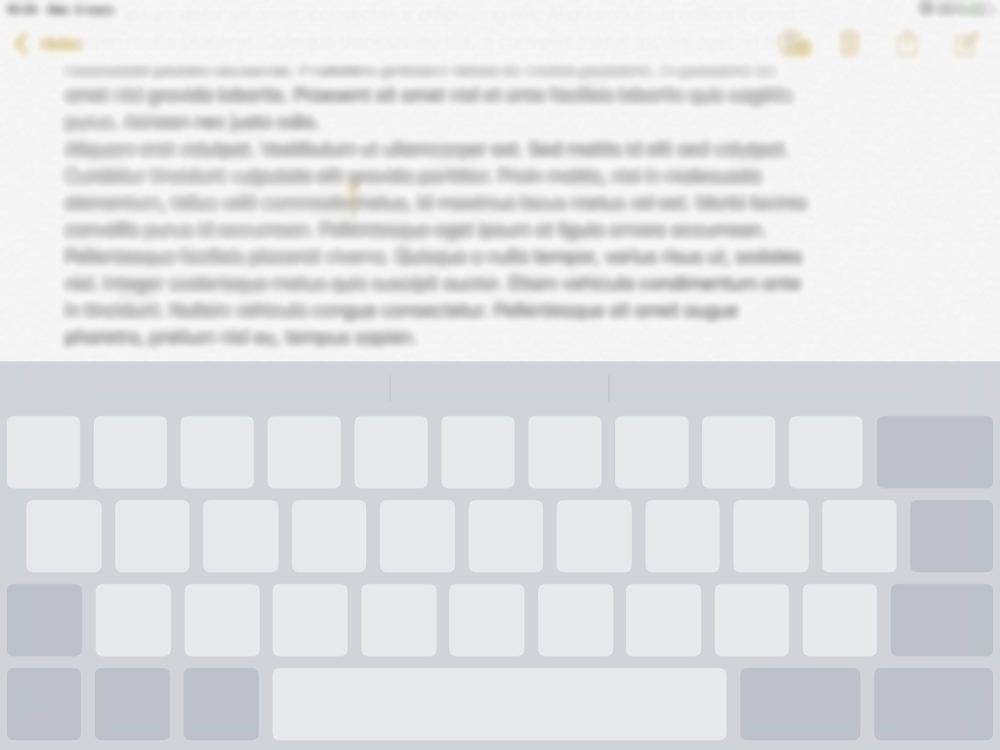
Virtual trackpad
It can sometimes be useful to be able to move the cursor within a section of text, for example when writing an e-mail. By touching your two fingers on the on-screen keyboard and moving them across the keyboard, the cursor will move as you move them. Note: this does not work if you are using a different keyboard app to Apple’s default one.
Voice assistants
In the festive season here are some fun things to try with your voice assistant.
Ask Siri “I see a little silhouetto of a man”
Playing a game, can’t find or use a dice, simply ask, “Alexa, roll a dice.”
Say, “Alexa, Beatbox for me”
Say, “Alexa, We don’t talk about Bruno”
Say, “Alexa, drum roll, please.”
Say, “Alexa, rap for me.”
Say, “Alexa, meow.”
Ask, “Alexa, how many sleeps until Christmas?”
Wishing you a very happy peaceful festive season and may 2024 be a good year for you. As always I am available to provide to support and help where I can, whether that be on using Microsoft Teams, Microsoft 365 in general, mobile technology, Smart Home technology or something else .
Thank you to all those who attended and contributed to the TechAbility conference. The feedback has been great and there was a wonderful atmosphere on the day. There were popular sessions on AI, accessible music, switch access and original research.
It was difficult to sum up the range of sessions and stalls, but given the variety of experience the theme became Progress not Perfection, recognising that we are all on different journeys and have much to learn. This was our first year running the conversation sessions at the end of the day, we hope they were able to meet the expressed need of more time to talk to each other about key issues.
It’s never to early to start requesting what you would like to see for next year and if you would like to contribute. You are what makes these events work.
If you’d like to see a review, we have put together a short video to capture the day.
Peer Exchange Week – 22nd – 25th January 2024
Over the four days Natspec will be hosting sessions on topical subjects of interest to specialist college staff in different job roles.
TechAbility are hosting a session on Thursday the 25th of January at 1pm until 2:15pm entitled Assistive Technology – Improving provision where the TechAbility Champions will take you through the changes they have made to improve their provision through Assistive Technology. You can expect topics such as Literacy support, communication, independence and transition in this session and we have gained permission from Natspec for all Karten members to have access to this event.
HSBC Launch Digital Accessibility Training and Apprenticeships
In an effort to improve accessibility HSBC is sharing its digital accessibility procedures with 1000 staff at other companies.
They have also launched an accessibility apprenticeship programme for disabled and neurodiverse apprentices to work at HSBC, upon completion they will be offered a full-time permanent job.
This is great news as it will improve understanding of accessibility at a range of companies while improving the representation of people with disabilities at HSBC – in turn leading to more accessible banking.
Based on the popularity of our previous mobile apps webinar, TechAbility have created another packed full of useful apps in just 20 minutes.
You can use apps to be creative, find learning resources, improve language pronunciation and set students tasks using videos that they can respond to in kind. How about a tool that can answer questions using AI that includes pictures and sources? Or something to support mental health techniques such as Cognitive Behavioural Therapy? You can even use your Android phone to make calls, speak phrases and activate environmental controls at the press of a customisable button.
We will provide options for Android and Apple devices wherever possible with the majority being free or at least having free features. We will have time for questions after the session and would love to hear from you about your favourite apps.
This course will give staff the knowledge to help learners discover accessibility features and apps on phones, which in turn should reduce people’s requirement for human support to support basic skills.
Access the world through a mobile phone: more information and booking
Computers, tablets and phones have a wealth of accessibility options already built into the operating systems. All teaching and learning support staff should have an awareness of these features so they can remove barriers for learners.
This course focusses on key stages in a learner’s journey and highlights the appropriate support required for effective outcomes.
Supporting learners’ Assistive Technology at all stages of their college journey: more information and booking
We use cookies on our website to give you the most relevant experience by remembering your preferences and repeat visits. By clicking “Accept All”, you consent to the use of ALL the cookies. However, you may visit "Cookie Settings" to provide a controlled consent.
This website uses cookies to improve your experience while you navigate through the website. Out of these, the cookies that are categorized as necessary are stored on your browser as they are essential for the working of basic functionalities of the website. We also use third-party cookies that help us analyze and understand how you use this website. These cookies will be stored in your browser only with your consent. You also have the option to opt-out of these cookies. But opting out of some of these cookies may affect your browsing experience.
Necessary cookies are absolutely essential for the website to function properly. These cookies ensure basic functionalities and security features of the website, anonymously.
Cookie
Duration
Description
cookielawinfo-checkbox-analytics
11 months
This cookie is set by GDPR Cookie Consent plugin. The cookie is used to store the user consent for the cookies in the category "Analytics".
cookielawinfo-checkbox-functional
11 months
The cookie is set by GDPR cookie consent to record the user consent for the cookies in the category "Functional".
cookielawinfo-checkbox-necessary
11 months
This cookie is set by GDPR Cookie Consent plugin. The cookies is used to store the user consent for the cookies in the category "Necessary".
cookielawinfo-checkbox-others
11 months
This cookie is set by GDPR Cookie Consent plugin. The cookie is used to store the user consent for the cookies in the category "Other.
cookielawinfo-checkbox-performance
11 months
This cookie is set by GDPR Cookie Consent plugin. The cookie is used to store the user consent for the cookies in the category "Performance".
viewed_cookie_policy
11 months
The cookie is set by the GDPR Cookie Consent plugin and is used to store whether or not user has consented to the use of cookies. It does not store any personal data.
Functional cookies help to perform certain functionalities like sharing the content of the website on social media platforms, collect feedbacks, and other third-party features.
Performance cookies are used to understand and analyze the key performance indexes of the website which helps in delivering a better user experience for the visitors.
Analytical cookies are used to understand how visitors interact with the website. These cookies help provide information on metrics the number of visitors, bounce rate, traffic source, etc.
Advertisement cookies are used to provide visitors with relevant ads and marketing campaigns. These cookies track visitors across websites and collect information to provide customized ads.