Nuvoic TechAbility Ian Karten Charitable Trust
Skip to Content
login
karten Network Logo

Supporting organisations working with disabled people

  • Home
  • About Us
    • Introduction
    • Trustees
    • Support Team
    • Minutes of Board Meetings
    • Karten Centre DVD
  • Research
  • Centres
    • Karten Centre Search
    • All Centres
    • Eire
    • England
      • East Midlands
      • East of England
      • London
      • North East
      • North West
      • South East
      • South West
      • West Midlands
      • Yorkshire and The Humber
    • Israel
    • Northern Ireland
    • Scotland
    • Wales
    • Success Stories
    • Equipment Donation
    • Apply for support
  • News
    • Newsletters
  • Resources
    • Mobile Technology Resource
    • eSafety
    • Useful links
    • Webinars
    • Talent and Technology Report
    • Audio Books
    • Event Handouts
  • Job Vacancies
  • Events
  • Contact Us
  • Home
  • About Us
    • Introduction
    • Trustees
    • Support Team
    • Minutes of Board Meetings
    • Karten Centre DVD
  • Research
  • Centres
    • Karten Centre Search
    • All Centres
    • Eire
    • England
      • East Midlands
      • East of England
      • London
      • North East
      • North West
      • South East
      • South West
      • West Midlands
      • Yorkshire and The Humber
    • Israel
    • Northern Ireland
    • Scotland
    • Wales
    • Success Stories
    • Equipment Donation
    • Apply for support
  • News
    • Newsletters
  • Resources
    • Mobile Technology Resource
    • eSafety
    • Useful links
    • Webinars
    • Talent and Technology Report
    • Audio Books
    • Event Handouts
  • Job Vacancies
  • Events
  • Contact Us

Derwen College ‘Support Work’ apps

Posted on July 8, 2020 at 12:21 pm.

Written by martin

Neil Bevan

by Derwen College ‘industry champion’ and project manager Neil Bevan, owner of design and app development business Hunter Bevan Ltd

Hunter Bevan Ltd is working in partnership with Derwen College on a three-year project to support young people with special educational needs and disabilities (SEND) to gain supported work placements as part of their learning journey. For some students this may ultimately lead to paid employment, the added independence and sense of achievement that brings. Our involvement in the project is in the development of a suite of iOS and Android-compatible apps to support training through an accessible, understandable platform. 

As Project Manager, it is interesting to interface between the needs of the educational sector and the technical delivery of desired outcomes from the apps. The challenges include how we deliver those outcomes through the use of technology and mobile devices for training which are understandable, easy to use and accessible to students, using simple design and specific content such as Makaton symbols, which will be of benefit to staff and students as a teaching and learning aid.

In ‘mainstream’ commercial training apps we might take a totally different approach to that of working in a specialist college setting. Some of the things we are learning through working with the college are shaping the future development of apps in this sector – such as the example of fingerprint recognition patterns being different in students with Down syndrome to those of the wider community, meaning that using that method of recognising an individual may be difficult using current technology. These subtle differences are informing future accessibility to the apps we are developing in relation to security and safeguarding issues. We are also exploring the use of different learning methods – using video and spoken word, Makaton and written words, and a series of pictures and written words, to learn which approach different types of students prefer for their own personal learning. One thing that is definite is that the use of technology is being welcomed by the students and they enjoy using the apps in their learning. This is demonstrated by students requesting to continue to use the apps on their personal devices after leaving the college!

The training app being displayed on an iPad

We have worked with the college to systemise the approach to determining the desired learning outcomes, producing easy-to-understand flowcharts of how the apps will work so that the specification can be agreed at an early stage. User interface designs are then created and presented to college staff so that we can discuss accessibility and user-friendliness appropriate to the students’ needs, learning from their specialist knowledge, before coding begins. We then share beta test versions of the apps with the college during the build process for evaluation, and continue to improve the ‘user journey’ through staff and student feedback. This ensures ongoing quality control and agility in being able to modify functionality and usability as we proceed to build the apps. The software behind the apps is the Laravel Nova admin panel, Cordova and React Native. We are partnering with Amazon Web Servers (AWS) to deliver server-side functionality where required, and the college is in the process of accessing grant funding from Amazon to support development on AWS. These state-of-the art development tools will enable further development of the apps in the future. 

Current apps include:

Premier Inn’s training manual in a pictorial, Makaton and simple sentence format on an iPad
  • Housekeeping training developed in conjunction with Premier Inn – working with Derwen College to convert Premier Inn’s training manual into a pictorial, Makaton and simple sentence version on paper – and then into a fully functioning app with the choice of using video and spoken word, Makaton and written words, and a series of pictures and written words.

Woking in a cafe screenshot
  • ‘Working in a Café’ – a step-by-step guide to common tasks when working in a café, using pictures, Makaton and words, which can be customised to an individual café’s own processes and ways of undertaking different tasks (e.g. multiple ways of making a cup of coffee using different equipment.

  • Digital CV builder, which enables a student to select descriptive words about themselves, upload pictures and personal data, and to incorporate videos and documents as evidence of their skills and work experience. As well as choosing from options, students can further personalise their CV using text, or voice recognition. The app also allows for schools and colleges attended, qualifications, work experience, references and a mock interview to be uploaded. An online or pdf CV is then generated which can be accessed by a potential employer who has been granted a secure access code. 
  • Early-stage development of a ‘Getting ready for work’ calendar-based app to support being ‘work-ready’ and the use of public transport to travel to work.

As the apps are currently for internal use within the college and a limited user-base outside the college, they are distributed to users as .apk files for Android and via TestFlight for iOS. Hunter Bevan Ltd are approved Apple Developers for iOS. 

We are delighted to be working on this project as it presents us with design and development challenges in building effective tools to benefit people with learning difficulties and disabilities which are really making a difference to the students’ lives and employment opportunities. The project has forged stronger links with Hunter Bevan and Derwen College and I have taken on a voluntary role as an Industry Champion for the Retail Pathway with the College – promoting their work, and supporting the staff and students with ‘real life’ business experience. The project has also proven to be an effective platform to introduce and present the work of the college to the wider business community.


Karten Print Shop – My skills by Sam Innes

Posted on July 8, 2020 at 11:32 am.

Written by martin

Sam working at home on his report

I spend a lot of my time on campus working in the Karten Print Shop. This has given me lots of great work experience and developed my work skills. It has helped me do well in my external work placements and will help me in any job I do in the future. It has given me confidence to look for a job when I leave College. I went from being a rookie to a professional!

Sam working in the Karten Print Shop.

 The type of jobs I do in the Karten Print Shop include:

  • Answering the telephone and telephoning external customers and taking orders,
  • Using the heat pressing machine to decorate sport tops and leavers tops,
  • Using the automatic guillotine to cut leaflet,
  • Quality control such as checking the quality of business cards,
  • Making badges and key rings counting them to make sure we have the right quantity,
  • Printing and creating banners,
  • Binding booklets
  • Deliveries-around campus and to external customers picking up from campus,
  • Cashing up the till,
  • Printing off labels for jam jars then delivering them to the Food Centre,
  • Showing visitors around the Print Shop,
  • Manning the reception desk,
  • Helping first year students and other students who are less experienced than me.

This has helped me develop many skills including:

  • Confidence to talk to customers on the phone and in person,
  • Communication skills and listening skills as I have to listen to customers carefully as they have detailed specific requirements,
  • Administration and organisational skills for example in taking down orders, checking numbers, etc.,
  • Practical skills – using specialist machinery like the heat press, guillotine, banner printer, badge making tool, 
  • Mentoring skills,
  • Money skills.

My work in the Karten Print Shop made me feel ready to take on external work experience with Severn Trent. At Severn Trent I work on reception, greeting external customers. I use the intercom and CCTV to control people entering the building and I have to tell them off if they are tail-gaiting. The communication skills I have learnt in Karten in dealing with customers has allowed me to do my reception work with confidence.

Sam at working at Severn Trent reception

I also use my practical and organisational skills when I rank the post and count how many items of post there are. These skills and my quality control skills are also essential when I do my other duty of doing fire safety checks of every building on the Severn Trent site. Without my experience in the Karten Print Shop I might not have had the confidence to take on this important role on Severn Trent reception.

Sam at Severn Trent

My experience at Karten enabled me to take on the job at Severn Trent. It makes me feel I would have a lot to offer in any retail, business or office environment and will give me the confidence to apply for jobs when I leave College. I now have lots of essential work skills. I am a good communicator with a focus on customer service and quality of service. I mentor and help other staff. I have administrative and organisational skills and also practical skills. I understand the importance of quality work and quality control and know I can learn to use different types of machinery with confidence once I have been shown how.


Network Development Coordinator’s Update – Summer 2020

Posted on July 7, 2020 at 12:50 am.

Written by martin

Hello Everyone I hope all is as well as it can be with you and yours during these very strange and challenging times.  I have remained in close contact with many Karten Centres as the lockdown has progressed, either providing direct support or during our weekly Karten Cuppas.  In the face of adversity, your passion, enthusiasm, determination and commitment to do the very best for the people you support have shone above everything else. I have never been prouder to be involved with the Karten Network and the organisations that make it.

Working in partnership with a number of organisations we have been able to provide resources, materials and access to webinars during the lockdown.  Thanks particularly to TechAbility (https://www.techability.org.uk/) , Natspec ( https://natspec.org.uk/) and Jisc (https://www.jisc.ac.uk/) for providing timely and authoritative advice and guidance in response to Covid-19 related matters.

The Karten Network’s website has a section to support service users at home –  https://karten-network.org.uk/home-learning-support/

Natspec’s Home learning website includes a wealth of material to help with home learning and a blended approach – https://homelearning.natspec.org.uk/

TechAbility also has fabulous sections for supporting people at home – https://www.techability.org.uk/resources/aiding-learning-from-home/

TechAbility has delivered an excellent series of webinars.  Upcoming webinars can be found here – https://www.techability.org.uk/webinars/  All webinars are recorded and can be watched at a later date via the YouTube Channel – https://www.youtube.com/playlist?list=PLlQNUqK0ICK7tEd8rGaBmFUF5Lu4yyH-p

We are delighted to introduce Liz Howarth to the Karten Network team, she introduces herself later in the newsletter and introduces the exciting project she is managing.

Over the next few weeks we will be sending out a questionnaire to help us to focus our support for Karten Centres as effectively as possible as we start to get back to something closer to normal.  Karten Centres are entitled to free support from myself and Martin Pistorius, please don’t hesitate to contact us at any time.  Karten Centres can also access consultancy support from TechAbility.

Huge strides have been made by many organisations in the use of different technology and tech platforms during lockdown.  This has been achieved more on a “needs must” than planned basis, but it has enabled many people see what is possible if we seek creative and innovative solutions.  Many of those staff members who allegedly could barely turn the computer on to send an email are now Zooming, or using MS Teams like old hands – they have embraced technology and we now need to build on these advances in order to be optimally flexible and agile moving forwards.  If you are looking to consolidate on the previous learning and development, I would encourage you to review and update your digital strategy.  Reference to the TechAbility standards could inform your planning – https://www.techability.org.uk/techability-standards/

Unfortunately, due to the economic climate we are not currently able to accept applications from Karten Centres to procure additional equipment.  I will keep you informed and make sure you are advised of the next funding window.  I realise this will be disappointing to some of our Karten Centres who are now in scope for additional funding.  Trustees are working diligently to maintain the sustainability of Ian Karten’s incredible legacy and to ensure that they can continue to provide financial support to Karten Centres well into the future.  2020 is Ian Karten’s Centenary year – we had wonderful ideas for Centenary Celebrations later this year but Covid-19 had other plans!  We will celebrate 101 in 2021 and look forward to sharing our plans with you. 

May I extend my best wishes to you for a safe and healthy summer.

Dawn Green
Karten Network and Development Co-ordinator


Creating inclusive communities through Zoom

Posted on July 1, 2020 at 2:55 pm.

Written by martin

When lockdown started on March 23rd, everything came to a stop. But for social care workers up and down the country though, that wasn’t the case.

Initially, anything beyond ‘health’ and the safety of the people we support and our colleagues had to take a back seat and it’s easy to see why – none of us have experienced the challenges of a once in a lifetime pandemic before – but at SeeAbility we’re all about pushing beyond day-to-day medical care and supporting people to live ambitious lives in inclusive communities.

So how could we continue to support inclusion in a society where everyone is literally isolating? And how could we support people with the very real challenges of understanding the changes to their routines and daily life, and why they could no longer see their friends and family members? The answer: lots of video calls.

It wasn’t and still isn’t just about occasional ‘check-in’ video calls however. It’s about making sure that people have all the tools they need to be part of society – that means control over their lives, the specialist support to communicate, and the contacts within the community.

Amplifying the voices that matter

Even before the covid-19 pandemic railroaded through our routines and lives, we were making a concerted effort to amplify the voices of people we’re supporting, so they can campaign for change both in their local communities and within SeeAbility, and have more control over their lives.

Scott Watkin BEM is the first person in our leadership team with the lived experience of a learning disability, and leads on ensuring people with learning disabilities have a bigger voice in society. He’s recruited three ‘associates’ from people we support and is training them to become the next generation of campaigners with disabilities.

We didn’t want to stop this incredible engagement activity just because of lockdown. In fact, it became more important than ever for us to engage with people to find out how they’re coping with lockdown and what we can do to support people even better through it.

So Scott set up a weekly drop-in Zoom call every week, where anyone we support can join to discuss how they’re finding lockdown, exchange ideas, talk about their feelings and feel part of a community.

“I think it’s really important,” says Scott. “People need to have that opportunity to make their voice heard and express how they’re feeling, so we can work out how we can make changes as an organisation.”

For many of the Zoom regulars, the call is an incredibly important way for them to stay connected with other people with similar experiences.

“The calls are there to give people a voice, but also for them to connect with other people, their colleagues and their friends. Last week people were even bringing along didgeridoos! That was unexpected!”

Providing specialist support remotely

As well as helping people to find their voices and express their opinions on the things that matter to them, we also make sure people are able to get the specialist support they need to communicate effectively. We’ve got an in-house team of Speech and Language Therapists who work with the people we support to help them find ways to communicate.

One of these ways is through Makaton a sign language that is often used by people with learning disabilities who find verbal communication challenging. Speech and Language Therapist Lesley Thorndycraft has been running Zoom ‘Sign-a-longs’ for people who use Makaton, for anyone to learn new signs through popular songs. It’s also open to their families to join in.

“It means that people are able to keep learning Makaton across SeeAbility in a fun and accessible way,” says Lesley. “When people learn the signs to a song they know, they learn the signs without even realising it, just through the repetition.”

“It’s been a lifeline for some people. One lady lives at home with her family and she relies on Makaton to communicate. The sing-a-longs keeps her engaged and help her stay mentally healthy even when she can’t see other people face-to-face.”

Staying connected with the outside world

But our dream of an inclusive community is that people with disabilities are able to participate in the wider community outside their support. We empower people to make changes within the organisation, and give them the specialist support they need to communicate – but ultimately, we want to help people engage with wider society.

Our volunteers have been brilliant here. In normal times, we have over 150 volunteers who give their time to support people with all sorts of things, often partnering up with someone through a shared hobby. For instance, there’s a volunteer tandem club, pairing up sighted volunteers and people who have visual impairments.

Although hobbies like tandem cycling are impossible during lockdown, we’ve worked with the volunteers to ensure they can continue with their roles as far as possible.

Volunteer Vivien has become close friends with Joyce, and they usually meet up to sing duets together. These sing-a-longs have now moved to the phone, so they can carry on singing virtually.

“I miss seeing my friend Joyce in person.” says Vivien. “But I phone every few days to speak to her. We ‘duet’ to a couple of her favourite songs over the phone! I’ve been a voluntary friend for over 8 years now and find it so hard not being able to visit.”

Volunteers like Vivien going the extra mile during lockdown mean that people we’re supporting are still able to make those valuable connections with the outside world and feel included in their communities.

Inclusion remains at the very heart of what we do, and through technology we’ve been able to keep people connected and included even through these difficult circumstances. Scott says it best: “If we ever have to go into lockdown again, we’d do everything the same. I think we’ve done really well to make sure people have remained connected and are feeling part of their communities.”


Improved acoustics for improved learning

Posted on July 1, 2020 at 5:46 am.

Written by martin

Yael Shraga Roitman, Institutional accessibility advisor, Ono academic college.

Last week I was sitting in a cafe with some co-workers. We had a conversation about the current state of special education in Israel. Though the conversation was interesting, I didn’t enjoy it. The music was loud, and other people were talking around us.  I was struggling to listen to my friends, tried to read their lips, to lean against the table, and to assemble coherent sentences from the fragments I’ve heard. At some point, I got tired, and although I had a lot to say, all I wanted was to go back to the office.

I often hear about similar experiences when I talk to students and lecturers. As an Institutional accessibility advisor, complaints about noise are one of the most common complaints in academic environments. Students tell that they couldn’t get a clear understanding of the learning material because of noise interruptions, and lecturers explain that they had difficulties giving clear and coherent explanations to the students due to the same reasons. Both students and lecturers told me that the class took a lot of effort, and on many occasions, they didn’t fulfill their learning and teaching goals.

Julian Treasure, a sound and communication expert, said in his Ted lecture “Why architects need to use their ears”: “If you can hear me, you can understand me without seeing me. If you can see me without hearing me, that does not work”. In other words, excellent acoustics are essential to any learning experience. The discussion about acoustics in learning spaces becomes more relevant when we talk about students with cognitive disabilities, hearing disabilities, and visual disabilities. A quiet environment prevents distractions and makes it easier to grasp the information more clearly.

Students sitting in a lecture Hall

Generally, acoustic adjustments in learning spaces include noise isolation coming from outside, noise reduction originating in the interior space, and echo reduction from the floor, walls, and ceiling. For starters, it’s recommended to identify the most influential factor that affects the acoustics and address it. If, for example, traffic noise coming from the windows is the most disturbing factor in the lecture hall, sealing the windows might be the most effective solution for this particular space.

Furthermore, lecture halls should have a good sound system that includes a high-quality set of microphones and speakers that are distributed equally in the learners’ area.

Due to the contribution made in 2017 by the Ian Karten Charitable Trust, we improved the acoustics in 14 lecture halls and the Support center for students with disabilities in Ono academic college. Because of this, more students are choosing to come and study in the Support center. Also, students and lecturers become more aware of the importance of a quiet environment and a high-quality sound system in the lecture halls and other learning spaces. They ask to learn and teach in the lecture halls with acoustic accessibility and direct our attention to problematic areas on the campus.

As the number of students in higher education increases over the years, the physical environment plays a significant role in students’ engagement in campus activities. Acoustic design around campus can ensure quiet as well as noisy areas that can be planned according to the type of use and users. Hopefully, professionals who are involved in space design will refer to diverse users and optimize their academic experience.


Nuvoic

Posted on June 30, 2020 at 2:30 pm.

Written by martin

The Karten Network is very pleased to begin work this Summer on the Nuvoic project, which aims to improve access to voice recognition technologies for people who have dysarthric or unclear speech. Our project partner Voiceitt produces a specialist voice recognition app, designed to be used by people who have dysarthric speech and who are unable to use mainstream voice-controlled systems.

We want to recruit participants who would be willing to provide voice samples to extend Voiceitt’s database of English-accented dysarthric speech, which will help improve the performance of their recognition systems. Voiceitt are also working to develop new and existing functions for their apps. Potential uses include voice output, to help users to communicate more easily with people who are unfamiliar with their speech, and control of other voice-driven technologies such as the Amazon Alexa and other smart-home and environmental control systems. There are also plans to develop a voice-controlled online shopping app.

We are looking for participants aged 16 or over to join this exciting project, to test these apps and provide feedback to Voiceitt on how they could be improved. The apps give written instructions to the user, so some literacy is needed. If you would like to get involved with this project or would like to find out more, please contact Liz Howarth who is the project co-ordinator for the Karten Network: liz@karten-network.org.uk.

We would be very grateful for any help from colleagues in our Karten Centres to help us to publicise this project and make contact with any potential participants. The Voiceitt apps currently run on Apple devices but Android versions are planned for the future. Participants using their own iPhone or iPad will benefit most easily but some funding is available to provide testing kit where needed.


The Cedar Foundation: Rebekah’s Story

Posted on June 29, 2020 at 11:00 pm.

Written by martin

The Cedar Foundation is an organisation based in Northern Ireland that supports people living with disability, autism & brain injury (https://www.cedar-foundation.org/). It has two Karten CTEC Centres, one based in Belfast and the other in Ballymena.

As part of its Inclusion Works programme Cedar provides person centred assessment, training and support to adults to enable their full participation in society. The following outlines one of Cedar’s participant’s experience on her journey…

Image of a lady's hand typing on a keyboard
Screenshot from Rebekah’s blog: https://rebroken.blog/

Rebekah is one of Cedar’s Inclusion Works participants who has received training in The Cedar Foundation’s Belfast, Karten CTEC Centre. After initial assessment for Assistive Technology and IT Support Rebekah participated in work the placement with Cedar’s Communications Team. This enabled Rebekah to raise awareness of ABI & relate her ongoing story of recovery through social media and her online blog. This is Rebekah’s story…

“My name is Rebekah and I am 28 years old.  When I was 24, I had a car accident when I was going to my horse-riding lesson.  The accident left me with an Acquired Brain Injury which affects the left-hand side of my body.  I was in a coma for 4 months in the Royal Victoria Hospital and in January 2017 I was transferred to the Regional Acquired Brain Injury Unit (RABIU) in Musgrave Park Hospital. While at RABIU I underwent assessment and rehabilitation and was discharged September 2017.

I came out feeling broken and had no confidence – unsure of who I was, the left side of my body wasn’t working, and I felt angry and frustrated! I have always had the support of my fiancé and family which has been irreplaceable.

In November 2018, my Occupational Therapist from the Community Brain Injury Team (CBIT) referred me to the Cedar Foundation’s Inclusion Works Service Belfast (IWB). I had previously heard good reports about the Cedar Foundation from a good friend whose son had attended there as a service user.

I started on the IWB Programme in January 2019. I was introduced to my Case Officer, Helen Savage, who has been very supportive and attentive. When I started Cedar, I was unsure what I would like to do. Initially I met with Helen weekly, we discussed my goals and ways to help me build my confidence and stamina. Prior to my accident I was extremely independent and worked full-time.

Photos of Rebecka at work and play

I started attending ICT classes in Cedar’s Karten CTEC Suite. I found this very beneficial as I write a blog about my experience of living with a Brain Injury. Joe Cash (IT Tutor) supported me with online social media and exploring assistive technology options. I was also provided with support to try out online courses. This enabled me to explore remote learning options and helped me to refresh my previous learning.

Prior to my accident I had achieved a 1st Class Honours degree in Communication and Public Relations. As a result, Helen set up a work placement with Cedar’s Communications Team. I thoroughly enjoyed this placement and felt I had taken the first step to looking at work since my accident. I helped with updating Cedar’s Facebook and Twitter page. These
opportunities helped to build on my self-confidence, resilience and communication skills.

I hope my placement will resume soon – after Covid-19! In the meantime I will continue to focus on my hobbies (Art and Cooking) and update my daily blog – https://rebroken.blog/. Please check my blog out.

Meeting the Cedar team has been a great experience and they have been very supportive, helping me to improve my confidence, especially in exploring my workplace options in the future :-) “.

For further information on The Cedar Foundation Inclusion Work’s program click on the following link… https://www.cedar-foundation.org/Pages/Category/training-and-employment


Welcome to Liz Howarth

Posted on June 28, 2020 at 12:48 pm.

Written by martin

Liz Howarth

Liz Howarth has joined the Karten Network in June as Project Co-ordinator for the Nuvoic project, which aims to improve access to voice-recognition technologies for people who have dysarthric or unclear speech. Liz has recently worked as a health researcher at the University of Manchester, contributing to several trials and evaluation studies, and has previously worked in learning and communication support and assistive technology roles at Beaumont College in Lancaster.

There, she provided technical and learning support to students using voice output communication aids, and through the Wheeltop project worked to improve students’ access to education, entertainment, social networking and environmental controls through development of customised interfaces for portable devices.  

Liz is looking forward to working with Karten Centre teams to support participation in the Nuvoic project. This will be an opportunity for people with dysarthric speech who are unable to use mainstream voice recognition systems to get involved in testing and improving more accessible voice control. Potential applications include voice output for communication with others, or to interact with existing voice-driven systems such as the Amazon Alexa and other smart-home devices. For more information see our featured article, or contact liz@karten-network.org.uk.


Update from Mobile Technology Advisor – New features and updates from Apple and Google

Posted on June 27, 2020 at 3:18 pm.

Written by martin

Apple’s annual Worldwide Developers Conference

Apple’s annual Worldwide Developers Conference (WWDC) took place last month. Unlike the previous 30 conferences, it was held virtually and free for anyone to attend.

The WWDC keynote, streamed directly from Apple Park included, the introduction of iOS and iPadOS 14, watchOS 7, tvOS 14, and more. The full keynote is available on YouTube.

iOS and iPadOS 14

iOS 14 homescreen widgets

Version 14 of iOS and iPadOS, expected to be released in September, brings the first major change to the user interface since iOS was first released with the introduction of widgets. A concept that Apple have used successfully on their Apple watch. These widgets, available in different shapes and sizes can be placed on the home screen, creating a more data-rich home screen. A variety of widgets that can be added through the Widget Gallery.

iOS widget sizes

Widget Stacks

To optimise the use of space you can create Widget Stacks, allowing you to stack up to 10 widgets on top of each other.  Swapping between them with a swipe.

iOS widget stacks

A Smart Stack can be added. This folder uses on device intelligence to automatically display the best widget option based on time, location, and activity. For example, if you stack up the weather widget, the calendar widget, and the maps widget, you might see the weather when you wake up, the calendar as events as they come up and maps when you are out.

iOS smart stack widgets

Siri is also ever present, providing a Siri Suggested widget based on your device usage. If you read the news every morning on the bus or train, you may see the BBC or Apple News app. If you order coffee each day around lunch time the Costa or Starbucks app will appear around that time.   

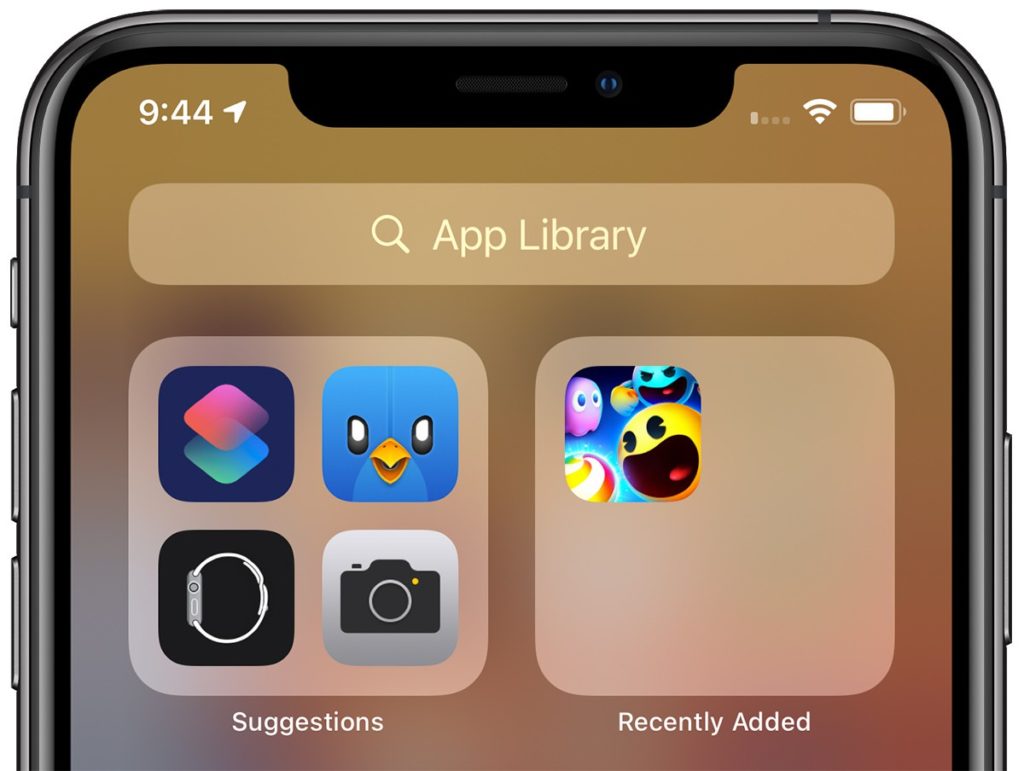
App Library

To compliment widgets, a new App Library feature has been added. Similar to Apple Watch’s app list view, App Library automatically organises every app you have installed into category folders.  

iOS App library

Swipe right to get past the Home Screen pages and onto App Library view. This seems a great to quickly access apps that normally reside beyond the first or second page.

App Library includes an intelligent “Suggestions” folder where four recommended apps are shown based on factors like, usage, the time of day, location, and activity.

iOS 14, app library suggestions

It is now possible to hide individual pages or apps, limiting apps to the App Library. This will allow for much tidier screens.

iOS edit pages

Other screen-space saving changes include a new compact incoming call and Siri interfaces. Siri is not only now more compact but has received a significant update, making Siri “smarter”.

Improved Accessibility

As with every new iteration of iOS, the accessibility has been improved and expanded. Voice Control, introduced last year gets a new British English voice and expanded capabilities, support for Braille has been enhanced and expanded, and more. Some of the new features worth mentioning are:

Sound recognition

While this is not a new concept, it is the first-time sound recognition has specifically been used for accessibility purposes. Amazon, Google, and others have used AI-based sound recognition for personal safety applications. For example, Google Pixel phones are able to listen for a car crash and Amazon’s Alexa can listen for the sound of broken glass.  Once enabled in the accessibility section of iOS 14 the phone will listen for 14 different sounds, including a knock at the door, a doorbell, sirens, smoke detector alarm, dog barking, a crying baby, and more. If one of these sounds is heard you are alerted.    

iOS Sound recognition displaying a running water notification

Headphone enhancements

This new feature allows people to adjust the frequency response and boost softer sounds to make it easier to hear. While this requires one of the compatible headphone sets (e.g. AirPods Pro, AirPods, Powerbeats, Powerbeats Pro and Beats Solo Pro, EarPods) it is a great enabler for anyone who has trouble hearing.   

Back Tap

Back Tap this new simple feature lets you assign an action to a tap on the rear of your iPhone and it even works when the phone is in a case. Currently, Back Tap only supports two movements, a double and a triple tap. However, there are large number of actions that can be assigned to the taps.

iOS back tap settings

FaceTime Sign Language

The update to FaceTime now includes artificial intelligence that will recognise if someone is using sign language during group FaceTime call. The system will then  make the person on the call who is signing appear more prominent.

VoiceOver

VoiceOver has been upgraded. Most notably is VoiceOver utilises on-device machine learning and Apple’s Neural Engine to recognise and audibly describe what’s happening on screen. VoiceOver can now identify key display elements, especially on websites and apps that don’t have their own accessibility functionality. This can include text within images as well as interface controls that can all now be read out.

Apple Magnifier

Apple Magnifier has been upgraded too. It now magnifies more of the area you are pointing at, as well as capture multi-shot freeze frames. You can now filter or brighten images for better clarity as well as capture multiple images at once – making it simpler to review multipage documents or longer content.

Other new features and changes in iOS

With more than the reported 250 changes and enhancements from iOS 13 here are some of the changes and new features:

  • Picture-in-Picture (PiP). While not a new concept Apple has added it’s “Apple touch” to it. If you swipe away while watching a full-screened video, the window will now float on your home screen, allowing you to move and resize it. The video can also be minimise into a small button on the side of the screen. All this means that you can continue to play a video while doing something else.
iOS 14 showing picture in picture
  • App Clips – similar to Android’s Instant Apps, App Clips allow you to use an app without needing to download the full version. App Clips will also support Apple Pay. This feature could be useful for those times when you need quick access or only need an app temporarily.
iOS App clips
  • A significant update to Apple Maps and includes new cycling-specific navigation, among other things. This can alert you to increases in elevation as well as a notification if there are stairs along your route. This could be very useful for wheelchair users too.

    Unfortunately, for now, is US and China focused and will be first available for New York City, Los Angeles, San Francisco, Shanghai, and Beijing. Although more cities will be added once iOS 14 is released.
  • Third-Party Default Apps – for the first time since iOS was released Apple allows you to set third-party browser and e-mail apps as the default. This means Google Chrome users and those who prefer other e-mail apps can use them more easily.
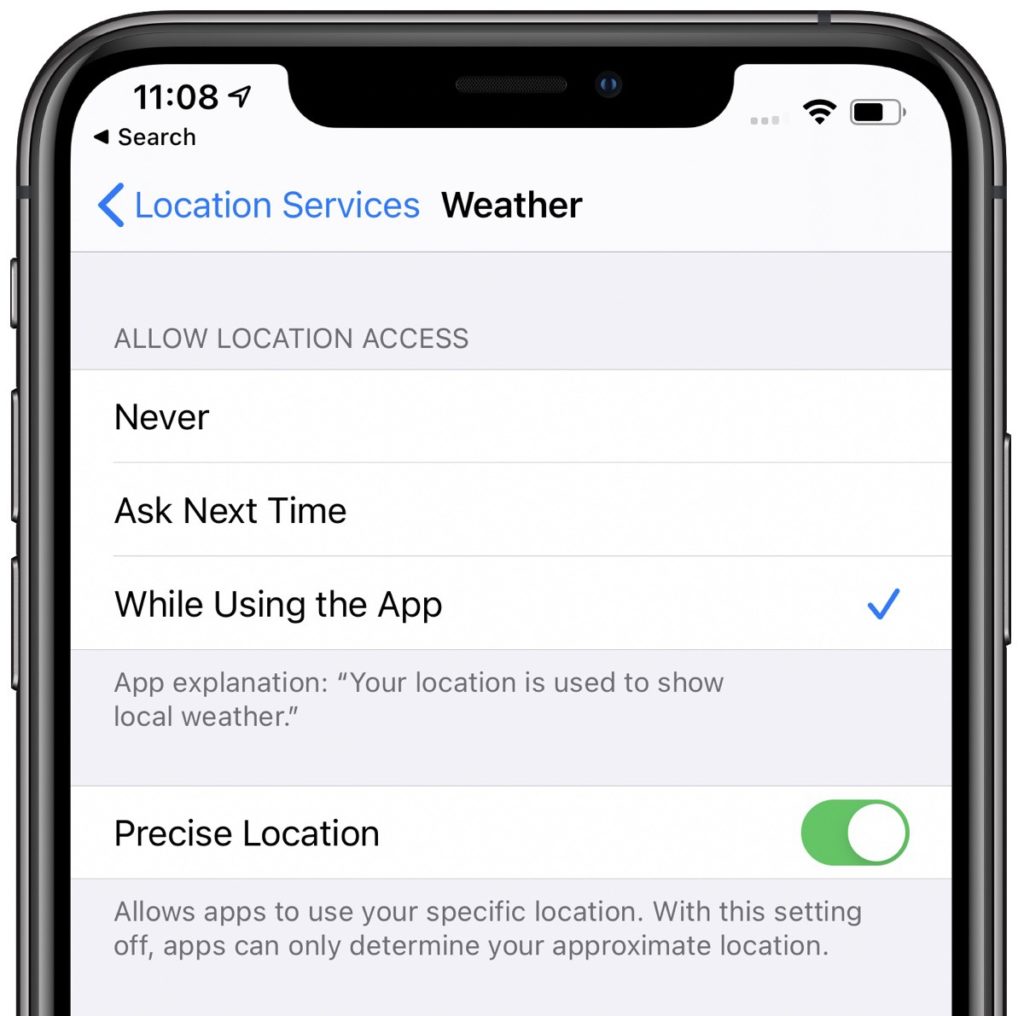
  • Privacy Protections – A significant amount of work has gone into improving and expanding the privacy protections. It is now even clearer what information apps collect, requiring more user permission. It is now possible to use location dependant features without providing your specific location data. 
    iOS 14 displaying the use of non-specific location data


    Changes have been made to the Apple app store to make is clearer what the privacy impact of each app is before you download it. Apple now require developers to self-report their privacy practices, including any data they collect and used to track people.

    Developers must now also obtain express permission from the user to access or use any tracking data.  

    The Apple Clipboard now provides a notification, so you know what app is accessing text copied to it.

    Apps that need to discover and access devices on your local network now need to gain your permission to do so first.  
    iOS 14 shwong network device access request
    Fine-grain control to your photos has been added. Any app that requests access to the Photo Library, no longer needs to have access to all your photos. You can choose to block access, select specific photos that the app can view, or allow full access. 

    If an app uses either the camera or microphone for recording purposes an indicator light will now appear next to the mobile signal bar. This will happen whether an app is being used or running in the background. This will ensure that apps are not secretly recording without your knowledge.
    iOS 14 recording notification light


    To prevent operators tracking your device Wi-Fi now includes the option to “Use Private Address”; and Bluetooth devices can be renamed.    
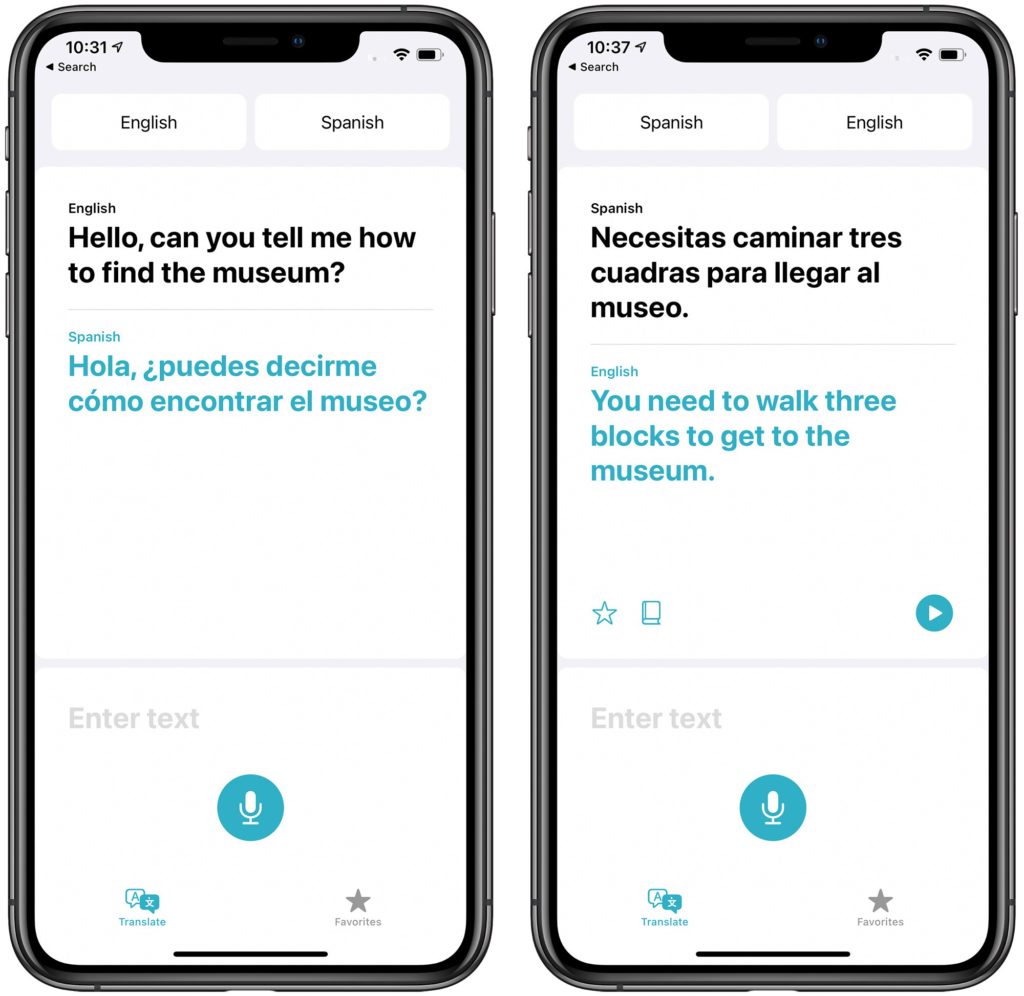
  • Translate App – Siri’s translation capabilities added in iOS 13 have been expanded into a dedicated translation app.The underling translation engine has also been integrated into the new version of Safari. This makes it possible for websites to be translated too.
    Apple's Translation app
  • Memoji will be expanded, including more age options, and accessories for Memoji, such as face masks – I sign of the extraordinary times we are living in.   
iOS 14 new memoji wearing a face mask

iPadOS 14

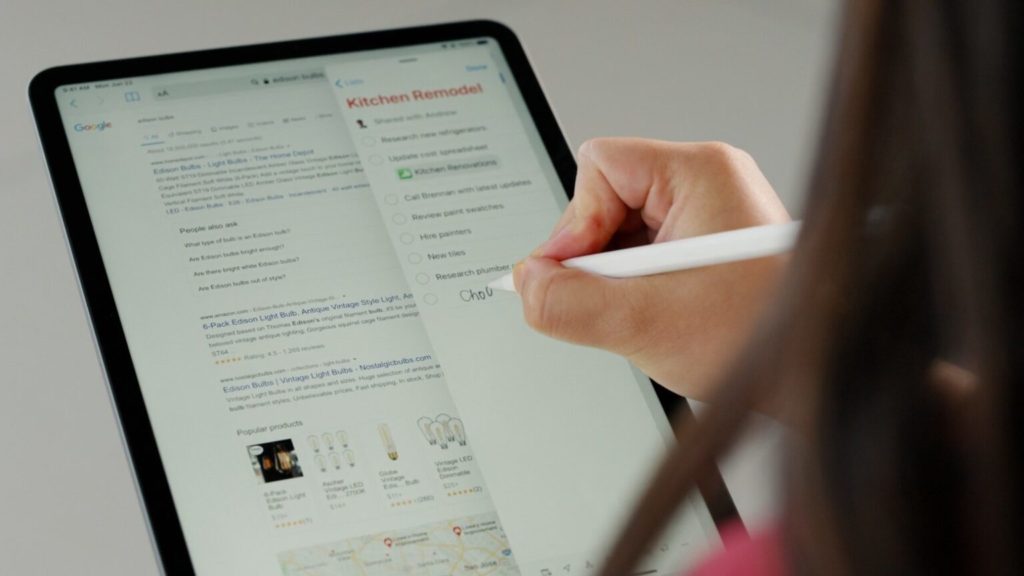
Most of the changes and new features of iOS 14 will also be included in iPadOS 14. Apple also introduced a new “Scribble” feature for Apple Pencil. This can automatically convert handwriting into text.  Built in intelligence makes Scribble context aware. This means it is able to for example recognise a phone number or address and offer you an appropriate app to use the data.    

Using an Apple Pencil to enter text anywhere with Scribble in iPadOS 14.

watchOS 7

Apple has finally added sleep tracking to Apple watch. While more in-depth data will be gathered if you use an Apple watch, the companion app for iPhone doesn’t require you to use an Apple Watch.   

iOS sleep tracking app

With the coronavirus pandemic hand hygiene has become even more important. watchOS 7 now includes a Handwashing app. This new app not only can detect the motion of you washing your hands but uses the watch’s microphones listen for the sound of splashing water to confirm that you’re actually washing your hands. The app then displays a countdown to ensure you wash your hands for an adequate amount of time.   

Apple Watch, displaying the new Handwashing app

Google I/O

Google took the decision to cancel their annual developer conference entirely.  Google did however announce some accessibility improvements.  

Google Accessibly places

An Accessible Places feature has been added to Google Maps. Available on both Android and iOS, Accessible Places is designed to display wheelchair accessibility information about a location or business. You can enable Accessible Places by open the latest version of the Google Maps app. Navigate to “Settings”, then choose Accessibility and turn on Accessible Places.

Google Accessible Places settings being displayed on a mobile device

Once turned on, it’ll show a wheelchair icon for places with an accessible entrance. More detailed information is also available, including Blue Badge parking, accessible seating, and toilets. Accessible Places will be released in the UK, US, Japan and Australia, with more countries being added later.

Action blocks, mentioned in the Autumn 2019 newsletter has now been released. The app enables you to create customisable home screen buttons. Creating a string of tasks or actions that can be trigged by a single tap

Google's Access blocks

Live Transcribe, Google’s real-time, speech-to-text transcriptions for conversations has been updated. You can add custom words or names for the system to recognize and spell. You can use search to search through past conversations. To enable this feature though you need to enable “Saving Transcriptions”. This will then save transcriptions to the device for three days.

It is now also possible to set Live Transcribe to listen for your name. Your phone will then vibrate whenever someone nearby says your name.  


Images used in this article courtesy of:

  • macrumors.com
  • 9to5mac.com
  • cultofmac.com
  • theverge.com
  • zdnet.com
  • techcrunch.com
  • phonedog.com

Support Groups for People with ALS (Motor Neurone Disease) via Text Messaging Platform

Posted on June 26, 2020 at 12:03 am.

Written by martin

Receiving the news that a family member has been diagnosed with ALS, is a tumultuous and life-rending moment for the patient and family.

AL.S. is a progressive neurodegenerative disease that affects nerve cells in the brain and the spinal cord. As a result, all voluntary muscles in the body are injured and degenerate to a state where the patient remains confined to his bed, unable move and unable to communicate with his environment, fed by a PEG and ventilated by an oxygen machine after a tracheostomy. However, the patient’s cognitive and sensory ability is not impaired, and he is aware of his condition and what is happening around him.

This is a complex and difficult disease that causes the patient considerable physical and mental suffering. It presents the patient with many different and complex struggles and challenges that create a confusing and intensely emotional and draining reality.

The disease brings with it a continuous sequence of deteriorating physical loss and emotional impact. The loss of physical ability creates a reality of endless changes in the daily level of functionality and organization.

Along with these changes also come changes in family and professional roles that also evoke feelings of loss and frustration. These and other changes can cause a range of fragile emotions that sometimes contradict each other and add to feelings of confusion, chaos and helplessness.

As the disease develops, communication becomes increasingly difficult and eventually the patient completely loses the ability to speak. At this stage there is the need for Augmentative and alternative communication (AAC). Communication is primarily carried out by means of a communication computer with the Grid 3 communication software together with the appropriate accessibility method, for example: a head-controlled mouse, or EyeGaze system.

The use of the supportive and alternative communication systems requires great effort and patience from the patient and his family. As a result, in a large percentage of cases the communication becomes limited and sparse around concrete and basic needs only.

In addition, leaving home involves a great deal of effort from both the patient and the family, and is mainly reduced to “no choice” situations, medical examinations or emergencies only.

Dealing with the difficulties of illness and the knowledge of imminent death, the inability to leave the home and the intrinsic difficulty of interpersonal communication, raises serious emotions among patients such as: loneliness, anger, frustration, jealousy of the healthy people close to them, a feeling of isolation, the erasure of the self, the difficulty of finding interest and meaning in their lives, acute anxiety of the future to come and depression.

In most families, there is a fundamental difficulty in talking about the consequences of the illness and the fears that arise with its development, such as: coping with the fear of anticipated death and the need to make decisions about what to do next. In addition, patients often feel the need to “protect” the people closest to them and do not share their toughest thoughts and feelings with them, enhancing their sense of loneliness.

Against the background of all the above, a substantial need arose for emotional support for the patients and this led to the establishment of a support group through the means of a text messaging platform.

icon of the text support group

A text support group is a group similar to a frontal support group, but it is created with the help of a dedicated application developed in Israel called “7 chairs” that can be downloaded to a computer or smartphone and allows a six-person support group and facilitator. The group is writing-only, with no voice or picture, and the group’s participants can attend it wherever they are located.

In its appearance, the group is like a WhatsApp group, but unlike the WhatsApp group, the application allows for absolute confidentiality and the content cannot be exposed outside the group’s framework.

In most cases, participants do not know each other.

The group has been around for two consecutive years as part of the Israeli ALS Association (IsrALS) and is the first and only text support group of its kind for the ALS patients in the world.

Group Goals:

  • Enable patients to create social connection and mutual support with other sufferers by sharing similar experience.
  • Learning and mutual support of ways of coping with the concrete and emotional challenges that the disease brings.
  • Breach the experience of isolation and loneliness.
  • Creating a safe and accepting space for sharing experiences, thoughts and feelings.
  • Provide opportunity to talk about decision making at significant junctures in dealing with the disease.

Issues that arise in the group:

  • Thoughts and deliberations on the choice of longevity devices (peg, respirator)
  • Dealing with the experience of total dependence on the environment; family and caregiver.
  • Engaging in the experience of being “a burden” to the environment and the question of whether they are as “useful” as somebody who is sick – what contribution do they make to their immediate environment, to their family and children.
  • Engaging in physical and emotional loss, such as: the loss of ability to work and feeling of being insignificant, loss of role within the family, loss of ability to eat and enjoy eating. The loss of a recognized personal identity, the fear of a complete loss of the ability to communicate and all that it implies, etc.

Subject of death: Anxiety from the process of the deterioration of the disease, a sense of responsibility and commitment to children and parents, engaging in approaching the “farewell”.

Subject of Hope: Is There Hope that you may recover? Or hope is the search for a way to find good in what exists?

The impact of coronavirus on the support group

The need for the support group increased even further during the Covid 19 virus period in Israel and around the world. During this challenging period, ALS patients seemed to express the universal experience: forced home confinement, social isolation and loneliness, uncertainty and anxiety about the future and the actual threat to life. For the patients, this period was difficult seven times over. Because ALS patients are defined as being in the high risk group for catching the virus, social isolation is more acute. They had to completely avoid leaving home, family and friends were banned from visiting, and all the para-medical treatments (such as our communication accessibility project, physiotherapy reflexology, etc.) were completely discontinued, which made their condition worse.

The meetings during this period were emotionally crowded and the experience was that “death hovers” in the meetings more intensely. Feelings of loneliness, anxiety, despair and a desire to end the suffering of the illness. At the same time, the ability of the group members and the facilitator to listen to the fears and thoughts of the will to die or the fear of death, the ability to accept without judgement and support one another without escaping was a very powerful and significant experience in terms of both the group experience and each individual within the group.

In Conclusion

The supportive and alternative communication system is of utmost importance in aiding assistance and emotional support to ALS patients. It is the only means that allows patients to share difficult experiences and feelings, breakdown the harsh loneliness of coping with the disease, share deliberations about decisions at significant junctures of the disease, and feel that there is someone who shares their fate and can understand the depth of what they are enduring.


  • Website Feedback
  • Site Map
  • Cookies
  • Accessibility
  • Privacy
  • Data Protection Policy
  • Disclaimer

© 2026. Karten Network

We use cookies on our website to give you the most relevant experience by remembering your preferences and repeat visits. By clicking “Accept All”, you consent to the use of ALL the cookies. However, you may visit "Cookie Settings" to provide a controlled consent.
Cookie SettingsAccept All
Manage consent

Privacy Overview

This website uses cookies to improve your experience while you navigate through the website. Out of these, the cookies that are categorized as necessary are stored on your browser as they are essential for the working of basic functionalities of the website. We also use third-party cookies that help us analyze and understand how you use this website. These cookies will be stored in your browser only with your consent. You also have the option to opt-out of these cookies. But opting out of some of these cookies may affect your browsing experience.
Necessary
Always Enabled
Necessary cookies are absolutely essential for the website to function properly. These cookies ensure basic functionalities and security features of the website, anonymously.
CookieDurationDescription
cookielawinfo-checkbox-analytics11 monthsThis cookie is set by GDPR Cookie Consent plugin. The cookie is used to store the user consent for the cookies in the category "Analytics".
cookielawinfo-checkbox-functional11 monthsThe cookie is set by GDPR cookie consent to record the user consent for the cookies in the category "Functional".
cookielawinfo-checkbox-necessary11 monthsThis cookie is set by GDPR Cookie Consent plugin. The cookies is used to store the user consent for the cookies in the category "Necessary".
cookielawinfo-checkbox-others11 monthsThis cookie is set by GDPR Cookie Consent plugin. The cookie is used to store the user consent for the cookies in the category "Other.
cookielawinfo-checkbox-performance11 monthsThis cookie is set by GDPR Cookie Consent plugin. The cookie is used to store the user consent for the cookies in the category "Performance".
viewed_cookie_policy11 monthsThe cookie is set by the GDPR Cookie Consent plugin and is used to store whether or not user has consented to the use of cookies. It does not store any personal data.
Functional
Functional cookies help to perform certain functionalities like sharing the content of the website on social media platforms, collect feedbacks, and other third-party features.
Performance
Performance cookies are used to understand and analyze the key performance indexes of the website which helps in delivering a better user experience for the visitors.
Analytics
Analytical cookies are used to understand how visitors interact with the website. These cookies help provide information on metrics the number of visitors, bounce rate, traffic source, etc.
Advertisement
Advertisement cookies are used to provide visitors with relevant ads and marketing campaigns. These cookies track visitors across websites and collect information to provide customized ads.
Others
Other uncategorized cookies are those that are being analyzed and have not been classified into a category as yet.
SAVE & ACCEPT