We have been in conversation with Hector Minto, founder of Kerbcut, an AI-powered discovery platform for assistive technology products and services, launching in September. It works as a chat experience that guides people to the right solutions, including services like ours.
As the Kerbcut team tests and refines the system ahead of launch, they need real-world questions pushed through it, and they have given us access to do exactly that.
Think about the questions heard every day from the people we support: finding the right tool for a specific need, funding routes, comparing options, and where to get training or support. The more varied and realistic, the better. The platform is self-explanatory once you are in.
A couple of notes: there is no individual tracking, they will only know the questions came from our network. Please keep the link within our organisation rather than sharing it externally.
It’s been a really busy time across the sectors and the organisations we support. I hope that by the time you read the Karten Network’s Summer Newsletter, you are either preparing for a well-deserved break, or returning from a lovely holiday!
In this newsletter, we share information about the newly launched Professional Association of Assistive Technologists, you can apply for membership now and ensure you are involved raising assistive technology standards and experiences for the tech users. There is also news from TechAbility about the annual conference which will be held this year on Thursday 19 November at the Coventry Building Society Arena. The programme looks fabulous and it’s the place to be for anyone who has an interest in AT. We are doing a Karten Network brand refresh, get involved in influencing the Karten Network’s new logo by completing our super short survey!
And finally, our newsletter wouldn’t be complete without articles from some of our Karten Centres. Many thanks to all contributors!
The Karten Network Team wish you a very Happy Summer!
Behind the Headlines – Accessibility and AI at WWDC and Google I/O 2026
Early summer brings, as it does most years, two of the technology calendar’s biggest fixtures: Apple’s Worldwide Developers Conference (WWDC) and Google I/O. Both events are dominated, once again, by artificial intelligence, and it would be easy to read the coverage and conclude that this year was simply more of the same. Look past the keynote highlights, however, and there is a great deal that matters directly to the people we support, some of it announced with fanfare, and some of it tucked away in a press release ahead of Global Accessibility Awareness Day. This article covers both.
WWDC 2026: A New Siri, Built with Gemini
Apple’s Worldwide Developers Conference ran from 8 to 12 June, and previewed iOS 27, iPadOS 27, macOS 27, watchOS 27, tvOS 27 and visionOS 27, alongside the next generation of Apple Intelligence. The centrepiece was the long-delayed overhaul of Siri, now rebranded Siri AI. Apple describes it as a profoundly more intelligent and capable assistant, one that can understand what is happening on screen and carry out multi step tasks across apps. I found it interesting that this new assistant is powered by Google’s Gemini models, a partnership that would have seemed unlikely only a year or two ago. Apple has been clear that this does not change its approach to privacy. Straightforward requests are still handled entirely on the device, and anything needing more computing power is sent to what Apple calls Private Cloud Compute, its own servers built so that the data passing through cannot be seen even by Apple’s own staff. It will be worth watching how well that holds up now that some of the heaviest requests are reported to run on Google’s infrastructure too, though Apple says it anonymises each request so that neither company can trace it back to a person.
Liquid Glass, One Year On
You may recall that last year’s introduction of Liquid Glass, Apple’s translucent, layered design language, drew concern from the accessibility community, particularly around readability in areas like Control Center. Apple responded during testing by adjusting blur levels and increasing contrast. This year’s update goes further still. iOS 27 introduces an opacity slider, allowing each person to dial the see-through effect up or down, or turn it off altogether in favour of a fully solid interface. It will sit in Settings, under Appearance, then Liquid Glass, once iOS 27 arrives. In the meantime, the existing Reduce Transparency option, found in Settings under Accessibility, then Display & Text Size, already softens the effect considerably. It is a welcome acknowledgement that a single aesthetic does not suit everyone, and a good example of a company listening to feedback over successive releases rather than treating a design once shipped as finished.
Who Gets Siri AI, and When
While Siri AI has been presented as the headline feature of the year, its availability is uneven. The full experience, including expressive voices and more advanced dictation, will require an iPhone 17 Pro, iPhone 17 Pro Max or iPhone Air. Older devices will run iOS 27 perfectly well but will not see the most capable assistant features. Unlike in the EU, where regulations mean Siri AI cannot ship on iPhone or iPad at launch, this restriction does not apply here in the UK.
Continuity for Older Devices
On an encouraging note, Apple confirmed that every device currently able to run iOS 26 will also be able to install iOS 27, including the iPhone 11. In services where devices are often several years old and replacement budgets are limited, that continuity is genuinely useful, even if it means some of the newest AI features remain out of reach for now.
Accessibility Highlights from WWDC 2026
As has become customary, Apple previewed a set of accessibility updates shortly before WWDC, ahead of Global Accessibility Awareness Day on 21 May. This year’s additions are substantial, below are some that I thought worth highlighting.
VoiceOver and Magnifier
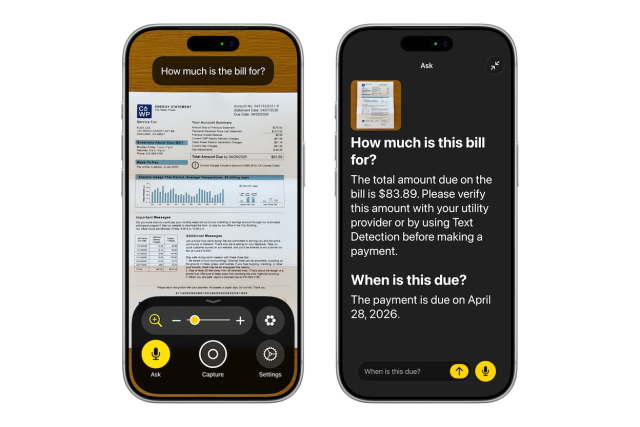
VoiceOver will use Apple Intelligence to generate richer, more natural descriptions of images, documents and real world objects, moving beyond simple labels toward something closer to a genuine description of a scene. Magnifier gains similar AI powered interactions, and Voice Control becomes conversational, accepting more natural phrasing rather than a fixed set of commands. None of this needs a new setting to find. Once a device is updated to iOS 27, the improvements simply appear inside VoiceOver and Magnifier as they already exist.
Accessibility Reader
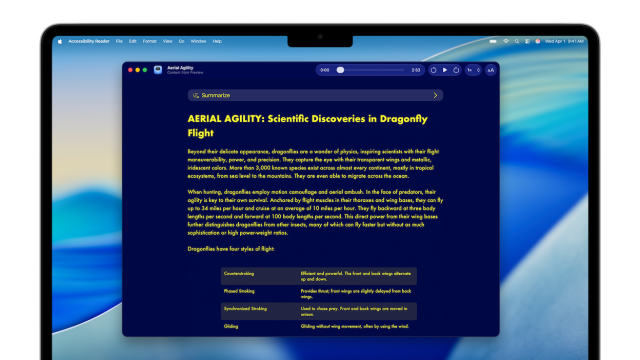
Accessibility Reader, first introduced last year, has been improved to handle more complex layouts, including multi column articles, images and tables. Readers can now request an on-demand summary or overview of a piece of content and can translate it into their own language. For anyone wanting to try it, it can be found in Settings, under Accessibility, then Read & Speak. Once switched on, the quickest way in is to triple click the side button, or add it to Control Center for a single tap from any app. For anyone supporting a person who finds dense or cluttered web pages overwhelming, this continues to be one of the more quietly useful features in Apple’s accessibility suite.
Generated Subtitles
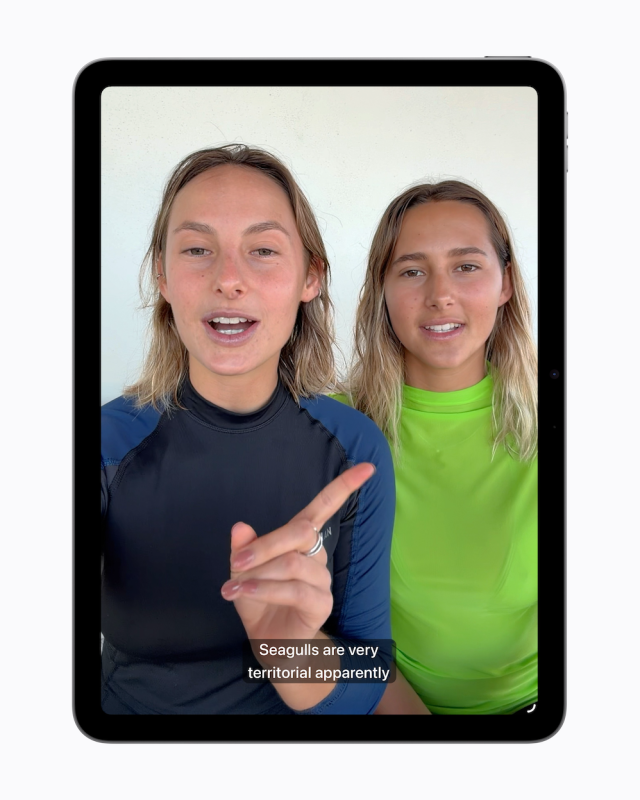
Commercially produced video is usually captioned. Personal video, such as a clip recorded on someone’s own iPhone, generally is not. Apple’s operating systems will now generate closed captions automatically for uncaptioned video, processed privately on the device, and available on iPhone, iPad, Mac, Apple TV and Vision Pro. This closes a long-standing gap between professional and everyday content that many Deaf and hard of hearing users have raised for years. Once iOS 27 is installed, the toggle will be available in Settings, under Accessibility, then Subtitles & Captioning.
Wheelchair Control for Vision Pro
The feature that caught my attention most this year is Wheelchair Control, which uses the Vision Pro’s eye tracking functionality to control a powered wheelchair, intended for people for whom joystick control is not possible. This is a genuinely interesting feature, and it is encouraging to see eye tracking, already established in Apple’s software as an input method, extended into something as consequential as mobility. It also raises the questions we always need to ask of new assistive technology. A Vision Pro remains an expensive piece of hardware, and driving a wheelchair is a safety critical task in a way that scrolling a screen is not. How this performs outdoors, in poor light, or over extended use, and who is actually able to access and fund it, will matter far more than how it looks in a demonstration video. A short demonstration of this feature is available below, taken from Apple’s official announcement introducing Wheelchair Control for Vision Pro.
The video opens on a man in a powered wheelchair, wearing Vision Pro, in his kitchen. A message arrives letting him know a visitor is on the way and inviting him to come say hello. He opens the Wheelchair Control option from Vision Pro’s control menu, alongside other options including Gestures and Slide to Type. A set of directional controls appears in his view, which he steers using his eyes alone, shown in close-up as his eye moves to guide the chair. He drives out through the house, over a small step at the doorway, and into the garden, where two people are waiting. He joins them outside to say hello. The video has no dialogue, only background music.
Vehicle Motion Cues, Face Gestures and Dwell Control
Vision Pro also gains an extended set of interaction methods. Vehicle Motion Cues, introduced in 2024 to reduce motion sickness when using an iPhone or iPad in a moving vehicle, is now supported in visionOS as well. Face gestures can be used for taps and system actions, and a new Dwell Control method allows selection using the eyes alone, without a physical input. Taken together, these updates continue to broaden the range of ways a person can control an Apple device without relying on hands.
Touch Accommodations and Hearing Aids
A couple of smaller but still meaningful updates round out this year’s accessibility announcements. Touch Accommodations bring new options to personalise touch input on iOS and iPadOS, found in Settings under Accessibility, then Touch. Made for iPhone hearing aids gain more reliable pairing and hand-off, meaning the audio switches automatically to whichever Apple device you are using without needing to reconnect manually, alongside an improved setup experience across iOS, iPadOS, macOS and visionOS, managed from Settings under Accessibility, then Hearing Devices.
Google I/O 2026: The Agent Era
Google I/O took place in May, and if WWDC was Apple’s attempt to catch up on AI, Google I/O was a statement that Google intends to stay ahead. The event introduced Gemini 3.5 Flash, the first in Google’s latest family of models, and the language used throughout the keynote was telling. Google described a shift from AI that assists you to agents that act on your behalf, a distinction that is likely to matter a great deal for how these tools are used, and by whom, in the years ahead.
A Search Box Reimagined
Google Search received what the company calls its biggest upgrade in over twenty five years. The search box itself has been redesigned around AI Mode, now expanding to nearly two hundred countries and ninety eight languages, with no subscription required. Search can build a custom response on the fly, including interactive visuals, tables and simulations tailored to the question asked, and can, for select categories such as home repair or beauty appointments, call a business on the person’s behalf. Personal Intelligence, which allows Search to draw on connected apps such as Gmail and Google Photos, is opt in throughout, and Google has been explicit that people choose if and when to connect each app.
Gemini Spark and the Rise of the Agent
Perhaps the clearest expression of this year’s theme is Gemini Spark, described by Google as a personal agent that takes real actions on a person’s behalf, integrating first with Gmail, Docs and other Workspace apps before expanding to third party tools in the coming months. A companion feature, Daily Brief, draws on Gmail, Calendar and Tasks to produce a personalised digest of the day ahead. Both work in much the same spirit as Apple’s Siri AI: assistants that once waited for a question are now expected to notice what needs doing and get on with it unprompted. It will be worth watching how comfortable people feel handing over that much initiative, and how much say they are given over what is done on their behalf.
Accessibility Highlights from Google I/O 2026
Google’s dedicated accessibility session at I/O 2026 covered updates to TalkBack and Voice Access, an expanded dark theme, and a set of new accessibility APIs intended to make it easier for developers to build inclusive experiences from the outset. Detail on these updates remains less than Apple’s equivalent announcements this year, which is itself worth noting. Accessibility featured clearly in Google’s developer sessions, but rarely in the main keynote, where the emphasis was almost entirely on Gemini and agentic tools.
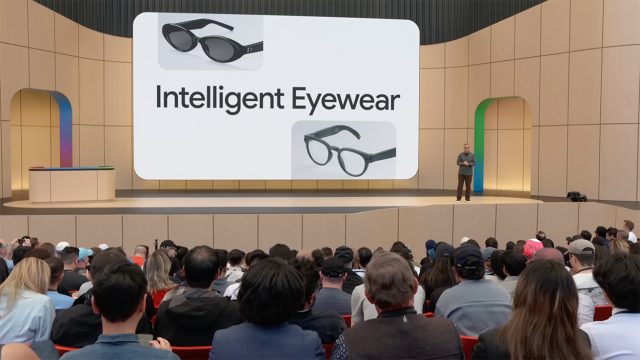
Intelligent Eyewear
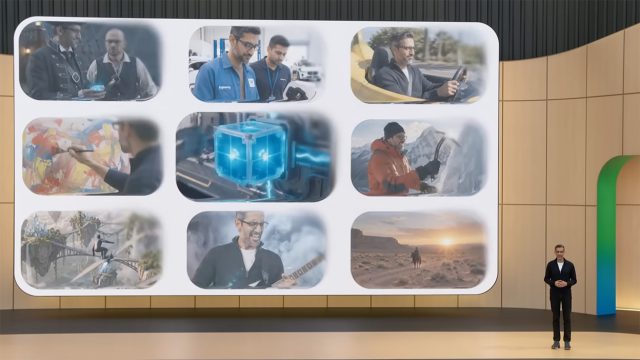
Google also showed new intelligent eyewear arriving this autumn, continuing the direction previewed as Android XR last year. Developed with Samsung and eyewear brands Gentle Monster and Warby Parker, the first models are audio only, with no display, and lean on Gemini to give spoken directions, read out messages, answer questions about what is in front of you, and take photos on request, woken with a spoken word or a tap on the frame. Display versions are expected to follow. The glasses pair with both Android and iOS phones, so this is not locked to Google’s own ecosystem. For anyone with a visual impairment, restricted hand function or sensory sensitivity, hands free, audio led interaction of this kind has clear potential, though as with any new hardware category, it is too early to say how well it will work outside a stage demonstration, or what it will cost once it reaches shop shelves.
The Path Ahead
Both companies are edging toward the same idea: an assistant that gets on with things once you have asked it, or occasionally before you have asked at all, rather than one that simply waits for a question. Apple’s Siri AI and Google’s Gemini Spark are, in their own ways, both examples of this. For many of the people we support, an assistant that can hold context, understand what is on screen, and carry out several steps in a row could ease some of the physical and cognitive effort that using a device still involves.
Whether that promise holds up in daily use is, as ever, a separate matter from how well it was announced. The features that impress on stage are usually the ones that need the newest phone, a paid subscription, or both. Apple has kept its most capable Siri AI features for its newest iPhones, and Google’s newest AI Ultra tier costs one hundred dollars a month in the United States.
None of that makes either announcement less worth watching. It does mean the useful question stays the same as it has every year: will the person you are actually supporting, with their own device, their own budget and their own way of communicating, get to use any of this?
As always, I am keen to hear how you are using AI and accessibility features on Apple and Android devices in your setting. If you would like a particular topic covered in the next newsletter, please let me know. Finally, if any of the features covered in this article sound useful and you would like a hand getting them set up, or you have any other question or need technical help and support, please do get in touch.
Earlier this year, the Karten Network took part in an ATech Policy Lab summit in the Midlands, looking at how free assistive technology could be built into supported employment programmes. The discussion brought together representatives from BASE, TechAbility, and both the East and West Midlands Combined Authorities, and returned again and again to a single point: the barrier is rarely the technology itself. Most of the tools already exist, built into the phones and computers people use every day. The barrier is that too few people know they are there.
Building on that discussion, Policy Connect has been developing a regional pilot exploring how free assistive technology could be embedded into supported employment support in the Midlands, from the earliest stages of vocational profiling through to job coaching. The Karten Network is a funded partner in the project, alongside TechAbility and BASE, and will be supporting the delivery of training. Plans are still taking shape, and funding is being finalised, but the intention is to begin practical work later this year.
There will be more to share on this as things develop.
We are giving the Karten Network’s branding a light refresh, and we would like your help with one part of it.
The strap line beneath the logo currently reads “Supporting organisations working with disabled people”. We are considering replacing it with three words instead.
Rather than choose those three words ourselves, we would prefer they came from you. What three words would you use to describe the Karten Network, based on your own experience of working with us?
We’re excited to announce the launch of the Professional Association of Assistive Technologists (PAAT) on Wednesday 1st July 2026!
The Association has been established with a clear mission: to advance Assistive Technology (AT) as a recognised profession and improve outcomes for everyone who relies on it.
PAAT is committed to raising standards across the sector by supporting high-quality service provision, promoting professional recognition, and strengthening the role of the Assistive Technologist. Through professional development, a robust code of conduct, continuing professional development (CPD), and opportunities for peer support, PAAT aims to build a confident, connected, and respected professional community.
The Association also champions improved training pathways, greater consistency in employment standards, and increased recognition of Assistive Technology services by commissioners and regulators as an integral part of service delivery.
Importantly, PAAT is not intended to replace existing professional bodies in education, health or social care. Instead, it provides a professional home for Assistive Technologists who may not currently have one, while working collaboratively with established membership organisations. Reflecting the multidisciplinary nature of Assistive Technology, PAAT is committed to partnership, collaboration and shared expertise.
Whether you are an experienced practitioner or new to the profession, PAAT offers an opportunity to help shape the future of Assistive Technology and ensure the highest standards of practice for the benefit of AT users and the wider sector.To find out more and how to apply for membership, visit the PAAT website.
If you need to stay the night before, the Hilton Hotel is in the Coventry Stadium building. We’ve negotiated a preferential rate – details will be provided when your book. Alternatively, there are several hotels within a small radius.
Hope to see you there!
Mobile phone app cards updated
Thank you for all the positive feedback around the mobile phone app cards, it’s been great to hear how you are all using them.
They are apps that TechAbility or associated professionals have used over the years. They can be printed out or used as a digital resource. Some centres have printed key apps out as a display to show others.
As the apps change it’s important to periodically update them, for that reason please find the links to the updated app cards below:
Helen chats to Carl Beech, creator of BeechBand an innovative device which can support regulation across movement, speech, and wellbeing. Carl shares his personal story of early onset Parkinson’s, the development of the BeechBand and stories from people who have benefited.
PowerPoint presentations can be a great way to deliver accessibly, but only if you are aware of the features in the software and the theories behind creating accessible resources In this previous TechAbility webinar highlight we will create a presentation live demonstrating how to lay out text, compliment this with visuals, while demonstrating the accessibility features in Microsoft PowerPoint.
Join one of our Assistive Technologists to discuss ten quick fire topics covering a wide range of assistive hardware, software and techniques.
Supporting learners’ Assistive Technology at all stages of their college journey
7 October 2026
This course focusses on key stages in a learner’s journey and highlights the appropriate support required for effective outcomes.
Built-in access
21 October 2026
Computers, tablets and phones have a wealth of accessibility options already built into the operating systems. All teaching and learning support staff should have an awareness of these features so they can remove barriers for learners.
Learn about the types of technology which can support learners with PMLD and how to effectively support their use with learners.
Access the World through a Smartphone
25 November 2026
This course will give staff the knowledge to help learners discover accessibility features and apps on phones, which in turn should reduce people’s requirement for human support to support basic skills
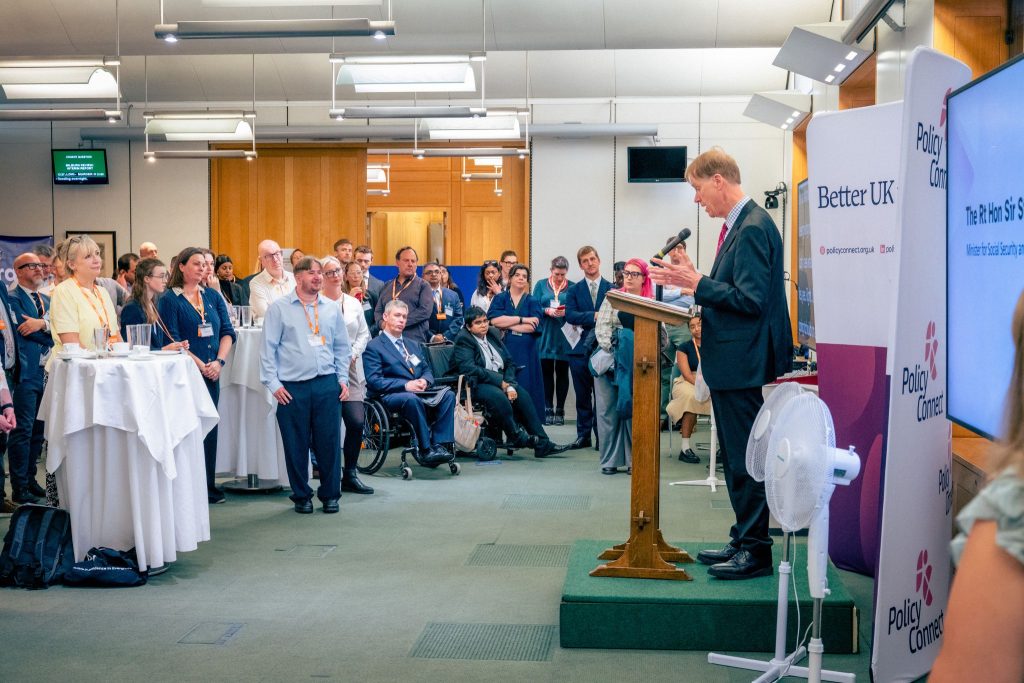
Employment remains one of the most persistent areas of inequality facing disabled people, and it was this question that shaped this year’s APPG for Assistive and Accessible Technology Annual Reception. The event was held at Portcullis House, Westminster, on Tuesday 2 June 2026, hosted by Policy Connect and chaired by Josh Fenton-Glynn MP. It brought together policymakers, parliamentarians, assistive technology providers, practitioners, and people with lived experience, all considering how disabled people can use technology to thrive in the workplace.
The Employment Gap
The context framing the discussions was significant. Just over half of disabled people are currently in employment, compared to more than four in five non-disabled people. Disabled workers are twice as likely to be unemployed as non-disabled workers, and disabled people in work earn on average around 14 percent less than the national average. Debbie Abrahams MP, Chair of the Work and Pensions Select Committee, described this position as absolutely unacceptable, referencing the Committee’s recent report ‘Disability at Work’, which recommended that employers be given clear time limits to respond to requests for reasonable adjustments (proposed at two weeks), and that all new employees be made aware of the rights of disabled people from the start of their employment.
Kieran’s Story
The most memorable contribution came from Kieran Gellard, a graduate of The Oaks Specialist College who now works permanently at Tesco. Kieran spoke about how the accessibility features already on his smartphone enabled him to do his job, from reading product labels on shelves to navigating the Tesco employee app. Perhaps most striking was that during his job interview, Kieran took the initiative to teach his interviewers how his technology worked. It was a compelling illustration of confidence, self-advocacy, and the transformative potential of technology that is already in people’s hands. As Libby Wilkins, Assistant Principal: Accessibility and Digital Applications at The Oaks, reflected, the goal was never simply about finding a job, but about enabling young people to have genuine choice over their futures.
Government Commitments
Rt Hon Sir Stephen Timms MP, Minister for Social Security and Disability, addressed the reception and acknowledged the persistent challenges facing disabled people in the labour market. He confirmed that the government will recruit an additional 500 staff to the Access to Work scheme, with a commitment to clear the existing backlog of applications and payments by September next year. He also announced a call for evidence on assistive technology, to be launched later this year, which will draw on input from across the ATech community to inform cross-government policy. A GOV.UK resource on assistive and accessible technology, titled ‘Using assistive and accessible technology (ATech)’, is now live, covering types of ATech, costs, legal rights, and how to get an assessment or purchase equipment. It is available at https://www.gov.uk/government/publications/using-assistive-and-accessible-technology-atech
What Comes Next
Robert McLaren, Director of the ATech Policy Lab at Policy Connect, closed by outlining the APPG’s next steps. These include regional pilots in the South East and Midlands to embed assistive technology into Connect to Work schemes, a session on SEND reforms and the role of ATech, and forthcoming papers on communication devices and their funding, accessible smoke and carbon monoxide alarms, and the upskilling of the social care workforce. Robert emphasised that the APPG’s ambition extends beyond employment, seeking to join up ATech policy across all areas of life.
I was glad to represent the Karten Network at this event and to have the opportunity to speak with a number of attendees about the Network’s work. Those conversations were a useful reminder of the challenges practitioners and organisations are still facing day to day, and of why the Karten Network’s perspective has a place in these discussions.
Martin Pistorius Karten Network Technology Advisor
Our Assistive Technology Week at Sense College Loughborough took place from Monday 20th to Friday 24th April, and it was a great success. There were 16 online sessions on the Tuesday and Thursday and 6 face to face sessions for Sense College students and staff on Monday, Wednesday and Friday. Overall we had 278 participants over the two days online workshops and 60 students attended the face to face sessions over the three days.
Day one of AT Week 2026 saw Jason Shaw from VisionAid Technologies set the bar high. Our students and staff got hands-on practice with vision support technology in a session that was practical, engaging, and interactive throughout! Seeing students interact with tools that could make a real difference to their day-to-day lives is exactly why we do this.
Across Tuesday 21st and Thursday 23rd April, we hosted a full programme of free online sessions as part of AT Week 2026, and there were 8 workshops each day.
One of our goals this year was to bring these topics into focus specifically for students, parents/carers, and professionals in further education settings like Sense College Loughborough and in other settings, and our presenters delivered on all levels. Every session had practical, applicable lessons that participants could take away with them and use in their own settings.
A massive thank you to each presenter who gave their time and expertise:
Mark Cooper from Newfriars College – The Human Algorithm: Bridging the SEND gap with contextual AI
Kingsley Saba from Sense College Loughborough – From here to there – Transitions across different contexts
Rosie Marten from Sense College Loughborough – AAC use
On Wednesday 22nd April 2026, our Speech and Language Therapist ran an in-person AAC carousel for our students and staff.
Students rotated through different stalls based on a range of access methods, AAC tools and strategies, getting hands-on time with different approaches to communication in a supported, exploratory environment. An additional stall for some Virtual Reality activities was also present!
It was great to see students and staff engage with AAC, trying things out, and building confidence along the way. A huge thank you to our SLT for designing and delivering such a thoughtful session.
It was also a pleasure to host Mike Hazlewood from SensePilot on Wednesday and it was truly exciting for our students as they tried out hands-free gaming. Using SensePilot for hands-free device control and gaming access was seamless from the start, and the clear, straight-to-the-point setup had students playing within minutes.
Watching students get excited to try out head tracking for gaming was one of the highlights of the week. It’s a reminder that one of the best ways to help students engage with assistive technology is to meet them where their interests already are. And for some of our students, that’s gaming. Thank you, Mike Hazlewood for making it look effortless and for showing our students what hands-free access can really feel like in practice.
Wednesday at AT Week 2026 was busy, as we also had Sarah Woodbyrne from Sense Active Sports showing how assistive technology is used in sports. The Try-It sessions gave our students the chance to get active, get involved, and experience sport in a way that’s designed around them not the other way around.
The smiles said it all. Thank you Sarah Woodbyrne, for a session that reminded us that assistive technology isn’t just about devices, it’s about access to life!
On Friday 24th April students took part in a Esport tournament with students from Portland College. It was great to see the students taking part in the games and we really hope to visit Portland College soon and carry on gaming!
It was great to see so many people taking part in the event and to have so many different workshops covering our themes of AI, VR and Transitions. We have already started planning for next year – so keep April 2027 free – date to be confirmed.
On Friday 24th April 2026, a group of learners from the Portland College Nottingham Hub had the exciting opportunity to represent the college at an inter-college E-Sports tournament hosted by SENSE College in Loughborough.
The event brought together learners with a shared passion for gaming, competition, and technology, encouraging collaboration and positive social interaction throughout the day.
The tournament provided learners with a valuable opportunity to showcase not only their gaming abilities, but also their confidence, adaptability, and teamwork in a new environment. Throughout the event, learners interacted positively with students from other colleges, exchanging ideas, building friendships, and working together to compete across a variety of games.
For many learners, the experience offered a chance to step outside of their comfort zones and connect with others who shared similar interests. The atmosphere was both supportive and engaging, helping learners to develop communication skills, resilience, and confidence while participating in competitive gameplay.
The event was a fantastic success for everyone involved, with several learners commenting on how much they enjoyed the experience and the opportunity to demonstrate their skills in games such as Minecraft and Rocket League. The tournament has also helped to strengthen the partnership between Portland College and SENSE College, with future online tournaments and collaborative opportunities already being planned between the two provisions.
Looking ahead, the learners are excited to continue developing their skills, representing the college, and taking part in future E-Sports collaborations and competitions.
Our print team has been busy behind the scenes, completing a range of orders for local organisations and community groups.
We recently produced a collection of name tags and custom mugs for the fantastic volunteers at Lucem House Community Cinema Plus+, using sublimation printing to create high-quality, personalised products. A special thank you goes to Jeff and Callum, who worked incredibly hard to ensure everything was printed and finished to a high standard.
We also completed an order for Aspire Performing Arts Academy, creating 15 black lanyards featuring their logo. The design was cut from vinyl using our Cricut machine and carefully applied to each lanyard to create a professional finish.
In addition, we fulfilled a repeat order from The Arc, producing more ID cards for their staff and volunteer team using our sublimation printing process.
It’s great to see our team’s skills supporting so many organisations across the community, and we look forward to working on more exciting projects in the months ahead.
Chester Lane Seed Library
A seed library operates much like a traditional library, but instead of books, it lends seeds. Earlier this year marked the official opening of Our Story Yard at Chester Lane Library. As part of the celebration, the new Seed Library, created in collaboration with Green Town St Helens and Retro Chimps, was unveiled. We were thrilled to have our design selected as the winning entry in the Chester Lane Library Seed Library competition by Johnny Vegas.
Our arts and crafts group worked tirelessly on the project, hand drawing flowers and leaves before painting, laser cutting and engraving them using our Glowforge laser cutter. Members also contributed to painting the Seed Library itself, making it a true collaborative effort from start to finish.
It was incredibly rewarding to see our idea brought to life and to have been part of a project that helped create a space where the community could grow, share and connect. Seeing the finished Seed Library standing proudly in Our Story Yard was a wonderful reminder of what could be achieved when creativity, community and sustainability came together.
Inspired by the Minster
Last year, our talented members had a fantastic opportunity to showcase their creativity at an exhibition held at St Helens Parish Church. Following its success, we’re delighted to be back again this year with another exhibition, this time at the newly designated St Helens Minster.
The exhibition marked the venue’s first official exhibition since becoming a Minster. Our members created a collection of unique, interactive artworks inspired by different areas of the Minster, celebrating creativity, community and inclusion. Visitors could also take part in interactive activities by looking for hidden acts of kindness around the Minster and writing a special message on a birthday candle to celebrate this important milestone in the Minster’s history. It was a proud moment to see our artwork displayed in such a special setting and enjoyed by visitors throughout the exhibition.
Elizabeth Lamb, Operations and Events Manager at St Helens Minster, said: “After seeing the incredible response to Buzz Hub’s #lovesthelens exhibition last year, we knew we wanted to welcome them back to the Minster. The creativity, talent and passion shown by the artists was truly inspiring, and it felt especially meaningful that this exhibition was the very first we hosted as St Helens Minster. We’re proud to work alongside Buzz Hub and to share this celebration of creativity, community and inclusion with everyone who visited.”
The exhibition was a fantastic achievement and highlighted the dedication, artistic talent and hard work of everyone involved. We are incredibly proud of all our members for helping make the exhibition such a success.
[images 11] (4 images: exhibition signage, banner, chair and books)
[images 12] (4 images: artwork, painting process and members at work)
Another Year, Another Belfast Adventure
Our members returned to Belfast once again this year to compete in the George Best Community Cup, taking on some of the strongest and most skilful disability football teams from across the UK.
Before the tournament got underway, we hosted a fundraising event at our allotment to help support the team’s trip. We were incredibly grateful to everyone who came along and contributed to making the journey possible.
The team also had something extra to celebrate. Thanks to the generous support of Fieldway Group, our players received custom Buzz Hub hoodies and polo shirts for the trip. To make them even more special, members of the football team had the opportunity to print their own hoodies and polos using our printing facilities, creating personalised kit that they proudly wore while travelling to Belfast and throughout the tournament. The experience gave everyone a real sense of ownership and pride before the first whistle had even blown.
Our players showed incredible determination, teamwork and resilience throughout the competition. Although we didn’t bring home the trophy, we returned incredibly proud of everyone’s efforts after narrowly missing out on a place in the quarter-finals by just one point while competing against some of the best disability football teams in the UK.
One of the highlights of the tournament came on the second day, when we secured a fantastic victory over the Guernsey national disability team. Beating a representative national side was a memorable achievement and the perfect way to round off another brilliant week of football.
A huge thank you to everyone who supported our fundraising event and to Fieldway Group for helping make the trip possible. Your support enabled our members to represent Buzz Hub with pride, both on and off the pitch.
[images 18] (4 images: final team celebration photos)
Kisharon Langdon supports children and adults with learning disabilities and autistic people to build skills, confidence, and independence. Our social enterprises provide a safe, inclusive environment where individuals gain real work experience and develop the skills needed for future employment.
Thanks to support from The Ian Karten Charitable Trust, we have introduced an interactive whiteboard in our Social Enterprise Hub, where participants create products to be sold to the public, both online and in Kisharon Langdon’s Equal Gift and Homeware Store, as well as fulfilling orders for local charities and food banks. The interactive whiteboard plays a key role in supporting these activities and has quickly become a vital learning tool for the 36 people who attend up to 4.5 days a week.
Participants use the board to support everyday tasks such as stocktaking, calculating orders, and tracking progress. It helps build numeracy, teamwork, and leadership skills, while boosting confidence through visual, hands-on learning. Features such as colour coding, shared screens, and group email drafting encourage collaboration and engagement.
The board is also used for presentations, Zoom sessions, and group discussions, allowing everyone to participate fully. From signing in at the start of the day to researching products and reviewing feedback, it supports learning at every stage.
This interactive tool is helping participants develop essential skills and move closer to meaningful employment.
We use cookies on our website to give you the most relevant experience by remembering your preferences and repeat visits. By clicking “Accept All”, you consent to the use of ALL the cookies. However, you may visit "Cookie Settings" to provide a controlled consent.
This website uses cookies to improve your experience while you navigate through the website. Out of these, the cookies that are categorized as necessary are stored on your browser as they are essential for the working of basic functionalities of the website. We also use third-party cookies that help us analyze and understand how you use this website. These cookies will be stored in your browser only with your consent. You also have the option to opt-out of these cookies. But opting out of some of these cookies may affect your browsing experience.
Necessary cookies are absolutely essential for the website to function properly. These cookies ensure basic functionalities and security features of the website, anonymously.
Cookie
Duration
Description
cookielawinfo-checkbox-analytics
11 months
This cookie is set by GDPR Cookie Consent plugin. The cookie is used to store the user consent for the cookies in the category "Analytics".
cookielawinfo-checkbox-functional
11 months
The cookie is set by GDPR cookie consent to record the user consent for the cookies in the category "Functional".
cookielawinfo-checkbox-necessary
11 months
This cookie is set by GDPR Cookie Consent plugin. The cookies is used to store the user consent for the cookies in the category "Necessary".
cookielawinfo-checkbox-others
11 months
This cookie is set by GDPR Cookie Consent plugin. The cookie is used to store the user consent for the cookies in the category "Other.
cookielawinfo-checkbox-performance
11 months
This cookie is set by GDPR Cookie Consent plugin. The cookie is used to store the user consent for the cookies in the category "Performance".
viewed_cookie_policy
11 months
The cookie is set by the GDPR Cookie Consent plugin and is used to store whether or not user has consented to the use of cookies. It does not store any personal data.
Functional cookies help to perform certain functionalities like sharing the content of the website on social media platforms, collect feedbacks, and other third-party features.
Performance cookies are used to understand and analyze the key performance indexes of the website which helps in delivering a better user experience for the visitors.
Analytical cookies are used to understand how visitors interact with the website. These cookies help provide information on metrics the number of visitors, bounce rate, traffic source, etc.
Advertisement cookies are used to provide visitors with relevant ads and marketing campaigns. These cookies track visitors across websites and collect information to provide customized ads.