It’s more than fair to say, that since November of 2020 when the first genuine pair of smart glasses for visually impaired people was released, that the competition in this particular market has evolved and is growing at a phenomenal rate as more and more companies are entering the space with ideas on how to solve age old problems we experience in our daily lives. These issues mainly relate to problems with reading and identifying text, navigating safely, locating objects and having a clear idea of your surroundings.
In terms of reading text and detailed scene descriptions, there are many different solutions currently available whether it’s an app on a smartphone or a specialist device. However, the two issues I personally find most challenging are navigating safely when both indoors and outdoors and locating different objects accurately and with confidence, which could be about to change, thanks to a new pair of smart glasses Seva Vision.
I am now involved in testing the software for the developers and the results, even at this early stage have been rather extraordinary and already have the potential to be extremely unique, life changing and can give information and details which are different to any other similar device I have previously tested.
Now in all honesty, it’s the “navigation” and “find object” features which have really got me excited. I’ve used similar features on other devices before, but none of them come anywhere close to matching the level of accuracy and detail in the Seva Vision Glasses.
Most other devices will just give a general description of objects such as “there is a table and two chairs in front of you.” You have no idea how far away the items actually are or exactly where they are actually located. However, the Seva Vision Glasses take this to the next level by giving the exact location of objects and how far away they are, which gives me access to more information than I have ever had before. Similarly, when using the “navigation” feature, audio instructions are given on where there are clear paths and the direction to go, but they then go the extra mile by giving additional information such as “walk for three meters and follow the wall on your right”, which could be extremely useful for cane users, in particular. The Seva Vision glasses also have some other interesting features such as face recognition, magnification and an SOS feature which allows you to call a designated contact in an emergency.
The text reading features on these glasses are vision based so still quite basic, however the next edition will be OCR enhanced, meaning you have more useability and can read offline, which is much more beneficial. The scene description feature is very detailed, but this sort of AI is already being used on lots of different devices, though it will be a massive and integral part of these glasses going forward.
What is also great is that the glasses can be personalised to provide the priorities and features most suitable to an individual, for example, digital zoom features for those with Low Vision making zooming on TV programs or small prints possible.
Some final points to make are that while most similar devices require a smartphone app to drive them in some way, the Seva Vision Glasses can be used completely on their own without the need for a mobile phone tether. They can be controlled via a touchpad or most interestingly, completely by voice activated commands, meaning that I have a completely hands-free solution which is a huge help, especially when using my Guide Dog. If you were to purchase the Seva glasses, they are supported by a SEVA on the GO pack; wi-fi dongle, a portable battery, Bluetooth speaker and magnetic charger, so you never need to worry about overuse, you can charge them while wearing and using them.
Unlike other consumer products in the market, SEVA is a specialist product dedicated to the Blind and Low Vision community to meet their special needs. SEVA is hardware agnostic providing them the freedom to bring versatile frame options in the future through manufacturing partnerships.
To sum-up, while these glasses will evolve, it’s already great to be part of the journey and I personally can’t wait to see where they go from here, as their potential is huge. The team is continuously evolving software & hardware to bring advance features to the community, and new and long-lasting hardware is already in the pipeline.
So, without doubt, extremely exciting times are ahead.
A little about Purview Technology, the Scottish Company behind SEVA Vision
SEVA Vision was founded by Mani Gupta and Reddy Punna, both core technologists with over three decades of industry experience, dedicated to delivering cutting- edge solutions to clients. As industries increasingly adopt wearables integrated with AI and AR for enhancing the capabilities of field workers, Mani and Reddy envisioned using the same AI models to assist a team member who had lost their sight at an early age. They trained the AI models to recognise everyday items like sandwiches and milk bottles in a refrigerator, allowing their blind colleague to identify objects around them. This marked the inception of SEVA Vision, with a mission to leverage AI and AR-powered smart wearables to enhance the lives of people with sensory impairments related to sight, sound, or speech.
SEVA Vision’s current glasses are now available to buy. They can be purchased as part of a subscription and licence model. All software and hardware upgrades will be free to those within the SEVA Vision Community.
Look out for Purview Technologies latest development in your next Newsletter.
Following on from SEVA Vision, Maitiri, a solution developed to support individuals who are either Deaf or hearing impaired will be launched in the Winter. Glasses are currently being designed and testing will soon be complete.
Funding recieved from the Ian Karten Charitable Trust made it possible to purchase new assitive technology. This equipment has allowed our clients to enjoy their hobbies again. This would include reading, doing puzzles, crafting and building Lego. Clients can also be more independent by reading their own mail and cooking instructions. They can also communicate with family through reading letters, writing birthday cards and looking at family photos.
These two case studies demonstate what a wonderful impact the new equipment is having.
Case Study 1:
Mrs S relied on very strong glasses for reading, she needed a new pair but were unable to get a pair that had strong enough magnification for her. She was always against using hand held magnifiers as she felt this brought attention to her sight loss.
She dropped into the centre one day and was shown the reveal 16 and explore 5 and 8 magnifiers. Straight away she felt they would be really useful for her, and wondered why she had never gone down this route before.
Having bought a reveal 16 and an explore 5, she can now read letters independently, she can see the whole letter rather than just a little at a time. The explore 5 helps her to see prices and size labels, which she couldn’t manage to do by herself before this.
Mrs S said: “I am managing so much more by myself now and it is less stressful for me. I wish I had done this before now.”
Case Study 2:
Mrs M came into Hub to look at magnifiers which she could use to read but also to help watch the TV. She has age-related macular degeneration (AMD) and is struggling with near and distance vision. We demonstrated a range of products however Mrs M loved the Explore 12. We were able to apply to the Skiffington Trust for her to purchase one.
Mrs M said: “The magnifier has been very useful for me. I am very happy with it. I was able to use it to sort through a load of paperwork and I use it when I am watching quiz programmes on the TV.”
I recently qualified with my third Guide Dog, Dax and to help him with learning routes and for my own confidence and piece-of-mind. I worked with my Guide Dog instructor around my home area and used a specialist GPS and navigation device called the StellarTrek to mark all of the places I go to on a regular basis. This was enormously helpful, as Dax is still very young and while he keeps me safe in terms of obstacle avoidance. I am able to keep him right and give him correct directions when navigating to places like the local shops, football ground and to the local café for a nice cup of tea.
Dax has since mastered all of our home routes, but the StellarTrek will still be very useful in the future if I ever do need to learn a new route in my local area. However, it was when I was trying to learn a route at my place of work at Seescape where the capabilities of the StellarTrek blew me away.
Seescape is based at Newark Road North in Glenrothes, Fife, and finding a safe walk for Dax and I in our lunch our was proving challenging, as it is on an estate and Glenrothes is completely unfamiliar to us both. My Guide Dog instructor persevered though and we eventually found a safe walk with only a few busy roads to cross. The problem was that I was having serious trouble committing the route to memory and on one memorable occasion, I actually became completely lost and had to call my work and ask for someone to come and find me and take me back in their car.
I called my Guide Dog instructor again and we tried the same route, but this time and with her sighted assistance, I used the StellarTrek and voice tagged the correct places to cross the roads and what to do when I got to the other side. So for example, when Dax took me to the first down-kerb, I marked the exact place to cross and said, “cross, then keep going straight. At the next down-kerb, I said “turn right” because I didn’t actually need to cross that road, I just needed to keep going and Dax then took me to the next road crossing which I marked with the instruction to “cross and turn right on the up-kerb.” I was unsure if this plan would work, but the only way to find out was to try it and my colleagues were on call if I needed help.
I recently went out accompanied by Dax as always and with the StellarTrek clipped to my pocket. The experience was absolutely uplifting, amazing and astounding. I followed the route and as soon as I was at a point I had previously marked with an instruction, I was able to follow it and keep Dax on the right path. Now with Dax’s superb guidance to keep me safe at all times along with the instructions from the StellarTrek, I can complete the route at lunch times independently and with confidence. Without the StellarTrek, I can honestly say that this would not be possible.”
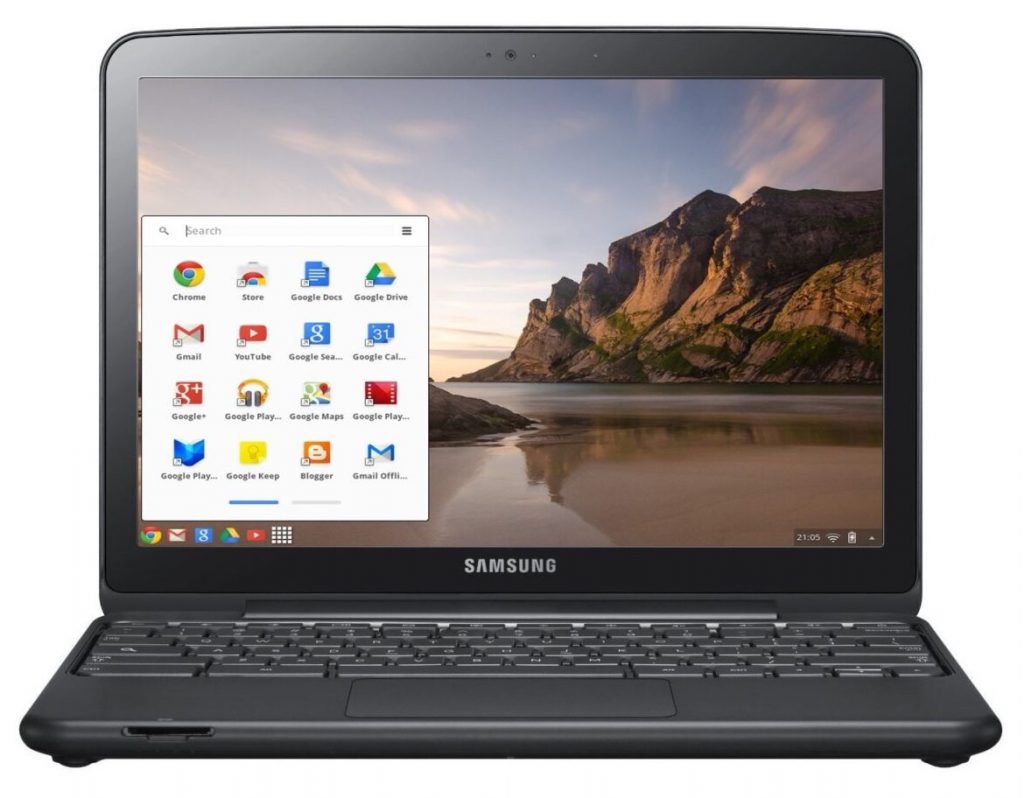
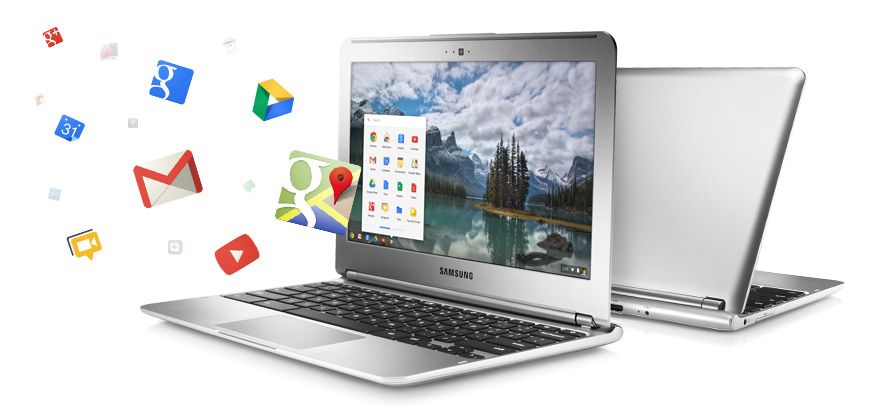
A chromebook is a laptop computer which has the google chrome operating system built-in. Just like windows and Apple Mac computers, Chromebooks can be used for everyday tasks such as word processing, working with email, using the internet and so much more. They are also a lot cheaper to buy, although if you have never used one before, it does take a bit of getting used to. However, I am one of those people who did decide to persevere and learn how to use a Chromebook and it is now my laptop of choice.
Why choose a Chromebook?
As I have already said, they are a much cheaper alternative to windows and Apple computers. The main reason for this, is because they require very little storage, my Chromebook only has 32gb. This is of little concern because any work I do is saved and backed up online automatically. For me at least, this is a huge advantage, as it means that I don’t have to back anything up on to an external device such as a memory stick or SD card. It also means that, if for any reason my Chromebook stopped working or was lost or stolen, I could just replace it for less than £200 and all of my previous work would be immediately available after signing-in with my Google account details. While there are other online storage services available, in most cases, you can only use a limited amount of storage. You will then be charged either monthly or yearly if you want to use more. This is not the case with Chromebooks, unless you need to store vast amounts of information. The final point to note, is that Chromebooks don’t pick up viruses very often if at all, because they are continually performing automatic updates in the background when the device is switched on. There is nothing you need to do, just let the Chromebook do the work.
So now we need to ask the question, how accessible are Chromebooks for people with a visual impairment?
The short answer is completely accessible. They have a number of built-in accessibility features to assist people who have low vision or for those who are unable to see the screen and therefore need to use a screen reader. Google’s version of a built-in screen reader is called ChromeVox and it can be used to navigate the entire Chrome operating system and will also work with the Google suite of apps which include:
Google Docs [for word processing];
Google Sheets [ when you need to work with spreadsheets];
Gmail [for email];
Google Chrome [for web browsing];
Google slides [for PowerPoint presentations];
Google Calendar [for scheduling and keeping track of appointments]; and
Google Drive [where all of your files and folders can be accessed]
To turn the ChromeVox screen reader on, press the keystroke Control+alt+z. This is a toggle keystroke to enable and disable the screen reader. When you turn ChromeVox on for the first time, you are taken through a quick start tutorial, which walks you through the basics of using ChromeVox. There are also other fantastic help features built-in to the screen reader, mainly a keyboard learn mode and a keyboard commands menu, which you can access at any time by pressing certain keystrokes.
Final thoughts
After making the decision to purchase a Chromebook and persevere in terms of learning the new operating system and screen reader, I can honestly say that the positives far outweigh the negatives and while Chromebooks obviously won’t be everyone’s preference, they should be seriously considered when making the decision about what computer will best suit your needs.
For more information, please contact Stuart Beveridge.
In December of last year, a new and truly life-changing innovative Wearable Assistive Technology device was launched for visually impaired people by a company called Envision who are based in the Netherlands. The company began by developing a fully accessible app for smart phones which is designed to assist with managing everyday tasks such as:
Reading printed and hand-written text (mail, newspapers etc
Describing what’s around you when you take a picture;
Colour recognition;
Barcode recognition;
Facial recognition;
Locating different objects such as chairs, tables, phone, etc.
The app is now used by many visually impaired people all over the world and is hugely popular. After a lot of positive feedback, Envision decided to integrate the app into a pair of smart glasses. This has now been achieved and I am delighted to say that the Envision Glasses are now available for purchase in the UK. The glasses have all of the app features as well as an explore mode which will tell you what’s around you in real-time and they also have a video-calling feature. This feature really does give these glasses an advantage over other wearable solutions as it allows you to connect with a sighted family member, friend or carer, who can then describe what they see through the camera of the glasses from the screen of their own smart phone. A constant and reliable internet connection is therefore required, but this can easily be achieved either by connecting the glasses through Wi-Fi or via the personal hotspot setting which is found on most up-to-date smart phones. You can also connect headphones or certain hearing-aids to work alongside the glasses either by using Bluetooth or through the USB-C charging port. So I think it’s fair to say at this point, that these glasses really do have everything covered! It’s also worth mentioning that all the information conveyed through the glasses is spoken or audio feedback, but if you are used to listening to a screen-reader on your computer or smart phone, then you shouldn’t have any issues with this. The glasses are operated using a touchpad which is found near the front of the right arm, so again, if you are used to using the VoiceOver or TalkBack Screen-readers on your smart phone or tablet, you will have no issues whatsoever in terms of learning how to use them.
My User Experience
I actually pre-ordered the Envision Glasses and have been using them since November. I can honestly say that they are one of the best purchases I have ever made and are worth every penny. I mainly use them for reading my own mail which is a great experience, as it means I don’t need to keep taking letters and post to my Mum and asking her what they are. I also used the glasses at Christmas to read a hand-written card sent by my neighbour. This is the first time I have been able to do this independently and I was really impressed in terms of how accurately the hand-writing was captured and read. I also use the glasses when out-and-about with my Guide Dog to describe my surroundings. On a recent walk, I went to my local park and took a picture of what was in front of me. I was told that there was a tree next to a bench. I was absolutely amazed by this, as I have walked around that park time-and-time again for the last fifteen years and had no idea that they were there. The video calling is my favourite feature though. I mainly use it when I’m stuck with a particular task such as organising tins in my cupboard or if my computer is not working and I need someone sighted to tell me what is on the screen. I now have all of my family members contact details stored, so if I’m ever struggling, I can just call one of them directly from the glasses and they can help me out. Think of the possibilities! I have always had difficulty knowing when to step-out to get on buses as I had no idea what number of bus was approaching. Not anymore! I’ll just call my Mum and she will be able to see the bus approaching through the camera of my glasses and keep me right. I also have serious problems finding an empty seat when I eventually manage to find the correct bus. Not anymore! Again, I can just call a family member and they can direct me to an empty seat. The possibilities are endless and to be honest, the only thing that will hold you back when using these glasses is your own imagination.
The really cool thing? This is only the beginning! Work is currently being done so that you will be able to control the glasses using your voice and there may even be the possibility of a navigation feature before too long, exciting stuff!
The Envision Glasses currently retail at £2695. Sight And Sound Technology are the UK distributor. However, we do work closely with Sight And Sound, so if you would like a demonstration or for more information, please contact Stuart Beveridge.
Stuart Beveridge, the Assistive Technology Trainer at
seescape has provided an expert review of the following products.
Victor Reader Trek
Last November, the company Humanware released their latest product called the Victor Reader Trek. This is a combination of two of Humanware’s most popular products, the Victor Reader Stream and the Trekker Breeze. The product is basically an audiobook player and GPS system compacted into one small and easy to use device. There is so much more to this product though as it can also be used to play podcasts, listen to radio stations and record voice memos. To put it simply, it is an entertainment and navigation system, all rolled into one. It is small enough to actually fit into a jacket pocket and can be operated one handed. This is made possible because of buttons which are all differently shaped and have easy to distinguish tactile markings which make them easy to locate by touch alone. The trek also has built-in bluetooth which means you can pair it with a set of bluetooth headphones for ease of use. In addition, the trek has an update feature which means that it is almost certainly a future proof device as additional content can be added in the coming years. There will also be frequent map updates, so that you have the latest information about your surrounding area curtesy of the TomTom map system which is fully supported within the device.
How does Victor Reader Trek work?
The victor Reader Trek has three different modes which you can switch between at the touch of one button. These modes are:
Offline bookshelf mode,
Online bookshelf mode and orientation mode.
Offline bookshelf
Within this mode you are able to listen to audiobooks, daisy
and other forms of text books which you can load onto the Trek via an sd card.
This mode also allows you to record voice notes such as memos, shopping lists
and can even in some cases be used to record lectures if you are a student.
Online mode
Within this mode, you can listen to radio stations through
the internet, download and play podcasts, search wikipedia for facts and update
the product to the latest version.
Orientation mode
This is the GPS orientation system. You would use this mode
when travelling either on foot or by vehicle. When in this mode you are kept up
to date about your current surroundings. Streets, interesting locations around
you and a detailed description of upcoming intersections are all announced.
There is also a fantastic feature which allows you to landmark areas which are
important to you and when you approach them in the future, they are announced
to you. You are also able to plan and get turn by turn instructions for
speciffic roots both when in a vehicle or when walking.
Please note that the orientation mode should be used
alongside another mobility aid such as a cane or guide dog.
First impressions
I have been using this product now for around serveral months and am really enjoying almost all of it’s features. I think it’s main appeal for me is the fact that you can easily toggle between the three different modes at the press of a button. This means that the potential of the product is huge because while you are using public transport, you can be listening to an audiobook or podcast while at the same time have full knowledge of the streets around you at all times. The fact that the product also supports bluetooth means that you can also use bone conducting (aftershock) headphones, which means that your ears are completely free to focus on traffic when crossing roads. The battery life of the product is also much better than expected.
Price
The Victor Reader Trek currently retails at £545. If you
would also like to purchas the Trekz Titanium Aftershock Headphones, which are
also supplied by Humanware and come highly recommended, they are an additional
£80.
Dyson 360 Eye
Tired of hoovering every day or missing chunks of dirt, dust
and possibly other mess such as pet hair? I certainly was, and solved this
solution by purchasing a Dyson 360 Eye robot vacuum cleaner.
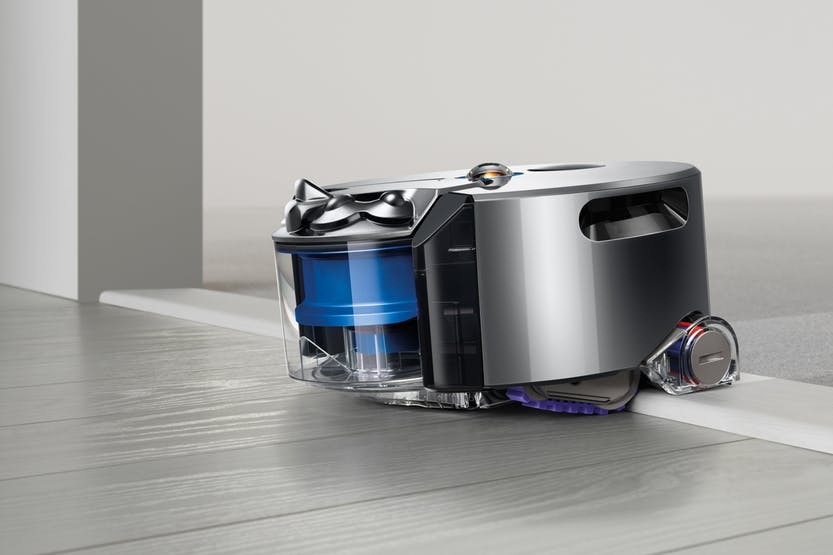
This self-navigating dirt destroyer is designed to clean every floor of your house at the simple touch of a button. It’s powerful enough to clean well on all floor types and surfaces, smart enough to navigate efficiently from room to room on one level and simple enough for anyone to use. Setting it up is also a breeze. Just plug in the pleasingly small and discreet charger/docking station, place.
The already assembled robot hoover on it and, when it’s
charged, hit the button on its top to start cleaning. It’s as simple as that.
Note that for best results you do need to make sure your floors are tidy, but
if there is enough room for the robot to successfully navigate, you have
nothing to worry about.
So how does it work?
The Dyson Eye 360 is small, compact and runs on rubber
tracks rather than wheels. It gets its name from the tiny 360-degree camera which sits on top and it’s
this camera that is the key.
Essentially, it means that the hoover can see in
every direction simultaneously, which helps it to not only map out where it’s
going, but also to avoid obstacles. It still bumps into things now and again, particularly
items below its camera line, but the Dyson knows where it’s going in relation
to where it’s been.
In terms of its approach to cleaning, it’s methodical,
calculating and efficient meaning that it covers as much of your floors as
possible. It picks its starting point and slowly works its way outwards in
squares, each time overlapping a little with its previous path so it doesn’t
miss anything. The fascinating thing about it is that when it is running out of
charge, it goes back to its docking station, recharges, and then remembers all
of the places it had previously cleaned and just carries on hoovering the rest
of the house. There’s really no limit to where the robot can clean, just close
your doors on any of the rooms you don’t want it to go and they will be
avoided.
The Dyson Link app
You also have the ability to connect your Dyson robot to an
app on your smart phone. The app which is fully accessible for iPhone users,
Allows you to use your phone to perform useful features. At
the point of writing this article, the app is also available for Android users
however I have been unable to thoroughly test it so am unsure how accessible it
actually is with the TalkBack screen reader. The app allows you to start and end cleaning sessions remotely,
control the cleaning schedule, and view what your robot did in each session.
That’s it.
Let’s finally discuss how I feel it performs and give my
conclusion.
I send the 360 Eye out every day before I leave the house
for work. It cleans the whole of my one bedroom bungalow meticulously covering
every available space. The one drawback of it is that it doesn’t clean skirting
boards, so you will still need a manual hoover of some description, but on the
whole, my life is made so much easier with the Dyson robot in it. Another small
consideration is the 360 Eye works best in daylight or decent artificial light.
Since it relies on a camera to navigate, the Dyson is more sensitive to changes
in lighting as it cleans. It has two infrared “headlights” to help combat
low-light areas, but it still works best when it can see clearly.
Now for the “big but”, price. Eight hundred pounds is a lot to spend on anything. However, the benefits out way the cost. It is, without doubt, a luxury. But it delivers and does so with minimum fuss and from my point of view is life changing.
In Your Pocket
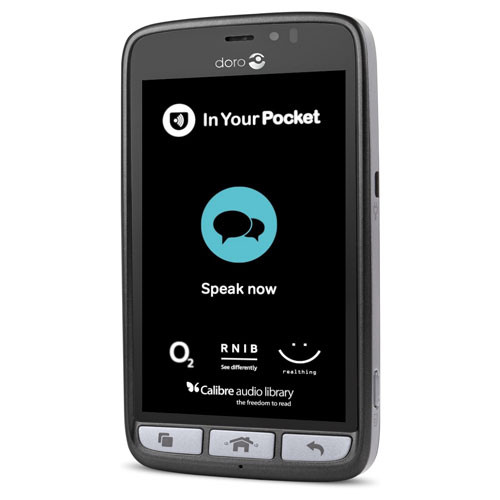
In February this year we acquired a new gadget which is ideal for anyone who struggles to use either push button or touch screen mobile phones. The In Your Pocket is a fully Voice Activated mobile phone which allows you to make and answer phone calls, send and read text messages, create contacts, listen to newspapers and audiobooks, get weather information, tell the time, hear your current location and streets around you and much more. All of this is achieved entirely by using your voice. This is a solution for anyone who would just like technology that is simple and easy to use with hardly any learning required.
How it works
The phone is operated by simply pressing a tactile button
found at the bottom of the screen. After you press the button, you simply speak
to the phone naturally and give it a command. So for example, some basic voice
commands include:
Phone Seescape”, “send a text message to Stuart”, “create a
new contact”, “What is the date”, “read the Guardian, “what is the weather
forecast”, “Where am I”etc.
Pricing
The In Your Pocket runs exclusively on the O2 network and if
you purchase the phone you would be subscribing to a fixed contract over two
years at £22 per month. This price plan gives you three GB of data and
unlimited calls and texts to any number. If you run out of mobile data, don’t
worry, it will just renew the next month and you will not incur any hidden
charges as the price plan is designed so that you will never go over your
allowance. Note that you can also connect to Wi-Fi which should save you using
a lot of mobile data.
Future plans
Later this year, the developers are planning to add even
more features to the phone which will be installed automatically as soon as
they become available. These include enhanced weather information, as well as a
personal diary function and the ability to set alarms.
OptiGrill
As we are approaching the festive period, I would like to
draw your attention to a new gadget I recently bought myself. Using this
device, I can now cook confidently and independently without the risk of either
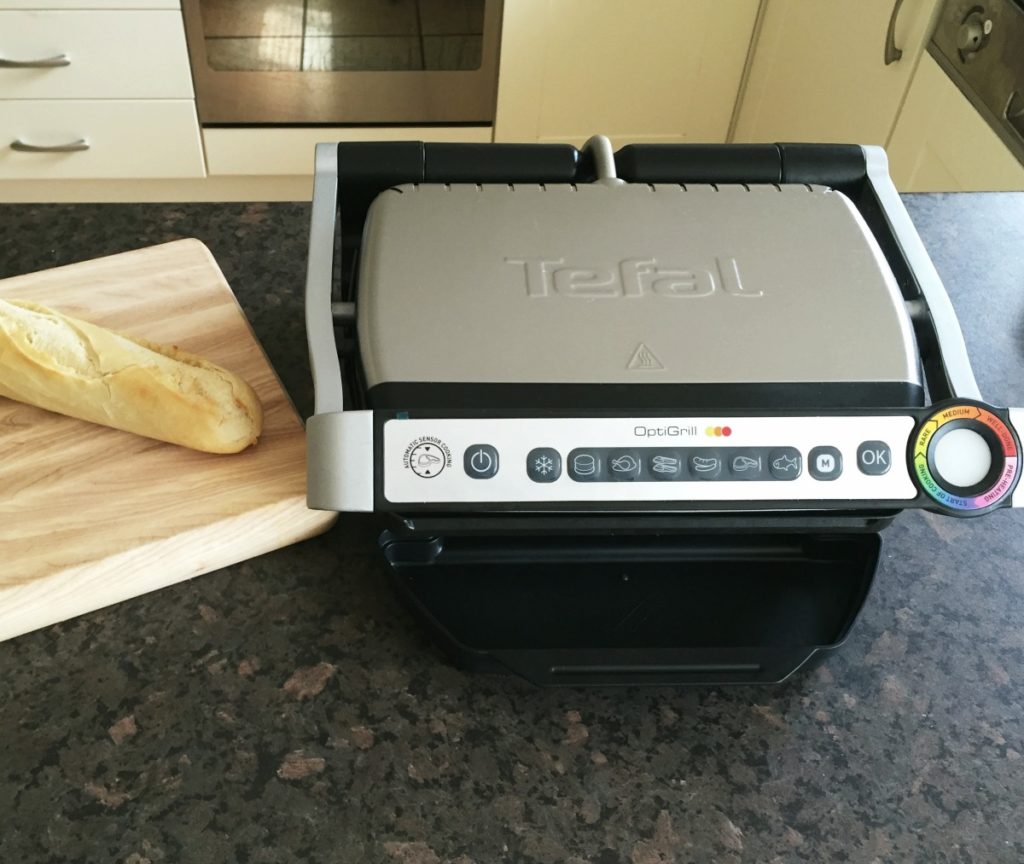
burning or under cooking food. This new revolutionary product is the OptiGrill
and is made by the company Tefal.
The Tefal OptiGrill is an electrically heated
grill similar to the George Foreman grill. However, unlike the George Foreman
grill, the OptiGrill is a smart grill! It will cook meat, poltry, fish and even
sea food, vegetables and toasted sandwiches. Another great feature of this
grill, is that it will also cook food from frozen as well.
How does it work?
The OptiGrill’s controls are found on the handle. From left to right there’s the On/Off
button and dedicated programmes for cooking specific food such as defrost, burgers, chicken, bacon, sausage,
steak, and fish. There’s also a manual mode and finally an OK button when you
are ready to start cooking. Right at the end is the LED cooking indicator that
uses different colours of lights to represent stages of the cooking process.
When you open the llid you’ll find the
removable non-stick plates. The bottom plate is slightly angled so any grease
or oil can run down into the dripping tray, which means healthier eating.
To cook, first turn the grill on and then select the type of
food you want to cook. Then press the ok button, and the grill will begin
heating up. When it is ready, it will give a series of beeping sounds. You can
then lift the lid and place the food on to the grill and then close the lid.
Now the magic part, the grill will do the cooking for you. There are sensors
inside the grill to measure the weight and the thickness of the food you are
cooking. You can cook food to rare, medium and well done standards. The grill
will give audible beeps to indicate each cooking stage. Just cook it to your
liking.
As I eat a lot of meat and fish, I am loving the OptiGrill.
I use it everyday, and the thing I really like is the fact that all the guess
work is taken out of cooking. Also, the grill is easy to clean as you can
remove the plates and clean them either in the sink or by putting them through
the dishwasher. I also love the fact that the food doesn’t dry out. Food such
as steak and chicken still retain a lot of their juices and moisture, even when
cooked to well done standard. The fact that the device has a massive stick out
handle for using to lift the lid is another added bonus. The risk of burning
yourself is seriously diminished, although I would advise some caution to begin
with.
Price
There are two types of OptiGrill. The small version is
priced at £110 and the larger version is currently £120. Depending on your
family circumstances, it would be up to you which one you prefer.
Please also note that while we don’t actually have an OptiGrill
at our centre, I would be more than happy to discuss this technology with you.
Also note that if there is enough interest in this device, we will
purchase the OptiGrill to demonstrate to
clients at our premises in Wilson Avenue in the future.
We use cookies on our website to give you the most relevant experience by remembering your preferences and repeat visits. By clicking “Accept All”, you consent to the use of ALL the cookies. However, you may visit "Cookie Settings" to provide a controlled consent.
This website uses cookies to improve your experience while you navigate through the website. Out of these, the cookies that are categorized as necessary are stored on your browser as they are essential for the working of basic functionalities of the website. We also use third-party cookies that help us analyze and understand how you use this website. These cookies will be stored in your browser only with your consent. You also have the option to opt-out of these cookies. But opting out of some of these cookies may affect your browsing experience.
Necessary cookies are absolutely essential for the website to function properly. These cookies ensure basic functionalities and security features of the website, anonymously.
Cookie
Duration
Description
cookielawinfo-checkbox-analytics
11 months
This cookie is set by GDPR Cookie Consent plugin. The cookie is used to store the user consent for the cookies in the category "Analytics".
cookielawinfo-checkbox-functional
11 months
The cookie is set by GDPR cookie consent to record the user consent for the cookies in the category "Functional".
cookielawinfo-checkbox-necessary
11 months
This cookie is set by GDPR Cookie Consent plugin. The cookies is used to store the user consent for the cookies in the category "Necessary".
cookielawinfo-checkbox-others
11 months
This cookie is set by GDPR Cookie Consent plugin. The cookie is used to store the user consent for the cookies in the category "Other.
cookielawinfo-checkbox-performance
11 months
This cookie is set by GDPR Cookie Consent plugin. The cookie is used to store the user consent for the cookies in the category "Performance".
viewed_cookie_policy
11 months
The cookie is set by the GDPR Cookie Consent plugin and is used to store whether or not user has consented to the use of cookies. It does not store any personal data.
Functional cookies help to perform certain functionalities like sharing the content of the website on social media platforms, collect feedbacks, and other third-party features.
Performance cookies are used to understand and analyze the key performance indexes of the website which helps in delivering a better user experience for the visitors.
Analytical cookies are used to understand how visitors interact with the website. These cookies help provide information on metrics the number of visitors, bounce rate, traffic source, etc.
Advertisement cookies are used to provide visitors with relevant ads and marketing campaigns. These cookies track visitors across websites and collect information to provide customized ads.