The University of Dundee is pleased to announce the launch of an MSc degree focused on training and professionalising the role of the Educational Assistive Technologist. The MSc in Educational Assistive Technology within the University’s School of Science and Engineering will train individuals to implement and support the use of technology within education to enable students with a broad range of learning difficulties and/or physical disabilities access the curriculum.
The first intake for this programme will be in January 2021.
The degree has been designed primarily as a blended learning part-time course taken over two years (a full-time version is also available). The degree differs from traditional Assistive Technology programmes in its focus on the assessment and support of technology within the Educational environment. It is aimed toward teachers, therapists and technologists who are seeking to develop and enhance their ability to support learners who require Assistive Technology (AT). We welcome applications from people who have experience of working to support disabled students in a variety of contexts, inclusive of those who may not hold higher qualifications. The entry requirements for the course have been designed to be as inclusive as possible.
Course participants already working in an AT environment will compliment theoretical learning with projects within their workplace. Students will also interact with expert users of AT within the University’s unique User Centre and during placements; and once qualified, will undertake the assessment, provisioning and ongoing support of AT systems within specialist and mainstream education or social care organisations.
How is the programme structured? The two-year part-time programme will be delivered by a blend of distance and on-campus learning (depending on COVID-19 guidance) as many of the target students will already be employed in education and social care organisations that provide services to disabled people. The philosophy throughout the programme is that teaching will be highly interactive, and students will be encouraged to bring their knowledge to bear on the learning community. Intensive on-campus teaching (or alternative online teaching to reflect current COVID-19 guidelines) will provide the theoretical underpinning to compliment the practical elements of the programme which will be undertaken within the students’ work setting. (Placements will be identified for students who are not currently employed.) Programme staff will work to support students and their home organisations to integrate the EduAT role successfully. Where possible this will include visiting students in their organisations to provide this support. Each year cohort will attend the equivalent of two intensive weeks per academic year, completing four weeks over two academic years. Full-time students will be accommodated by taking all four weeks within one academic year. Intensive weeks will normally take place on campus in Dundee where possible.
Who will teach the programme? The programme is delivered by the Discipline of Computing with the addition of optional modules in the Schools of Education and Social Work, Health Sciences and Social Sciences. The programme builds on the expertise in Accessibility and Augmentative and Alternative Communication (AAC) Technology within Computing and the ongoing collaboration across other Schools. The programme director is Professor Annalu Waller OBE, supported by two lecturers with extensive experience of working with and teaching individuals with a wide range of disabilities, Rohan Slaughter and Rolf Black. Together we have over 90 years’ experience in AT.
As we are now well and truly in to the season of winter and approaching Christmas, I decided to discuss the Hive App and hub. The app is fully accessible for both Apple and Android devices and is relatively easy to navigate and use.
I purchased the Hive Hub back in August of this year and
although it is pricy at £300 I have found the benefits to be enormous in terms
of giving me more control and access to my heating, lighting, security and
everyday appliances in particular.
As I
have a busy daily schedule, I wanted to make the process of operating my
heating that little bit easier to manage. Until I purchased Hive, I had no way
of setting timers or controlling the thermostat when trying to warm my home up
effectively. This is now a thing of the past thanks to the Hive app and hub.
From controlling heating and hot water, switching lights on and off and even
turning everyday appliances such as the kettle on using Smart Plugs, I have
total control of my entire home using the Hive app on my iPhone at anytime,
anywhere. This has helped make my life much easier and in theory, should help
me keep my utility bills affordable.
So
how does Hive work?
Firstly,
you must have a smart meter and a reliable internet connection through your
wifi router before even considering looking into purchasing the Hive Hub. Also
important to note is that Hive is exclusive to British Gas customers.
Therefore, if you are with an alternative energy supplier you will need to
contact them directly to find out if they have a similar option.
You then
need to have the hub installed by a qualified engineer. Once this has been
achieved, you can manage and setup your smart thermostat, plugs and lights
straight from the Hive app on your smart phone. The Hive thermostats allow you
to monitor the temperature in your house, set heating timers and even set the thermostat
to a target temperature so that if it falls below the set degree, the heating
will turn on automatically.
The
Hive Smart Plugs can make energy use more efficient by enabling electrical
appliances in the home to be turned on and off or by setting schedules. So for
example, if I am walking my guide dog and returning home, I can turn the kettle
on using my iPhone and it will be ready to pour as soon as I am through the
door. The use of smart plugs also gives the added benefit of allowing me to
switch off appliances I might have accidentally left on even though I am not
actually in the house. So they basically can help take the stress out of my working
day because I can monitor everything on the go. The Hive smart light bulbs work
in essentially the same way as the plugs meaning you can schedule timers so
they will be switched on when you are out of the house which is really good
from a security point of view. The additional advantage of being able to
connect all of your Hive appliances and heating to a smart speaker such as a
Google Home or Amazon Echo means that you have the opportunity to control
everything just by using your voice.
In summary, finally going down the route of making my home
“smart” gives me total control of almost every appliance, heating and security,
all through the use of an app. It makes my life far easier and definitely gives
me peace of mind for the future, both in terms of monitoring my utility bills
and also for security reasons. In my personal opinion, for those of you who are
smart phone users and are reasonably tech savvy, this kind of technology could
be a game changer for you in the future.
Over the last few years it is fair to say that there have
been some extremely exciting, innovative and life changing apps which have been
developed which increase the independence of people with all kinds of visual impairment.
Once again, I am delighted to bring another of these to your attention. This
time it’s an indoor navigation app called Clew.
Clew is a free
iPhone app that records a user’s path and then guides you back to your starting
point. Clew was created to help visually impaired people to remember a location
such as returning to a seat in a room. Designed to work indoors, Clew uses
the camera on your iPhone to record a video of landmarks along your route. It
will then save certain points such as stairs, turns etc and guide you back to
your initial starting point.
How to use Clew
Hold your phone
upright in front of you with the camera pointing straight ahead. Press the “record
path button”, then walk the route you want the app to remember. It is worth
stating that at this stage, it is recommended that when recording a route, you
ask for sighted guide if possible. Press Stop Recording at the end of the
route. When ready to return, Press the “Start Navigation Button” and Wait for
Clew to convert the information. Clew will then provide verbal, haptic and
visual feedback as you reverse the route. Visually, the screen shows an image of
the next part of the route with a red
pin indicating where to go. If the user veers off the path, the red pin
disappears off the edge of the screen. When walking along the desired path, a
clicking sound is heard; the clicking sound stops to indicate when the traveler
has veered. A whistle tone indicates a turn; the app also verbally announces
which way to turn. The route is available until the app is closed from the app
switcher. According to the website, Clew works best with short indoor routes
and it is not advisable to use the app when outdoors because of varying
lighting conditions and possible glare from sunlight which could interfere with
the video recording.
First impressions
I have been hoping for an app like Clew for years to assist
with travelling independently when an indoor environment. I have mainly tested
the app in familiar areas such as our centre and so far, I am delighted to say that the
experience has been fantastic. I recently used it to create a route from my
upstairs office to the downstairs kitchen as sometimes I still get confused
with this route as I don’t do it very often. The app then guided me almost
flawlessly back to my office from the kitchen and only stopped giving me
directions when I was back at my chair. It even told me when I was coming up to
stairs and where to turn when I had reached the first landing and needed to go
up another flight. Sometimes the app does get confused if you have to make a
lot of left and right turns in quick succession, but for the most part it is
extremely reliable and has really increased my confidence when using it. I
think the technology used within the app is also extremely interesting as
everything is achieved by video. There is no GPS or internet connection
required to use the app which means you can use it in any indoor environment
you choose. Please note that this app is still in it’s early stages so it will
be a case of trial and error when using. The developers are planning to update
the app regularly though and have lots of great ideas for improving it’s
capabilities. Also, as always with these apps, please remember that they are
not designed to be a replacement for a Cane or Guide Dog. It is designed to
work alongside your mobility aid and you will need to depend on your mobility
and orientation skills when using this app.
At the beginning of March, Microsoft released a new and extremely
innovative app designed to assist people with a visual impairment to navigate
and understand their surrounding environment. The app is called Microsoft
Soundscape and is free to download and use.
Note: At this stage, the app is only available for iPhone users.
Overview
Soundscape uses 3D audio sound to give you a full audio map of what’s
around you when you are out and about. It is designed to help you navigate
independently and encourage you to be more confident in exploring streets and
getting to destinations. The app announces streets and points of interest such
as shops, cafes etc. in 3D so that you actually hear the exact direction in
which the place is located. To use Soundscape accurately, you need to use a
pair of either bone conducting headphones or Apple AirPods. As soon as you put
the headphones in your ears and start walking, the app will begin telling you
what is in your surrounding area.
Example:
As you walk along a street, you may suddenly hear directly in your right ear, “McDonalds, twenty five metres.” This means that there is a McDonalds restaurant not too far away from you, immediately to your right. Then if you wish, you can actually tell the app to direct you to McDonalds by setting a beacon. This will then give you constant audio information and feedback to let you know if you are heading in the direction of McDonalds or if you are going off course.
Operating the app
Soundscape offers three modes – ‘My Location’ tells you the direction
you are facing and the streets and intersections which are closest to you,
‘Around Me’ gives you places of interest which are near you in all four
cardinal directions, and ‘Ahead of Me’ provides the names of five places of interest
which are nearest to you and directly ahead of you. It is also worth mentioning
that the app is fully accessible and that VoiceOver does not have to be enabled
in order to use the app. So basically, anyone with a visual impairment can use
this app.
First impressions
I was actually a tester for this app when it was under development and
have been impressed with it from the very start. I find the app extremely easy
to use and another great feature of the app I haven’t mentioned yet is that it
is compatible with Apple Watch. This means that I don’t have to keep stopping
in the street and taking my iPhone out of my pocket when I want to use the app.
I can just tap the relevant button from my Apple Watch which is constantly on
my left wrist.
I think my favourite feature of the app is definitely the beacon
feature. I used the beacon feature once when it was snowing very heavily and I
wanted to get to my local Co-op. I became disorientated, but once I had told
the app to direct me to the Co-op, it kept me on track the whole way and always
kept me heading in the right direction. In fact, the app only stopped giving me
information when I was outside the door of the store. I felt very reassured
after this experience I now actually use Soundscape almost every day when I am
walking with my guide dog.
Important additional note!! The app is designed to be used in tandem with your usual mobility aid, such as a cane or guide dog. Do not use this app on its own when you are travelling outside. Also, to use this app, a constant internet connection is required, so a 3 or 4G mobile data plan is essential.
Seeing AI is a Microsoft research project that uses Artificial
Intelligence features to deliver an intelligent app, designed to assist
visually impaired people with performing everyday tasks such as reading text,
recognising people’s faces, identifying products, and identifying your
surroundings. This app is fully accessible with VoiceOver and magnification
features on iPhones.
How it works:
The app has nine different ‘channels’, which you can use for performing a specific task. Below is a brief description of each of the channels.
Short text:
Simply point the camera at text and it will be read aloud. Very useful for reading signs, text on noticeboards or even on food tins etc.
Document:
Hold the phone camera over a document such as a magazine, newspaper or letter and the app will automatically take a picture of the document and read it aloud to you. It will also try to format the document for you as well, so you have an idea of how the page is laid out.
Product:
Hold the camera over the barcode of a product and the app will scan it and then tell you the name of the product. You can also find additional information about the product such as cooking instructions or ingredients. Barcodes are sometimes difficult to locate on certain products, but a really cool feature of the app is that audible beeps are given to help with the locating and scanning of barcodes.
Person:
This channel allows you to take a picture of a person’s face and the app will then attempt to work out the age of the person and tell you what they look like. Note that you can also train the app to recognise people’s faces as well, so if you point the camera towards them, the app will actually tell you who they are.
Currency preview:
Point the camera at different types of currency such as Euro, Dollar and Pound to hear their values.
Scene preview:
Simply point the camera in front of you and take a picture. The app will attempt to describe everything in the view of the camera. Note that the Scene channel is still being developed, so is not always accurate in describing certain things. Hopefully it will improve over the next few months though.
Colour preview:
Just point the camera of your phone at any object and its colour will be announced. Note: lighting conditions are a factor.
Handwriting preview:
This experimental channel allows you to take a picture of handwriting and the app will attempt to recognise it and read it to you. Note: the text has to be the right way up for this channel to work.
Light detector:
The camera on the phone will detect the amount of light around you. This works by using pitch sounds. The higher the pitch, the more light there is.
First impressions
I have used this app for around two months and am really enjoying most
of its features. The barcode and text reading facilities along with the facial
recognition features are extremely accurate most of the time. The colour,
handwriting and light detecting features also have huge potential, as does the
scene preview mode. To be honest though, I am a little unsure about the currency
feature, as now that plastic notes are being printed, all £10 notes have
Braille in the top left corner. On the whole though, I really feel that this
app has made a big difference in terms of increasing my independence on a daily
basis. Now I don’t need to depend on friends or family to read my mail or find
products in my freezer for me. The fact that all these features are available
in one easy to use app is fantastic!
Price:
Seeing AI is free to download and use.
Note: This app is currently only available for Apple products and requires a constant internet connection.
Fife College were successful in obtaining a grant from the Karten Trust at the start of the academic year in 2018. As part of this the college were awarded funding for a number of pieces of assistive technology to support students with additional support needs, these included laptops, digital recorders, C-Pen readers, Pearl Camera and assistive software such as Brain in Hand, JAWS and Sonocent.
This equipment was received and distributed to the Student Learning Hubs on each of the Fife College campuses to ensure that all students had the opportunity to access the equipment. Sonocent was rolled out over all campus computers and 6 students were identified to be part of the Brain in Hand Pilot. The College’s Assistive Technologist attended the Brain in Hand training and is now one of only 2 BiH trainers based in Scotland’s Colleges.
Case Studies
Brain in Hand
Student A – Beauty TherapyThe Inclusion Team were introduced to Student A after she had a severe anxiety attack at College after a misunderstanding in class which resulted in her being referred to an emergency psychiatrist for immediate treatment. Student A had previously been managing to cope with her anxiety levels within the college environment and had not required additional support.
Student A was then introduced to the College’s Assistive Technologist, Michele, who initially met with the student and her father to demonstrate Brain in Hand and how this would benefit her. The organisation, planning and both the traffic light response and the alert system allowing the system to contact her traffic light responder directly was met with enthusiasm.
Brain in Hand allows the user to input situations that they find difficult to cope with and break them down into exactly why they find these difficult. Then, there is a conversation about what has helped or hindered them in the difficult circumstances in the past and what they feel will be useful in the future. This makes it completely personal to the student’s own circumstances.
In this instance, Student A was ready to leave her course. Student A had previously been at another college and had had to leave before completion by recommendation of her Psychiatrist. Student A was determined to try her best to stay and complete the course.
In order to become proficient with BiH Student A received three training sessions with Michele, each of these lasting between two to three hours, and with support of her parents has been able to utilise this tool.
Student A is now very competent at adding details of her day to day life in and out of college. She has her daily routine from waking up, through meal times and her bed time and medication routine, along with any parts she finds difficult and how she can overcome them.
Student A also has her timetable for college embedded in Brain in Hand and if there are any parts of the daily college routine she finds difficult; she has easy access to the solutions. These include hyperlinks which will put her straight into contact with college staff and to her parent’s phone.
Student A also has travel links and external agencies contacts with whom she works with outside college saved within the Brain in Hand app.
Student A feels that by using Brain in Hand, it has given her the confidence to manage her life inside and outside college, including things such as keeping track of homework and when assessments are due and also to manage any disputes that may occur within her college day.
Student A states that having this support and the continued support from Michele has ensured that she has been able to remain on her course as it has provided her a helpful way to manage many situations that she previously would not have coped with. This has also led to a reduction in calls to NHS Direct when she is feeling as though she cannot cope and stopped her reaching this point by allowing early intervention and self-managing difficult situations that she would have previously found impossible.
Student B – Drama and Theatre Studies
Student B has recently completed their HND with the support of Brain in Hand, when in the course of carrying out DSA Needs Assessment, the assessor sought advice from the College’s Assistive Technologist to assess whether Brain in Hand would be an appropriate recommendation to the challenges that the student faced due to their Autistic Spectrum Condition.
Previously, Student B would leave any situation that they felt uncomfortable in, this regularly included walking out of classes, distraught, if they did not understand what was being expected from them. This often led to them leaving college from the day and heading straight home, or having loud outbursts in public areas of the college.
Michele initially met with the student and one of their parents to demonstrate Brain in Hand and what it could help with. The organisation, planning and both the traffic light response and the alert system allowing the system to contact their traffic light responder directly was met with cautious interest.
Brain in Hand allows the user to put in situations they find difficult and break them down into exactly why they find these difficult. Then there is a conversation about what has helped or hindered them in the difficult circumstances in the past and what they feel will be useful in the future. This makes it completely personal to the student’s own circumstances.
In this instance the student was ready to leave their course and had previously faced disciplinary action due to the outbursts and swearing at members of staff.
Student B had three training sessions with Michele on the use and benefits of Brain in Hand. The National Autistic Society was chosen as the most appropriate provider to provide the traffic light response.
Student B is now very competent at adding details of their day to day life in and out of college. They have added every aspect of college life, from class timetables to lunch and break times, they have embedded links to parent’s phone numbers, links to staff emails, phone numbers to contact the college if their bus is running late, a link that leads to their bus route online and to the transport provider’s website which shows if there are any issues with the particular bus service the student uses. They also add in their homework and any assessments or exams and the times they intend using to study or carry out the homework provided. They have included any difficulties they have had previously and how they feel they can be best resolved, including a number of solutions for each scenario. They add in any difficulties they face with the appropriate contacts, which allows them to confidently feel they can face most events.
This has led to Student B having less disruptive outbursts and feeling safer and happier in the college environment and it to be less confusing if there are unexpected changes or events. Simply as they have had in their phone what they should do.
They also use it for unusual events out with the normal routine externally to college, with things such as family weddings and holidays being added in to help them with the disruption to routine and after discussion with family to know what to expect in advance. In terms of retention it has, according to the student, helped them come into college and no longer want to leave.
C-Pen
Student C
Student C has Dyslexia and struggles with all aspects of reading, retaining information and writing. She has been at college for 2 years however the first courses were both practical and had very little written coursework, this has now increased significantly since starting a level 6 course.
Student C approached Inclusion during her first week as she was unable to read any of the notes that she had been given by her lecturer and needed someone to go through this with her. Student C had regular study support and a reader/scribe in all her theory classes but she was struggling as she was unable to work at home as there was no support available and craved independence. After meeting with the Lead Adviser to express her worries Student C was shown the C-Pen Reader, this was met with a great deal of enthusiasm. Student C trialled this in several of her classes and found that she was quickly relying on this, she was able to become a more independent learner in class and this, in conjunction with the other Assistive Technology she was introduced to, helped to build her confidence in learning and personal human support was able to be minimised to assessments only. Student C passed her course and is now looking forward to starting an HNC in the new academic year.
C-Pen
Class FAB
Within the Fabrication and Welding classes there are a group of 6 students all with reading difficulties that benefit from having shared support in classes by an Inclusion Assistant. However, she was unable to support all students at the same time, the students in this class all benefited from borrowing C-Pen Readers and Digital recorders. They were able to work independently while waiting on 1-1 support from their class lecturers or the Inclusion Assistant, after classes these students would then have study support to show them how to turn their recorded notes into suitable formats to aid with recall and revision.
Sonocent
Student D
Student D was really struggling keeping up with note taking in class. They found when they went home in the evening and tried to study for assessments, they were lacking a lot of the information on paper and key things they knew had been mentioned repeatedly. They had a diagnosis of dyslexia and anxiety, this in turn increased their anxiety.
By being trained on Sonocent Audio Notetaker, this meant they could just type in key points in the text area and listen back to the recording of the class. As time increased and they became more familiar with the software they managed to colour code the audio recordings of their lectures. This meant they were able to listen back to the information and write or type out any parts they felt were necessary.
This increased their confidence and they were able to take part in class discussions, whereas previously they were just trying to keep up with the notetaking and concentrating solely on that in class. It also meant they had all the notes from their classes for each day, in an organised system which was easily accessible.
They were able to easily access the information they required to study, meaning as well as a decrease in anxiety they were able to keep up to date with homework and this all has reduced their anxiety.
I have been working with Sarah Jones and the team at Create Education regarding 3D scanning and printing developments. Create Education have a 3D Printing loan scheme that may be of interest to the network.
For more information and how to apply please visit the Loan agreement page on the Create Education website: https://www.createeducation.com/loan-scheme/
The website also contains lots of information and resources to help prepare people that are looking to develop their 3D Printing and Design skills.
Should you wish to get involved please let me know and I will connect you with Sarah who will help you to find out more.
Dawn Green Karten Network and Development Co-ordinator
I hope you enjoy reading our Autumn Newsletter and like me you are inspired by the breadth of activities going on across our amazing Network. The real spirit of Networking is evident in this newsletter with contributions from individuals, organisations, suppliers and services and all with the aim of improving standards for people with additional needs.
There is so much going on, I urge you and your colleagues to engage as much as you can with network opportunities. Are you registered for the TechAbility Conference: Raising Standards? Are you involved with our Special Interest Groups showcasing best practice with Digital Design and Manufacture & Voice Activated Technologies? And what about the VoiceItt beta programme testing project? Would you like to loan a 3D printer free of charge? If you answered yes – great! If the answer was no and you want to find out more get in touch with us, our contact details can be found at the end of the newsletter. There are significant benefits in working collaboratively, if there is an area that you need support with please let us know as there is every chance we’ll be able to help.
Based on feedback from colleagues in some of our Karten Centres, we are re-launching the Mobile Technology Resource (MTR). Special thanks to Martin Pistorius for leading on this and for contributions from Stuart Beveridge (seescape) and Carrie Sant (FitzRoy). We really need your input to grow this resource, details of how are included in the MTR article.
In this edition, we extend a very warm welcome to two new Karten Network Board Directors Paul Doyle and Max Bianconi. We also celebrate the creation of two Karten Centres, ROC College, Part of United Response and St Helen’s CDP Buzz Hub. We are delighted to welcome them all to our Karten Family!
The theme of the 2019 TechAbility conference is raising standards. It aims to showcase the very best practice in assistive technology provision for all learners, whatever their requirements. Attending is a must if you’re interested in integrating assistive technology into your provision, getting first-rate outcomes from best practice, or if you just want to learn a little more about how assistive technology can help your learners.
Attendees will benefit from workshops that will stretch their practice. They include the results of a new study on using eye-gaze and speech technologies to code and of a research project on appropriate symbol communicational aids. If you’ve ever wondered what your organisation could get out of 3-D printing, or how to use switches effectively, there are workshops on those too.
Sessions on professional development for assistive technologists and how the GDPR applies to AAC devices will be highly informative for college and centre leaders.
TechAbility is also excited to introduce the TechAbility Standards at a workshop at the conference. These standards will outline best practice for assistive technology in further education. They’re useful if you’re just starting out or if you’re looking for something to judge existing practice against.
The keynote speakers will all be delivering on the theme of Raising Standards, but tying this into their area of expertise.
Janice Murray | Raising Standards: Enhancing AAC Decision Making Janice is Professor of Communication Disability (AAC) at Manchester Metropolitan University
Sal Cooke OBE | Raising Standards: Why Does It Matter Now? Sal is a trustee of the Ian Karten Charitable Trust and Association Council Member for the British Assistive Technology Association (BATA)
Robert McLaren | Raising Standards: Outcomes-focused policy Robert is Head of Industry Technology & Innovation, Policy Connect
Workshops
Opportunities for Professional Development in Assistive Technology Paul Doyle, Hereward College & Holly Hartley, Seashell Trust
What Use is 3D Printing? Simon Barnett, National Star College
AAC and GDPR; what should organisations be doing? Fil McIntyre, TechAbility and Beaumont College
AT Solutions for People with Visual Impairment Anna Janickyj, RNIB College
Identifying Appropriate Symbol Communication Aids; presentation of a research project Janice Murray, Manchester Metropolitan University
Implementing Assistive Technology: What can Specialist Colleges and General FE Colleges learn from each other? Rohan Slaughter, JISC
Demystifying Switches Hannah Golding, Treloar College
TechAbility Standards: what are they & how can they benefit your organisation? Neil Beck, TechAbility
Making Coding Accessible for People with Physical Impairments Bharat Paudyal, Birmingham City University
Exhibition
Exhibitors at the conference include Scanning Pens, Smartbox Assistive Technology, Liberator, Sight and Sound Technology, Sonecent, LexAble, TechEd Showcase, Claro Software, Present Pal, ACE Centre, Soloc, and CREATE Education.
ROC College, which is part of a charity called United Response, is delighted to now be part of the Karten Network and we have big plans for the centre. Our centre will be based in beautiful Totnes, at our Devon area office and will offer fantastic new opportunities to our students and the people we support within the local area.
By January 2020, we aim to have all the resources in place to run a 6 month Traineeship where students can enrol and develop their skills through a Marketing and Production accredited programme with the support of specialist staff. The students will be producing a range of personalised goods such as cards, coasters, t-shirts and keys rings. There will also be an opportunity to use some of the amazing art work produced in our well-being project, ROC Creative which is based at Palace Avenue Theatre to produce exciting bespoke items.
We hope that the opportunity will provide our students and
the people we support with key enterprise skills, IT skills and increased
confidence. In turn, helping them on their journey to paid employment.
Over the summer we hosted a series of training sessions
called the Sight and Sound Summer School. We realise that for many people,
accessing training can be difficult and costly, so we made it as easy as
possible by delivering the sessions online, using the very popular Zoom
meeting platform.
Over the course of 5 days, we covered a range of
solutions, with sessions on JAWS and keyboard shortcuts, ZoomText, RUBY
magnifiers and Braille displays. Finishing with a surgery style session, where
the attendees had the chance to ask us any questions about the Sight and Sound
product range.
With August being the prime time for summer holidays, we
made sure that we recorded each session in both audio and video format for
people to catch up on. You can find the details for these sessions below:
Is there something else you’d like us to cover or did you have a question that wasn’t quite answered in these sessions? We’d love to hear from you! You can email you suggestions or questions to carla.barker@sightandsound.co.uk
Advance warning that significant changes will be implemented regarding the application process for Karten funding. More details will follow by the end of November, but I wanted Centres to be aware that for future applications an Application Form will be introduced. This will apply to all Centres applying for additional funding from March 2020. The application form is currently under development and will be issued as soon as possible with relevant guidance.
If any Centres are currently working on their applications, the provided guidelines are still relevant and the spreadsheet will also need to be completed to accompany the application. You should be able to develop the basis of your applications and then transfer content over to the application form once it is ready for use.
Whilst most people might take a new piece of technology for granted, for Ben, it’s a fresh chance to develop his speech.
Last month, two of our services – Malvern and The Maltings – won Amazon Echo Dots in a tech roadshow organised by our Assistive Technologist, Carrie Sant. And these new gadgets have already made a hugely positive impact on the people we support.
Speaking to Louise Hutchings, Malvern’s Service Manager, she said: “Ben, who we have supported at Malvern for around 10 years, actually pulled his own name out of the hat to win the Echo Dot!
“Recently Ben has been using more assisted technology and has his own laptop which he can use to email his mum and play games. However, Ben’s speech isn’t very good, so when he won the Echo Dot we did think how much this will benefit him in being able to communicate verbally.
“Ben’s mum is brilliant at encouraging him to speak, so we try to use her techniques, and we thought it would be a good idea to use his new Echo Dot to help develop his speech further. His understanding of the technology is absolutely brilliant, he knows he needs to talk in short sentences to make it work.”
Louise continued to say that whilst Ben has been the only resident to use the Echo Dot, it has made them think about buying more for other residents.
“From our side we can see the technology is getting him to speak more,” Louise added. “Ben loves to make other people smile, and he can see that by talking more he is making everyone happy. It’s helping to open up another side of communication to him.
“It’s amazing how much assistive technology has opened up the world to everyone we support. We have one resident who is non-verbal who can keep in contact with his mum over Skype regularly, which is ideal because she is in her 80s and can’t travel to see him in person all the time.”
Kerensa Palmer, Service Manager at The Maltings, has also seen a positive response from the Echo Dots.
She said: “It has taken a few weeks for the members to get used to the Echo Dot and to understand how to use it, but the majority seem to enjoy it.
“The members use it to gain knowledge and ask it questions, one of The Maltings’ volunteers Andrew will ask what the weather is every morning and then will tell the people we support.”
Assistive Technologist, Carrie Sant, said: “The Amazon Echo devices have given some of the people we support the opportunity to interact with technology using their voices, teaching them new skills and confidence in trying new things. We hope that in the future this will help the people we support to access other technology such as environmental controls, giving them greater independence, choice and control in their daily lives”
“It is amazing to hear that the technology has had such a great response.”
Bridge
College received funding from Karten to implement a Print Enterprise at
college, iPads to support the learning and use of the printing kit and
equipment refreshes in the ICT suite including a 65’’ interactive rise/fall
touchscreen.
The
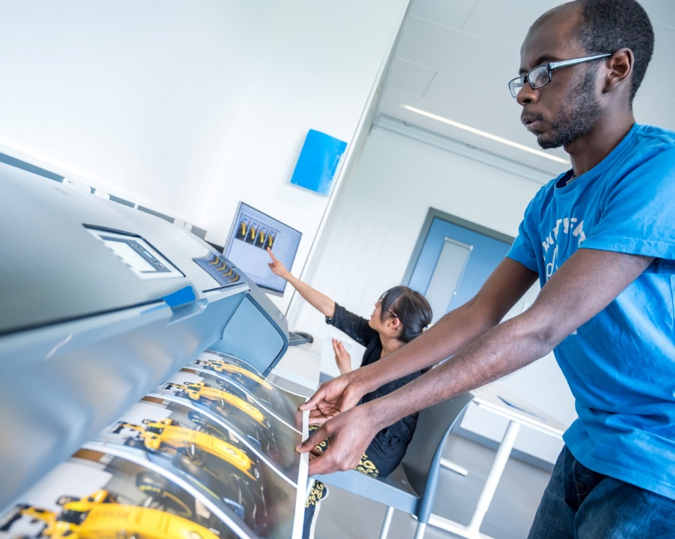
printing EDU solution consisted of a DesignJet 44’’ Photo printer with bespoke
software, mug printing solution and heat press bundle for bags/tshirts…etc.
We purchased 4 iPads to use with the printing kit to support the learners with instructions. We know that videos are a better way to show students how to use the printers, for example, how to change inks or printer rolls. We are using QR codes to link to videos we have created and can be scanned from any iPad.
In the IT suite the students have been participating in coding sessions using the large touch screen along with the website Code.org. The group have enjoyed learning how to code in a fun inclusive way.
The session
used a combination of visuals on the screen, a physical grid on the floor to
map out movements, and to navigate obstacles to reach a goal.
The screen
allowed the students to drag and drop elements of the code into the running
program and work out if their commands would accomplish the challenges set for
them.
It has been
a bit of a roller coaster journey with the print enterprise, lots of excitement
and interest at the beginning when the kit arrived but the brakes were put on
when training on the use of the kit was delayed for quite a long time.
In the meantime, the
plans are in place for it to be run as an enterprise for students who want to
experience the world of work at Bridge College. We have identified groups of
students who want to take part. It will be a great place for students to learn
about business in college.
We are working on it
being cost neutral at the moment with the students learning about money,
customer service and business skills. We have designs on making products such
as tote bags, personalized greeting cards and mugs.
There will be a lot of
different job roles that the students can get involved in; Finance, design and
the nitty gritty of making the products.
We are also hoping the day to day printing needs throughout college will
move into that department. For example, if a staff member wants a poster
printing to display around college they can send it to the team and they will
print it at a cost. We will have accounts set up for members of staff to access
the enterprise.
This will be a great
opportunity for students to use their customer service skills, so communication
at work will be an important aspect of this. Members of staff need a lot of
photocopying and laminating of documents to use around college and we have
already starting taking on these jobs while training up students on other
aspects of the enterprise.
Once the students have
the business up and running within college we are planning on expanding
opportunities by selling products on markets stalls. For example, we are
planning on selling products at this year’s Christmas fayre. To do this we are
linking with the art department here at Bridge College so the students will
actually design products themselves and follow the whole process from design to
selling the products.
We are also going to
be using the products as a marketing tool. For example: when we are visiting
schools, events and conferences it’s a great opportunity to give away mugs,
t-shirts and bags with our own designs on to prospective students and parents.
It’s well underway and
we can’t wait to see the products selling!
The students have
gained so many new skills using the technology, including coding with robots!
Using this inclusive tech throughout college has helped the students learn
about e-safety, coding, money, customer service and it’s preparing them to
embark on the business enterprise with confidence.
This is such an
exciting time in Bridge College. The Karten bid has been an amazing opportunity
for the students to learn all these new skills. To find more about Bridge
College and students we work with visit: https://www.togethertrust.org.uk/special-education/bridge-college
In September our Karten CTEC Centre based in Belfast,
Northern Ireland moved to a new, purpose-built
workspace. We also took the opportunity to re-brand the social enterprise from
The Orchardville Business Centre to Orchardville Works, highlighting the
project’s focus upon employability and inclusion.
The new, larger space will allow us to expand the range of
services we currently offer by having more storage available for customer’s
work and provide a broader range of on the job experiences for project
participants. Having moved in less than
three weeks ago we are certainly finding our feet and enjoying the new space.
We are also on the brink of launching our own handcrafted
product (a first for us!), so our talented team of participants have been
working hard to produce a range of genuine Irish Linen scarves:
These have been branded as Worthy “crafts with a cause” and
will be on shelves soon in Lisburn and Hillsborough, Northern Ireland.
We are looking forward to the future as we continue to
strive to improve our participants’ learning experiences with help and support from
the Karten Network.
St Helens Coalition Of Disabled People (CDP) Buzz Hub
provides an ongoing activity programme whereby people with a learning
disability are able to access and enjoy a wide range of activities aimed at
facilitating learning, development and achievement.
With the support from the Karten Network we are now able to
extend our
printing enterprise bringing a new learning experience to our members.
We also see opportunities for the printing enterprise to support the
local community by producing personalised merchandise, enabling
voluntary/support groups to promote their work, and community groups/members to
raise funds for worthwhile causes.
Through
this enterprise we want our members to not only learn new skills but to feel
that they are using their skills to help others as productive members of the St
Helens community.
We are looking forward to working with others across the Karten Network.
What
do you do if someone touches you inappropriately, but you can’t see or hear
them?
Students at our Karten CTEC for People with Deaf-Blindness benefit from one on one instruction from our teachers, most of whom are themselves deaf-blind, deaf, deaf-severally visually impaired, or hard of hearing-blind. They are fortunate to have good quality equipment, thanks in large part to the Ian Karten Charitable Trust. Skills taught enable direct, effective and independent communication with family, friends, bureaucracies, financial institutions, schools, help centers/hot lines, police or other authorities, as well as access to information. With that, the information found on-line is designed for the sighted-hearing public and does not focus on the specific dilemmas this population faces. As a result of this and other factors, our clients and staff are sometimes less well informed, and therefore find it even more difficult than their peers, to define, identify and report incidents of sexual harassment.
This is particularly problematic as they are at least as vulnerable as their hearing-sighted peers. Even in our Karten CTEC we must be alert and aware, especially as much of the communication is in tactile sign language, which naturally requires tactile (hands on) contact. The deaf-blind person puts their hands on those of the person signing in order to communicate, but not everyone is clear on where to draw the line between communication and undertones of sexual intonations or even harassment. While most teachers prefer the illumination provided by a portable spotlight funded by the Ian Karten Charitable Trust, one visually impaired Braille teacher prefers to teach in the dark, which makes it more difficult for sighted staff to see what’s going on.
Clearly, there is a real need for open discussion and education as to the border between communication and harassment. For example, in the hot Middle Eastern summer, if a client and/or teacher are lightly dressed and of different sexes, misunderstandings could occur. If someone, perhaps a visitor or another student or teacher, interacts with them in some way, the deaf-blind person may not know who it was or who – if anyone -may have witnessed the interaction.
We decided to organize a special half day seminar to address these and other issues. All of our current students and teachers, as well as many graduates, together with members of our Social Recreation-Rehabilitation Groups, other clients, Support Service Providers, communication facilitators (who copy the signs from the main interpreter into tactile sign language at events), interpreters as well as social workers and senior government officials attended. Of the 213 people present, 110 were deaf-blind and 65 were deaf.
One of our deaf-blind staff members paired each deaf-blind participant up with the appropriate Support Service Provider, communication facilitator or met their specific accessibility needs. Thanks to this and other measures the event was fully accessible, from beginning to end. Even students with a notoriously short attention span were spellbound throughout the entire five-hour event. Several hearing-sighted participants, unused to being in the minority, watched the deaf-blind participants with amazement. They wondered aloud how over a hundred deaf-blind individuals could get to our center in Tel Aviv, participate actively in the talks, enjoy the show and more.
Our Karten CTEC coordinator opened the event, followed by one of our social workers, Yonah, and then a presentation by a lawyer. In the course of 45 minutes, the lawyer touched on the relevant laws as well as differences between courting and harassing and more. At the end of her talk, and during the break that followed it, she answered the many questions that individual participants raised.
Next onstage was a play “Zipporah keeps a secret”, which presents the subject of sexual harassment in a light hearted but serious way, via the story of a bird who is harassed one day by her “friend”, a lovable white cat. The cat tells her to keep it a secret so her family won’t be angry with her. The whole concept of secrets, the damage they do and how to reveal them, is emphasized and examined from different perspectives. The audience understood and internalized the message.
The lead actress, a psychodrama therapist and group mentor who developed and wrote the show, then led a discussion about coping with harassment and talking about it. Here too she stressed how secrets empower themselves and how important it is to tell, and not to feel guilty about their reactions, whether they froze, or tried to flee or fight.
The final part of the event was a wrap up by our social worker, Yonah. She talked about the various elements of the seminar, from the more theoretical talk by the lawyer, through the more practical and emotional sides of the play and then specifically about tactile sign language. With the help of a Power Point presentation she discussed potential pitfalls, where tactile ISL can cross the border to sexual harassment. She then invited comments, questions and examples of potentially problematic situations.
Issues raised included those in which a man and a woman communicate in tactile sign language, especially facing each other in casual situations, such as at a party, in a swimming pool or at the beach. Sometimes the Support Service Provider, teacher or interpreter are friends with the client and might hang out together in the evening after the activities on an overnight trip. What is the status, what boundaries should be set and kept in mind in such a situation? Another example was describing and demonstrating the actions of a person/people dancing. This could be the case in our Karten CTEC, as well, if a teacher wants to explain what is on the screen and it happens to be a video of people dancing, for example at a Bar Mitzvah party. One of our deaf-blind staff members explained that in such a situation the person describing the dancing should demonstrate with their hands on their own body and the deaf-blind person’s hands on theirs.
Much discussion centered on the question of communication when both parties are seated, as in a computer lesson. The most comfortable position, and the one which is easiest to maintain, is to sit opposite each other with alternating knees, so that the knee of one person is between the other person’s knees, as can be seen here. This caused quite a storm, with many people contributing their opinions. The gist was that yes, it’s more comfortable, but if it’s a man and a woman it provides a perfect opening for sexual harassment. The conclusion was that if the two individuals are not the same gender, or don’t feel comfortable sitting like that, they should both keep their knees together.
Operatively, we are in the process of creating formal guidelines and ethics, for example that interpreters need to wear shirts with sleeves and not spaghetti straps.
This is a very important subject, which needed to be recognized and openly discussed, not only around the world but also at our Center. One student at our Karten CTEC was interested in the subject of sexual harassment and had used her new skills to research it online. The seminar was her only opportunity attend a fully accessible event focussed on the issues that concern deaf-blind individuals and learn more.
Overall, everyone learned that no undertones or atmosphere of sexual harassment should be tolerated. Participants learned to identify the signs, and that they have the right – even the obligation – to say no, and who to turn to if something should happen. Part of being empowered and gaining self-confidence is to learn to identify what makes you uncomfortable. The ability to say no, I’m not transparent, I’m here. The seminar helped to give them strength, strength that can be used in other areas of life. One woman opened up for the first time about a relevant experience.
Should such a situation arise in our Karten CTEC, our teachers and students are now equipped to identify, report and stop any such behaviour. Unlike other subjects we cover, we hope that this one will remain theoretical.
My name is Massimiliano (Max) Bianconi. I have been working in social care since 2001, accumulating the experience and knowledge that I now use to support others.
I am passionate about social justice and empowering people to live
a more independent and purposeful life.
I teach older and disabled people every day IT skills to give them
confidence and competence in today’s technological world.
I love to spend time with my family outdoors, climb a cliff when I
have the chance and make short videos and films.
I am delighted to join the Karten Network board, and I am looking
forward to sharing my know-how in using mainstream technology to make a
difference for older and disabled people.
My name is Paul Doyle. I have had the privilege of working in the field of Assistive Technology (AT) for 25 years.
My experience of AT ranges from installing and commissioning environmental control systems for the NHS to managing a multi-centre assessment service providing assessments for students eligible for the Disabled Students Allowance (DSA).
Throughout my career in the AT industry a common and recurring theme has been a lack of formal, accredited education and training for individuals working with AT and users of AT.
Experience has taught me that no matter how good an item of AT is. If it is not implemented and supported effectively by competent and confident teachers’ carers parents etc. the user will not gain the full benefit and of often will abandon their technology.
I have a passion for ensuring that an individual has access to products and services that genuinely enable independence and have been involved in several projects developing leaning programmes for individuals supporting users of AT.
I have been fortunate enough to be involved with industry and Government groups who are charged with representing and promoting AT at a national policy level.
I have also had opportunities to participate in numerous research and development projects with innovative organisations and individuals, this has helped me keep abreast of developments in an ever-changing field and establish interesting and rewarding relationships both in and outside the AT domain.
I very much welcome an opportunity to offer my knowledge, skills and just as importantly my enthusiasm to the Karten Network.
I hope to work with the Karten Network to expand on their offer to the community. For example, I have been collaborating with the Smart Home Industry for a many years and during that period I have learned of many benefits smart technologies can deliver to older and disabled people.
I see the Karten Centres as an ideal venue for an awareness raising programme, demonstrating smart products and highlighting their features and benefits to users in a supportive and ethical environment.
I am grateful for the opportunity to be part of a national organisation that at its core improves the lot of individuals and look forward to learning how best I can contribute to its future success.
Stuart Beveridge, the Assistive Technology Trainer at
seescape has provided an expert review of the following products.
Victor Reader Trek
Last November, the company Humanware released their latest product called the Victor Reader Trek. This is a combination of two of Humanware’s most popular products, the Victor Reader Stream and the Trekker Breeze. The product is basically an audiobook player and GPS system compacted into one small and easy to use device. There is so much more to this product though as it can also be used to play podcasts, listen to radio stations and record voice memos. To put it simply, it is an entertainment and navigation system, all rolled into one. It is small enough to actually fit into a jacket pocket and can be operated one handed. This is made possible because of buttons which are all differently shaped and have easy to distinguish tactile markings which make them easy to locate by touch alone. The trek also has built-in bluetooth which means you can pair it with a set of bluetooth headphones for ease of use. In addition, the trek has an update feature which means that it is almost certainly a future proof device as additional content can be added in the coming years. There will also be frequent map updates, so that you have the latest information about your surrounding area curtesy of the TomTom map system which is fully supported within the device.
How does Victor Reader Trek work?
The victor Reader Trek has three different modes which you can switch between at the touch of one button. These modes are:
Offline bookshelf mode,
Online bookshelf mode and orientation mode.
Offline bookshelf
Within this mode you are able to listen to audiobooks, daisy
and other forms of text books which you can load onto the Trek via an sd card.
This mode also allows you to record voice notes such as memos, shopping lists
and can even in some cases be used to record lectures if you are a student.
Online mode
Within this mode, you can listen to radio stations through
the internet, download and play podcasts, search wikipedia for facts and update
the product to the latest version.
Orientation mode
This is the GPS orientation system. You would use this mode
when travelling either on foot or by vehicle. When in this mode you are kept up
to date about your current surroundings. Streets, interesting locations around
you and a detailed description of upcoming intersections are all announced.
There is also a fantastic feature which allows you to landmark areas which are
important to you and when you approach them in the future, they are announced
to you. You are also able to plan and get turn by turn instructions for
speciffic roots both when in a vehicle or when walking.
Please note that the orientation mode should be used
alongside another mobility aid such as a cane or guide dog.
First impressions
I have been using this product now for around serveral months and am really enjoying almost all of it’s features. I think it’s main appeal for me is the fact that you can easily toggle between the three different modes at the press of a button. This means that the potential of the product is huge because while you are using public transport, you can be listening to an audiobook or podcast while at the same time have full knowledge of the streets around you at all times. The fact that the product also supports bluetooth means that you can also use bone conducting (aftershock) headphones, which means that your ears are completely free to focus on traffic when crossing roads. The battery life of the product is also much better than expected.
Price
The Victor Reader Trek currently retails at £545. If you
would also like to purchas the Trekz Titanium Aftershock Headphones, which are
also supplied by Humanware and come highly recommended, they are an additional
£80.
Dyson 360 Eye
Tired of hoovering every day or missing chunks of dirt, dust
and possibly other mess such as pet hair? I certainly was, and solved this
solution by purchasing a Dyson 360 Eye robot vacuum cleaner.
This self-navigating dirt destroyer is designed to clean every floor of your house at the simple touch of a button. It’s powerful enough to clean well on all floor types and surfaces, smart enough to navigate efficiently from room to room on one level and simple enough for anyone to use. Setting it up is also a breeze. Just plug in the pleasingly small and discreet charger/docking station, place.
The already assembled robot hoover on it and, when it’s
charged, hit the button on its top to start cleaning. It’s as simple as that.
Note that for best results you do need to make sure your floors are tidy, but
if there is enough room for the robot to successfully navigate, you have
nothing to worry about.
So how does it work?
The Dyson Eye 360 is small, compact and runs on rubber
tracks rather than wheels. It gets its name from the tiny 360-degree camera which sits on top and it’s
this camera that is the key.
Essentially, it means that the hoover can see in
every direction simultaneously, which helps it to not only map out where it’s
going, but also to avoid obstacles. It still bumps into things now and again, particularly
items below its camera line, but the Dyson knows where it’s going in relation
to where it’s been.
In terms of its approach to cleaning, it’s methodical,
calculating and efficient meaning that it covers as much of your floors as
possible. It picks its starting point and slowly works its way outwards in
squares, each time overlapping a little with its previous path so it doesn’t
miss anything. The fascinating thing about it is that when it is running out of
charge, it goes back to its docking station, recharges, and then remembers all
of the places it had previously cleaned and just carries on hoovering the rest
of the house. There’s really no limit to where the robot can clean, just close
your doors on any of the rooms you don’t want it to go and they will be
avoided.
The Dyson Link app
You also have the ability to connect your Dyson robot to an
app on your smart phone. The app which is fully accessible for iPhone users,
Allows you to use your phone to perform useful features. At
the point of writing this article, the app is also available for Android users
however I have been unable to thoroughly test it so am unsure how accessible it
actually is with the TalkBack screen reader. The app allows you to start and end cleaning sessions remotely,
control the cleaning schedule, and view what your robot did in each session.
That’s it.
Let’s finally discuss how I feel it performs and give my
conclusion.
I send the 360 Eye out every day before I leave the house
for work. It cleans the whole of my one bedroom bungalow meticulously covering
every available space. The one drawback of it is that it doesn’t clean skirting
boards, so you will still need a manual hoover of some description, but on the
whole, my life is made so much easier with the Dyson robot in it. Another small
consideration is the 360 Eye works best in daylight or decent artificial light.
Since it relies on a camera to navigate, the Dyson is more sensitive to changes
in lighting as it cleans. It has two infrared “headlights” to help combat
low-light areas, but it still works best when it can see clearly.
Now for the “big but”, price. Eight hundred pounds is a lot to spend on anything. However, the benefits out way the cost. It is, without doubt, a luxury. But it delivers and does so with minimum fuss and from my point of view is life changing.
In Your Pocket
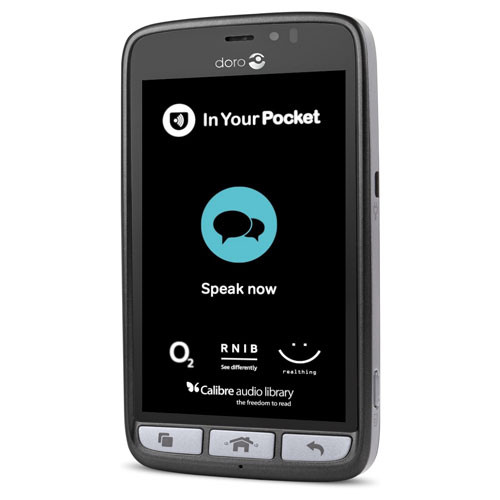
In February this year we acquired a new gadget which is ideal for anyone who struggles to use either push button or touch screen mobile phones. The In Your Pocket is a fully Voice Activated mobile phone which allows you to make and answer phone calls, send and read text messages, create contacts, listen to newspapers and audiobooks, get weather information, tell the time, hear your current location and streets around you and much more. All of this is achieved entirely by using your voice. This is a solution for anyone who would just like technology that is simple and easy to use with hardly any learning required.
How it works
The phone is operated by simply pressing a tactile button
found at the bottom of the screen. After you press the button, you simply speak
to the phone naturally and give it a command. So for example, some basic voice
commands include:
Phone Seescape”, “send a text message to Stuart”, “create a
new contact”, “What is the date”, “read the Guardian, “what is the weather
forecast”, “Where am I”etc.
Pricing
The In Your Pocket runs exclusively on the O2 network and if
you purchase the phone you would be subscribing to a fixed contract over two
years at £22 per month. This price plan gives you three GB of data and
unlimited calls and texts to any number. If you run out of mobile data, don’t
worry, it will just renew the next month and you will not incur any hidden
charges as the price plan is designed so that you will never go over your
allowance. Note that you can also connect to Wi-Fi which should save you using
a lot of mobile data.
Future plans
Later this year, the developers are planning to add even
more features to the phone which will be installed automatically as soon as
they become available. These include enhanced weather information, as well as a
personal diary function and the ability to set alarms.
OptiGrill
As we are approaching the festive period, I would like to
draw your attention to a new gadget I recently bought myself. Using this
device, I can now cook confidently and independently without the risk of either
burning or under cooking food. This new revolutionary product is the OptiGrill
and is made by the company Tefal.
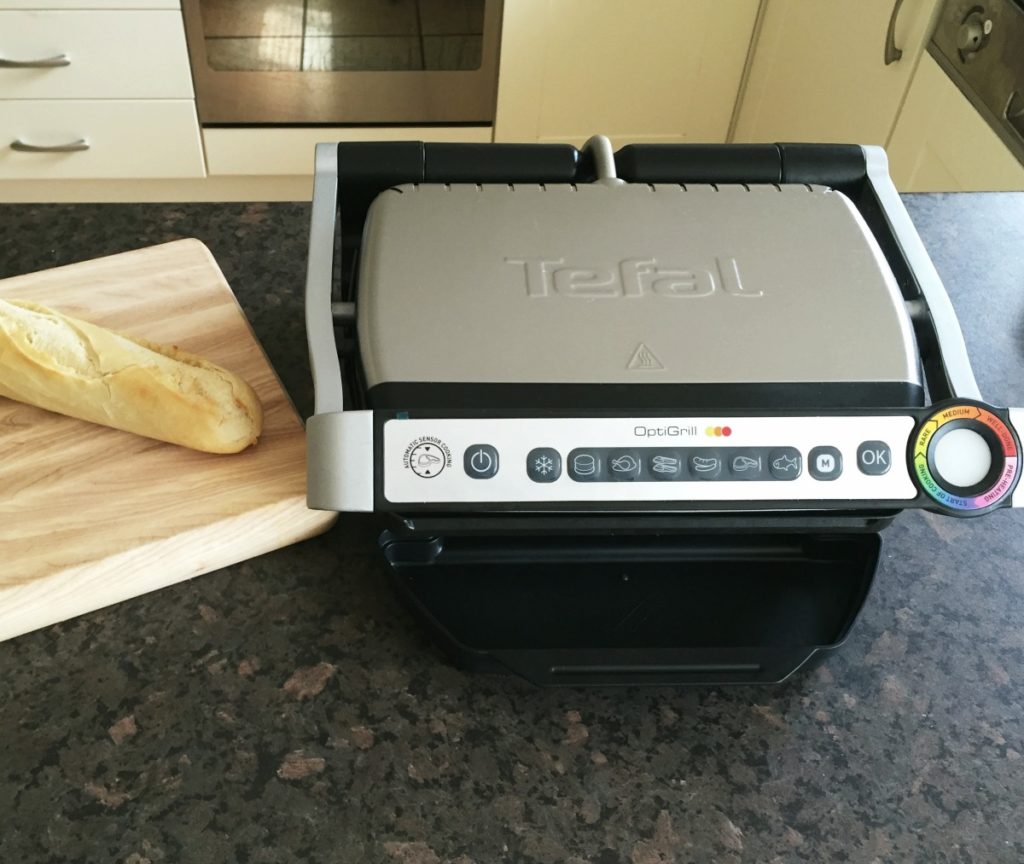
The Tefal OptiGrill is an electrically heated
grill similar to the George Foreman grill. However, unlike the George Foreman
grill, the OptiGrill is a smart grill! It will cook meat, poltry, fish and even
sea food, vegetables and toasted sandwiches. Another great feature of this
grill, is that it will also cook food from frozen as well.
How does it work?
The OptiGrill’s controls are found on the handle. From left to right there’s the On/Off
button and dedicated programmes for cooking specific food such as defrost, burgers, chicken, bacon, sausage,
steak, and fish. There’s also a manual mode and finally an OK button when you
are ready to start cooking. Right at the end is the LED cooking indicator that
uses different colours of lights to represent stages of the cooking process.
When you open the llid you’ll find the
removable non-stick plates. The bottom plate is slightly angled so any grease
or oil can run down into the dripping tray, which means healthier eating.
To cook, first turn the grill on and then select the type of
food you want to cook. Then press the ok button, and the grill will begin
heating up. When it is ready, it will give a series of beeping sounds. You can
then lift the lid and place the food on to the grill and then close the lid.
Now the magic part, the grill will do the cooking for you. There are sensors
inside the grill to measure the weight and the thickness of the food you are
cooking. You can cook food to rare, medium and well done standards. The grill
will give audible beeps to indicate each cooking stage. Just cook it to your
liking.
As I eat a lot of meat and fish, I am loving the OptiGrill.
I use it everyday, and the thing I really like is the fact that all the guess
work is taken out of cooking. Also, the grill is easy to clean as you can
remove the plates and clean them either in the sink or by putting them through
the dishwasher. I also love the fact that the food doesn’t dry out. Food such
as steak and chicken still retain a lot of their juices and moisture, even when
cooked to well done standard. The fact that the device has a massive stick out
handle for using to lift the lid is another added bonus. The risk of burning
yourself is seriously diminished, although I would advise some caution to begin
with.
Price
There are two types of OptiGrill. The small version is
priced at £110 and the larger version is currently £120. Depending on your
family circumstances, it would be up to you which one you prefer.
Please also note that while we don’t actually have an OptiGrill
at our centre, I would be more than happy to discuss this technology with you.
Also note that if there is enough interest in this device, we will
purchase the OptiGrill to demonstrate to
clients at our premises in Wilson Avenue in the future.
We use cookies on our website to give you the most relevant experience by remembering your preferences and repeat visits. By clicking “Accept All”, you consent to the use of ALL the cookies. However, you may visit "Cookie Settings" to provide a controlled consent.
This website uses cookies to improve your experience while you navigate through the website. Out of these, the cookies that are categorized as necessary are stored on your browser as they are essential for the working of basic functionalities of the website. We also use third-party cookies that help us analyze and understand how you use this website. These cookies will be stored in your browser only with your consent. You also have the option to opt-out of these cookies. But opting out of some of these cookies may affect your browsing experience.
Necessary cookies are absolutely essential for the website to function properly. These cookies ensure basic functionalities and security features of the website, anonymously.
Cookie
Duration
Description
cookielawinfo-checkbox-analytics
11 months
This cookie is set by GDPR Cookie Consent plugin. The cookie is used to store the user consent for the cookies in the category "Analytics".
cookielawinfo-checkbox-functional
11 months
The cookie is set by GDPR cookie consent to record the user consent for the cookies in the category "Functional".
cookielawinfo-checkbox-necessary
11 months
This cookie is set by GDPR Cookie Consent plugin. The cookies is used to store the user consent for the cookies in the category "Necessary".
cookielawinfo-checkbox-others
11 months
This cookie is set by GDPR Cookie Consent plugin. The cookie is used to store the user consent for the cookies in the category "Other.
cookielawinfo-checkbox-performance
11 months
This cookie is set by GDPR Cookie Consent plugin. The cookie is used to store the user consent for the cookies in the category "Performance".
viewed_cookie_policy
11 months
The cookie is set by the GDPR Cookie Consent plugin and is used to store whether or not user has consented to the use of cookies. It does not store any personal data.
Functional cookies help to perform certain functionalities like sharing the content of the website on social media platforms, collect feedbacks, and other third-party features.
Performance cookies are used to understand and analyze the key performance indexes of the website which helps in delivering a better user experience for the visitors.
Analytical cookies are used to understand how visitors interact with the website. These cookies help provide information on metrics the number of visitors, bounce rate, traffic source, etc.
Advertisement cookies are used to provide visitors with relevant ads and marketing campaigns. These cookies track visitors across websites and collect information to provide customized ads.