Our Performing Arts students recently visited Curve Theatre in Leicester to watch Dear Evan Hanson. They were then tasked with writing a blog post using WordPress about the performance by their PA tutor Kiah (also our Digital Lead). Jacob, a pathway 3 student at Homefield, excelled at this, writing a wonderful blog post. Jacob is particularly interested in trains, so we thought his blog name was genius!
Dear Evan Hansen – The Curve
What can I say about Dear Evan Hansen, my group took the train into Leicester on Thursday and met up with a few more students from our group before we went in to see the show. We got some seats that are near the back but we could still see the performance.
The show was about a young boy named Evan who was struggling with social anxiety and depression, his therapist encouraged him to write letters to himself as a form of confidence boosting but things soon got out of hands when a student named Connor got his hands on one of them, detailing his crush on Connor’s sister Zoe and commits suicide, thinking Evan was planning on making him look like a fool.
Evan later finds out and due to his signed sling, his family thinks him and Connor were best friends and Evan has to make up lies about Him and Connor in order to help his family, he and another student start a project to replant and orchard in Connor’s honor but Evan is later forced to confess about the lie about him and Connor’s friendship and he vows to be brutally honest about things in future when he sees the replanted orchard in the end.
I think Dear Evan Hanson is a fantastic example of an introverted protagonist story, The sets were full of detail and made you almost feel like you were in the story, especially the scene with the windows in the background which was my favourite by far. I also appreciated how emotional some scenes could get such as my favourite song “Words Fail” when Evan has to confess his lies to the Murphy Family, this scene in particular spoke to me as I’ve been in a similar scenario to Evan before.
I also like (and hate) the character of Jared as I could feel Evan’s pain when Jared tormented him, he’s almost like the little voice in your head that tells you you’re a failure, you’re a loser and you’re worthless over and over again with no way to break the cycle. I personally have had experience with people like Jared before and I commend the creators of this musical for creating a character that’s likable because they’re realistically unlikable.
I really recommend this play to people with anxiety or who are coming of age, this play will really speak to them as it did to me as the main protagonist has not just 1 but 2 mental disabilities and is also portrayed very realistically as well. If’s you’re someone who fall into these two categories and there’s a performance of this at your local theatre, I recommend you give this a watch as it’s an experience to remember!
Jewish Care Explore is dedicated to empowering individuals through technology, promoting greater independence in day-to-day life. In line with this mission, on Monday, November 4th, we conducted a training session at Hammerson House for volunteers and employees. This session focused on assistive technology and accessibility settings that can make technology more accessible and user-friendly. We also explored effective ways to help people feel confident and comfortable engaging with new technology. Attendees were introduced to accessibility settings to help people with visual, hearing, physical and cognitive impairments, along with some apps and equipment to help people with lived experience of these difficulties. They came away with an increased knowledge on accessibility based technology, and felt more able to assist people with this.
In today’s technologically driven world, access to technology and digital skills is essential, yet many individuals – in particular the elderly and people with disabilities – remain disconnected for various reasons. Promoting digital inclusion is paramount for enabling everyone to integrate fully in modern life, and collaboration among organisations is key to achieving this goal.
By working collaboratively, organisations can share resources and expertise, amplifying their impact. Collaborative efforts allow organisations like those within the Karten Network to provide training programs, reaching more individuals than any one organisation could achieve in isolation. Community-based organisations, deeply trusted and needed by the people they serve, are integral to fostering confidence and empowerment in those new to or wary of technology and serve to massively improve digital inclusion within our communities. When organisations work together to promote digital inclusion, they build a more connected, equitable society and empower more people to thrive in an ever-evolving digital world.
“80 Candles for 80 Years” is a project in collaboration with the Holocaust Memorial Day Trust, which we were invited to take part in. This initiative also involves the St. Helens Library Service. The project marks the 80th anniversary of the liberation of AuschwitzBirkenau, and we were tasked with designing and creating a Holocaust Memorial Day candleholder.
The first step in creating our candleholder was to choose a life story. Our candleholder was designed to commemorate the life story of an individual or community that was persecuted and/or murdered by the Nazis. We chose to commemorate the life of Helene Melanie Lebel. Our very talented writer, Callum, wrote a poem inspired by her life story, and the members of our art club all drew the national flower of Vienna, Helene’s birthplace.
To create this candleholder, we used our Glowforge laser cutter, which cut the plywood and engraved the drawings and Callum’s poem. Our candleholder will be part of a special digital exhibition for HMD 2025 and will be used annually at the St Helens Library Holocaust Memorial Service.
Jigsaw Exhibition
All of our artists at Buzz Hub are signed up for an online gallery with Outside In. Outside In provides a platform for artists who encounter significant barriers to the art world due to health, disability, social circumstance, or isolation.
Outside In is partnering with Jigsaw, the UK clothing company, which regularly displays rotating art in its shops. They saw Bill’s online gallery (one of our members) and are interested in featuring it at their Leeds location alongside another Outside In artist.
The collaboration will kick off with an in-store event at Jigsaw in Leeds on 14 November. This event will welcome friends, family, and customers, offering a unique opportunity for guests to engage directly with the artists and hear about their creative journeys. A recording of the event will also be available for wider audiences.
Bill creates beautiful watercolour and coffee landscape paintings. Jigsaw has chosen seven of Bill’s paintings to include in the exhibition. His works will be on display from 14th November 2024 – 6th March 2025.
We applied for a Karten Grant many years ago and bought a lot of VI Technology, including the OrCam My Eye which is still in use now. The OrCam My Eye is now on version 3 Pro and there is an OrCam Read 3 also and it is, pretty much, all singing and all dancing. It advertises itself as the “most advanced vision impairment wearable solution”. It reads or magnifies text, recognises faces, identifies products and you can ask it questions and get information.
Our original OrCam My Eye mainly reads text, but at the time it had the real “wow” factor. The OrCam is a device that attaches by magnet to glasses. The wearer can then point at text either nearby (book level) or at a poster / train timetable at a distance. The gadget then takes a photo of the text and reads it to the wearer. It takes a bit of getting used to because you have to have your head in the right position and your pointer finger in the right place, but once you get the hang of it then you can use it in so many different places and to read a range of text, close up and further away.
My student (KM) who used the OrCam a lot took it on his Animal Care course to read his handouts and what was on the board. Most memorably, he took it on a trip to a museum and art gallery to read the small printed information and when he adjusted his headphones he flipped the camera bit onto the floor and didn’t realise. Some time later he went to use it and realised that it wasn’t attached to his glasses. A frantic search occurred and, fortunately, he did eventually find it on the floor.
This is probably the weakest aspect of the OrCam My Eye – the magnet is light, as is the camera part, and it is easy to knock off and not realise, and it’s easy to forget that it is attached to your glasses. I hope that this is something OrCam have been able to improve, so that the magnet is stronger.
KM has now purchased his own My Eye Pro and this is what he has said:
I attended the College in 2018-19. Whilst I was there, I got introduced to the OrCam My Eye. When I first used the OrCam I was amazed at what it can do and how helpful it can be. I was impressed at how easy it is to use and that you don’t notice that it is there. The best thing about the OrCam is that you can take it anywhere and use it in any situation where reading is necessary. I now have an OrCam MyEye Pro. It is very helpful because it does a lot more than reading such as face recognition and scanning barcodes and telling me what the product is. I will always be grateful to the College for introducing me to this amazing piece of technology.
Another student (AB) has also tried out the OrCam and has since purchased his own. He uses this in College a lot and his tutor has said:
AB has been successful at using the OrCam in a variety of ways. This has included using the barcode function to identify which items to give customers when working as a cashier in our café Enterprise. AB has programmed in a range of faces into the OrCam and used the facial recognition function. He has also read a range of documents using its reading function and its speech output. This last way is his preferred way of working out of all the ways that he has tried. It enables him to access the same documents as his sighted peers and at the same pace.
The beauty of the OrCam is that it isn’t just for people with sight loss, but can also help people with Dyslexia, Irlens Syndrome and other reading difficulties. The OrCam Read is different to the My Eye as it is hand held or can be placed on a stand and it will read printed or digital text aloud from screens, books, newspapers, signs etc. The device also has a magnifier that can be used to upload and capture books, handwritten documents and images. Apart from that, the OrCam Read has an AI Assistant that you can ask questions about the text and other topics and it is interactive.
There is also the handheld OrCam Learn which reads text, and when in Reading Pal mode gives live feedback to students practicing reading aloud and can assess understanding by asking relevant questions. It will also read signs and text when the person is out and about. The OrCam Learn can be used in exams when in exam mode and with Wi-Fi disabled. This option is a lot more affordable than the other options.
So, although we were given the OrCam My Eye many years ago through the Karten Grant the impact continues to this day, with students and former students continuing to use this technology because they learned about it at College. Definitely a gift that keeps on giving.
Sadly, OrCam have announced that they will no longer be focusing on developing products for people with sight loss but will be concentrating on their OrCam Hear products for people with hearing loss. I am sure that this product will be as good as their other products for people with sight loss or reading difficulties. However, even though there will be a change of direction for OrCam, I hope that we will still be able to buy Read 3 or Learn, because we have a number of students who would, definitely, benefit from one or both of these gadgets.
We have recently adopted our local railway station. We work in partnership with St Helens Rotary club.
We have built seven planters that now sit on both platforms. We will over the coming months produce artwork that will complement the planters representing St Helens through the ages.
Our Towns Sound
This is a project that we are involved in. This is facilitated through Shakespeare North. The project is looking to record dialects and sayings throughout the Liverpool City region.
As part of this project, we are developing a performance to be held at The Shakespeare North Theatre.
As part of the project Matt the lead on the project wanted something that would be able to capture and record the sayings and dialects. Matt had the idea of a telephone box. He approached our members and creatives to see if this would be possible. Indeed, it was.
We used the wide format printer to print images from St Helens and neighbouring Prescot. Our Glow Forge printer cut the crowns for the telephone box.
The telephone box is currently touring the region capturing the sounds of our region.
Café Laziz
We have recently developed a partnership with café Laziz.
The café is set up for recently settled refugees and asylum seekers to work and train in and integrate with the local community.
The café is open to the public to try new cuisines from around the world.
Our members share volunteer opportunities, and we are engaged to provide all their printing needs.
The printing is allowed due to funding from the Ian Karten Charitable Trust.
Inklusion St John’s opened the doors in 2012 having secured funding for our project from the Ian Karten Charitable Trust. Starting as a printshop in Seaford we have now relocated to our Brighton college campus to be more inclusive of our students’ skills and to be part of the thriving community the city offers.
Through a student led approach, we want to show the equal value in the contributions of the business to create better acceptance and inclusiveness for those living with disabilities.
As we grow, we aim to offer a wider variety of products in turn opening more opportunities of work for our students. All profits made will sustain the enterprise and the wider charity.
In this article you can see the instructions students follow to print their designs onto Tote bags.
Using the Ricoh Ri100 DTG A4 Printer to print full colour onto T-shirts and Tote Bags.
1. E-mail your design to the print shop e-mail address. Download to your learner folder and right clicking choose to open the image with Photoshop.
2.Centre and clean any ink smudges where needed.
3. Find the middle of the bag and place on the tray. Put on the tray lining up on the centre line and make sure the opening of the Bag or Neck of the T-Shirt are on the relevant “R” Indicators depending on Portrait or Landscape design.
4.Tuck in the excess to make sure that it doesn’t get caught in the machine whist printing.
5. Close the top half of the tray.
6. Preheat the oven beneath the printer to 170 degrees by holding in the power button and then pressing the Preheat button.
7. Open the oven door and gently push the loaded tray into the oven. Push the bottom lever to the left to press the Bag/T-Shirt to give us a smooth surface to print on.
8.Take the pressed Bag/T-Shirt out of the oven and push it gently into the printer until it clicks into place. Handle the now hot tray by the green heat resistant tabs.
9. Send the artwork from Photoshop on the computer to the printer using the setting Ricoh Ri100 and A4.
10. When the printer is ready the Start Button will flash while processing and show steady when ready to begin printing. The LED will change to say “Press key to start.”
11. The printer will maneuver the tray and start printing. Sometimes it will ask for a height adjustment before proceeding. Press the down arrow on the Height Button 6 or 7 times and repeat by pressing the Start Button until the printer accepts the tray and pulls it into the printer to line up with the printheads.
12. After printing, the tray will offer itself to be removed and placed back in the oven for fixing. Do this by sliding the bottom handle to the right wait for the countdown to finish, bring the lever to the middle and then to the right again to start another 1 minute 30 seconds countdown which will “fix” the ink and enable washing without losing the design.
13. Remove the tray from the oven safely, handling the tray by the green tabs. Place the tray gently onto the table and pinch together the two grey buttons on the front. This will release the tray and allow the Bag/T-Shirt to be removed.
14. Show off your fabulous product and Pose for a photograph. :)
Our New Bridge Enterprise have had another amazing year, developing a new product to add to their long list of products. This year has seen the birth of the Snugglioz! Snugglioz aim to be a calming and stress relieving teddy by scanning a QR code and revealing a heartfelt message. As ever, the students have been using the local markets to sell their products and presented at the annual Young Enterprise Dragon’s Den event.
The students have used the Karten funded printing equipment and camera equipment to produce high quality promotional flyers, banners and branding for their huge catalogue of products.
In addition to the banners, flyers, business cards printing, we have started to produce vinyl wall prints for schools across our Trust and we aim to start promoting this to schools across the region. These wall prints are so powerful and really enhance the environment of any room. Take a look at some of the students at work and some of the designs going up.
The video production enterprise is going from strength to strength, providing a huge catalogue of promotional films for our Mult Academy Trust, with a new library of Destination Champion films but also gaining commissions across the country.
The students recently received a paid commission to film the Evidence for Learning Conference in Leicester. This involved an overnight stay the night before and a full day of filming workshops, presentations and Interviews and editing them for EfL to promote across their social media platforms. Exmples of the videos created can be viewed on the New Bridge Group & MAT Promotional Channel YouTube.
Another Karten funded project that we have seen impact with is the use of the virtual forklift truck simulator. This exciting machine has really engaged some of our post-16 students to want to venture into work within warehouse logistics and potentially go on to become a forklift truck driver. Ok, so we haven’t any qualified fork lift truck drivers yet, but just to be able to get them interested in warehouse logistics and succeed in a work placement as a warehouse operative is a starting point. Here we can see how well Imran did and how this inspired him to gain confidence within a work placement at The Range.
You can find more information about the products on the NBEnterprise website and their social media channels too.
We can’t thank the Ian Karten Charitable Trust enough for all their support. We see the impact of each of the funded projects every day. The opportunities our young people have had because of the equipment they have available to them would not be possible without the ongoing support over the years. Thank you.
Daniel, one of our Creative Media students who studies in our Karten Centre, came first in the Giant Slalom event and fourth overall in alpine skiing at the recent Special Olympics GB National Winter Games held in Italy.
Located in Folgaria, in the northern Italian region of Trentino-Alto Adige, the week-long competition offered 73 athletes the opportunity to compete in alpine skiing and ice skating.
Daniel, currently in his second year at QAC, has been skiing for over ten years through Special Olympics Great Britain, the largest provider of sports training and competition for children and adults with intellectual disabilities. He has enjoyed competing in winter sports overseas on several occasions and in over fifty regional ski competitions in the UK. Following his success in Italy, Daniel also competed in a regional Special Olympics Ski competition held in Brentwood, Essex, on 28 April, winning a gold and silver medal.
At Homefield College, we take immense pride in nurturing talent and providing real-world experiences that shape our students’ futures. One shining example of this is Luke, a Pathway 2 student who has been excelling in his internal work experience with our IT support team.
Luke’s dedication and skills have been nothing short of remarkable. Here’s a glimpse into his impressive contributions:
Upgrading Technology: Luke has been instrumental in downloading and installing Windows 11 on laptops, ensuring our systems are up-to-date with the latest software.
Preparing Devices for Sale: He has efficiently wiped laptops clean, preparing them for resale and contributing to our sustainability efforts.
Maintaining Smooth Operations: Luke has played a key role in making sure all site computers are running smoothly, providing essential support to our daily operations.
In addition to these tasks, Luke showcased his initiative by independently helping a staff member transfer important photos of student progress from their mobile device to a secure SharePoint area. This not only highlights his technical skills but also his willingness to go above and beyond to assist others.
Luke’s achievements don’t stop there. He has mastered the IT Zendesk ticket and asset management systems, demonstrating his capability in handling complex tools and processes. Moreover, Luke has taken charge of the HP £200 laptop cashback project. His responsibilities include ensuring that five older laptops are fully operational and ready to be shipped to HP with the necessary documentation. This initiative alone is set to save the college an impressive £1000 off the purchase price of five new laptops.
We extend our heartfelt congratulations to Luke for his exceptional performance and look forward to seeing his continued success in the field of IT. Keep up the fantastic work, Luke!
Bry is non-verbal, with very limited movement and she tends to withdraw from people if her mood is low. In order to support Bry we have provided one-to-one sessions in the sensory room, which have helped her because the sensory experiences are distracting and helps her to re-engage with her surroundings and has allowed more social interaction with her carers.
The use of the new sensory equipment has enabled Bry to communicate her choices more clearly through eye pointing. She indicates clearly what holds her interest through her gaze and facial expression if she is not interested, Bry will look away or not respond. Her preferences tend to be visual, which has made the projected interactive images provided by the Omi Reflex projector particularly beneficial, as Bry can look at them directly and track their movements across the screen.
Because of Bry’s very limited movement, the use of the mobile magic carpet has been adapted for her by projecting images on a tabletop which is extended by using a white sheet over her lap so she can look down on the pictures and touch the image movements to cause an effect. When Bry is completely engaged, her arms and hands relax, enabling her to press a switch to operate an interactive toy or bubble machine. She demonstrates a clear understanding of cause and effect by repeating the action without prompting if she enjoys the result, giving a tiny smile at the end.
The refreshed sensory provision has had a very positive impact for Bry it has helped her reestablish some old skills and enhanced her levels of engagement and well-being. What the staff have noticed is that the more Bry engages with the sensory provision in the home, the more Bry is able to transfer the communication skills learnt to other areas and activities using her eye movements.
Case Study Laura – Ravenswood Support Worker
Laura, one of the support workers at Pamela Barnet, has been working closely with the new sensory equipment. Through direct practical application, she has increased her understanding of the methods of communication best suited to the individuals she supports. This understanding has transferred into her daily tasks, making life easier in the home.
For many years, Ravenswood has benefited from the Karten Network funded sensory room in the precinct. Norwood is keen that knowledge is more widely applied by staff to enable the people we support. The renewed interest in the sensory area has provided Laura with development opportunities to create new sensory activities. This new responsibility has enhanced her role as she can use new equipment to add to the care provided, increasing engagement, regulation and communication in imaginative ways to benefit the people she supports.
Laura has reported that she’s noticed a renewed uptake in staff members taking individuals to the sensory room since the new equipment has arrived. The people we support have been using the facilities more regularly which has increased their alertness and engagement.
Laura explained that having more flexibility with the range of equipment allowed staff to respond more spontaneously to the needs of the people in their care, providing calming activities should someone be distressed. It also enabled staff to offer alternative sensory activities during bad weather or when other activities are cancelled. Also, being able to move the mobile projectors along with smaller items means the equipment is more fully used.
Laura has been planning with Wendy, future sensory themes and is keen to link other activities in and outside the home. For example, using a jungle theme with sensory stories link them with jungle art projects to decorate the home, taste sessions if appropriate, and an off-site visit to the Living Rainforest Experience.
Laura said, “I am keen to get a more structured timetable for the sensory room in place so all the residents can benefit more regularly from the enhanced facility. I have seen the benefits of the sensory provision for different individuals, and their sensory preferences should form part of their person-centred activity planning.”
Impact
The purchase of the additional mobile sensory equipment has enabled more variety and flexibility, as certain activities can be taken to individual flats or bedrooms as needed. For example, Jay* had become quite distressed and the Mobile Magic Carpet and fibre optics were taken to his room. This created a calming sensory activity which helped him to refocus, improving his mood and regulation. An additional positive outcome was the increased confidence of the staff to respond in a proactive way. The flexibility, simplicity and ease of use of items such as the Magic-Carpet and Omi-Reflex projector have encouraged more use of the equipment, therefore benefiting the people we support.
Staff have been able to refresh their approaches to working with the people we support in the sensory room. Closer observation of the responses from the people we support has increased staff understanding of individuals sensory preferences, communication methods and social interaction.
Staff have been enabled to develop more detailed ‘sensory profiles and how to work with me’ documents so new or agency staff have a reference point when engaging with an individual in the sensory room. This continues as a developmental piece of work.
With the investment in new equipment, a further outcome has been that the Pamela Barnet home has appointed a member of staff to focus on and co-ordinate the sensory activities provided. This has helped to embed and drive the thematic sensory approach so that good practice is developed with the staff, while ensuring full use of the equipment.
The impact of the new mobile sensory equipment has resulted in an increase in equipment being used.
Development includes further thematic approaches not only in the sensory space but linked with other activities around the home. The aim is to create immersive experiences in the form of events, including a themed sensory story space in decorated areas around the home created by in house art activities, themed food and music.
Encouraging staff to take imaginative, creative ideas that incorporate sensory diets will- further benefit the people we support.
Next Steps for sensory provision at Ravenwood
To embed the use of the sensory provision within individual’s person-centred plan. Completing sensory profiles.
Continue to widen staff awareness and skills within the sensory provision through ongoing training.
Plan new sensory activities for the coming year and keep the momentum going!
Norwood’s use of Assistive Technology (AT) is at a critical point. Transitioning from older analogue to digital technology. Aiming to consolidate and embed its extensive organisational knowledge and expertise gained over the past decade. By prioritising user engagement, empowering individuals, and fostering a culture of knowledge sharing, Norwood can create a future where digital technology serves as a powerful tool for enhancing the lives of the individuals we support.
We are tremendously grateful to The Karten Network for your continued support. We appreciate your ongoing partnership as we work to enhance the lives of those in our in our community.
BID Services is a charity which works to remove barriers and empower those who are D/deaf, hard of hearing, sight impaired, deafblind or have other disabilities to live full lives. Our team in Leeds has setup a mobile Karten Centre which can not only offer access to technology and support at our city centre office in Leeds but can also be taken to our community hubs across the Leeds area where we deliver services closer to our clients. The mobile Karten Centre is already helping us support people to overcome the digital divide on both mainstream technology and bespoke solutions for our clients.
We spend a lot of time introducing people to the multiplicity of technologies that can play a part in supporting the independence of our service users, but there is the constant threat of a small change breaking the solution that has been relied on for years. A Screenreader is an incredibly powerful tool, it can make the difference between independently accessing the digital world or missing out on that world as it becomes ever more prevalent. Screenreaders are constantly updated, whether built into the operating system such as Apple’s VoiceOver or Microsoft’s Narrator or created by a third party like Freedom Scientific’s JAWS for Windows, but sometimes a fundamental change happens to the software we all use. Although it can be irritating in the extreme to non-disabled people it can completely break a tried and trusted method used by the disabled user.
Recently, Google Mail withdrew their basic HTML view from their Gmail website, and this has caused no end of problems for some Screenreader users, although quite correctly Google insisted that the standard webpage was accessible it required at least one Screenreader to be used very differently than most users would be used to. For those who haven’t come across one, a Screenreader provides synthesised speech output as a user interacts with the webpage. As it can be used by people without any useful sight it can be controlled completely by the keyboard when using a laptop, or by a different set of gestures when using a mobile device. Its effectiveness when navigating a webpage is limited however by how accessible the page is, how well web standards have been applied by the designers and of course the amount of content filling the page. A Screenreader is also such a powerful tool that the learning curve to become proficient in all situations is steep and of course a client will usually learn how to drive the software to the extent they need to complete their everyday tasks. Although skills gained in one area should translate to a different application, we become comfortable in the everyday. This is true of reading a webpage. There are a multitude of keyboard shortcuts so that a user can jump between elements and not find themselves limited to reading the page from top to bottom.
So, when the change was made to Gmail, one of our clients who uses JAWS suddenly found themselves outside their comfort zone and unable to deal with their email when accessing the webpage. They found themselves lost on the page as previous shortcuts took their focus to strange new places. In the past they had relied on a muscle memory that involved pressing keys in a remembered order to get to the email list or the reply button and even though the elements were still available they were lost to the mental picture that had previously provided a framework to the page. Our client grew more frustrated with the inability to progress and was unable to let go of the previous way of working to clear the way to engage with the new. After many weekly sessions with no success, it was time to start looking at alternatives. JAWS is considered by many to be the most well-developed and widely used Screenreader for the Windows platform and it follows a principle of supporting access to the applications and webpages in the most comprehensive way. But as the Gmail page shows sometimes that comprehensive access comes with an almost overwhelming amount of information. Within the Visually Impaired technology world applications on mobile devices tend to be streamlined by design, more suited to smaller screens and this can simplify the user experience. After looking at a number of mobile solutions the client tried out a Synapptic device which is a bespoke mobile phone sitting on the Android platform but using software to give a straightforward user experience suitable for those who are struggling with mainstream accessible technologies. Even though the client was learning a new system, this was more intuitive than amending their previous understanding and they soon were managing their email independently.
Being able to work through a change in circumstances, especially when it is forced on a client through the constant updating inherent in the world of technology is such a vital part of what we can provide through our Karten Centre rather than sending people away with solutions that cannot grow with the client experience.
We would like to say a huge thank you to The Ian Karten Charitable Trust for your ongoing support and helping us develop our mobile Karten Centre in Leeds so that we can provide the best possible support to our clients.
To find out more about our services in Leeds and our Karten Centre, find us at: Leeds – BID Services
Over the past few years, we have developed a very strong relationship with the Local Authority’s young people’s service. We recently developed their young peoples Transition website. We were also approached and commissioned to design and produce a promotional film for Supported Internships.
The Supported Internship programme is an educational course at St Helens College. The course is offered to young people aged 16-24 who are in possession of an Educational Health and Care Plan. The Film was designed and acted by our members. Members filmed, Edited and voiced over the footage. Filming took place at Carmel College.
Working at Amazon
We also followed Matthew who successfully found employment following the course. The filming took place at Amazon and filmed what a typical day looked like for Matthew. We look forward to sharing the film in the next newsletter.
December saw Queen Alexandra College’s (QAC) usual logo get taken over by a specially designed Christmas logo created by one of the college’s IT students based in its Karten Centre. Not only did Zachary decide to create the logo he then submitted it through the appropriate channels with the request of it being used during the festive season. The college happily agreed the request and adopted the new logo on all social media outlets during the festive period.
Zachary enjoys using his digital and design skills and has also been working more recently on app creation. He is based in the Karten Centre at QAC which delivers level 1,2 and 3 qualifications in Information Technology courses where students are able to explore areas such as web design, databases and spreadsheets applying knowledge to art and design, computer aided design and computer numerical control to name a few.
QAC is an independent college for 16 to 25 year olds with learning difficulties and disabilities.
Creative Media students visited by a Script Coordinator
As part of Career’s Week our Creative Media students were visited by William Hughes, a Script Co-ordinator for Marvel Studio projects. He spoke to our students about his journey into the industry and even showcased a couple props from the Ghostbusters film he had worked on.
The students had lots of questions to ask him about the industry and were very excited to hold/wear the props Will had brought with him, the students found the session very informative and he helped answer questions about their future aspirations.
William stated that “QAC is incredibly invaluable in a world where there’s not enough’. Our creative media suite is based in the Karten Centre which was originally funded by the Ian Karten Charitable Trust.
Massive thank you to Will for coming in to QAC today to talk to our students!
Sight Village Exhibitions
QAC Sight Village is described as ‘the UK’s leading exhibition for blind and partially sighted people and for those experiencing sight problems’. Each year thousands of people visit the events to find out first hand the latest technology, products and support services available including: audio equipment and services, braille equipment and services, CCTV/Magnification, computers, daily living equipment, education and training, information and support services, leisure services, low vision aids, mobility aids, peripherals, screen enlargers/readers. Exhibitors include charities, commercial companies and voluntary organisations from across the UK, Europe and the world. Admission is FREE to all the events.
Laura enjoyed spending her time in Lakeside Printing by finding pictures on google and printing them out. Motivating Laura to use the equipment for any other purpose was almost impossible. Whilst it was lovely to Laura enjoying her time, she was not developing her skills or progressing in her use of technology during her time in Printing.
Peer support along with visual aids helped to engage Laura in making a range of products
With the new focus on the skill of sublimation, Laura has become increasingly more engaged with the production element of Lakeside Printing. With the help of visual resources, Laura has been working side by side her peers who have supported her to make some fantastic personalised products, including door hangers, coasters and air fresheners.
Pride of her design when being printed
The pride Laura has in her work as it is being printed is evident for anyone to see! These new opportunities have allowed Laura to progress her love of printing pictures into a productive skill where she can design the picture and use them with purpose.
Using new equipment
Laura’s new found confidence inLakeside Printing has seen her using equipment that she would not previously have engaged with. Not only is Laura using the equipment – she isdoing so with a smile!
Gathering together products needed
Laura can use the visual step by step guides to see which resources she will need to create her end product and it allows her to find everything easily.
Referring back to step by step
The easy to follow step by step guides in Lakeside Printing have allowed Laura to use the equipment, such as the laptops and the Sublimation Printer, independently. Laura can design and make a range of products without staff support and refer back to it whenever she is unsure on the next step. If Laura did get stuck, her peers can use the visual guides to help her. Not only are Laura’s IT based skills developing, but so are her independence and peer to peer support skills.
Operating the Heat Press
Using the Heat Press is something that previously would have worried Laura, however, her new interest in Lakeside Printing has helped her to over come these worries and use all of our available equipment and develop new skills.
Presentation for the customer
Once Laura has completed all of the steps its time to do a quality inspection and get it ready for the customer. When Laura is happy that the product is exactly as she wants it, she carefully presents it in a box to add the final touch.
Contacting the customer
Laura’s pride in the final result means she cannot wait to show off her work to the customer! Laura calls up the customers to let them know that she has made their product and it is ready to collect.
Happy customers!
Thank you Ian Karten Charitable Trust
We can’t Thank you enough for the opportunities you provide our Trainees with. As a not-for-profit organisation we would struggle to purchase this equipment and maintain it all. The sense of pride and achievement our Trainees have during their sessions in Lakeside Printing are priceless. THANK YOU!
Funding recieved from the Ian Karten Charitable Trust made it possible to purchase new assitive technology. This equipment has allowed our clients to enjoy their hobbies again. This would include reading, doing puzzles, crafting and building Lego. Clients can also be more independent by reading their own mail and cooking instructions. They can also communicate with family through reading letters, writing birthday cards and looking at family photos.
These two case studies demonstate what a wonderful impact the new equipment is having.
Case Study 1:
Mrs S relied on very strong glasses for reading, she needed a new pair but were unable to get a pair that had strong enough magnification for her. She was always against using hand held magnifiers as she felt this brought attention to her sight loss.
She dropped into the centre one day and was shown the reveal 16 and explore 5 and 8 magnifiers. Straight away she felt they would be really useful for her, and wondered why she had never gone down this route before.
Having bought a reveal 16 and an explore 5, she can now read letters independently, she can see the whole letter rather than just a little at a time. The explore 5 helps her to see prices and size labels, which she couldn’t manage to do by herself before this.
Mrs S said: “I am managing so much more by myself now and it is less stressful for me. I wish I had done this before now.”
Case Study 2:
Mrs M came into Hub to look at magnifiers which she could use to read but also to help watch the TV. She has age-related macular degeneration (AMD) and is struggling with near and distance vision. We demonstrated a range of products however Mrs M loved the Explore 12. We were able to apply to the Skiffington Trust for her to purchase one.
Mrs M said: “The magnifier has been very useful for me. I am very happy with it. I was able to use it to sort through a load of paperwork and I use it when I am watching quiz programmes on the TV.”
On the 11th of March, I embarked on a journey from London to St. Helen, excited to visit David and the team at Buzz Hub. Our primary aim was to delve into a shared project interest: utilising virtual reality (VR) to craft tailored travel experiences for individuals unable to embark on conventional journeys.
Upon arrival at the Buzz Hub Media location, David and Sophie warmly welcomed me. Eager to collaborate, they generously shared insights on optimising video production with a 360-camera device. We delved into various aspects of video and audio capture techniques, discussing camera height, speed, different recording methods, and ensuring smooth visuals. Fortuitously, the weather favoured us, allowing venturing out and test recordings, granting me a glimpse of previously unexplored corners of the city centre.
Our day progressed with David guiding me through different hubs, commencing with the bustling media hub. This vibrant centre showcased an array of captivating activities, including DJing, radio broadcasting, filming, printing stations, and virtual reality experiences. Transitioning to the art and joinery hub was equally enlightening; I was captivated by the creative atmosphere and the remarkable pieces crafted by the service users under the guidance of dedicated staff. Although presently sharing space with the joinery hub, plans for relocating the art hub were underway. Witnessing the harmony between staff and members was truly inspiring, particularly during a culinary activity by a group of service users.
To my pleasant surprise, upon returning to the media hub, I found myself thrust into the spotlight as Karl interviewed me for local radio. With this unexpected moment of recognition behind me, I bid farewell. I returned to the station, equipped with a 360 camera in my backpack, eager to embark on our project experimentation and implementation.
Reflecting on the day’s events during my train journey home, I realised the experience had exceeded my expectations. While the primary focus was on discussing our VR project and securing the camera from David and the team, the visit left me excited, particularly after witnessing the remarkable work of the Buzz Hub. The dedication and professionalism demonstrated by all involved were commendable, reaffirming my admiration for the exemplary work carried out across Karten Centres.
I feel so privileged to be part of the Karten Network, not only for the development opportunities it offers, not only for the financial, technical, and ethical support it provides, to allows us to support our service users as best we can, not only for the influential work it does to advocate for people living with disabilities and education but also for the network (as the name says) of peers that it provides us with—for someone working on the front line with our users, being able to bounce ideas and pick up tricks and concerns of people working in similar settings and probably experiencing the same obstacles, the Karten Network is without a doubt a fantastic ally to have.
The network’s collaborative ethos, exemplified through initiatives like Techability Champions, peer week exchanges, and conferences, is something I wholeheartedly encourage others to embrace and leverage for mutual growth and success.
Has anyone ever stated their assistive technology for read aloud is faulty?
The assistive technology was then tested and no fault could be found, but the user still was determined it did not work for them?
Inaccessible documents being accessed with read aloud software can make it seem as though the assistive technology is faulty. If the read aloud software cannot access the content it is expected to read out, nothing will happen or it may read out what seems like nonsense. One thing is for sure it is not behaving as expected.
Inaccessible documents caused issues for student utilising assistive technology such as read aloud and screen readers within Fife College. This has led to work being carried out to ensure both the college website and documents being more accessible. As well as a drive to meet the current accessibility legislation.
Training has been devised for all staff throughout the college, on creating accessible documents, emails and social media content. A group of staff was created to devise a policy on accessibility. This is currently in progress. Accessibility testing of the college website is carried out once a month. This has improved accessible content being available, and also ensures greater compliance with accessibility regulations. Accessibility also applies to documents in paper form. Scanning pens, which read aloud the text on paper can also only access accessible content.
The first training offered was for the main two documents used, Word and PowerPoint. This would offer the widest benefit to the most staff and students. Communication was targeted next for emails and social media. There is training being devised for Excel, Sway, One Note and PDFs. Awareness raising of assistive technology use is also being devised for staff. It is hoped this will allow a greater understanding of why accessible content is required for staff and students using assistive technology. Reducing the concept, it is only a tick box exercise to comply with legislation.
The main benefit is students being able to work independently and access their assistive technology. Instances of waiting on accessible content being created from existing documents, or requiring human support to access the inaccessible content have been reduced. It is hoped that this will not only improve outcomes for students using assistive technology, some of which has been provided by the generous funding from the Karten Network. Reducing frustration for staff and students is also hoped to be a positive benefit of providing this training. Accessibility is an on-going process, the training is now mandatory as accessibility is every member of staffs responsibility.
Orchardville Works is a social enterprise that provides training and support to people with learning disabilities or autism to gain valuable life skills and hands on experience to help them progress to gain paid employment.
The most popular jobs we would complete with our participants are hand packing jobs, embroidery jobs and pressing jobs. Each one of our participants has 1-1 support through every job we are completing, and we always have the best time! Provided are just some of the amazing jobs completed by our fantastic team.
About a year ago I fell down my son’s stairs and damaged my spinal cord, becoming a tetraplegic. Before that I worked for M&S as a Store Manager, so I was always busy and on my phone a lot. When I was first in King’s I told my daughter to keep my phone because I couldn’t work it. I was there for eight weeks and was then transferred to Queen Elizabeth Hospital and was still unable to work my phone. I spent six months with no phone. If I wanted to watch my iPad, I had to call someone if I wanted to change the channel or start watching a film. It was the worst feeling, not being able to contact anyone; my friends had to contact my daughter as they couldn’t contact me directly. My daughter also had to do my online banking. Anything I needed I had to ask for help with.
When I came to Stoke Mandeville that was my first goal, to be able to use technology. I met Alison, Aspire’s Assistive Technologist, who is so good, she really knows her stuff. She introduced me to so much technology for accessibility, such as different types of mouth control; she went through everything. I started using voice control and it was such a game changer. Suddenly I could ask my daughter to leave my phone with me as I could work it and I could use my iPad without having to ask someone. It’s the simple things that can mean a really big change. I got a laptop from work, and she helped with that too. I’m able to use my fingers more to operate that now. It’s been so amazing; everything I can do now I couldn’t do for six months.
I am desperate to go back to work and I feel confident that I could do that – at least with the technology side – even if some of the physical side of it I wouldn’t be able to do. Technology-wise, I feel 100% confident that I could do the job. My boss has been very supportive and visits me regularly. When he asked me what my concerns are, I said firstly when and where I was going to live and, secondly, going back to work. He said he didn’t know of a Store Manager in a wheelchair “but that’s not to say you can’t be the first”. My job is waiting for me and I should be able to go back to work in some capacity, they are really good at looking after people.
I’m leaving hospital at the end of April and going into a bungalow where I will be for 6-12 months whilst my home is being adapted. I lost my husband nine years ago and have three children. One of my daughters lives at home and the other has four children. My son got married last year, which I had to miss.
I’m a very positive person and tried not to let my injury get to me. If you let it get to you, you’ll go on a downward spiral. Because I was so positive, that stopped my three children from getting depressed about it as well. As it goes on you can’t help having more and more negative thoughts about what you can’t do, but at Stoke Mandeville they educate you into things you can and can’t do.
The first six months were definitely harder because I couldn’t use technology, as I spent a lot of time in bed. Alison was brilliant, so patient. It’s a shame I didn’t meet Alison earlier in my journey.
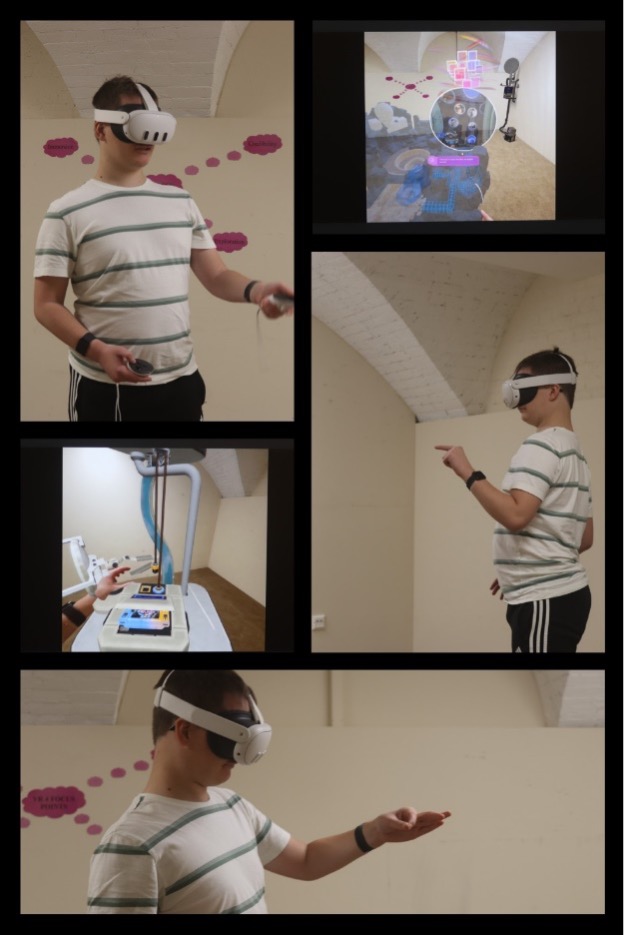
Advancements in technology continually transform the landscape of education. At our college, we have embraced Virtual Reality (VR) to enhance and elevate students’ learning journeys.
What is Virtual Reality?
It’s a realm of simulated three-dimensional environments where users can immerse themselves, interact, and explore. These digital worlds can range from entirely fictional realms to life-like replicas of real-world settings and scenarios.
Equipped with motion sensors and tracking technology, VR headsets transport students into these immersive environments. They can freely look around and navigate, fostering a tangible presence that blurs the boundary between what is real and what is simulated. With controllers in hand, students can manipulate objects within the virtual space, further enhancing their interactive experience. While some applications support hand-tracking technology, it is not universally integrated yet.
It is essential for us that students distinguish between reality and unrealism; that is one of the reasons why we project the ongoing sessions.
How do we use Virtual Reality?
We collaborate closely with subject teachers, tailoring VR experiences to align with students’ educational objectives.
By leveraging the extensive library of apps and games available in the Meta VR ecosystem, we empower students to engage with their learning in novel and impactful ways.
Even if students prefer not to wear headsets or experience discomfort such as motion sickness, they can still participate in sessions and collaborate with their peers. Our VR initiatives are not just about immersion; they are about inclusivity and flexibility in learning.
Let us take a glimpse at how VR intersects with GCSE English:
Engaging in Escape Rooms fosters creativity, promotes problem-solving skills, enhances reading comprehension, and cultivates teamwork.
Crafting Virtual Mind Maps aids students in organizing their thoughts, refining their writing abilities, and structuring their ideas effectively.
What lies ahead in our VR journey?
We are actively expanding our VR curriculum, integrating it with Sports, Maths, and Science subjects.
The response from students has been overwhelmingly positive, with enthusiastic engagement and eagerness to explore new horizons. Our teachers are equally excited, witnessing firsthand the transformative impact of VR on student learning.
We are not just embracing technology for technology’s sake. We are exploring it to unlock new realms of educational possibility, fostering creativity, collaboration, and discovery.
Inclusivity, accessibility, collaboration, sustainability & creativity at the core of design and development for the future.
Day opportunities – past ventures
Prior to the unexpected closure of Day Opportunities during 2020, Eduprint served as more than just a workspace; it was a supportive environment where individuals could engage in meaningful activities, interact with others, and contribute to the success of a sustainable business. The structured routine and socialisation opportunities played a crucial role in the well-being of all those who attended and visited.
Eduprint was open to provide a space within our David Lewis community for adults with Learning Disabilities, Autism, and Epilepsy. To access a service taking on design work from external businesses, in-house creative exploration, development of skills, and socialisation by gaining knowledge of a sustainable business.
Open 5 days a week, many individuals had the opportunity to attend a new environment and complete assigned tasks, giving them fulfilment throughout the day, a sense of belonging, and pride in the work they completed.
Day Opportunities – in the present
Since re-opening, the Creative Hub has welcomed the people we support to explore and develop design techniques, using different mediums and discover their passions in a creative manner. Utilising digital technology and combining that with hands on techniques has enabled the people we support to finesse their fine motor skills, learn how to write emails, develop advertisements, animations and make items with a personal touch for friends and family. Through the right support and the development of the service we have enabled the individuals and the team to create more opportunities and exciting ventures.
Day Opportunities – What’s in the future?
The vision is to expand the Creative Hub, with plans for new equipment, alongside the building of a new website. The Creative Hub is beginning to embark on a journey of personalised gifts, designing of cards and prints, keychains and sensory items with the use of a 3D printer to name a few.
We have a strong belief that we can create a sustainable business run by the people we support from across the David Lewis site.
With the right support right culture, inclusion and huge passion at the forefront of everything we do, we believe that the Creative Hub will grow and the vision of the people we support will be a success for all involved.
We use cookies on our website to give you the most relevant experience by remembering your preferences and repeat visits. By clicking “Accept All”, you consent to the use of ALL the cookies. However, you may visit "Cookie Settings" to provide a controlled consent.
This website uses cookies to improve your experience while you navigate through the website. Out of these, the cookies that are categorized as necessary are stored on your browser as they are essential for the working of basic functionalities of the website. We also use third-party cookies that help us analyze and understand how you use this website. These cookies will be stored in your browser only with your consent. You also have the option to opt-out of these cookies. But opting out of some of these cookies may affect your browsing experience.
Necessary cookies are absolutely essential for the website to function properly. These cookies ensure basic functionalities and security features of the website, anonymously.
Cookie
Duration
Description
cookielawinfo-checkbox-analytics
11 months
This cookie is set by GDPR Cookie Consent plugin. The cookie is used to store the user consent for the cookies in the category "Analytics".
cookielawinfo-checkbox-functional
11 months
The cookie is set by GDPR cookie consent to record the user consent for the cookies in the category "Functional".
cookielawinfo-checkbox-necessary
11 months
This cookie is set by GDPR Cookie Consent plugin. The cookies is used to store the user consent for the cookies in the category "Necessary".
cookielawinfo-checkbox-others
11 months
This cookie is set by GDPR Cookie Consent plugin. The cookie is used to store the user consent for the cookies in the category "Other.
cookielawinfo-checkbox-performance
11 months
This cookie is set by GDPR Cookie Consent plugin. The cookie is used to store the user consent for the cookies in the category "Performance".
viewed_cookie_policy
11 months
The cookie is set by the GDPR Cookie Consent plugin and is used to store whether or not user has consented to the use of cookies. It does not store any personal data.
Functional cookies help to perform certain functionalities like sharing the content of the website on social media platforms, collect feedbacks, and other third-party features.
Performance cookies are used to understand and analyze the key performance indexes of the website which helps in delivering a better user experience for the visitors.
Analytical cookies are used to understand how visitors interact with the website. These cookies help provide information on metrics the number of visitors, bounce rate, traffic source, etc.
Advertisement cookies are used to provide visitors with relevant ads and marketing campaigns. These cookies track visitors across websites and collect information to provide customized ads.