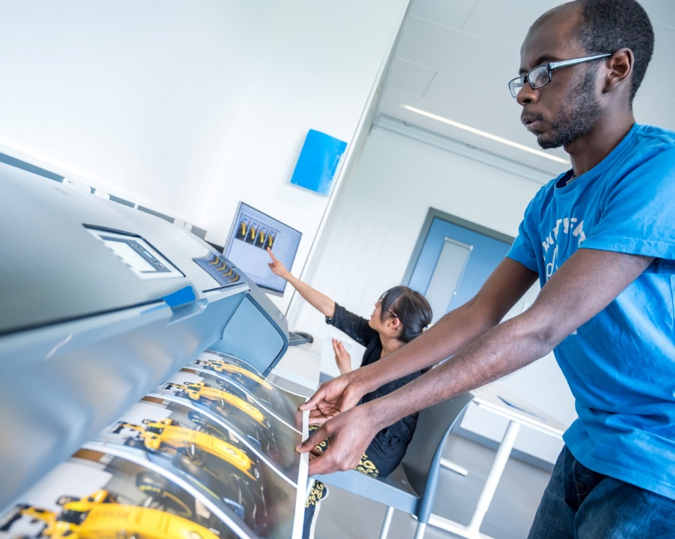
On Tuesday 4 th February we were joined by Richard Bright and students from the New Bridge Team. Richard and the team filmed and interviewed members and staff within our print unit. The footage will form part of a Centenary film to celebrate the life and legacy of Ian Karten. We are delighted and proud to be part of the Karten Network.
On Friday 21 st and 28 th of February we hosted two screenings of our first feature film. The Connolly Files has been a two year project. Our members have shown great commitment over this time. The screenings took place at Cineworld St Helens. Over two hundred people attended. These were great occasions and the feedback around the film has been amazing.
On Tuesday 25 th February our Drama performance was filmed at the Theatre Royal St Helens. The Drama Cinderella was performed around Christmas time. The feedback was amazing so much so that we had to film the production at a venue befitting its quality.
On Friday 28 th February we hosted the Launch of the Merseyside Mencap Round the World Challenge. We were joined at the event by St Helens RLFC, St Helens Council Outdoor Activity Centre, Mill Green School and Ed and Mary from Mencap North. The aim of the project is to encourage physical activity whilst having fun at the same time. Periods of activity equate to a set number of miles. Individuals can plot routes around Great Britain, Europe and the World.
The Shalva National
Center in Jerusalem, Israel has been developing award-winning rehabilitative
and inclusion programs for children with disabilities for thirty years.
Recently, the organization has also incorporated an array of adult services;
including employment and vocational training programs, volunteer military
service with the Israel Defence Forces, social support, and independent living
in the community. In the years prior to launching their adult services, Shalva laid
the groundwork to create the optimal opportunities for their clients. In 2016,
Shalva partnered with the Ian Karten Foundation, the Dan Marino Foundation, and
the University of Southern California’s Institute of Creative Technology to
create a unique therapy solution based on virtual reality software called SHALVA
VITA. The SHALVA VITA program utilizes interactive avatars to simulate job
interviews for adults with disabilities in order to prepare them for a
successful transition into the mainstream job market.
Following an initial
pilot initiative, the VITA program is currently in the process of being
implemented across Shalva’s employment and vocational training programs. This
March, the SHALVA VITA program will be presented at the annual International
Down Syndrome Day Conference co-hosted by Shalva and the Hadassah Medical
Center, with approximately 500 disability professionals and members of the
broader community expected to be in attendance.
The Karten Network’s
March 2019 newsletter featured a Shalva VITA client named Ella who participated
in the VITA pilot program. Nearly one year later, Ella relays the life-changing
experience in her own words:
Ella an Employee at Shalva
Authored by: Ella Greco, January 2020
My name is Ella. I’m 24 years old and this
year has been a very exciting year for me because I moved to an independent
living apartment with other roommates. It’s my first time living outside my
family home, but so far it’s going well. I have a professional camera and I
took a photography course so I like to take pictures of things in my life. I
also like to go out with my boyfriend and talk with him on WhatsApp. During the
day, my favorite thing to do is working at the jewelry studio at Shalva. I like
to keep busy and have full days with lots of activities, especially since I get
bored quickly from doing the same thing for a long time. When I’m making
jewelry, it’s not like that so much. I can do it for a long time and plan out
different designs and patterns and then create them in the jewelry. I think
it’s because I like being creative and because its very relaxing in the jewelry
studio. We turn on music and we work quietly and its really fun and relaxing.
The jewelry studio is at Shalva but we work
with YVEL. Orna teaches us how to string pearls and we make necklaces and
bracelets that are sold in Shalva’s gift shop I also like working in the
creative workshop making ceramics.
[YVEL is a luxury jewelry brand which specializes in artistic pearl jewelry creations. YVEL has partnered with Shalva’s creative workshop to train adults with disabilities in creating pearl jewelry. YVEL founder and jewelry designer, Orna Levy provides personal instruction to Shalva’s employees in the art of stringing pearls. The unique, high-end pieces are sold at the Shalva SHOP and at craft fairs across Israel.]
Last year I started working with Liron using VITA. [Liron is Shalva’s Director of Research and Development who coordinated the SHALVA VITA pilot program.] There are characters on the screen and they ask you questions for job interviews. Even though VITA is about job interviews, I think it has helped me in conversations with Shimrit and the friends at the Shalva workshop. [Shimrit is the director of the creative workshop at Shalva and serves as the employees’ primary superior. In the process of creating marketable crafts, she guides the employees in practicing workplace etiquette and communication skills.]
The
hardest question for me in the VITA interview was to tell about my strengths
and weaknesses. I never thought about describing myself like that before. And
they also asked me that question at SHEKEL when I was interviewed for the
independent living apartment. [SHEKEL is another Jerusalem-based organization
that operates independent living apartments for adults with disabilities]. When
they asked me about my strengths and weaknesses and what would make me a good
roommate, I remembered the question from VITA and I think VITA helps prepare
for other kinds of interviews too, not just job interviews. It’s also more than
that; when you practice the questions in VITA, it teaches you things for life:
how to listen to others, how to talk in a way that other people will listen to
you, how to talk about things that are challenging for you.
E (27 years) lives with his parents. E has low vision due to a premature birth and holds a Certificate of Blindness. In addition, he has been diagnosed with Cerebral Palsy. He walks with the aid of a walker and has difficulty with motor skills.
E began a back office job working for a major health service company as well as the Community Center in the town where he lives. He was referred to Migdal Or’s computer classes in Jerusalem for design and customization of assistive technology. During the assessment that was carried out by Migdal Or, it was revealed that E was not familiar with basic computer applications and assistive technology, and, as such, was dependent on others to perform the tasks assigned to him during the course of his work.
As a result of this, in June he began a 3-month technology course in order to learn how to operate a computer independently with assistive technology and to use applications relevant to his role at the Health Service and Community Center. This would eventually help him to expand his responsibilities.
E improved his skills in Word (which were very basic prior to the course) and learned to use Excel and Outlook. Likewise, he learned to use keyboard short cuts to operate the screen reader program, NVDA, for when he is unable to depend on his sight. In addition, during the course, E gained skills in the use of the iPhone which helps him carry out various activities. “Due to the course, I can work faster” he says, “I can perform tasks all by myself”.
Following the course, E’s case manager reported that he now comes to work knowledgeable and self-confident – a stark contrast prior to undertaking the course. Today, he is more independent and tries to overcome challenges on his own. She added that as a result of the skills he learned on the course, E’s manager expanded his responsibilities and added new tasks.
E’s mother expressed great satisfaction with Migdal Or’s computer class. She reported that he receives positive feedback in both his workplaces and he feels great satisfaction in being a working person, and is able to give and be of help, not only receive help. She described with emotion how he gets up in the morning and goes to work happy. They could not imagine the magnitude of the change that has transpired in him.
Beaumont College were incredibly grateful to have secured a further grant from the Karten Trust in 2019. The bid was focussed on two main areas:
Developing a more innovative and interactive electronic music provision.
Upgrading and maintaining the Karten ICT Suite which is integral to the college’s education and social delivery.
Progression with both of these areas is described below.
Making music in different ways
Beaumont has always had an electronic component to its music delivery but in the last few years some exciting software and hardware tools have been released which the music department and Beaumont College Records were keen to access. Beaumont College Records is the in-house record company run by and for learners.
Ableton makes professional music creation software and this has been used at college for years. A new software tool called Link enables electronic instruments to be played live and to stay in time musically. This is really important for many Beaumont students whose physical impairments may mean they know when a note needs to be played, but can’t quite get their hand or foot to hit it at the right time. Link connects instruments wirelessly and synchronises any notes played to a specified timing. Instruments can be keyboards but often are iPads on which there is a wide range of apps with which to create sounds.
It could be seen that this use of syncing stifles creativity, but in Beaumont’s experience Link is a tool which can stop learners focussing on the “correct” timing and free them up to play what they want. It also improves self-esteem by levelling out the timing ability of learners and preventing some from feeling they are failing when playing with other learners. In a live playing situation the electronic instruments are often accompanied by guitar, bass, percussion etc. which cannot be synchronised and this continues to add a “free” element to the live performance. When recording Link is used in the same way professional artists use it and indeed recording studios have for many years had ways of “fixing” notes played out of time.
The Push is a versatile instrument also created by Ableton. The potential of this instrument was clear for our learners as it has multiple buttons on the front which can be configured to play any note, sound or sample. Many learners have experimented with the Push and different setups are used dependent on the learner’s access skills and understanding. For instance even though there are 64 buttons these can be programmed so that there are four large sections which each play one sound.
Sometimes minor improvements can have major impacts. As part of the Karten funding, Beaumont purchased a number of wireless microphone and instrument systems. These remove the need to have wires connecting microphones and instruments to amplification. This obviously prevents a health and safety issue but from a creative point of view this has enabled more freedom and experimentation within music sessions. Also a cross-curricular project with a dance group has been using these so performers are not ‘tethered’ by cables and can move freely within large spaces.
Upgrade for Karten Suite and increased access
The PCs and touch monitors in Beaumont’s Karten Suite had been serving learners well. However in the last few years many PCs had been repaired or had components replaced. In addition many of the touch monitors were failing and the rise and fall desks were making some ‘interesting’ grinding noises when adjusted. The Karten Suite is heavily used during teaching sessions, at breaks and lunchtimes. Residential learners also use the Karten suite during evenings and weekends.
As a way of increasing access for our learners we are experimenting with 3D depth sensing cameras mounted on the top of monitors. These can be linked to Windows Hello which enables log-in via facial recognition. Many learners at Beaumont it hard to input their log in and password, either because it can take a long time to type or they struggle to remember it. Currently one learner is experimenting with this as a solution and has agreed to work with us to iron out any issues, before we roll it out further. It could be transformational for some learners leading to greater independence, privacy efficiency.
The desks were replaced with new ‘non-grinding’ height adjustable desks. We were very specific about the cases our desktop PCs were housed in. Cases can sometime have the power button on the top, meaning accessibility fails at the earliest point as some learners might not be able to reach to turn the PC on! Likewise we made sure that there were front mounted USB sockets for plugging in alternative mice and keyboards and front mounted headphone sockets.
We chose large touch monitors which also have built in speakers. Previously PC speakers had been unplugged, swapped or were easily broken leading to frustration for learners. Unfortunately the built in speakers are not loud enough for that environment (possibly because they are rear-mounted). There was also some confusion when learners plugged in headphones as Windows displays a dialog box to choose which device you have plugged in. Not all learners can understand this dialog box so were not able to activate their headphones. We have purchased external speakers which have headphone ports and hopefully this will solve the issue.
The flexibility Karten allowed us in this bid enabled a split between the exciting music project and the (seemingly) mundane PC and desk replacement. However, both are critical to the engagement learners have with the subjects they are studying while both also give us the opportunity to experiment with cutting-edge ways of accessing technology.
Fil McIntyre. Lead Assistive Technologist, Beaumont College, Lancaster.
I get asked this question quite a lot, often by parents and sometimes by students themselves. Unfortunately I don’t really have an answer, but I do think that it is an important question that needs to be discussed.
The views and opinions in this article are my own, based on my experiences and do not represent the views or opinions of RNIB College or RNIB.
The question about technology and Braille always makes me think about the song ‘Video Killed the Radio Star’ and how the process of new replacing old continues: videos replaced home movies, DVDs replaced videos, and downloads are replacing DVDs etc. Technology changes quickly, but what remains the same is that people like to watch films and programmes, regardless of the method of watching. The purpose of Braille is for people with sight loss to be able to communicate and be able to read and write. It is a “code by which all languages may be written and read. Through the use of braille, people who are blind are able to review and study the written word. It provides a vehicle for literacy …” (www.royalblind.org)
When Louis Braille punched out that first dot he revolutionised life for people with sight loss and opened up a whole world for them. At that point if a person with sight loss wanted to read or write, then Braille was one of the main options, and it “allowed blind people to read independently for the first time”. (Rose, D; BBC News Feb 2012) But in our technologically advanced society there are so many different ways that people with sight loss can communicate and read and write.
I like technology, and believe that it can make life easier and fuller for people with sight loss. I have recently seen the RNIB and Amazon Alexa advert, which demonstrates how low cost technology can be used every day and how it can help people with sight loss. There is a lot of technology available now that can make a huge difference to people with sight loss and other disabilities. Apple and Microsoft have led the way with their accessible programmes and apps, particularly the very impressive, and free, Microsoft Seeing AI, the exceptionally useful Apple Voiceover and Siri. Other technology is also more readily available and being developed, for example Orcam Reader and the easy to use Synapptic. These tools or “vehicles” are in daily use by some of my students, and I can see the impact that the technology has had on their studies, independent living skills and personal lives.
I also like Braille and I really enjoy teaching it. I strongly believe that Braille was one of the most life changing inventions for people with sight loss at the time, but currently there are ongoing concerns “about the decline of Braille” (Clark, N. The Independent 20.5.2014). Although Braille is now more readily available, there is a “contradiction – as Braille use spreads across everyday objects, the number of people using the system has actually been in long-term decline.” (Rose, D; BBC News Feb 2012)
I learned Braille because I wanted to read Harry Potter. Some of my students learn Braille because they love to read, and aren’t keen on listening to books, while others use Braille because they have learned it as children, but are auditory learners and prefer audio books or JAWS / Voiceover etc. Before I start to teach Braille I identify why the student wants to learn / use Braille. Generally speaking, my students seem to have three main reasons for learning or using Braille:
To
read and write simple text, e.g. shopping lists
To
read and write for pleasure, e.g. reading a novel, or a letter
To
read and write for ongoing studies or employment
I am sure that there are other reasons for people to learn
Braille, but for the 3 purposes above I can identify at least one piece of technology
that could do the same (Alexa, Kindle, Laptop with JAWS).
As well as competing with technology, Braille can be hard
to learn. This could be due to the tactile
nature, but is also likely to be because of the complicated rules and the
difficulties in remembering everything.
It is difficult to recall all the complex rules, and even more demanding
to apply them in all the different permutations within the English language. Even students who learn Braille as children
can sometimes struggle to recall and to explain why a specific rule exists.
Moreover a lot of children who have sight loss also have
additional needs. This includes learning
difficulties, autism, cerebral palsy and physical difficulties. This can make the learning of Braille
extremely difficult and even impossible.
Technology, in comparison, is easier to learn for young
people. For those students who do want
to learn and use Braille, then portable Braille technology could be a way
forward. Technology can make a Braille
book manageable, make a Braille document accessible in print and make sharing
of ideas between a sighted individual and a person with sight loss
possible. However, Braille technology
has to be much more financially accessible.
For my students the choice between a Braille Notetaker costing nearly
£4000 and an iPad costing £600 is not a choice at all.
I believe that Braille is important and I hope that it
continues, but I do think there needs to be some changes and adaptations. Just as technology changes, so Braille also
needs to develop and change in order to fit into our technologically advanced
lives.
If Braille is to survive then Braille technology has to be
less expensive or at least on a par with other technologies that fulfil a
similar purpose. In order to remain
relevant, I also think Braille needs to become a little more user-friendly to
all those with sight loss, including those with additional needs. Perhaps it needs to be simplified and be made
less about the rules.
In my opinion Braille needs to develop and adapt, or risk
becoming obsolete. If it doesn’t become
more modern, then I believe that eventually technology will take over and
people will stop wanting to read cumbersome Braille books or will stop using
expensive Braille technology, because they can get cheaper audio books, tablets
and iPads and phones that can do as much, and more.
I do recognise that there is a place for more complex
Braille for technical, scientific and mathematical use and I know that there will be those who will
disagree with me, and will probably say that they do not want Braille to be
“dumbed down” or that the rules are there for a good reason and cannot be modified. However, without some adjustments, I feel
that the use of Braille is likely to continue to decline.
One of my favourite quotes is about technology being a tool
not the goal, and I think that this could be applied to Braille. Braille is a tool to enable people with sight
loss to communicate, read and write and it is not the goal. And just as technology adapts and changes, I
think Braille will need to do the same.
The New Bridge Enterprise have had a very busy couple of months. There are two new products that they are promoting as part of their involvement with Young Enterprise, which include the Cozy Cuddler heat pad and the Key Minds key rings. More information about the products and the NBEnterprise as a whole can be found on their website https://nbenterprise.co.uk/
Both groups had to prepare a presentation about the products to a Dragons Den in the business quarter of Manchester – Spinningfields.
Both groups did amazingly well in presenting their products in front of the Dragons and it was great preparation for the Young Enterprise finals happening later this term. Over recent years we have always come away with an award so fingers crossed for this year too. The Dragons gave both groups some advice and tips on how they might improve their presentations and both teams came away feeling motivated and confident. Especially as the Cozy Cuddlers heat pad was announced as the best product the Dragons had seen this year!
We have also been driving around the different Karten centres to film other projects that are happening for the Karten Centenary Promotional Film.
We visited The Hamlet, Derwen College, Langdon College, Bridge College and St Helens CDP and was blown away by the great work that is going on in the different centres.
We need more footage from other centres so that we can represent all the other successes funded by the Ian Karten Charitable Trust. The students are planning to start editing the footage after Easter break and we cant wait to see the results.
Another karten-funded project taking shape this year is our VR technology. This last few months we have started to film some of our work placements and bring an immersive experience with ClassVR of the potential job into the classroom before students go on their placement. We have also been testing how some of the young adults with complex needs cope with VR headsets and look to see if calm environments such as swimming with dolphins can help our service users relax when they are feeling anxious or in crisis.
And our final development has been around the use of our Karten-funded VR simulator. More and more students are now exploring the use of the Fork Lift Truck simulator and we are starting to generate a list of potential candidates who might progress further.
All projects are so exciting and we cant wait to see what the rest of the year brings.
In 2015 I had a fall from a horse that left me paralysed from the shoulders down. Whilst I was a patient in Stoke Mandeville Spinal Injury Centre, Andrew, Aspire’s Assistive Technology Manager, provided me with essential tools that I still use very effectively now.
With Smart Nav I can move the cursor around the screen by moving my head; a dot on my glasses is tracked by an infrared camera. It gives me really good control over the cursor and it works well with Dragon voice recognition software. Andrew helped me to operate it initially; at times it felt like learning to type again, and I’m still learning new commands now. I have learnt it can be important to check how accurately Dragon has taken down your words. There was a period when I began to receive rather strange emails back from close friends. On re-reading emails that I had sent out, where I had dictated “XXX”, Dragon had written “expect sex”!
With these tools, I am able to read and write emails and do everything I need to on my computer. It’s meant I can continue my work as a Non-Executive Director Search Consultant. I run my own business, mostly working from home, but with a staff of seven.
Assistive Technology has been a life-saver; it’s meant I can get back to work at a time when I suspect otherwise things would have been very difficult. It also allows me to read books independently and do everything else we all use computers for. The only limitation I have is how long I can sit in front of a screen.
Over the Christmas and New Year period our
FitzRoy Assistive technologist, Carrie, will be visiting our three Karten
Centres to deliver the first FitzRoy Assistive Technology Workshops.
Carrie will be working with key staff and
managers within the services to explore how the equipment is currently being
used to enhance the lives of those we support and to identify innovative
applications to enhance the impact of the current technology.
Staff attending the workshops will become ‘AT
Champions’ and support the day to day use of the equipment, promoting best
practice and building confidence amongst the rest of their team.
The Maltings in Norfolk, were the first
service to hold the workshop and the session was attended by the IT champions
from the day service, other key staff as well as the managers.
Key ideas were to develop basic guides to
using the accessibility features on the iPads and PCs that would be easily
accessible to staff as well as introducing an ‘Assistive Technology Passport’
which summarises the needs of each individual in relation to the devices they
will be using. New resources are also going to be trialled including the online
HelpKidzLearn resources which will be accessible on the PCs, iPads and
Clevertouch as well as apps such as Pictello which will help with activity
sequencing.
The people we support at the Maltings have
been busy preparing to take part in their local Christmas light switch on. This
year FitzRoy have their own stall and the people we support have been using the
PCs and iPads at the service to research ideas for things to design, make and
sell on the stall as well as to print labels for their ‘reindeer food’!
We’re proud to report that the age record has been broken in
Jewish Care Explore, a Karten Centre, in the month of October.
We provide our mainstream technology training and support
service to older members of the community as well as any adults with mild to
moderate disabilities. As such, the age range was quite wide already, going
from 22 to 94, with a median age of around 68.
This was pushed even further this October, when Justin
signed up for a new membership. Justin is a passionate photographer who has
captured on (digital) film many of the most cherished moments of the community.
He also owns PhotoShop, which he uses to retouch or improve his photos.
He signed up because he wanted to print some of the photos
he had taken – his old dot-matrix printer had become unreliable. He also
discovered that he could do some basic editing on our computers, using the built-in
Windows 10 app.
Being a very active, gregarious and energetic man, we were
very surprised to find out that he was, in fact, 96 years old, having been born
in 1923.
We were even more surprised when, less than a week later, David
joined our service, and broke the record again, having been born about a month
earlier than Justin!
David is well-equipped with technology, owning an iPhone,
iPad and laptop (and that’s just what he’s shown us). We provide beginner and
intermediate courses for learning how to use these devices, but these weren’t
necessary for our latest member.
What he was looking for was support in using technology
independently. Many Explore members are familiar with technology but like to
have support in case they have a question or a problem pops up.
In his case, this meant sorting out issues as the they came up,
such as the Safari browser accidentally going into split view or changing some
settings on the iPhone.
He also wrote some DVDs as a means of distributing a lecture
he has co-authored. We, of course, mentioned creating a channel as an
alternative to easily sharing videos. He seemed very interested – perhaps soon
YouTube will be breaking a new record as well?
Having a conversation with family, friends and colleagues is something
most of us take for granted, but one that can be denied to people with motor
neurone disease (MND) – a neurological disease which attacks the nerves that
control movement, leaving people unable to move, talk and eventually breathe. As the disease progresses, over 80% of people with MND will have
communication difficulties as their vocal muscles cease to work.
With thanks to the Ian Karten Charitable Trust, we were able to expand our communication aids service for people with MND. Part of this service is to support people with MND who wish to voice or message bank, and the Karten-funded equipment is helping us to do this.
Specialist
communication aids make a huge difference to daily life for people living with
MND by providing people with a voice through the conversion of text to speech
using an in-built synthesised voice, however many people wish to create a
personalised synthetic version of their own voice (more commonly referred to as
voice banking).
Voice banking has existed for over ten years, but over the last six years technology and services have improved to such an extent that more and more people are able to realise the benefits.
“I’ve now got a digital model of my voice which sounds really like me, it is quite impressive. So if my voice goes completely then I will be able to use my model voice on a little gadget. Luckily things have moved on since Stephen Hawking first got his synthetic voice.”
Michael who is living with MND.
Although technology is
improving, the process of voice banking remains ostensibly the same as it
always has. The user records a set of phrases, using a laptop or computer and a
headset microphone, that are then used to form the basis of the synthetic
version of the voice. The number of phrases needed depends on the service used
but can be anywhere between 215 and 3,500.
With the technology
improving, the time taken to make the recordings has reduced from an average of
90 days in 2018, to 6 days in 2019 which has made a big difference to people
with MND undertaking the process.
The quality of the voice
produced is also rising. Until recently the services would use the recordings
to capture enough phonemes to create the voice, whereas now the process
captures the algorithms within the recordings, allowing for clearer and faster
voice creation.
Message banking is another
option. Message banking allows you to
add emotion to your recordings, but as it is simply recording messages it means
you are limited to what you record. However, it can be useful for recording particular
catchphrases, place names, or a distinctive laugh.
One example of how message
banking can benefit is a lady who had voice banked, but her dog did not
recognise the synthetic voice due to the lack of emotion – however when using
her message banked phrase, her dog instantly recognised the opportunity to go
for a walk!
Through our communication aids service, we loan laptops and headset microphones to enable people with MND to voice and message bank. We also provide financial support towards the cost of creating a voice. To help promote message and voice banking to people with MND, we have created a short video, which you can view below.
What is voice and message banking?
“The equipment provision via the Karten Trust has been very important as it has ensured very quick access to the correct items needed, minimising delays, which really matter when someone’s voice is already changing.”
Louise Rickenbach, Regional Care Development Adviser, MND Association.
Langdon College’s Karten Centre has been working on a
multigenerational collaborative painting and photography project, bringing
together two of Manchester’s key charities.
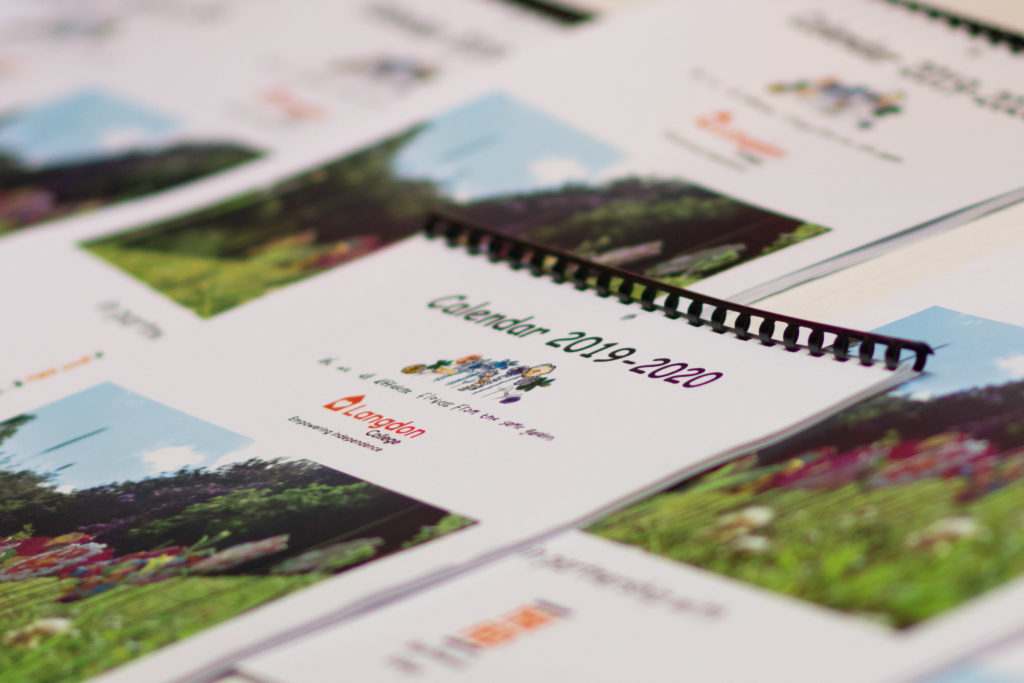
This partnership working has resulted in the production of a Jewish calendar
which was launched on 22nd September 2019.
Students at Langdon College, who work within the LC-Print
enterprise business, residents of the Feds’s Heathlands Village care home had
taken part in joint art sessions over recent months. Together they created original artwork and
imagery based on a monthly theme, many of which reflect Jewish festivals and celebrations.
Langdon College tutor, Rebecca Holmes said, “The students
have worked incredibly hard behind the scenes.
Through their teamwork and efforts, they also enhanced many of their
interpersonal skills, such as communication and organisational ability.”
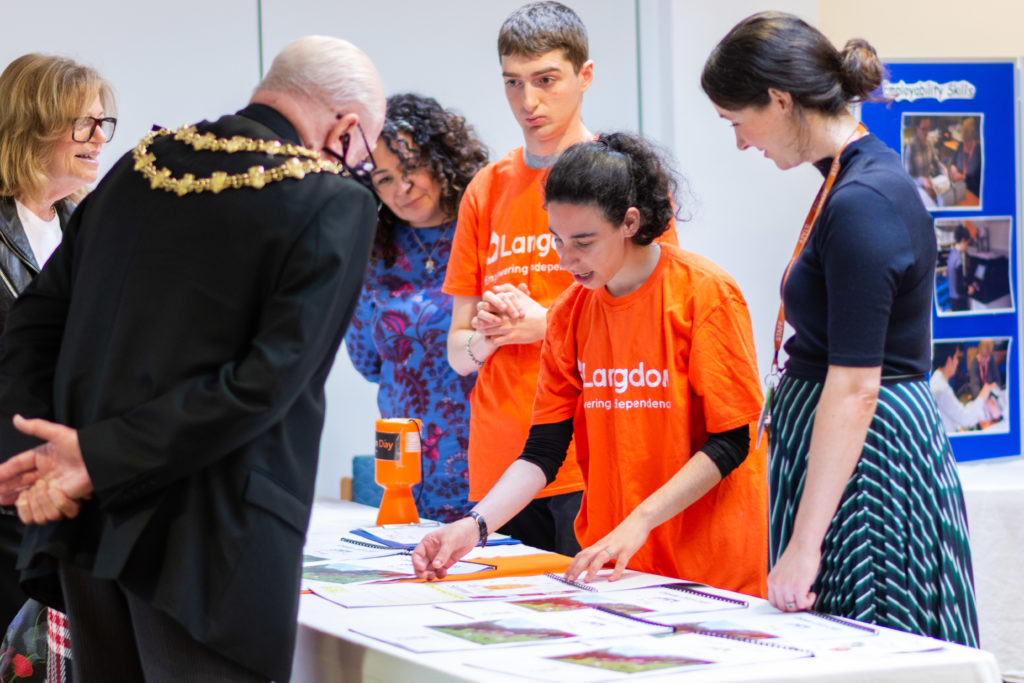
At a joyful launch event which took place at Heathlands
Village, in the presence of Trevor Holt Mayor of Bury, the calendars were
presented for sale to the public for the first time, by students and residents.
Rebecca continued “from creating the artwork together to the students printing
and binding the calendars – it has been a huge success.”
The calendars are priced at £7 and are available to purchase
from either Heathlands Village Shop or Langdon College and the proceeds will be
split between the charities.
I’ve always loved animals. Back home in Lithuania, my house was filled with cats, dogs, rabbits, spiders and snakes! I’ve always wanted to be a veterinary surgeon even from a small child; my first job was working with horses.
At the time of my accident, I was on my way to meet my boyfriend when I was hit by a car. It left me with no use of my legs and small movement in my hands and neck. Due to my experience working with animals, I understood what it was to have a spinal cord injury. I was familiar with what it looked like to have this type of injury. Most of the time, we would put the animal to sleep if this happened. My first reaction when I found out that I was now paralysed was to get on with it. I needed to deal with this new situation and face it.
I was in hospital for about six months and transferred to Stanmore as soon as I was stabilised. Whilst I was in Stanmore, my Occupational Therapy team introduced me to the Aspire’s Assistive Technology Programme. I wanted to be able to use a computer; I wanted to be able to do something by myself.
Andrew, Aspire’s Assistive Technology Manager, showed me how to use a SmartNav and Dragon. I found SmartNav quite interesting. I was able to control a mouse using my head. When I first tried it felt like something out of a science fiction movie. After a couple of sessions, I was able get to grips with it pretty quickly. The equipment plus a laptop was left with me inbetween sessions so I was able to do lots of practice on my own. I was quickly using it to communicate with my friends, read and send emails. Andrew also showed me a program where I was also able to try drawing using the computer. It made me realise how many tools were actually out there.
I knew that when I finally got out of hospital and home, I would want the same set up. Whilst I waited for it to arrive, I used the EVA Facial mouse which I also tried with Andrew whilst I was in hospital. This uses my facial expressions to operate my computer. I’ve now got a SmartNav at home and with it I’m able to communicate with friends and family, use Facebook, email.
I’ve also been able to do some online training as well. I don’t think I will ever be able to go back to being a veterinarian surgeon but it will always be an interest of mine.
SeeAbility’s specialist teams working to reduce isolation and promote education opportunities to ensure that people with learning disabilities, autism and sight loss are able to access the latest technology to get connected and grow their independence.
Introducing voice activated home assistants, like Amazon’s Echo Dot, opens up whole worlds of possibilities for the people we support to live with greater independence. Using the Echo Dot is one of the easiest ways for someone with sight loss to verbally access the internet and gain immediate auditory response. It helps people do everything from turning on their favourite music to searching the internet for information and sharing ideas with others. It’s hugely empowering and gives individuals greater control in their lives.
Group activity and skills sessions at the Millennium Centre in Surrey have taken on a new energy and are far more interactive since the introduction of the Echo Dot. This new gadget has transformed everything from our music workshops to keep fit sessions.
Learning to make voice commands has taken time and a lot of support from Our Vision Rehabilitation and Speech and Language Therapy teams. At first the people we support had to learn how to ask short, factual questions that that could be deciphered by the Echo Dot. Some people may have struggled with getting their words out in time but everyone enjoys having their questions answered so they persevered.
David and Anne use an Echo Dot to choose music in their Book Club session
Sessions now offer a more inclusive experience since the Echo Dot has been embedded. In fact, our volunteers and specialist teams can engage more with the people they are supporting now that the voice activated technology is on hand to offer up answers to tricky questions. Workshops have more spontaneous interaction and people are developing confidence to lead conversations.
Anne says: “With Alexa it means you can hear lots of different types of music in the same session. We all get to request what we want on it. It’s made our music slot so much more fun.”
David, who has a love of folk and blue grass music, uses Alexa to play obscure tracks as part of his music session. He says: “Alexa helps me find rare tracks and I enjoy hearing and singing along with my favourite songs and sharing them with my friends. It brings us closer.”
Fife College were successful in obtaining a grant from the Karten Trust at the start of the academic year in 2018. As part of this the college were awarded funding for a number of pieces of assistive technology to support students with additional support needs, these included laptops, digital recorders, C-Pen readers, Pearl Camera and assistive software such as Brain in Hand, JAWS and Sonocent.
This equipment was received and distributed to the Student Learning Hubs on each of the Fife College campuses to ensure that all students had the opportunity to access the equipment. Sonocent was rolled out over all campus computers and 6 students were identified to be part of the Brain in Hand Pilot. The College’s Assistive Technologist attended the Brain in Hand training and is now one of only 2 BiH trainers based in Scotland’s Colleges.
Case Studies
Brain in Hand
Student A – Beauty TherapyThe Inclusion Team were introduced to Student A after she had a severe anxiety attack at College after a misunderstanding in class which resulted in her being referred to an emergency psychiatrist for immediate treatment. Student A had previously been managing to cope with her anxiety levels within the college environment and had not required additional support.
Student A was then introduced to the College’s Assistive Technologist, Michele, who initially met with the student and her father to demonstrate Brain in Hand and how this would benefit her. The organisation, planning and both the traffic light response and the alert system allowing the system to contact her traffic light responder directly was met with enthusiasm.
Brain in Hand allows the user to input situations that they find difficult to cope with and break them down into exactly why they find these difficult. Then, there is a conversation about what has helped or hindered them in the difficult circumstances in the past and what they feel will be useful in the future. This makes it completely personal to the student’s own circumstances.
In this instance, Student A was ready to leave her course. Student A had previously been at another college and had had to leave before completion by recommendation of her Psychiatrist. Student A was determined to try her best to stay and complete the course.
In order to become proficient with BiH Student A received three training sessions with Michele, each of these lasting between two to three hours, and with support of her parents has been able to utilise this tool.
Student A is now very competent at adding details of her day to day life in and out of college. She has her daily routine from waking up, through meal times and her bed time and medication routine, along with any parts she finds difficult and how she can overcome them.
Student A also has her timetable for college embedded in Brain in Hand and if there are any parts of the daily college routine she finds difficult; she has easy access to the solutions. These include hyperlinks which will put her straight into contact with college staff and to her parent’s phone.
Student A also has travel links and external agencies contacts with whom she works with outside college saved within the Brain in Hand app.
Student A feels that by using Brain in Hand, it has given her the confidence to manage her life inside and outside college, including things such as keeping track of homework and when assessments are due and also to manage any disputes that may occur within her college day.
Student A states that having this support and the continued support from Michele has ensured that she has been able to remain on her course as it has provided her a helpful way to manage many situations that she previously would not have coped with. This has also led to a reduction in calls to NHS Direct when she is feeling as though she cannot cope and stopped her reaching this point by allowing early intervention and self-managing difficult situations that she would have previously found impossible.
Student B – Drama and Theatre Studies
Student B has recently completed their HND with the support of Brain in Hand, when in the course of carrying out DSA Needs Assessment, the assessor sought advice from the College’s Assistive Technologist to assess whether Brain in Hand would be an appropriate recommendation to the challenges that the student faced due to their Autistic Spectrum Condition.
Previously, Student B would leave any situation that they felt uncomfortable in, this regularly included walking out of classes, distraught, if they did not understand what was being expected from them. This often led to them leaving college from the day and heading straight home, or having loud outbursts in public areas of the college.
Michele initially met with the student and one of their parents to demonstrate Brain in Hand and what it could help with. The organisation, planning and both the traffic light response and the alert system allowing the system to contact their traffic light responder directly was met with cautious interest.
Brain in Hand allows the user to put in situations they find difficult and break them down into exactly why they find these difficult. Then there is a conversation about what has helped or hindered them in the difficult circumstances in the past and what they feel will be useful in the future. This makes it completely personal to the student’s own circumstances.
In this instance the student was ready to leave their course and had previously faced disciplinary action due to the outbursts and swearing at members of staff.
Student B had three training sessions with Michele on the use and benefits of Brain in Hand. The National Autistic Society was chosen as the most appropriate provider to provide the traffic light response.
Student B is now very competent at adding details of their day to day life in and out of college. They have added every aspect of college life, from class timetables to lunch and break times, they have embedded links to parent’s phone numbers, links to staff emails, phone numbers to contact the college if their bus is running late, a link that leads to their bus route online and to the transport provider’s website which shows if there are any issues with the particular bus service the student uses. They also add in their homework and any assessments or exams and the times they intend using to study or carry out the homework provided. They have included any difficulties they have had previously and how they feel they can be best resolved, including a number of solutions for each scenario. They add in any difficulties they face with the appropriate contacts, which allows them to confidently feel they can face most events.
This has led to Student B having less disruptive outbursts and feeling safer and happier in the college environment and it to be less confusing if there are unexpected changes or events. Simply as they have had in their phone what they should do.
They also use it for unusual events out with the normal routine externally to college, with things such as family weddings and holidays being added in to help them with the disruption to routine and after discussion with family to know what to expect in advance. In terms of retention it has, according to the student, helped them come into college and no longer want to leave.
C-Pen
Student C
Student C has Dyslexia and struggles with all aspects of reading, retaining information and writing. She has been at college for 2 years however the first courses were both practical and had very little written coursework, this has now increased significantly since starting a level 6 course.
Student C approached Inclusion during her first week as she was unable to read any of the notes that she had been given by her lecturer and needed someone to go through this with her. Student C had regular study support and a reader/scribe in all her theory classes but she was struggling as she was unable to work at home as there was no support available and craved independence. After meeting with the Lead Adviser to express her worries Student C was shown the C-Pen Reader, this was met with a great deal of enthusiasm. Student C trialled this in several of her classes and found that she was quickly relying on this, she was able to become a more independent learner in class and this, in conjunction with the other Assistive Technology she was introduced to, helped to build her confidence in learning and personal human support was able to be minimised to assessments only. Student C passed her course and is now looking forward to starting an HNC in the new academic year.
C-Pen
Class FAB
Within the Fabrication and Welding classes there are a group of 6 students all with reading difficulties that benefit from having shared support in classes by an Inclusion Assistant. However, she was unable to support all students at the same time, the students in this class all benefited from borrowing C-Pen Readers and Digital recorders. They were able to work independently while waiting on 1-1 support from their class lecturers or the Inclusion Assistant, after classes these students would then have study support to show them how to turn their recorded notes into suitable formats to aid with recall and revision.
Sonocent
Student D
Student D was really struggling keeping up with note taking in class. They found when they went home in the evening and tried to study for assessments, they were lacking a lot of the information on paper and key things they knew had been mentioned repeatedly. They had a diagnosis of dyslexia and anxiety, this in turn increased their anxiety.
By being trained on Sonocent Audio Notetaker, this meant they could just type in key points in the text area and listen back to the recording of the class. As time increased and they became more familiar with the software they managed to colour code the audio recordings of their lectures. This meant they were able to listen back to the information and write or type out any parts they felt were necessary.
This increased their confidence and they were able to take part in class discussions, whereas previously they were just trying to keep up with the notetaking and concentrating solely on that in class. It also meant they had all the notes from their classes for each day, in an organised system which was easily accessible.
They were able to easily access the information they required to study, meaning as well as a decrease in anxiety they were able to keep up to date with homework and this all has reduced their anxiety.
ROC College, which is part of a charity called United Response, is delighted to now be part of the Karten Network and we have big plans for the centre. Our centre will be based in beautiful Totnes, at our Devon area office and will offer fantastic new opportunities to our students and the people we support within the local area.
By January 2020, we aim to have all the resources in place to run a 6 month Traineeship where students can enrol and develop their skills through a Marketing and Production accredited programme with the support of specialist staff. The students will be producing a range of personalised goods such as cards, coasters, t-shirts and keys rings. There will also be an opportunity to use some of the amazing art work produced in our well-being project, ROC Creative which is based at Palace Avenue Theatre to produce exciting bespoke items.
We hope that the opportunity will provide our students and
the people we support with key enterprise skills, IT skills and increased
confidence. In turn, helping them on their journey to paid employment.
Whilst most people might take a new piece of technology for granted, for Ben, it’s a fresh chance to develop his speech.
Last month, two of our services – Malvern and The Maltings – won Amazon Echo Dots in a tech roadshow organised by our Assistive Technologist, Carrie Sant. And these new gadgets have already made a hugely positive impact on the people we support.
Speaking to Louise Hutchings, Malvern’s Service Manager, she said: “Ben, who we have supported at Malvern for around 10 years, actually pulled his own name out of the hat to win the Echo Dot!
“Recently Ben has been using more assisted technology and has his own laptop which he can use to email his mum and play games. However, Ben’s speech isn’t very good, so when he won the Echo Dot we did think how much this will benefit him in being able to communicate verbally.
“Ben’s mum is brilliant at encouraging him to speak, so we try to use her techniques, and we thought it would be a good idea to use his new Echo Dot to help develop his speech further. His understanding of the technology is absolutely brilliant, he knows he needs to talk in short sentences to make it work.”
Louise continued to say that whilst Ben has been the only resident to use the Echo Dot, it has made them think about buying more for other residents.
“From our side we can see the technology is getting him to speak more,” Louise added. “Ben loves to make other people smile, and he can see that by talking more he is making everyone happy. It’s helping to open up another side of communication to him.
“It’s amazing how much assistive technology has opened up the world to everyone we support. We have one resident who is non-verbal who can keep in contact with his mum over Skype regularly, which is ideal because she is in her 80s and can’t travel to see him in person all the time.”
Kerensa Palmer, Service Manager at The Maltings, has also seen a positive response from the Echo Dots.
She said: “It has taken a few weeks for the members to get used to the Echo Dot and to understand how to use it, but the majority seem to enjoy it.
“The members use it to gain knowledge and ask it questions, one of The Maltings’ volunteers Andrew will ask what the weather is every morning and then will tell the people we support.”
Assistive Technologist, Carrie Sant, said: “The Amazon Echo devices have given some of the people we support the opportunity to interact with technology using their voices, teaching them new skills and confidence in trying new things. We hope that in the future this will help the people we support to access other technology such as environmental controls, giving them greater independence, choice and control in their daily lives”
“It is amazing to hear that the technology has had such a great response.”
Bridge
College received funding from Karten to implement a Print Enterprise at
college, iPads to support the learning and use of the printing kit and
equipment refreshes in the ICT suite including a 65’’ interactive rise/fall
touchscreen.
The
printing EDU solution consisted of a DesignJet 44’’ Photo printer with bespoke
software, mug printing solution and heat press bundle for bags/tshirts…etc.
We purchased 4 iPads to use with the printing kit to support the learners with instructions. We know that videos are a better way to show students how to use the printers, for example, how to change inks or printer rolls. We are using QR codes to link to videos we have created and can be scanned from any iPad.
In the IT suite the students have been participating in coding sessions using the large touch screen along with the website Code.org. The group have enjoyed learning how to code in a fun inclusive way.
The session
used a combination of visuals on the screen, a physical grid on the floor to
map out movements, and to navigate obstacles to reach a goal.
The screen
allowed the students to drag and drop elements of the code into the running
program and work out if their commands would accomplish the challenges set for
them.
It has been
a bit of a roller coaster journey with the print enterprise, lots of excitement
and interest at the beginning when the kit arrived but the brakes were put on
when training on the use of the kit was delayed for quite a long time.
In the meantime, the
plans are in place for it to be run as an enterprise for students who want to
experience the world of work at Bridge College. We have identified groups of
students who want to take part. It will be a great place for students to learn
about business in college.
We are working on it
being cost neutral at the moment with the students learning about money,
customer service and business skills. We have designs on making products such
as tote bags, personalized greeting cards and mugs.
There will be a lot of
different job roles that the students can get involved in; Finance, design and
the nitty gritty of making the products.
We are also hoping the day to day printing needs throughout college will
move into that department. For example, if a staff member wants a poster
printing to display around college they can send it to the team and they will
print it at a cost. We will have accounts set up for members of staff to access
the enterprise.
This will be a great
opportunity for students to use their customer service skills, so communication
at work will be an important aspect of this. Members of staff need a lot of
photocopying and laminating of documents to use around college and we have
already starting taking on these jobs while training up students on other
aspects of the enterprise.
Once the students have
the business up and running within college we are planning on expanding
opportunities by selling products on markets stalls. For example, we are
planning on selling products at this year’s Christmas fayre. To do this we are
linking with the art department here at Bridge College so the students will
actually design products themselves and follow the whole process from design to
selling the products.
We are also going to
be using the products as a marketing tool. For example: when we are visiting
schools, events and conferences it’s a great opportunity to give away mugs,
t-shirts and bags with our own designs on to prospective students and parents.
It’s well underway and
we can’t wait to see the products selling!
The students have
gained so many new skills using the technology, including coding with robots!
Using this inclusive tech throughout college has helped the students learn
about e-safety, coding, money, customer service and it’s preparing them to
embark on the business enterprise with confidence.
This is such an
exciting time in Bridge College. The Karten bid has been an amazing opportunity
for the students to learn all these new skills. To find more about Bridge
College and students we work with visit: https://www.togethertrust.org.uk/special-education/bridge-college
In September our Karten CTEC Centre based in Belfast,
Northern Ireland moved to a new, purpose-built
workspace. We also took the opportunity to re-brand the social enterprise from
The Orchardville Business Centre to Orchardville Works, highlighting the
project’s focus upon employability and inclusion.
The new, larger space will allow us to expand the range of
services we currently offer by having more storage available for customer’s
work and provide a broader range of on the job experiences for project
participants. Having moved in less than
three weeks ago we are certainly finding our feet and enjoying the new space.
We are also on the brink of launching our own handcrafted
product (a first for us!), so our talented team of participants have been
working hard to produce a range of genuine Irish Linen scarves:
These have been branded as Worthy “crafts with a cause” and
will be on shelves soon in Lisburn and Hillsborough, Northern Ireland.
We are looking forward to the future as we continue to
strive to improve our participants’ learning experiences with help and support from
the Karten Network.
St Helens Coalition Of Disabled People (CDP) Buzz Hub
provides an ongoing activity programme whereby people with a learning
disability are able to access and enjoy a wide range of activities aimed at
facilitating learning, development and achievement.
With the support from the Karten Network we are now able to
extend our
printing enterprise bringing a new learning experience to our members.
We also see opportunities for the printing enterprise to support the
local community by producing personalised merchandise, enabling
voluntary/support groups to promote their work, and community groups/members to
raise funds for worthwhile causes.
Through
this enterprise we want our members to not only learn new skills but to feel
that they are using their skills to help others as productive members of the St
Helens community.
We are looking forward to working with others across the Karten Network.
What
do you do if someone touches you inappropriately, but you can’t see or hear
them?
Students at our Karten CTEC for People with Deaf-Blindness benefit from one on one instruction from our teachers, most of whom are themselves deaf-blind, deaf, deaf-severally visually impaired, or hard of hearing-blind. They are fortunate to have good quality equipment, thanks in large part to the Ian Karten Charitable Trust. Skills taught enable direct, effective and independent communication with family, friends, bureaucracies, financial institutions, schools, help centers/hot lines, police or other authorities, as well as access to information. With that, the information found on-line is designed for the sighted-hearing public and does not focus on the specific dilemmas this population faces. As a result of this and other factors, our clients and staff are sometimes less well informed, and therefore find it even more difficult than their peers, to define, identify and report incidents of sexual harassment.
This is particularly problematic as they are at least as vulnerable as their hearing-sighted peers. Even in our Karten CTEC we must be alert and aware, especially as much of the communication is in tactile sign language, which naturally requires tactile (hands on) contact. The deaf-blind person puts their hands on those of the person signing in order to communicate, but not everyone is clear on where to draw the line between communication and undertones of sexual intonations or even harassment. While most teachers prefer the illumination provided by a portable spotlight funded by the Ian Karten Charitable Trust, one visually impaired Braille teacher prefers to teach in the dark, which makes it more difficult for sighted staff to see what’s going on.
Clearly, there is a real need for open discussion and education as to the border between communication and harassment. For example, in the hot Middle Eastern summer, if a client and/or teacher are lightly dressed and of different sexes, misunderstandings could occur. If someone, perhaps a visitor or another student or teacher, interacts with them in some way, the deaf-blind person may not know who it was or who – if anyone -may have witnessed the interaction.
We decided to organize a special half day seminar to address these and other issues. All of our current students and teachers, as well as many graduates, together with members of our Social Recreation-Rehabilitation Groups, other clients, Support Service Providers, communication facilitators (who copy the signs from the main interpreter into tactile sign language at events), interpreters as well as social workers and senior government officials attended. Of the 213 people present, 110 were deaf-blind and 65 were deaf.
One of our deaf-blind staff members paired each deaf-blind participant up with the appropriate Support Service Provider, communication facilitator or met their specific accessibility needs. Thanks to this and other measures the event was fully accessible, from beginning to end. Even students with a notoriously short attention span were spellbound throughout the entire five-hour event. Several hearing-sighted participants, unused to being in the minority, watched the deaf-blind participants with amazement. They wondered aloud how over a hundred deaf-blind individuals could get to our center in Tel Aviv, participate actively in the talks, enjoy the show and more.
Our Karten CTEC coordinator opened the event, followed by one of our social workers, Yonah, and then a presentation by a lawyer. In the course of 45 minutes, the lawyer touched on the relevant laws as well as differences between courting and harassing and more. At the end of her talk, and during the break that followed it, she answered the many questions that individual participants raised.
Next onstage was a play “Zipporah keeps a secret”, which presents the subject of sexual harassment in a light hearted but serious way, via the story of a bird who is harassed one day by her “friend”, a lovable white cat. The cat tells her to keep it a secret so her family won’t be angry with her. The whole concept of secrets, the damage they do and how to reveal them, is emphasized and examined from different perspectives. The audience understood and internalized the message.
The lead actress, a psychodrama therapist and group mentor who developed and wrote the show, then led a discussion about coping with harassment and talking about it. Here too she stressed how secrets empower themselves and how important it is to tell, and not to feel guilty about their reactions, whether they froze, or tried to flee or fight.
The final part of the event was a wrap up by our social worker, Yonah. She talked about the various elements of the seminar, from the more theoretical talk by the lawyer, through the more practical and emotional sides of the play and then specifically about tactile sign language. With the help of a Power Point presentation she discussed potential pitfalls, where tactile ISL can cross the border to sexual harassment. She then invited comments, questions and examples of potentially problematic situations.
Issues raised included those in which a man and a woman communicate in tactile sign language, especially facing each other in casual situations, such as at a party, in a swimming pool or at the beach. Sometimes the Support Service Provider, teacher or interpreter are friends with the client and might hang out together in the evening after the activities on an overnight trip. What is the status, what boundaries should be set and kept in mind in such a situation? Another example was describing and demonstrating the actions of a person/people dancing. This could be the case in our Karten CTEC, as well, if a teacher wants to explain what is on the screen and it happens to be a video of people dancing, for example at a Bar Mitzvah party. One of our deaf-blind staff members explained that in such a situation the person describing the dancing should demonstrate with their hands on their own body and the deaf-blind person’s hands on theirs.
Much discussion centered on the question of communication when both parties are seated, as in a computer lesson. The most comfortable position, and the one which is easiest to maintain, is to sit opposite each other with alternating knees, so that the knee of one person is between the other person’s knees, as can be seen here. This caused quite a storm, with many people contributing their opinions. The gist was that yes, it’s more comfortable, but if it’s a man and a woman it provides a perfect opening for sexual harassment. The conclusion was that if the two individuals are not the same gender, or don’t feel comfortable sitting like that, they should both keep their knees together.
Operatively, we are in the process of creating formal guidelines and ethics, for example that interpreters need to wear shirts with sleeves and not spaghetti straps.
This is a very important subject, which needed to be recognized and openly discussed, not only around the world but also at our Center. One student at our Karten CTEC was interested in the subject of sexual harassment and had used her new skills to research it online. The seminar was her only opportunity attend a fully accessible event focussed on the issues that concern deaf-blind individuals and learn more.
Overall, everyone learned that no undertones or atmosphere of sexual harassment should be tolerated. Participants learned to identify the signs, and that they have the right – even the obligation – to say no, and who to turn to if something should happen. Part of being empowered and gaining self-confidence is to learn to identify what makes you uncomfortable. The ability to say no, I’m not transparent, I’m here. The seminar helped to give them strength, strength that can be used in other areas of life. One woman opened up for the first time about a relevant experience.
Should such a situation arise in our Karten CTEC, our teachers and students are now equipped to identify, report and stop any such behaviour. Unlike other subjects we cover, we hope that this one will remain theoretical.
Stuart Beveridge, the Assistive Technology Trainer at
seescape has provided an expert review of the following products.
Victor Reader Trek
Last November, the company Humanware released their latest product called the Victor Reader Trek. This is a combination of two of Humanware’s most popular products, the Victor Reader Stream and the Trekker Breeze. The product is basically an audiobook player and GPS system compacted into one small and easy to use device. There is so much more to this product though as it can also be used to play podcasts, listen to radio stations and record voice memos. To put it simply, it is an entertainment and navigation system, all rolled into one. It is small enough to actually fit into a jacket pocket and can be operated one handed. This is made possible because of buttons which are all differently shaped and have easy to distinguish tactile markings which make them easy to locate by touch alone. The trek also has built-in bluetooth which means you can pair it with a set of bluetooth headphones for ease of use. In addition, the trek has an update feature which means that it is almost certainly a future proof device as additional content can be added in the coming years. There will also be frequent map updates, so that you have the latest information about your surrounding area curtesy of the TomTom map system which is fully supported within the device.
How does Victor Reader Trek work?
The victor Reader Trek has three different modes which you can switch between at the touch of one button. These modes are:
Offline bookshelf mode,
Online bookshelf mode and orientation mode.
Offline bookshelf
Within this mode you are able to listen to audiobooks, daisy
and other forms of text books which you can load onto the Trek via an sd card.
This mode also allows you to record voice notes such as memos, shopping lists
and can even in some cases be used to record lectures if you are a student.
Online mode
Within this mode, you can listen to radio stations through
the internet, download and play podcasts, search wikipedia for facts and update
the product to the latest version.
Orientation mode
This is the GPS orientation system. You would use this mode
when travelling either on foot or by vehicle. When in this mode you are kept up
to date about your current surroundings. Streets, interesting locations around
you and a detailed description of upcoming intersections are all announced.
There is also a fantastic feature which allows you to landmark areas which are
important to you and when you approach them in the future, they are announced
to you. You are also able to plan and get turn by turn instructions for
speciffic roots both when in a vehicle or when walking.
Please note that the orientation mode should be used
alongside another mobility aid such as a cane or guide dog.
First impressions
I have been using this product now for around serveral months and am really enjoying almost all of it’s features. I think it’s main appeal for me is the fact that you can easily toggle between the three different modes at the press of a button. This means that the potential of the product is huge because while you are using public transport, you can be listening to an audiobook or podcast while at the same time have full knowledge of the streets around you at all times. The fact that the product also supports bluetooth means that you can also use bone conducting (aftershock) headphones, which means that your ears are completely free to focus on traffic when crossing roads. The battery life of the product is also much better than expected.
Price
The Victor Reader Trek currently retails at £545. If you
would also like to purchas the Trekz Titanium Aftershock Headphones, which are
also supplied by Humanware and come highly recommended, they are an additional
£80.
Dyson 360 Eye
Tired of hoovering every day or missing chunks of dirt, dust
and possibly other mess such as pet hair? I certainly was, and solved this
solution by purchasing a Dyson 360 Eye robot vacuum cleaner.
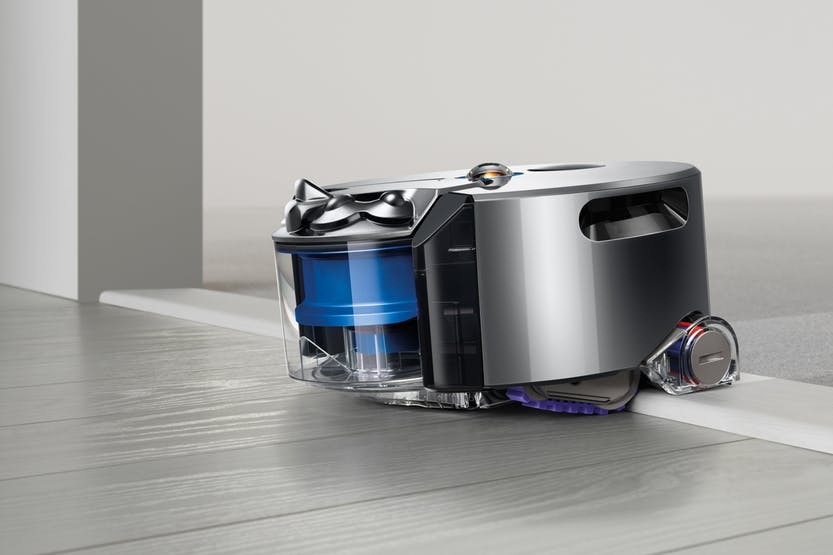
This self-navigating dirt destroyer is designed to clean every floor of your house at the simple touch of a button. It’s powerful enough to clean well on all floor types and surfaces, smart enough to navigate efficiently from room to room on one level and simple enough for anyone to use. Setting it up is also a breeze. Just plug in the pleasingly small and discreet charger/docking station, place.
The already assembled robot hoover on it and, when it’s
charged, hit the button on its top to start cleaning. It’s as simple as that.
Note that for best results you do need to make sure your floors are tidy, but
if there is enough room for the robot to successfully navigate, you have
nothing to worry about.
So how does it work?
The Dyson Eye 360 is small, compact and runs on rubber
tracks rather than wheels. It gets its name from the tiny 360-degree camera which sits on top and it’s
this camera that is the key.
Essentially, it means that the hoover can see in
every direction simultaneously, which helps it to not only map out where it’s
going, but also to avoid obstacles. It still bumps into things now and again, particularly
items below its camera line, but the Dyson knows where it’s going in relation
to where it’s been.
In terms of its approach to cleaning, it’s methodical,
calculating and efficient meaning that it covers as much of your floors as
possible. It picks its starting point and slowly works its way outwards in
squares, each time overlapping a little with its previous path so it doesn’t
miss anything. The fascinating thing about it is that when it is running out of
charge, it goes back to its docking station, recharges, and then remembers all
of the places it had previously cleaned and just carries on hoovering the rest
of the house. There’s really no limit to where the robot can clean, just close
your doors on any of the rooms you don’t want it to go and they will be
avoided.
The Dyson Link app
You also have the ability to connect your Dyson robot to an
app on your smart phone. The app which is fully accessible for iPhone users,
Allows you to use your phone to perform useful features. At
the point of writing this article, the app is also available for Android users
however I have been unable to thoroughly test it so am unsure how accessible it
actually is with the TalkBack screen reader. The app allows you to start and end cleaning sessions remotely,
control the cleaning schedule, and view what your robot did in each session.
That’s it.
Let’s finally discuss how I feel it performs and give my
conclusion.
I send the 360 Eye out every day before I leave the house
for work. It cleans the whole of my one bedroom bungalow meticulously covering
every available space. The one drawback of it is that it doesn’t clean skirting
boards, so you will still need a manual hoover of some description, but on the
whole, my life is made so much easier with the Dyson robot in it. Another small
consideration is the 360 Eye works best in daylight or decent artificial light.
Since it relies on a camera to navigate, the Dyson is more sensitive to changes
in lighting as it cleans. It has two infrared “headlights” to help combat
low-light areas, but it still works best when it can see clearly.
Now for the “big but”, price. Eight hundred pounds is a lot to spend on anything. However, the benefits out way the cost. It is, without doubt, a luxury. But it delivers and does so with minimum fuss and from my point of view is life changing.
In Your Pocket
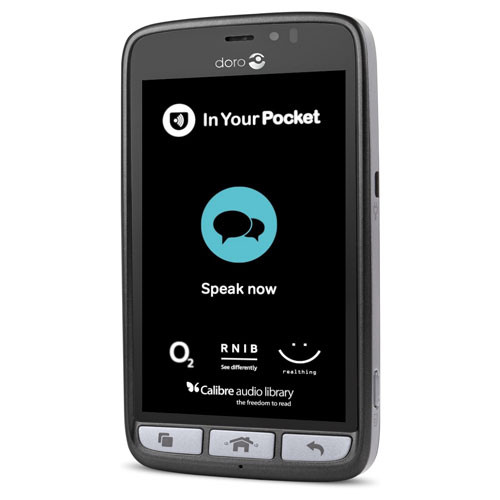
In February this year we acquired a new gadget which is ideal for anyone who struggles to use either push button or touch screen mobile phones. The In Your Pocket is a fully Voice Activated mobile phone which allows you to make and answer phone calls, send and read text messages, create contacts, listen to newspapers and audiobooks, get weather information, tell the time, hear your current location and streets around you and much more. All of this is achieved entirely by using your voice. This is a solution for anyone who would just like technology that is simple and easy to use with hardly any learning required.
How it works
The phone is operated by simply pressing a tactile button
found at the bottom of the screen. After you press the button, you simply speak
to the phone naturally and give it a command. So for example, some basic voice
commands include:
Phone Seescape”, “send a text message to Stuart”, “create a
new contact”, “What is the date”, “read the Guardian, “what is the weather
forecast”, “Where am I”etc.
Pricing
The In Your Pocket runs exclusively on the O2 network and if
you purchase the phone you would be subscribing to a fixed contract over two
years at £22 per month. This price plan gives you three GB of data and
unlimited calls and texts to any number. If you run out of mobile data, don’t
worry, it will just renew the next month and you will not incur any hidden
charges as the price plan is designed so that you will never go over your
allowance. Note that you can also connect to Wi-Fi which should save you using
a lot of mobile data.
Future plans
Later this year, the developers are planning to add even
more features to the phone which will be installed automatically as soon as
they become available. These include enhanced weather information, as well as a
personal diary function and the ability to set alarms.
OptiGrill
As we are approaching the festive period, I would like to
draw your attention to a new gadget I recently bought myself. Using this
device, I can now cook confidently and independently without the risk of either
burning or under cooking food. This new revolutionary product is the OptiGrill
and is made by the company Tefal.
The Tefal OptiGrill is an electrically heated
grill similar to the George Foreman grill. However, unlike the George Foreman
grill, the OptiGrill is a smart grill! It will cook meat, poltry, fish and even
sea food, vegetables and toasted sandwiches. Another great feature of this
grill, is that it will also cook food from frozen as well.
How does it work?
The OptiGrill’s controls are found on the handle. From left to right there’s the On/Off
button and dedicated programmes for cooking specific food such as defrost, burgers, chicken, bacon, sausage,
steak, and fish. There’s also a manual mode and finally an OK button when you
are ready to start cooking. Right at the end is the LED cooking indicator that
uses different colours of lights to represent stages of the cooking process.
When you open the llid you’ll find the
removable non-stick plates. The bottom plate is slightly angled so any grease
or oil can run down into the dripping tray, which means healthier eating.
To cook, first turn the grill on and then select the type of
food you want to cook. Then press the ok button, and the grill will begin
heating up. When it is ready, it will give a series of beeping sounds. You can
then lift the lid and place the food on to the grill and then close the lid.
Now the magic part, the grill will do the cooking for you. There are sensors
inside the grill to measure the weight and the thickness of the food you are
cooking. You can cook food to rare, medium and well done standards. The grill
will give audible beeps to indicate each cooking stage. Just cook it to your
liking.
As I eat a lot of meat and fish, I am loving the OptiGrill.
I use it everyday, and the thing I really like is the fact that all the guess
work is taken out of cooking. Also, the grill is easy to clean as you can
remove the plates and clean them either in the sink or by putting them through
the dishwasher. I also love the fact that the food doesn’t dry out. Food such
as steak and chicken still retain a lot of their juices and moisture, even when
cooked to well done standard. The fact that the device has a massive stick out
handle for using to lift the lid is another added bonus. The risk of burning
yourself is seriously diminished, although I would advise some caution to begin
with.
Price
There are two types of OptiGrill. The small version is
priced at £110 and the larger version is currently £120. Depending on your
family circumstances, it would be up to you which one you prefer.
Please also note that while we don’t actually have an OptiGrill
at our centre, I would be more than happy to discuss this technology with you.
Also note that if there is enough interest in this device, we will
purchase the OptiGrill to demonstrate to
clients at our premises in Wilson Avenue in the future.
We use cookies on our website to give you the most relevant experience by remembering your preferences and repeat visits. By clicking “Accept All”, you consent to the use of ALL the cookies. However, you may visit "Cookie Settings" to provide a controlled consent.
This website uses cookies to improve your experience while you navigate through the website. Out of these, the cookies that are categorized as necessary are stored on your browser as they are essential for the working of basic functionalities of the website. We also use third-party cookies that help us analyze and understand how you use this website. These cookies will be stored in your browser only with your consent. You also have the option to opt-out of these cookies. But opting out of some of these cookies may affect your browsing experience.
Necessary cookies are absolutely essential for the website to function properly. These cookies ensure basic functionalities and security features of the website, anonymously.
Cookie
Duration
Description
cookielawinfo-checkbox-analytics
11 months
This cookie is set by GDPR Cookie Consent plugin. The cookie is used to store the user consent for the cookies in the category "Analytics".
cookielawinfo-checkbox-functional
11 months
The cookie is set by GDPR cookie consent to record the user consent for the cookies in the category "Functional".
cookielawinfo-checkbox-necessary
11 months
This cookie is set by GDPR Cookie Consent plugin. The cookies is used to store the user consent for the cookies in the category "Necessary".
cookielawinfo-checkbox-others
11 months
This cookie is set by GDPR Cookie Consent plugin. The cookie is used to store the user consent for the cookies in the category "Other.
cookielawinfo-checkbox-performance
11 months
This cookie is set by GDPR Cookie Consent plugin. The cookie is used to store the user consent for the cookies in the category "Performance".
viewed_cookie_policy
11 months
The cookie is set by the GDPR Cookie Consent plugin and is used to store whether or not user has consented to the use of cookies. It does not store any personal data.
Functional cookies help to perform certain functionalities like sharing the content of the website on social media platforms, collect feedbacks, and other third-party features.
Performance cookies are used to understand and analyze the key performance indexes of the website which helps in delivering a better user experience for the visitors.
Analytical cookies are used to understand how visitors interact with the website. These cookies help provide information on metrics the number of visitors, bounce rate, traffic source, etc.
Advertisement cookies are used to provide visitors with relevant ads and marketing campaigns. These cookies track visitors across websites and collect information to provide customized ads.